
The Knight’s Tour Puzzle
The “Knight’s Tour” is a familiar chess puzzle. The object is to move a knight according to chess rules around the board in such a way that each square is visited only once. The puzzle may be solved by using a trial and error process that systematically explores all of the moves until a solution is found.
The program in Listing 1 will allow you to find a solution to the puzzle with your computer. You set the size of the board, pick the knight’s starting point, and sit back and watch the knight make its tour of the board.
The Programming Algorithm
The program uses what is called a backtracking algorithm to arrive at a solution. The board locations of each successful move are stored on a stack along with the direction that allowed a move to proceed to another. When a position is found from which no move can be made, the program pops off the stack and continues with the next direction that was stored with the move. In this way the program remembers where it left off trying new moves at every location.
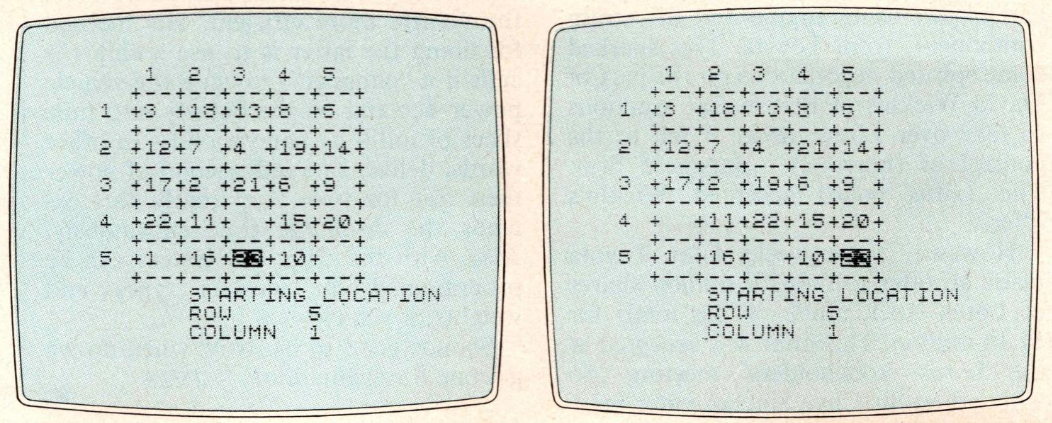
The board is displayed and the moves are entered on the board with the current location of the knight shown in inverse. This enables you to observe the backtracking process on the screen.
Entering the Program
1) Before typing in the program, we need to set up an array to store the values used to compute moves from a location on the board. Since a knight has 8 possible moves from a given location, we need an 8 x 2 array. In the immediate mode type in DIM A(8,2) and ENTER.
2) Then type in the short program in Listing 2.
3) Start the array input program by typing GOTO 10 and enter the values shown in Table 1.
4) Type in Listing 1 which will erase the program you used to input the array values.
| 1 | -1 | -2 |
| 2 | -2 | -1 |
| 3 | -2 | 1 |
| 4 | -1 | 2 |
| 5 | 1 | 2 |
| 6 | 2 | 1 |
| 7 | 2 | -1 |
| 8 | 1 | -2 |
Running the Program
1) Put the computer in SLOW mode and type GOTO 900 and ENTER.
2) The program will first request the size of the board. It will accept only values from 1 to 8. I have found that boards smaller than 5 x 5 are unsolvable. Of course, a 1 square board is solved simply by one move. (Try starting with a 5.)
3) The program will request the row and column numbers for the location of the starting point of the knight. (Try using row 5 and column 1.)
4) The program will then start solving the puzzle. (The solution for the suggested data will be found in a little over two minutes. You will probably not want to observe the solution of some starting locations simply because it will take too long in compute and display mode. You can operate the program in FAST mode by first entering the line 225 SLOW so the screen will activate when a solution is found. Then put the computer in FAST and type GOTO 900)
5) The program will then give you the option of finding another solution from the same input or of resetting the board size and starting point. (If you choose to try for another solution with the suggested input, you will get one in about 3 1/2 minutes. The program will start back tracking from the solution it just found in an attempt to find another.)
6) Pressing any key other than A or R will cause the program to execute a STOP statement. The program will also stop and leave the board blank if it is unable to find a solution (try a 3 x 3 board).
Line Notes
900-920: Input board size.
930: Sets variable E to the number of squares on the board.
940: Sets X to the string slice length for printing the board.
950: Clears the screen.
1000-1050: Print the board.
1060: Defines stack array; size set to number of squares by 3 so that it can store the row, column, and direction value for every move made. The direction value is actually the index to the array A indicating which values are being used to compute trial moves.
1070: Defines a string array to represent the board and to check if a square is already occupied. A blank indicates that the square is unoccupied; an X that the square is occupied.
1080: Sets variable P to point to top of the stack. Since your starting location is the first move, it is stored at S(1,1) and S(1,2). So P begins at 2.
1090: Sets variable C to point to the current move in the stack which is 1 to begin with.
1100-1165: Input the starting location of the knight. |
1170: Prints knight at this location.
1180: Marks board position.
1190: Sends control to main part of program (lines 10-220).
10: Sets up trial move loop. The FOR NEXT variable I is used as the index to the array A.
20, 30: Compute a possible move using the values in A and the current location of the knight. I takes on the values 1 to 8 to examine all the moves until one is found from the current location.
40: Checks if the move is on the board and if the square has not been visited. When a move cannot be made from a location after all 8 moves have been tried, the program proceeds past the NEXT (line 50). If all the conditions in line 40 are met, the program branches to 150.
60, 70: Blank out the current location on the screen and board map.
80: Backs up to previous location.
100: Prints it in inverse.
110: Decrements P so that the next move found erases the deadend move.
120: Sets I to the last direction tried at this previous location so the NEXT in line 130 will set I to point to the values in A that will produce a move in the next direction.
140: GOTO instructs program to back up if all the moves at this point have been exhausted until a location can be found from which a not previously tried move may be made.
150: Prints current location in normal video and new location in inverse.
160, 170: Store the new location in the stack at P.
180: Stores the index to A that was used to compute the new location with the old location data in the stack at C.
190: Sets current move pointer, C, to point at the new location data in the stack.
200: Marks the board map.
210: Increments pointer P to point to the next free space in the stack.
220: Checks if the board is full; indicated by the stack being full and, if so, the solution is found. If not, the program branches to the beginning of the trial move loop.
300-360: Restart option if solution is found.
Listing 1: Knight’s Tour BASIC Program
10 FOR I=1 TO 8
20 LET X=S(C,1)+A(I,1)
30 LET Y=S(C,2)+A(I,2)
40 IF X>0 AND Y>0 AND X<=L AND Y<=L THEN IF B$(X,Y)=" " THEN GOTO 150
50 NEXT I
60 PRINT AT S(C,1)*2,S(C,2)*3;"  "
70 LET B$(S(C,1),S(C,2))=" "
80 LET C=C-1
90 IF NOT C THEN STOP
100 PRINT AT S(C,1)*2,S(C,2)*3;(CHR$ (INT (C/10)+156) AND C>9);CHR$ (C-INT (C/10)*10+156)
110 LET P=P-1
120 LET I=S(C,3)
130 NEXT I
140 GOTO 60
150 PRINT AT S(C,1)*2,S(C,2)*3;C;AT X*2,Y*3;(CHR$ (INT (P/10)+156) AND P>9);CHR$ (P-INT (P/10)*10+156)
160 LET S(P,1)=X
170 LET S(P,2)=Y
180 LET S(C,3)=I
190 LET C=P
200 LET B$(X,Y)="X"
210 LET P=P+1
220 IF P<=E THEN GOTO 10
225 SLOW300 PRINT AT 21,0;"HIT A=ANOTHER SOLUTION,R=RESTART"
310 LET I$=INKEY$
320 IF I$="" THEN GOTO 310
330 PRINT AT 21,0;"                                "
340 IF I$="A" THEN GOTO 10
350 IF I$="R" THEN GOTO 800
360 STOP
800 CLS
900 PRINT "ENTER SIZE OF BOARD"
910 INPUT L
920 IF L<1 OR L>8 THEN GOTO 910
930 LET E=L*L
940 LET X=L*3+1
950 CLS
1000 PRINT "   1  2  3  4  5  6  7  8"(TO X+1)
1010 FOR I=1 TO L
1020 PRINT TAB 2;"+--+--+--+--+--+--+--+--+"(TO X)
1030 PRINT AT I;TAB 2;"+  +  +  +  +  +  +  +"(TO X)
1040 NEXT I
1050 PRINT TAB 2;"+--+--+--+--+--+--+--+--+"(TO X)
1060 DIM S(E,3)
1070 DIM B$(L,L)
1080 LET P=2
1090 LET C=1
1100 PRINT "ENTER STARTING LOCATION"
1110 FOR I=1 TO 2
1120 PRINT AT I+L*2+2,0;"ENTER ";("ROW" AND I=1)+("COLUMN" AND I=2)
1130 INPUT X
1140 IF X<1 OR X>L THEN GOTO 1130
1145 PRINT AT I+L*2+2,0;"       ";TAB 14;X
1150 LET S(C,I)=X
1160 NEXT I
1165 PRINT AT L*2+2,0;"     "
1170 PRINT AT S(C,1)*2,S(C,2)*3;"1"
1180 LET B$(S(C,1),S(C,2))="X"
1190 GOTO 10
TS2068 Adaptation
To use this program on the TS2068, type in the listing with the following line changes.
100 INVERSE 1: PRINT AT s(c,1)*2,s(c,2)*3;c: INVERSE 0: PAUSE 20
150 PRINT AT s(c,1)*2,s(c,2)*3;c: IF p<e THEN INVERSE 1: PRINT AT x*2,y*3;p: INVERSE 0: PAUSE 20
155 IF p=e THEN PRINT AT x*2,y*3;p
255 (delete)
Listing 2: Array input program
10 FOR I=1 TO 8
20 PRINT I;",";1
30 INPUT A(I,1)
40 CLS
50 PRINT I;",";2
60 INPUT A(I,2)
70 CLS
80 NEXT I
Products
Downloadable Media
Image Gallery
Note: Type-in program listings on this website use ZMAKEBAS notation for graphics characters.