
“Just for Fun” shares short programs that illustrate a point, demonstrate a technique, or show something the author has found interesting. If you have some programs that you want to share, send them to: Just for Fun, SYNC, 39 E. Hanover Ave., Morris Plains, NJ 07950.
If Betsy Ross Had Had a ZX81…
Dan Matejczyk
8K ROM; 2K RAM; 1K RAM
Enter Listing 1. Put your computer in SLOW mode and note how the display develops on the screen. After you are satisfied that you see how the program works, SAVE the program if you want and hit NEW and ENTER.
Now enter Listing 2. Again put your computer in SLOW mode and note the change in how the display unfolds.
These programs show two different ways of producing the same display. The fun in writing them was to develop the display one graphics character or plot statement at a time while minimizing the number of program lines to stay within 1K RAM. Compare the two programs to see how they set up the display.
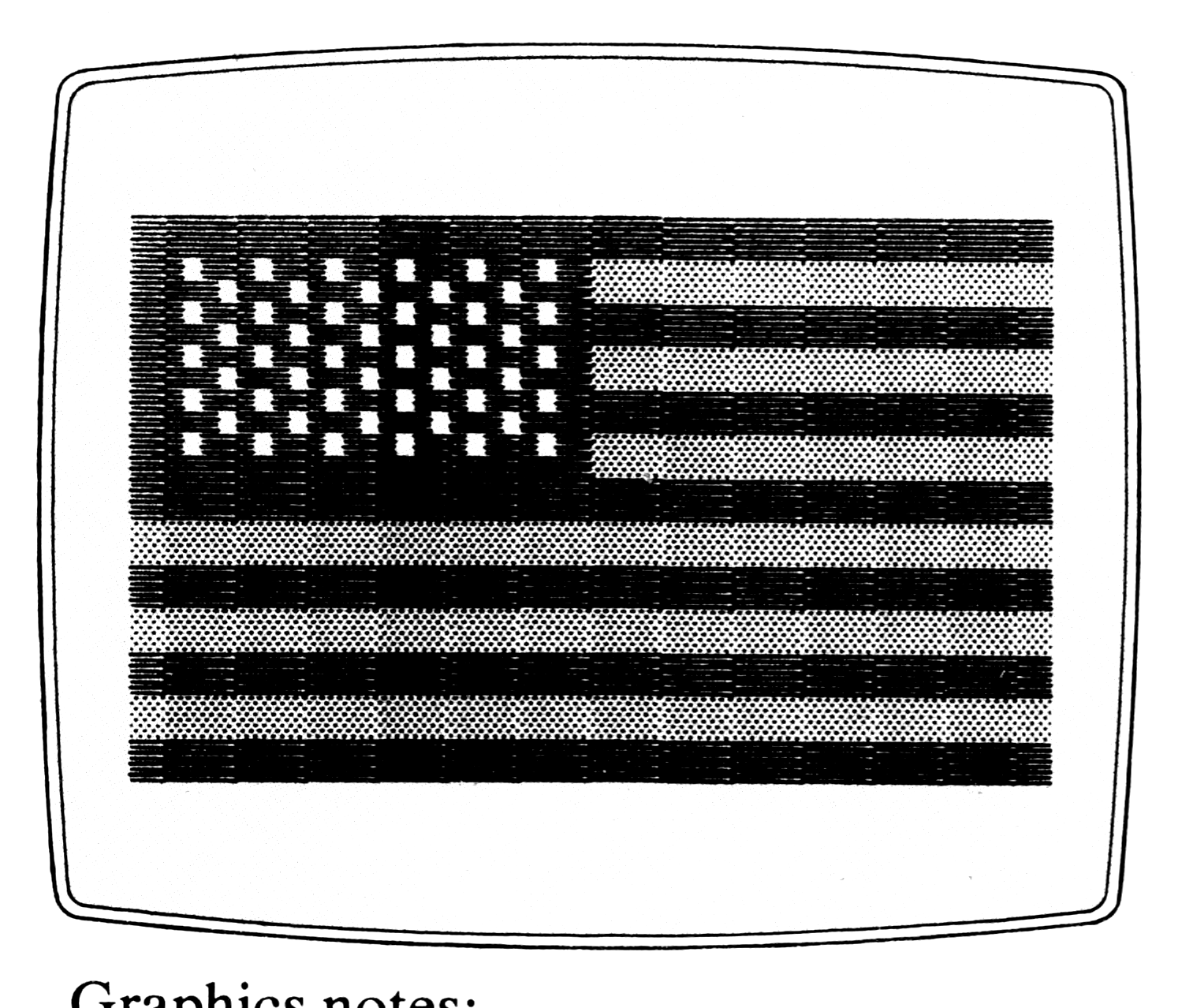
Graphics notes (█ = inverse space; ▒ = graphic on the A key):
Listing 1:
20: Inverse space
40: A
50, 120: Inverse space
Listing 2:
70: Inverse space
74: A
120: Inverse space
Listing 1.
 10 FOR I=1 TO 26
 20 PRINT AT 5,I;"█"
 30 FOR J=6 TO 16 STEP 2
 40 PRINT AT J,I;"▒"
 50 PRINT AT J+1,I;"█"
 60 NEXT J
 70 NEXT I
100 FOR I=1 TO 13
110 FOR J=6 TO 10 STEP 2
120 PRINT AT J,I;"█"
130 NEXT J
140 NEXT I
200 FOR J=23 TO 31 STEP 2
210 FOR I=5 TO 21 STEP 4
220 UNPLOT I,J
230 IF J=23 THEN GOTO 250
240 UNPLOT I+2,J-1
250 NEXT I
260 UNPLOT 25,J
270 NEXT J
Listing 2.
 58 FOR J=5 TO 17 STEP 2
 60 FOR I=1 TO 26
 70 PRINT AT J,I ;"█";
 72 IF J=17 THEN GOTO 80
 74 PRINT AT J+1,I;"▒";
 80 NEXT I
 90 NEXT J
100 FOR J=6 TO 10 STEP 2
110 FOR I=1 TO 13
120 PRINT AT J,I;"█";
130 NEXT I
140 NEXT J
210 FOR J=22 TO 30 STEP 2
220 FOR I=4 TO 24 STEP 4
230 UNPLOT I+1,J+1
232 IF J=22 THEN GOTO 240
233 IF I=24 THEN GOTO 240
234 UNPLOT I+3,J
240 NEXT I
250 NEXT J
Think of a Number
Cecil K. Johnson
“Think of a Number” is really a mathematical magic trick. You think of a number, and enter it in the computer. The program reminds you of your selected number and gently suggests an appropriate range of numbers. Of course, you were not told what use would be made of the number in your thoughts so you very possibly thought too high or low. Even though a range of numbers is suggested, no numbers are turned down, and since this is so, the range is quite wide and interesting.
The screen will then display a 4 x 4 magic square made especially for the number in your thoughts. Add rows or columns, and you will find that the sum is the secret number that you confided only to the computer. The diagonals will also add up the same, as will the four corner numbers and the four in the center.
You can try another number by pressing RUN and ENTER.
Suppose you thought of 34. Try these combinations: 3 + 5 + 14 + 12, 3 + 10 + 14 + 7, 6 + 10 + 11 + 7, 4 + 15 + 14 + 1. See how many combinations you can find.
Think of some unusual numbers. For example: With 0 the smallest number used is -8, the largest is 9. Both -8 and 8 are used. No number is repeated in a single square. With 70 all numbers are two digit numbers; 10 is the lowest, 25 the highest.
Did you notice when you used 70 that the 16 displayed numbers centered around 17? For 34 the numbers center around 9.
Try to find the smallest number that could be used without requiring negative numbers. Note that there are no negative numbers used when a magic square for 500 is called up. Could you construct a square for 500 that would use negative numbers?
You might try combining with this Nick Godwin’s “Tidying Up Your Display” (SYNC 3:1).
Line Notes
30-50: Gently direct the player to an ordinarily acceptable range of numbers.
55: Major mathematical calculation.
60-95: Locate the numbers on the square.
100, 105: Provide spaces to divide the square from the following lines.
  5 REM "NUMBER" BY CECIL K.
 JOHNSON, GARLAND,TX.  2/9/83"
 10 PRINT "THINK OF A NUMBER."
 20 INPUT A
 25 PRINT "       YOU SELECTED  "
;A;"."
 30 IF A<15 THEN PRINT "YOUR NU
MBER WILL BE USED BUT IT IS TOO
SMALL."
 35 IF A<31 AND A>14 THEN PRINT
 "WE WILL ACCEPT YOUR NUMBER BUT
 WOULD PREFER A LARGER NUMBER."
 40 IF A>30 AND A<55 THEN PRINT
 "THAT IS A REASONABLE NUMBER."
 45 IF A>54 AND A<100 THEN PRIN
T "WE WILL ACCEPT YOUR NUMBER BU
T  WOULD PREFER A SMALLER NUMBER
."
 50 IF A>99 THEN PRINT "YOUR NU
MBER IS TOO LARGE BUT IT WILL BE
 USED."
 55 LET B=INT ((A-30)/4)
 60 PRINT AT 5,8;B+8,AT 5,12;B+
5,AT 5,16;B+2
 62 IF A=31 THEN PRINT AT 5,20;
16,AT 7,12;15,AT 9,8;14,AT 11,16
;13
 63 IF A=32 THEN PRINT AT 11,16
;14,AT 9,8;15,AT 5,20;17,AT 7,12
;16
 65 IF (A-30)/4=B+.25 THEN PRIN
T AT 5,20;B+16,AT 7,12;B+15,AT 9
,8;B+14,AT 11,16;B+13
 70 PRINT AT 7,8;B+3,AT 7,16;B+
9,AT 7,20;B+4
 75 IF (A-30)/4=B+.5 THEN PRINT
 AT 5,20;B+17,AT 7,12;B+16,AT 9,
8;B+15,AT 11,16;B+14
 80 PRINT AT 9,12;B,AT 9,16;B+7
,AT 9,20;B+10
 85 IF (A-30)/4=B+.75 THEN PRIN
T AT 5,20;B+18,AT 7,12;B+17,AT 9
,8;B+16,AT 11,16;B+15
 90 PRINT AT 11,8;B+6,AT 11,12;
B+11,AT 11,20;B+1
 95 IF (A-30)/4=B THEN PRINT AT
 5,20;B+15,AT 7,12;B+14,AT 9,8;B
+13,AT 11,16;B+12
100 PRINT
105 PRINT
110 PRINT "THIS IS A 4 BY 4 MAG
IC SQUARE"
115 PRINT "FOR ";A;".  THE SUM
OF HORIZONTAL"
120 PRINT "LINES OR VERTICAL CO
LUMNS WILL"
125 PRINT "BE YOUR CHOSEN NUMBE
R OF ";A;"."
130 PRINT "ALSO TRY THE DIAGONA
LS AND "
135 PRINT "CORNERS."
The Psychic ZX
Richard Wilson McDaniel
In a dimly lit room, a stranger said, in a low voice with a hypnotic tone, “Choose a card, for it will lead you to your destiny.” I chose and . . .
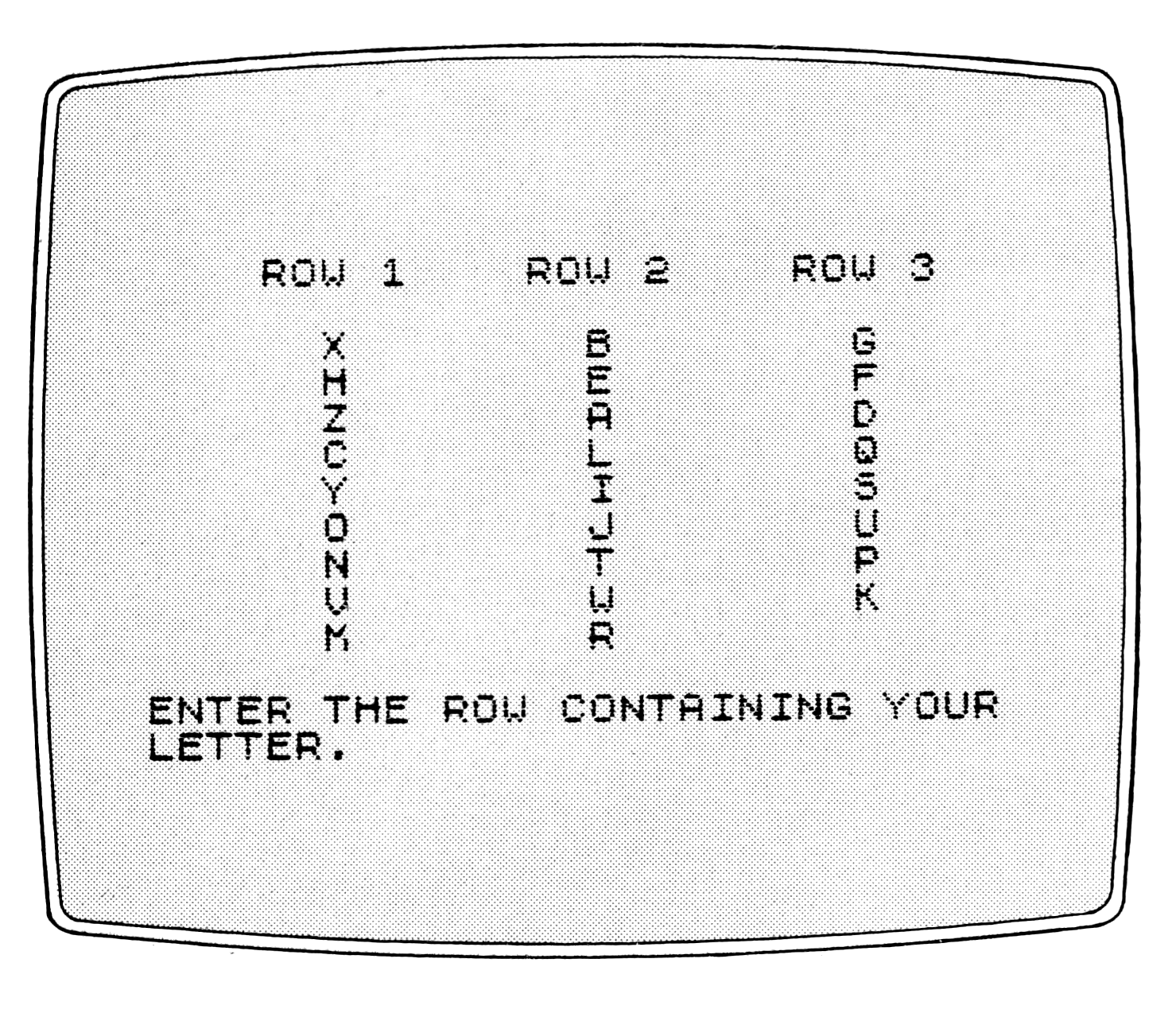
Actually a friend was showing me a card trick in which he dealt out face up three rows of five cards each. He asked me to pick a card and tell him which row the card was in. Then he picked up the rows of cards and dealt them out in the same three row, five card arrangement. Again he asked me to tell him which row the card was in. Again he picked up the rows, redealt them, and asked which row my card was now in. He collected the cards, dealt them face up, and, much to my surprise, found the correct card.
After a few more repetitions of the trick, I convinced my friend to divulge the secret. Its application is simple but yet it remains a mystery. While waiting in a bus station at 2:30 in the morning, I decided to write a program to duplicate the trick. When I implemented the program, I discovered that various odd numbers of cards in the rows also worked. My version of the trick uses nine cards in each row. The 27 cards are represented by the 26 letters of the alphabet and a space.
I hope this program will mystify and amaze you and your friends as much as it has mystified and amazed me.
Line Notes
10-30: Introduce the program.
40-170: Initialize and scramble the letters in R$.
180-270: Print the layout of the letters and the prompt for the row containing your letter.
280: Inputs your response.
290: Checks the input.
300: Branches to the conclusion of the program after the third question.
310-460: Perform the actual shuffling of the letters.
470-480: Clear the screen and loop back to the next question.
490: Prints the letter you picked.
500-530: Prompt you to try again.
 10 REM "PSYCHIC"
 20 REM RICHARD W. MCDANIEL.
 30 REM JANUARY 1,1983
 40 DIM R$(9,3)
 50 FOR A=1 TO 9
 60 FOR B=1 TO 3
 70 LET R$(A,B)=CHR$(34+A*3+B)
 80 NEXT B
 90 NEXT A
100 LET R$(9,3)="#"
110 FOR I=1 TO 30
120 LET A=INT (RND*9)+1
130 LET B=INT (RND*3)+1
140 LET T$=R$(A,B)
150 LET R$(A,B)=R$(5,2)
160 LET R$(5,2)=T$
170 NEXT I
180 FOR I=1 TO 3
190 PRINT TAB 4;"ROW 1";TAB 13;
"ROW 2";TAB 22;"ROW 3",,
200 FOR A=1 TO 9
210 PRINT TAB 6;
220 FOR B=1 TO 3
230 PRINT R$(A,B);"########";
240 NEXT B
250 PRINT
260 NEXT A
270 PRINT "ENTER THE ROW CONTAI
NING YOUR   LETTER."
280 INPUT C
290 IF C<1 OR C>3 THEN GOTO 280
300 IF I=3 THEN GOTO 470
310 FOR A=1 TO 9
320 LET T$=R$(A,2)
330 LET R$(A,2)=R$(A,C)
340 LET R$(A,C)=T$
350 NEXT A
360 LET T$=""
370 FOR A=1 TO 3
380 FOR B=1 TO 9
390 LET T$=T$+R$(B,A)
400 NEXT B
410 NEXT A
420 FOR A=1 TO 9
430 FOR B=1 TO 3
440 LET R$(A,B)=T$(A*3+B-3)
450 NEXT B
460 NEXT A
470 CLS
480 NEXT I
490 PRINT ,,"I MYSTICALLY PERCE
IVE YOUR","LETTER TO BE ";R$(5,C
);"."
500 PRINT ,,"WOULD YOU LIKE TO
TEST MY MAGIC ABILITIES AGAIN?(Y
/N)"
510 INPUT T$
520 CLS
530 IF (T$+"#")(1)="Y" THEN GOT
O 180
Decimal Alignment
Robert J. Midura
1K RAM
“Decimal Alignment” offers an alternative to Nick Godwin’s program for aligning money displays (SYNC 3:1). It has only four Basic lines (five, if used as a subroutine). It does not use a FOR-NEXT loop or GOTO branch. Consequently, the routine runs faster and takes less memory. It makes use of the string variables X$ and I$ and the numeric variable N. The stand alone routine occupies 257 bytes.
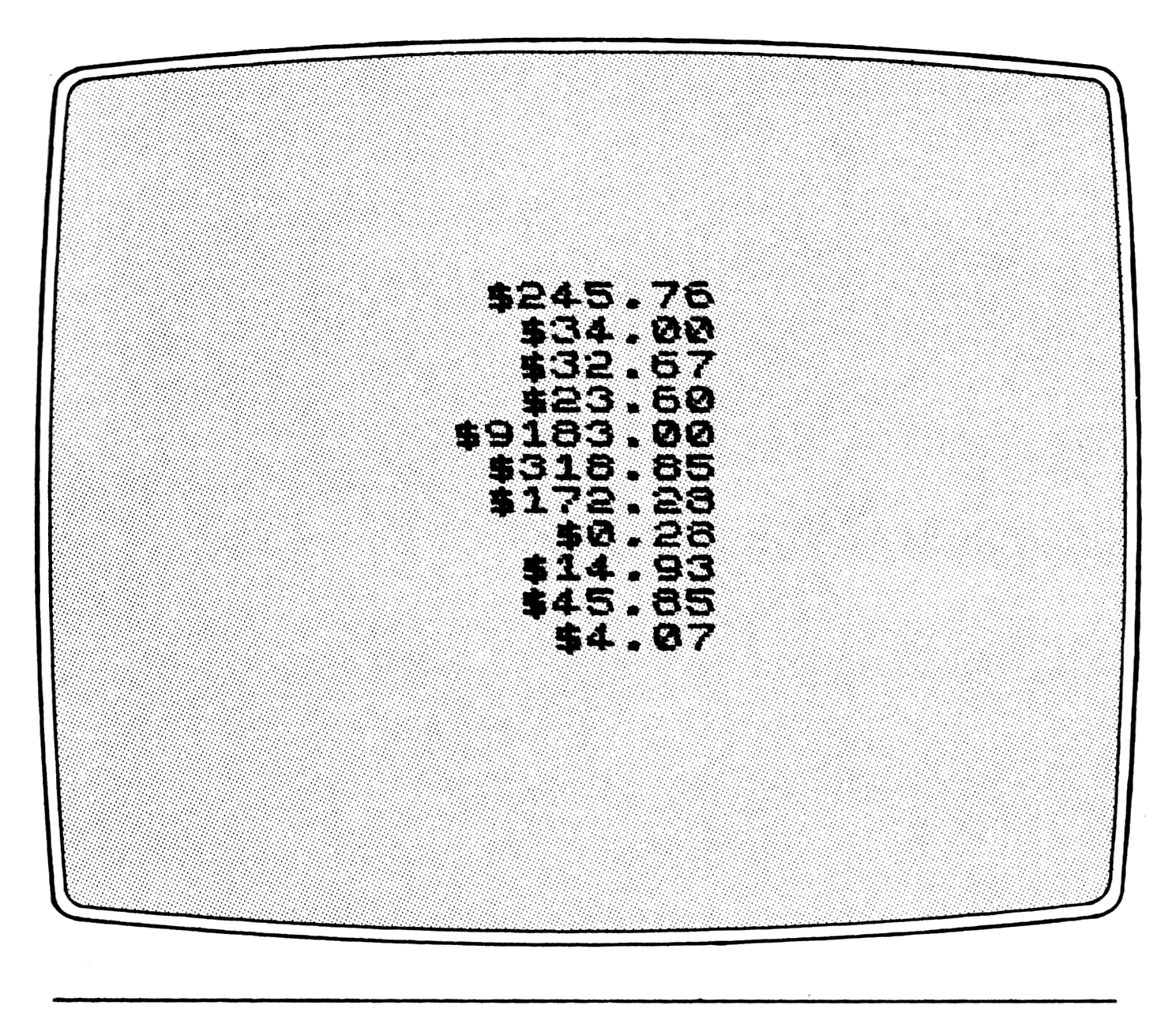
1000 LET I$=STR$ INT N
1005 LET X$=STR$ (INT ((N-INT N)
*100+.5)/100)
1010 PRINT TAB 15-LEN I$;"$";(I$
 AND X$<>"1");(STR$ (VAL I$+1) A
ND X$="1");(".00" AND (X$="0" OR
 X$="1"));X$((1 AND X$(1)=".")+(
2 AND (X$(1)="0" OR X$="1")) TO
);
1015 IF LEN X$=3 THEN IF X$(2)="
." THEN PRINT "0"
1020 RETURN
The routine works only for positive values of N. I have never had the occasion to print negative money amounts. In the financial programs I have written, I put debits in a list and store and print them as positive values. When this list is printed, a heading is required to indicate that the figures are debits.
To use the routine, set the variable N to the number you want printed.
Media
Note: Type-in program listings on this website use ZMAKEBAS notation for graphics characters.