
“Just for Fun” shares short programs that illustrate a point, demonstrate a technique, or show something the author has found interesting. If you have some programs that you want to share, send them to: Just for Fun, SYNC, 39 E. Hanover Ave., Morris Plains, NJ 07950.
Lots of Pi
Blanchard Smith
8K ROM; 16K RAM
This program computes the value of Pi to 8, 16, 32, . . . up to 8192 decimal places! It uses base-100 arithmetic rather than decimal arithmetic and puts the numbers in character strings rather than arrays of five-byte numbers. It uses long-division to get the terms of Taylor’s series expansion of the arctangent, and long-addition to get the algebraic sum until the term vanishes.
But do not wait with baited breath for the answer. It takes about 60 hours (FAST mode, naturally) to compute Pi to 2048 decimal places! If you do not have a printer, modify the subroutine at 6000 to PRINT a page and STOP before continuing.

  10 REM  PI TO 4,8,16,,,8192
DECIMAL PLACES
  20 LET T=100
  30 FOR J=2 TO 12
  40 LET N=2**J+1
  50 DIM A$(3,N)
  60 LET A$(1)=""
  70 LET A$(2)=""
  80 LET A$(2,1)=CHR$ 16
  90 LET D=5
 100 GOSUB 4700
 110 LET S=1
 120 LET D=25
 130 FOR E=1 TO 9E9 STEP 2
 140 GOSUB 5000
 150 GOSUB 4700
 160 LET S=-S
 170 IF Z<>0 THEN NEXT E
 180 LET A$(2)=""
 190 LET A$(2,1)=CHR$ 4
 200 LET D=239
 210 GOSUB 4700
 220 LET S=-1
 230 FOR E=1 TO 9E9 STEP 2
 240 GOSUB 5000
 250 GOSUB 4700
 260 LET S=-S
 270 GOSUB 4700
 280 IF Z<>0 THEN NEXT E
 290 GOSUB 6000
 300 NEXT J
 310 STOP
 320 CLEAR
 330 LET X$="PI"
 340 SAVE X$
 350 RUN
4700 LET A=0
4710 LET Z=0
4720 FOR K=1 TO N
4730 LET A=CODE A$(2,K)+A
4740 LET Q=INT (A/D)
4750 LET A$(2,K)=CHR$ Q
4760 LET R=A-D*Q
4770 LET A=R*T
4780 LET Z=Z OR (Q+R)
4790 NEXT K
4800 RETURN
5000 LET A=0
5100 FOR K=1 TO N
5110 LET A=CODE A$(2,K)+A
5120 LET Q=INT (A/E)
5130 LET A$(3,K)=CHR$ Q
5140 LET A=(A-E*Q)*T
5150 NEXT K
5160 LET C=0
5170 IF S<0 THEN GOTO 5240
5180 FOR K=N TO 1 STEP -1
5190 LET A=CODE A$(1,K)+CODE A$(
3,K)+C
5200 LET C=A>=T
5210 LET A$(1,K)=CHR$ (A-(T AND
C))
5220 NEXT K
5230 RETURN
5240 FOR K=N TO 1 STEP -1
5250 LET A=CODE A$(1,K)-CODE A$(
3,K)-C
5260 LET C=A<0
5270 LET A$(1,K)=CHR$ (A+(T AND
C))
5280 NEXT K
5290 RETURN
6000 LPRINT ,," "
6010 LET P$="3."
6020 FOR K=2 TO N-1
6030 LET X$="0"+STR$ CODE A$(1,K
)
6040 LET P$=P$+X$(LEN X$-1 TO )
6060 IF LEN P$<32 THEN NEXT K
6070 LPRINT P$
6080 LET P$=""
6090 NEXT K
6100 RETURN
Explanation???
Robert J. Midura
8K ROM; 1K RAM
Type in the following lines:
  4 REM (OPTIONAL) PRINT
  5 LIST 10
 10 FOR L=0 TO -1 STEP 100
 20 STOP
 30 NEXT L
 40 PRINT AT 3,29;L
 50 NEXT L
 60 PRINT AT 5,29;L
 70 NEXT L
 80 PRINT AT 7,29;L
 90 LET L=L*4
100 PRINT AT 9,29;L
110 NEXT L
120 PRINT AT 11,29;L
130 LET L=-1
140 PRINT AT 13,29;L
150 NEXT L
160 PRINT AT 15,29;L
170 LET L=-101
180 NEXT L
190 REM    **** NOTE ERROR 9/20
For best results use SLOW mode. Press RUN and ENTER. Observe the results. How does this one work?
Richochet Revisited
David R. Rowland
8K ROM; 1K RAM
One of the pleasures of the “Just for Fun” column comes from typing in the program, playing around with it, and coming up with something new or different. This particular program started out as James John Hollandsworth’s “Richochet” (SYNC 3:2) and evolved into something rather different with only a few changes. Run in SLOW mode. Be patient. If the first pattern does not please, try again.
  6 LET E=RND*4-2
  7 LET M=RND*4-2
  8 LET X=RND*42
  9 LET Y=RND*42
 10 PLOT X+10,Y
 11 PLOT Y+10,X
 12 PLOT 52-X,42-Y
 13 PLOT 52-Y,42-X
 14 LET Y=Y+M
 15 LET X=X+E
 16 IF X<0 THEN LET X=0
 17 IF Y<0 THEN LET Y=0
 18 IF X>42 THEN LET X=42
 19 IF Y>42 THEN LET Y=42
 20 IF X=0 OR X=42 THEN LET E=-
E
 21 IF Y=0 OR Y=42 THEN LET M=-
M
 22 GOTO 10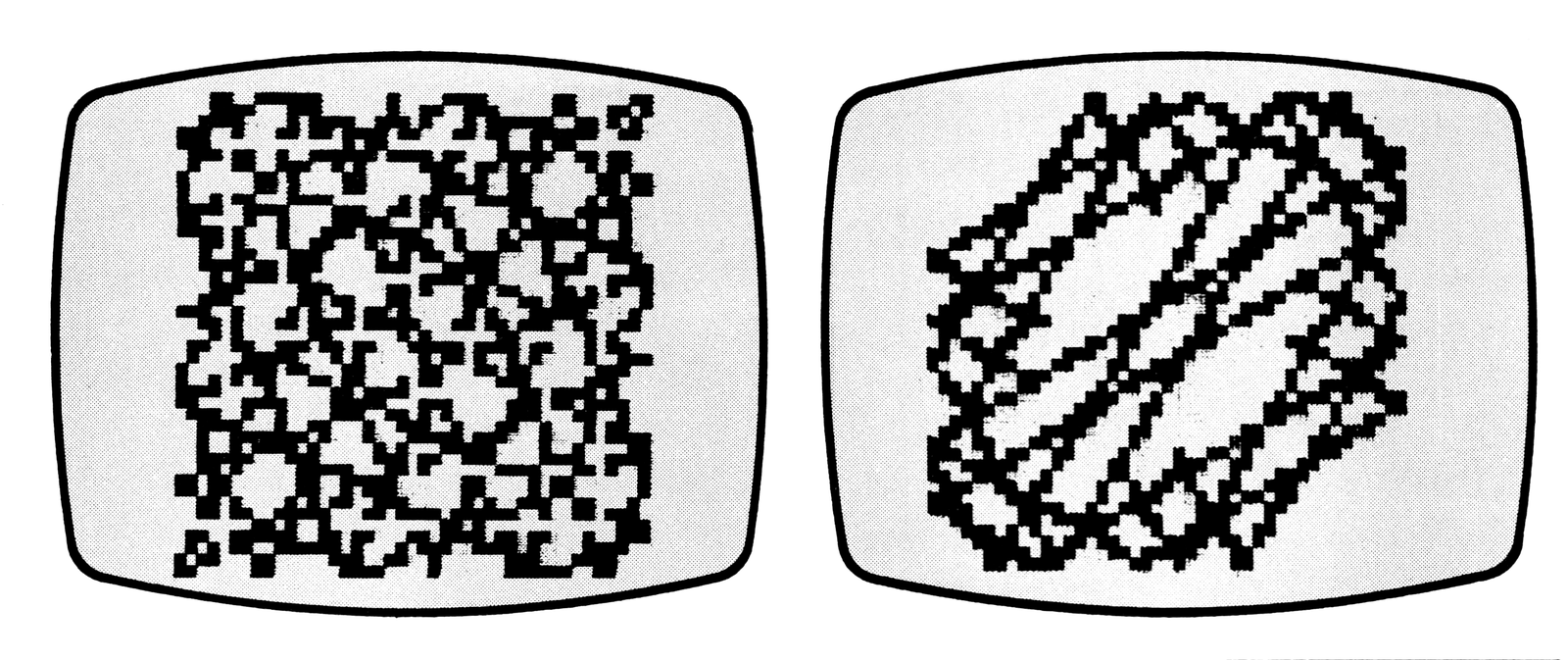
INPUT Anywhere
Matt Dralle
8K ROM; 1K RAM
If you have ever wanted to INPUT variables from somewhere other than the bottom left hand corner of the screen, “INPUT Anywhere” is the answer.
The program allows any number between 0 and 9999 to be INPUTted anywhere on the screen. Negative numbers cannot be used.
To change the INPUT location, change the PRINT AT statements in lines 15 and 40. Be certain that the Y coordinate in line 15 is one less than that of line 40. When INPUTting numbers less than 1000, be sure to add preceding zeros, e.g., 0020, not 20.
The ENTER key need not be pressed after the number is typed in. On the last keystroke, the entire number automatically goes into variable A, and the program continues.
  5 LET A$=""
 10 FOR I=1 TO 4
 15 PRINT AT 10,9+I;"▒"
 20 LET U$=INKEY$
 25 IF U$="" THEN GOTO 20
 30 LET A$=A$+U$
 40 PRINT AT 10,10;A$
 50 NEXT I
 60 LET A=(CODE A$-28)*1000
 70 LET A=A+(CODE A$(2)-28)*100
 80 LET A=A+(CODE A$(3)-28)*10
 90 LET A=A+CODE A$(4)-28
100 PRINT A
COPYing Lines 23 and 24
William H. Baldwin
When I got my TS2040 printer, I found that it would COPY the top 22 lines of the display. Quite a few programs use the bottom two lines, yet these are not available to the printer by the COPY command.
All 24 lines can be COPYed with the short machine code routine below. Type in the following line:
1 REM -/LN ?▒TANType in the immediate mode
POKE 16517,107Then any where in the program that you want to COPY the screen, add the following line preceded by the appropriate line number:
(line number) RAND USR 16514This line should come immediately after the screen looks like you want it to on paper. Voila! All 24 lines of the display!
Media
Note: Type-in program listings on this website use ZMAKEBAS notation for graphics characters.