
Copyright N.A. Pashtoon ,1984
The GI 8912 integrated circuit , a powerful sound making chip , is utilized in the TS2068 in conjunction with the SOUND command . The GI chip can provide 3 channels of sound as well as three noise channels simultaneously .The pitch , envelope, attack and decay time , and duration of the waveform can all be brought under program control . It is worth mentioning that even though the chip is capable of a plethora of sounds it does not have the versatility of say the Commodore sound-making chip used in the Commodore 64 , which provides for program controlled filtering of the sound channels . Thus the TS2068 cannot be used as a true sound synthesizer .
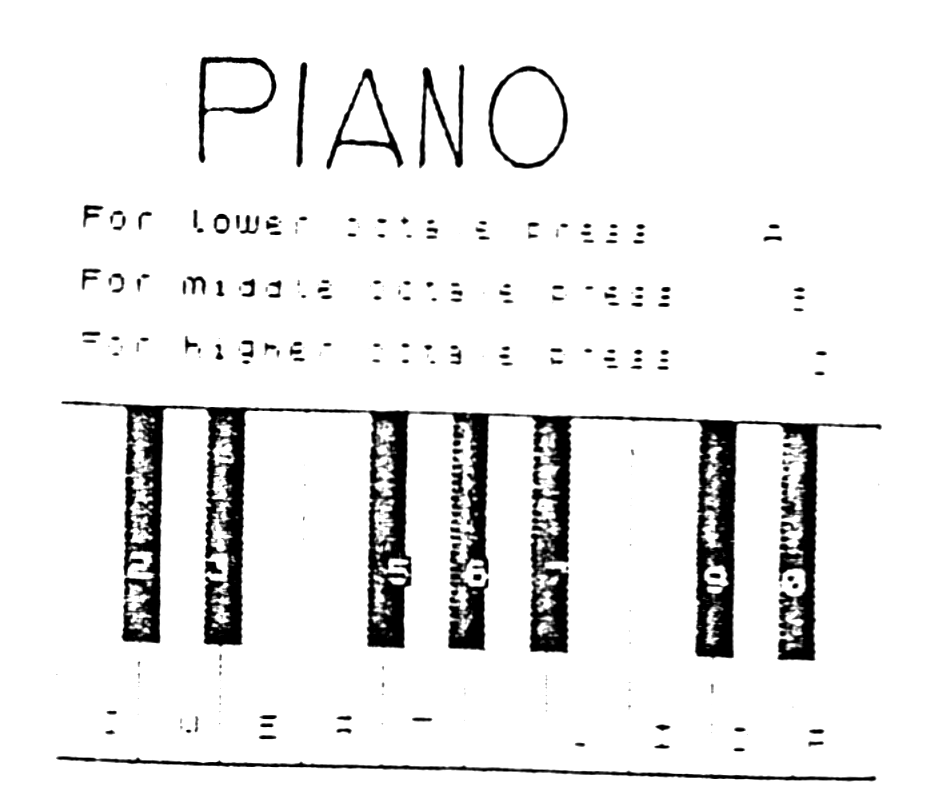
In the program that follows, an attempt is made to create a piano-like sound with a 3 octave range . The TS2068 is capable of generating polyphonic sound , but in this program only Channel A of the sound generator is utilized . I am hoping to develop a more versatile program in the future .*
PROGRAM NOTES :
Lines 10-300: The white and black keys of the piano are plotted on the screen . Each piano key is identified with the QWERTY keys on the keyboard.
LINE 610 :The string variable k$ is identified as the string of keys which will be used for the piano keyboard .
LINE 600,and 620-640:The dimensioned variable b() is used to redefine the “character set “. The character set in this case is none but the pitch values given on p.187 of TS2068 Manual. These pitch tables for the various octaves are given in the DATA statements in LINES 1000-1400 .
LINE 760 , 900-980 : activates the lower octave .
LINE 765,800-880 : activates the middle and upper octave .
Finally the variables F and z are flags to differentiate between octaves .
*See screen dump p.11
   1 REM "ELEM-PIANO"  , 3 octaves
  10 FOR x=3 TO 252
  20 PLOT x,10: PLOT x,100: NEXT x
  30 FOR x=3 TO 260 STEP 25
  40 FOR y=10 TO 100
  50 PLOT x,y
  60 NEXT y: NEXT x
  65 LET n=0
  70 FOR x=28 TO 228 STEP 25
  80 LET n=n+1
  90 IF n=3 OR n=7 THEN GO TO 130
 100 FOR y=40 TO 100 STEP 1
 105 FOR e=1 TO 12
 110 PLOT x-6+e,y
 115 NEXT e
 120 NEXT y
 130 NEXT x
 140 FOR x=0 TO 9
 150 LET k$="QWERTYUIOP"
 160 PRINT AT 19,x*3+2;k$(x+1)
 170 NEXT x
 190 LET k$="2356790"
 200 PRINT AT 14,3; BRIGHT 1; INVERSE 1;k$(1);AT 14,6;k$(2);AT 14,13;k$(3);AT 14,16;k$(4);AT 14,19;k$(5);AT 14,25;k$(6);AT 14,28;k$(7): INVERSE 0: BRIGHT 0
 300 PRINT AT 3,1;"For lower octave press";AT 3,27; BRIGHT 1;"A"; BRIGHT 0;AT 5,1;"For middle octave press"; BRIGHT 1;AT 5,28;"S"; BRIGHT 0;AT 7,1;"For higher octave press"; BRIGHT 1;AT 7,29;"D"; BRIGHT 0
 500 REM   MUSIC  MAKER
 510 RESTORE 1200
 520 LET F=0
 600 DIM b(256)
 610 LET k$="q2w3er5t6y7ui9o0p"
 620 FOR l=1 TO 17
 630 READ b(CODE k$(l)+1)
 640 NEXT l
 650 LET k=CODE INKEY$+1
 660 IF INKEY$="a" OR INKEY$="A" THEN RESTORE 1000: LET F=1: GO TO 620
 670 IF INKEY$="s" OR INKEY$="S" THEN RESTORE 1200: LET F=0: GO TO 620
 680 IF INKEY$="d" OR INKEY$="D" THEN RESTORE 1400: LET F=0: GO TO 620
 760 IF b(k) AND F=1 THEN GO TO 900
 765 IF b(k) THEN GO TO 800
 770 GO TO 650
 800 REM
 850 SOUND 0,b(k);1,0;8,31;11,16;12,55;13,8;7,56
 860 PAUSE 120
 870 SOUND 8,0;7,63
 880 GO TO 650
 900 LET z=0
 910 IF b(k)<164 THEN LET z=1
 950 SOUND 0,b(k);1,z;8,31;11,16;12,55;13,8;7,56
 960 PAUSE 120
 970 SOUND 8,0;7,63
 980 GO TO 650
1000 DATA 162,138,116,95,75,57,39,23,7,248,234,221,209,197,186,175,165
1200 DATA 209,197,186,175,165,156,147,139,131,124,117,110,104,98,93,87,82
1400 DATA 104,98,93,87,82,78,73,69,65,62,58,55,52,49,46,43,41
Media
Note: Type-in program listings on this website use ZMAKEBAS notation for graphics characters.