
Judging from the many books on word search (or “find a word”) puzzles available at any newsstand, these puzzles must be popular. To save some money, you can create your own puzzles rather than buy the puzzle books. But, if you create your own manually, you know where the words are so it is not much fun. There is another way. By using this program in the ZX80 or MicroAce, you can create your own 15- by 11-character word puzzles and have fun solving them or give them to your friends to solve.
The program requires 2K of memory to run and just barely fits into that. So changes to the program that you may want to make must not increase its size if you have only 2K.
When the program is run, the following is displayed.
CREATE A WORD SEARCH PUZZLE

ENTER WORDS OF UP TO 11 LETTERS EACH

FIRST WORD? NULL ENTRY TO END.
The first word is keyed in, followed by NEWLINE. The program responds in one of four ways to each word entered.
1. "word entered"
   NEXT WORD? NULL ENTRY TO END.
The program has successfully embedded the word and wants another.
2. "word entered"
   WORD DOES NOT FIT
   NEXT WORD? NULL ENTRY TO END.
The program was unable to embed the word. Although the puzzle is getting full, another word may fit.
3. "word entered"
   TOO MANY LETTERS
   REENTER
The word entered is longer than 11 letters. Try another.
4. "word entered"
   INVALID CHARACTER
   REENTER
The word entered contains a character other than a letter. Reenter it correctly.
After all words have been entered or the program appears to be unable to embed any more words, a null entry (NEWLINE only) ends the entry and puzzle-construction phase.
The output phase asks the user to select among three options by printing
(S)OLUTION, (P)UZZLE, OR (E)ND?
Entering E and NEWLINE ends the program and returns to the Basic mode. Entering S and NEWLINE prints the solution to the puzzle. P and NEWLINE or any other entry prints the puzzle
As an example, the following Basic words were entered into the program.
CLEAR       NEW
CLS         NEXT
CONTINUE    POKE
DIM         PRINT
FOR         RANDOMISE
GOSUB       REMARK
GOTO        RETURN
IFTHEN      RUN
INPUT       SAVE
LET         STOP
LIST
LOAD
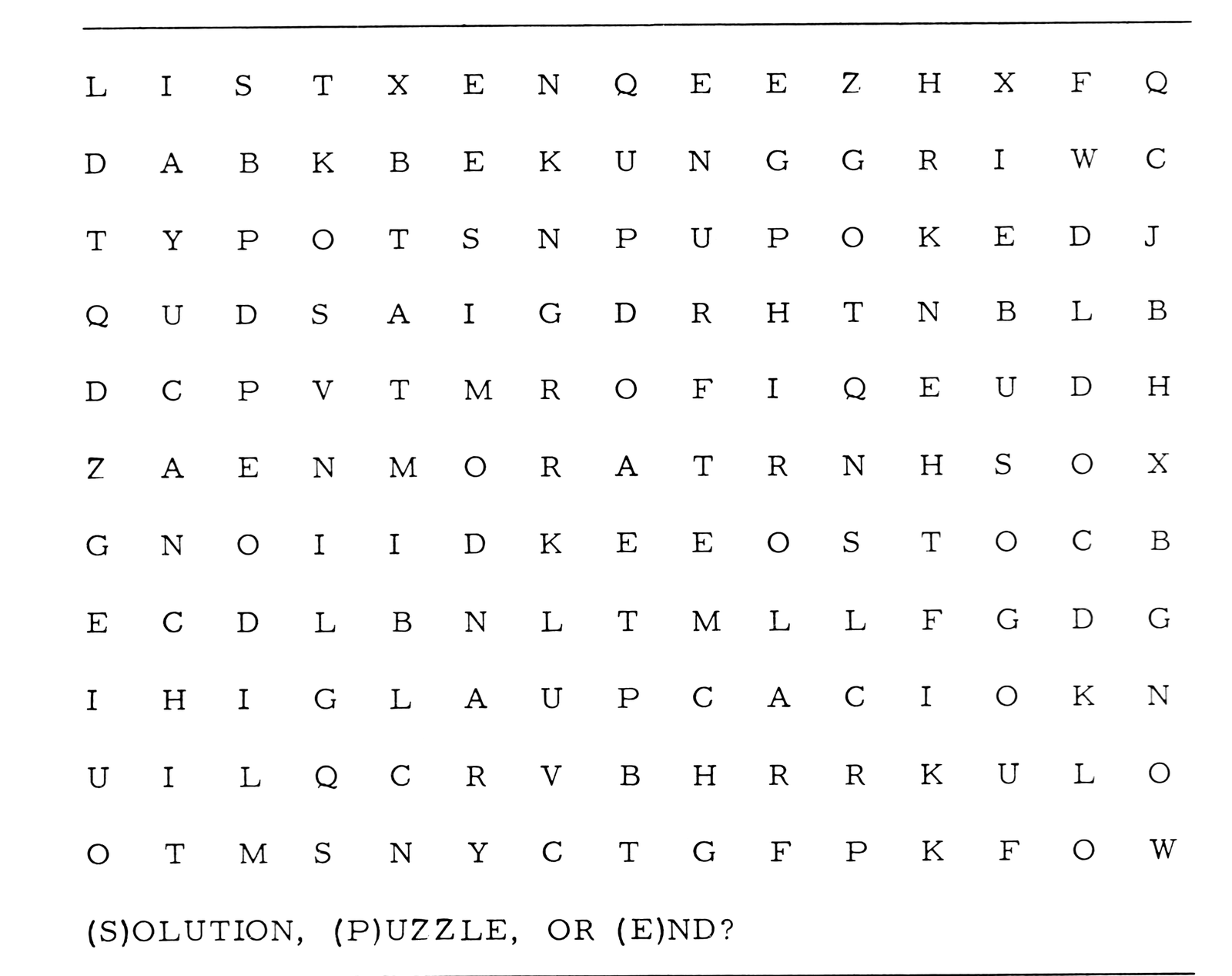
The puzzle listing generated by P and NEWLINE is seen in Figure 1. The listing contains the embedded letters and randomly-generated letters in all unused positions.
L  I  S  T  X  E  N  Q  E  E  Z  H  X  F  Q
D  A  B  K  B  E  K  U  N  G  G  R  I  W  C
T  Y  P  O  T  S  N  P  U  P  O  K  E  D  J
Q  U  D  S  A  I  G  D  R  H  T  N  B  L  B
D  C  P  V  T  M  R  O  F  I  Q  E  U  D  H
Z  A  E  N  M  O  R  A  T  R  N  H  S  O  X
G  N  O  I  I  D  K  E  E  O  S  T  O  C  B
E  C  D  L  B  N  L  T  M  L  L  F  G  D  G
I  H  I  G  L  A  U  P  C  A  C  I  O  K  N
U  I  L  Q  C  R  V  B  H  R  R  K  U  L  O
O  T  M  S  N  Y  C  T  G  F  P  K  F  O  W

(S)OLUTION, (P)UZZLE, OR (E)ND?
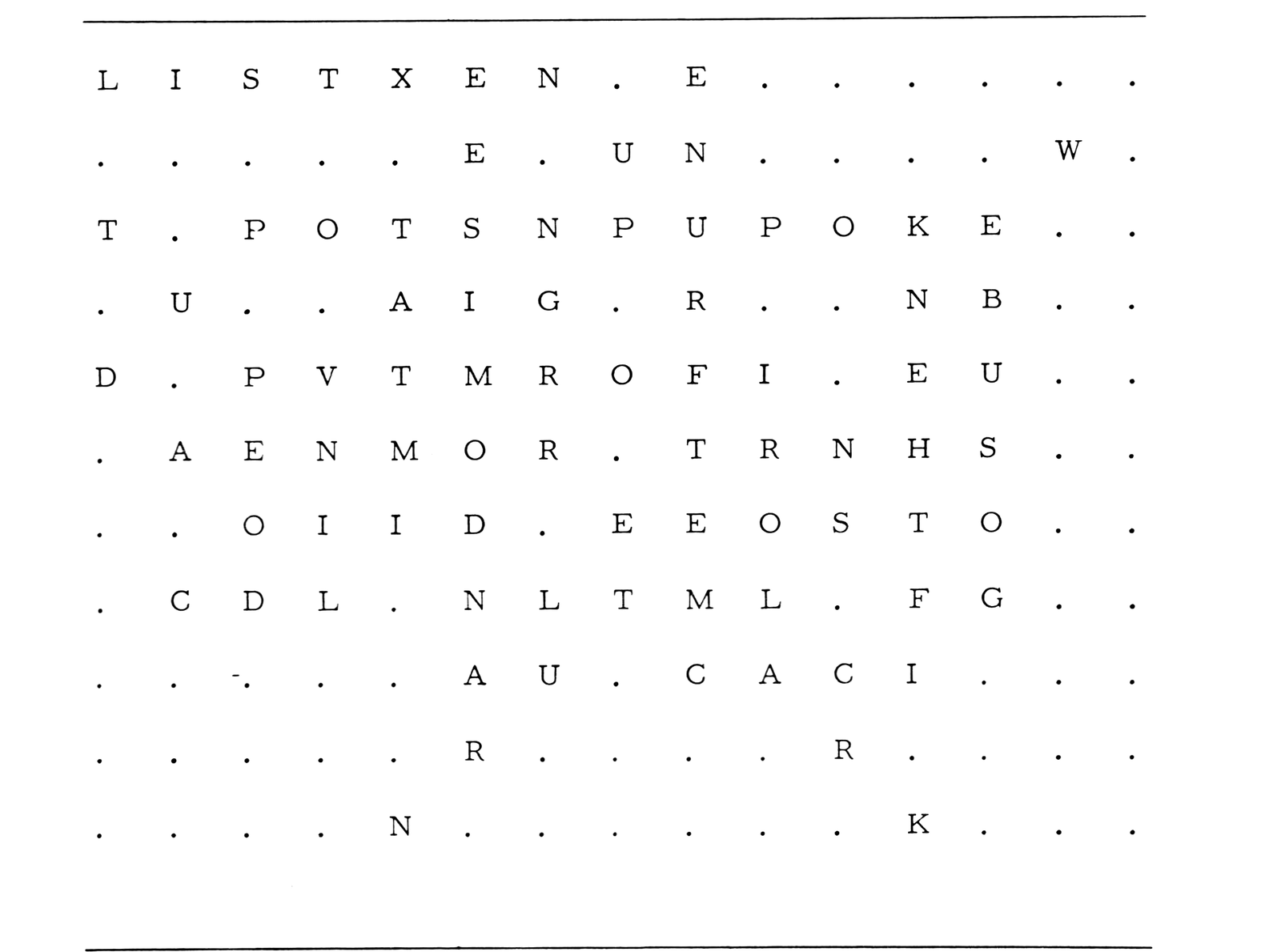
L  I  S  T  X  E  N  .  E  .  .  .  .  .  .
.  .  .  .  .  E  .  U  N  .  .  .  .  W  .
T  .  P  O  T  S  N  P  U  P  O  K  E  .  .
.  U  .  .  A  I  G  .  R  .  .  N  B  .  .
D  .  P  V  T  M  R  O  F  I  .  E  U  .  .
.  A  E  N  M  O  R  .  T  R  N  H  S  .  .
.  .  O  I  I  D  .  E  E  O  S  T  O  .  .
.  C  D  L  .  N  L  T  M  L  .  F  G  .  .
.  .  .  .  .  A  U  .  C  A  C  I  .  .  .
.  .  .  .  .  R  .  .  .  .  R  .  .  .  .
.  .  .  .  N  .  .  .  .  .  .  K  .  .  .
At this point the user can copy the puzzle onto paper. The output options are listed at the bottom for selection. The selected letter does not show on the display when it is entered, but it is still input.
If SOLUTION is selected, the same listing is generated, but periods are substituted for the randomly-generated letters in the unused positions. The solution listing for the puzzle in Figure 1 is shown in Figure 2.
The solution and puzzle may be listed as many times as desired until E is selected. Each time P is selected, the randomly-generated letters change. The embedded letters, of course, are unchanged.
Hints for Users
Long words should be entered first. Since more of the spaces are unoccupied, the chances of successful embedding are improved.
If the program is able to embed all but a small number of the words desired, running the program again may allow the entire list to be embedded, since randomness is used in the embedding process.
Algorithm
A word may be embedded in any of eight orientations, corresponding to the eight points of the compass. One of these directions is chosen randomly. All possible locations for the word in that orientation are checked. The location giving the greatest degree of overlap with the previously positioned words is chosen. If no overlap is possible, the word may be embedded without overlap, if there is space open yet. If the word cannot be placed in the selected orientation, the other seven orientations are investigated in turn in the same manner until embedding is accomplished or is found to be impossible.
Variables
A array   Contents of the puzzle locations.
B array   Letters of the word to be embedded.
A$        General character variable, many uses.
A         Overlap level attained.
B         Overlap counter for position being investigated.
C         Length - 1 of the word to be embedded.
D - G     Horizontal and vertical limits of the possible starting positions
          for the orientation being investigated.
I - M     General and loop variables.
P         Starting location for the word position giving the overlap
          level given in A.
Q         Letter displacement for the word position starting in P.
U - V     Horizontal and vertical displacements for the orientation
          being investigated.
W         Sum of U and V; the total displacement.
X - Y     Horizontal and vertical position of the starting position
          being investigated.
Program Notes
10-130        Initialize the program and give the first output.
140-180       Get a word and output it.
200-300       Test the word for validity.
310-350       Select an orientation randomly.
360-670       Test a possible embedding position.
    360       Initializes the overlap level attained.
    380       Changes the orientation.
    390-420   Calculate the X and Y limits for the orientation.
    430-440   Select a location within the limits randomly.
    460-500   Move to the next location.
    520-590   See if the word fits here.
        580   Increment overlap counter if a matching letter is found.
    600-640   If greater overlapping found, save the level and position.
    655       Embedding possible in this orientation?
700-760       Embed word.
780-790       Go to get another word.
800-940       Output results.
950-990       Subroutine to change orientation.
Program Listing
 10 DIM A(164)
 20 DIM B(10)
 40 RANDOMISE
 50 FOR I=0 TO 164
 60 LET A(I)=0
 70 NEXT I
 80 PRINT " CREATE A WORD SEARCH
    PUZZLE
 90 PRINT
100 PRINT "ENTER WORDS OF UP TO
    11 LETTERS"
110 PRINT "EACH"
120 PRINT
130 LET A$="FIRST"
140 PRINT A$;" WORD? NULL
    ENTRY TO END."
150 INPUT A$
160 CLS
170 IF A$="" THEN GO TO 800
180 PRINT A$
200 FOR C=0 TO 10
210 LET B(C)=CODE(A$)
220 IF B(C)<38 THEN GO TO 290
230 LET A$=TL$(A$)
240 IF A$="" THEN GO TO 310
250 NEXT C
260 PRINT "TOO MANY LETTERS"
270 PRINT "REENTER"
280 GO TO 150
290 PRINT "INVALID CHARACTER"
300 GO TO 270
310 LET U=1
320 LET V=0
330 FOR I=1 TO RND(8)
340 GO SUB 950
350 NEXT I
360 LET A=-1
370 FOR I=1 TO 8
380 GO SUB 950
390 LET D=-C*(U<0)
400 LET E=15+C*(U>0)
410 LET F=-C*(V<0)
420 LET G=11+C*(V>0)
430 LET X=RND(E-D)+D-1
440 LET Y=RND(G-F)+F-1
450 FOR J=1 TO (E-D)*(G-F)
460 LET X=X+1
470 IF X<E THEN GO TO 510
480 LET X=D
490 LET Y=Y+1
500 IF Y=G THEN LET Y=F
510 LET B=0
515 LET M=X+15*Y
520 FOR K=0 TO C
530 LET L=A(M)
540 LET M=M+W
560 IF L=0 THEN GO TO 590
570 IF NOT L=B(K) THEN GO TO 660
580 LET B=B+1
590 NEXT K
600 IF NOT B>A THEN GO TO 660
610 LET A=B
620 LET P=X+15*Y
640 LET Q=W
660 NEXT J
665 IF A>-1 THEN GO TO 700
670 NEXT I
680 PRINT "WORD DOES NOT FIT"
690 GO TO 780
700 FOR K=0 TO C
750 LET A(P)=B(K)
755 LET P=P+Q
760 NEXT K
780 LET A$="NEXT"
790 GO TO 140
800 PRINT "(S)OLUTION, (P)UZZLE,
    OR (E)ND?"
810 INPUT A$
815 IF A$="E" THEN LIST
820 CLS
830 LET I=0
840 FOR K=0 TO 10
850 FOR J=0 TO 14
860 LET L=A(I)
862 IF L THEN GO TO 880
864 LET L=27
870 IF NOT A$="S" THEN LET
    L=RND(26)+37
880 PRINT CHR$(L);" ";
890 LET I=I+1
900 NEXT J
910 PRINT
920 PRINT
930 NEXT K
940 GO TO 800
950 LET W=(U>-1)*(V>-1)-(U<1)*(V<1)
960 LET V=15*((U<1)*(V>-1)-(U>-1)
    *(V<1))
970 LET U=W
980 LET W=U+V
990 RETURN
Note: Type-in program listings on this website use ZMAKEBAS notation for graphics characters.