
Byte-Back RS-232 and TASWORD TWO
The following information will allow you to use your Byte-Back RS-232 and the TASWORD TWO word processing software on your Timex 2068.
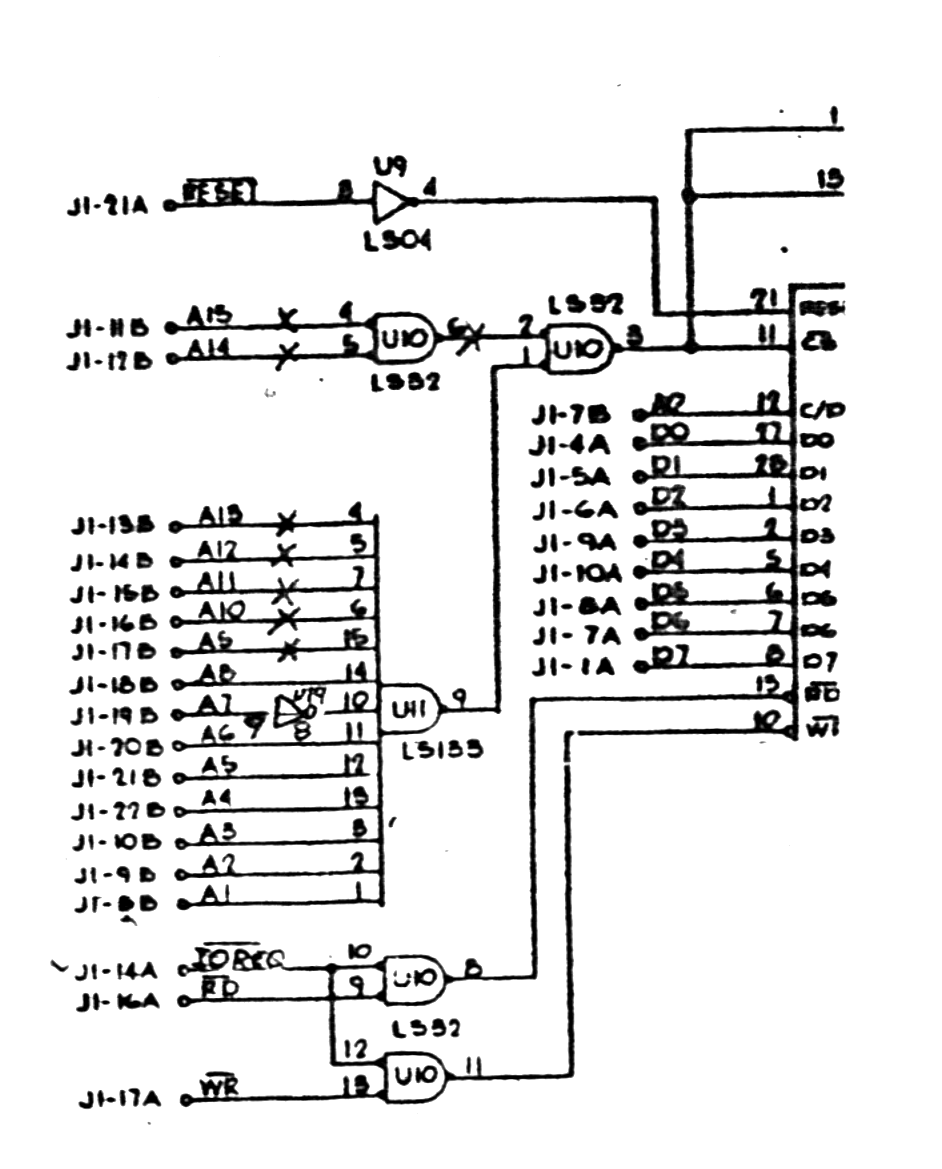
A few hardware changes will be required which will require a soldering iron. If you are unable to make these changes yourself, Byte-Back will be glad to make them for you and will charge our normal repair fee of $25.00
1) Cut the traces leading to pins 4,5,6,7,14,and 15 of the 74LS133. This is the IC which has another IC piggybacked on top of it. Now solder all of the above pins to the 74LS133 pin 16.
2) Cut the trace leading to the 74LS32 pin 2 and solder a jumper wire from this pin to the 74LS04 or 74F04 pin 7.
3) Now load TASWORD TWO and exit to basic. Make the following changes:
add lines:
1 OUT 127,0
2 OUT 127,0
3 OUT 127,0
4 OUT 127,64
5 OUT 127,205
6 OUT 127,55
and POKE the following:
POKE 57978,32
     57979,12
     57997,79
     57998,205
     57999,9
     58000,32
     58001,56
     58002,2
     58003,207
     58004,12
     58005,0
     58006,219
     58007,127
     58008,203
     58009,127
     58010,32
     58011,2
     58012,24
     58013,240
     58014,203
     58015,87
     58016,40
     58017,236
     58018,121
     58019,211
     58020,126
     58021,201
     58022,201
Now return to TASWORD TWO by RUN and exit to the menu and save your new version of TASWORD TWO with all of these changes built in. You do not need to load the printer driver program when using this program. Please note that this hardware modification in no way effects the operation of the RS-232 and that this program modification is set to run at 4800 BAUD so adjust your printer for 4800 also.
THANK YOU! BYTE – BACK!
Note: Type-in program listings on this website use ZMAKEBAS notation for graphics characters.