Tired of using the same old commands? Well, saddle up your Interface 1 unit and let Gavin Smyth demonstrate the practice of adding up to 26 new commands to your Spectrum.
Sinclair Basic, for all its slowness, is fairly comprehensive. But as with all things, the more you have, the more you want and a few extra commands might certainly come in useful. How about, for instance, an absolute draw. With Interface 1 attached, it’s possible to add as many extra commands as you like.
First, let’s look at the extended interpreter and the individual routines in detail.
NEW INTERPRETATIONS
When a line of Basic is entered, the original ROM checks its syntax; if it fails to recognise the command, it passes control over to the Interface 1 ROM. This scans the line checking for new words such as ‘FORMAT’. If this test also fails, the processor jumps to the error handling routine (at ERR6) via the vectored address at 23735. You can alter this address and have further tests implemented to provide extra commands.
This is what the extended interpreter does. It checks for the presence of an asterisk at the beginning of a statement followed by a letter; with this simple test, however, only 26 new commands can be invented. If it finds no asterisk or letter it gives the usual syntax error. If all is correct, it jumps to the actual routine via the table of vectors. Note that unimplemented commands point to the error handler. The individual command routines check the rest of the syntax and contain the runtime routine.
For the interpreter to function properly, there must be at least one space between the new command word and any following arguments. The command word must start with an asterisk and a letter, followed by any (or no) characters at all.
ABSOLUTE DRAW
The first new command is:
*DRAW x,yWhich draws to the point (x,y). It’s much simpler to use than relative co-ordinates (especially in graphs). Thus:
PLOT 100,100: DRAW 20,30Is equivalent to:
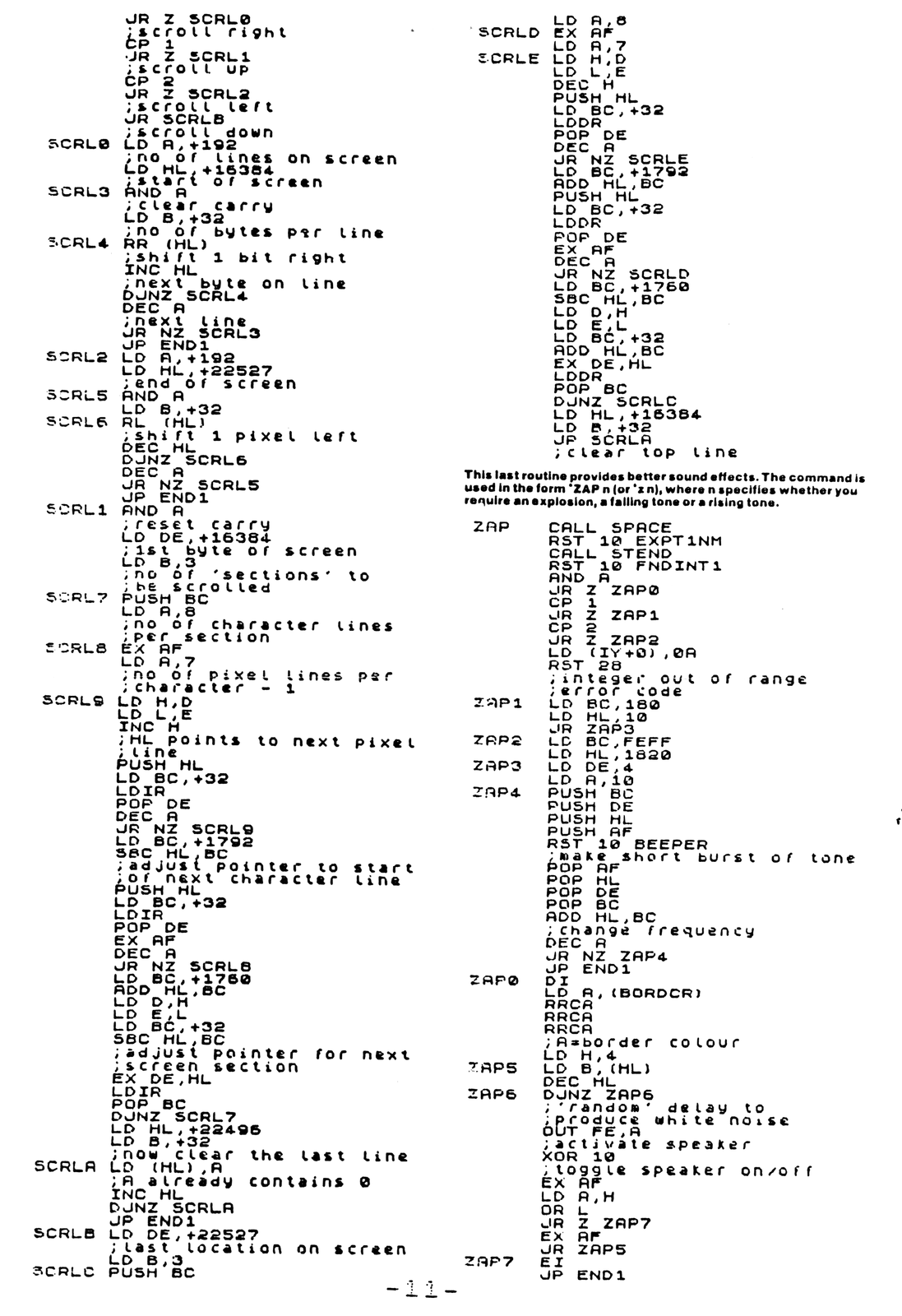
PLOT 100,100: *DRAW 120,130First, the routine calls SPACE to get to the end of the first word (in this case, *DRAW). Then it checks for the presence of two numeric arguments separated by a comma; if there’s something wrong it jumps to the error handler. In syntax time — that is, when the line is first entered into a program — the routine ends here; in runtime the rest is executed. This part simply calculates the size of the relative co-ordinates and calls the Basic ROM’s DRAW subroutine.
When this subroutine is being executed, the Interface 1 ROM is paged in. This allows routines in the Interface 1’s ROM, such as STEND, to be simply CALLed; routines in the main ROM, such as FNDINT1, have to be called via RST 10h followed by the starting address (this is true for all the new command routines).
PRINTING PIXELS
The next routine allows a user-defined graphic character to be placed anywhere on-screen. The reason for restricting it to UDGs is that it’s unlikely that anyone would want to print a lot of text like this (since the routine handles only one character at a time) and, if required, the UDGs may be re-defined as letters.
The syntax for the command is:
*PRINT x,y,cWhere (x,y) are the pixel co-ordinates of the top left corner of the character (x lies between zero and 255, y between zero and 175) and c is the number of the UDG (UDG A is zero, UDG B is one . . . UDG U is 20). For example:
FOR x=0 TO 247: *PRINT x,100,0: NEXT xThe above will glide the first UDG (initially a capital ‘A’) across the screen. This time the extended syntax checker looks for three numbers separated by commas.
In the runtime routine, the data for the UDG is found and shifted across to give the correct information for the screen memory; the listing contains the code and full comments. The routine ends with the attribute bytes being set to the permanent colours.
PIXEL SCROLL
The scroll command allows pixel scrolling of the entire screen. The actual command is:
*SCROLL nWhere n is a numeric expression controlling the direction of the scrolling (n must lie between zero and 255, but only the mod four value is used):
n=0 (or 4,8,. . .) scrolls right one pixel
n=1 (or 5,9,. . .) scrolls up
n=2 scrolls left
n=3 scrolls down
For example, to scroll one whole character down, you could use:
FOR f=1 TO 8: *SCROLL 3:NEXT fThis moves the screen by eight pixel lines. The syntax checker this time looks for only one numeric argument. Only the lower two bits are used (giving a range of zero to three) and the routine jumps to each separate scrolling routine. The left and right scrolls are fairly simple — they just shift each line of 32 bytes by one bit. The up and down scrolls are complicated by the layout of the screen memory, but all they do is move each line into the one above or below, clearing the final one.
The colour attributes are not affected at all, since they have only character block and not pixel resolution.
SIMPLE SOUNDS
The final routine is a simple sound effects generator — useful for games if nothing else. The command syntax is:
*ZAP nWhere n, between zero and two, specifies the type of sound:
n=0 gives an explosion noise
n=1 gives a falling tone
n=3 gives a rising tone
For example:
FOR f=1 TO 100: *ZAP INT(RND*3):NEXT fThe above will give several seconds of ‘exciting’ sounds (well, more exciting than BEEP!). The computer again looks for a single argument and checks its value; if it’s out of range, it gives an error, otherwise it jumps to the specific routine. The rising and falling tones are produced by short beeps of changing frequencies, while the explosion is produced by sending ‘random’ data from the ROM to the speaker port.
A COMMANDING LEAD
You can check from the assembler listing several important points about adding new commands:
1. First, the syntax is checked — using EXPT1NM for numeric expressions and CP “,” to check for separating commas. This section ends with CALL STEND.
2. Next comes the runtime routine and, since the values of the arguments are on the calculator stack, these can be pulled off into the A register with FNDINT1.
3. The runtime code ends with a jump to END1.
4. Any subroutine in the Basic ROM must be called via RST 10h. Note that all registers are preserved while the ROMs are paged.
5. Before the code will run, the vector at 23735 must point to the beginning, with a jump back to ERR6 at the end to trap genuine syntax errors.
The code may be entered using either an assembler or the Basic program provided which will relocate the 559 bytes of machine code anywhere in memory; it should run on a 16K Spectrum, so long as Interface 1 is connected.
To use it, set lines 10 and 20 to the desired starting address (for example, 31000 in a 16K machine and 64700 in a 48K model). Next SAVE the program in case there is a mistake (which is usually fatal in machine code). Now, RUN the program and after a few minutes a message will appear on the screen; the code has been located in memory but will have no effect since the vector at 23735 has not been altered. To use the extra commands enter the line in the message — as a single line rather than two separate POKEs, otherwise the machine may crash.
If NEW is entered the vector is reset; however, the code is still in memory, so repeat the two POKEs to allow the commands to be used. We’ve seen a simple interpreter that will allow up to 26 new commands, but with only four examples; there are 22 more possible words, so get working!
ASSEMBLER NOTES
The assembler used was the Artic version which, in fact, is slightly non-standard. The main differences between it and a standard assembler are:
EQU is replaced by the ‘=’ sign.
All numbers are in hexadecimal unless preceeded by ‘+’ or ‘-‘, in which case they are in decimal.
DEFB, DEFW, and so on do not exist; the number or label is simply placed in the source text where the DEFB would occur, and EX AF,AF is entered as EX AF.
ROUTINE   VALUE    COMMENT
GETCHAR   18       Fetches current char on BASIC line into A
NXTCHAR   20       Fetches next char, ignoring spaces
ERR6      1F0      Normal error handler
STEND     5B7      Subroutine to exit command routine in syntax check time
END1      5C1      Routine to exit in runtime
EXPT1NM   1C82     Syntax checker for expecting a numeric expression (puts it on the stack)
FNDINT1   1E94     Fetches number into A from stack
BEEPER    3B5      Loudspeaker routine HL=437500/freq-30.125 DE=freq*duration
CHADD     74       Reads next character including spaces
BORDCR    +23624   System variable holding attributes for the lower screen and border
STACKA    2D28     Puts A on to the calculator stack
COORDS    +23677   System variable holding x & y co-ordinates of last point plotted
DRAWR     24BA     Relative draw routine, takes x & y offsets from BC & DE registers
PIXADD    22AA     Converts co-ords in BC to an address in HL
UDG       +23675   System variable holding address of user-defined graphics data
POATTR    BDB      Sets attributes for the screen byte in HL
TEMPS     D4D      Sets temporary colours (used by POATTR) to the permanent colours
The ROM routines and addresses used by the program.
   1 REM ** EXTENDED BASIC **
   2
   3 REM In line 20, set start to the desired beginning of the machine code, and in line 10, CLEAR to the location before
   4
   5 REM This BASIC program will relocate the code anywhere in memory, but it is fairly slow
   6
   7 REM The machine code is 559 bytes long
   8
  10 CLEAR 64797
  20 LET start=64798
  30 LET a$=""
  40 FOR a=start TO start+558
  50 IF a$="" THEN  READ a$
  60 POKE a,FN h(a$)*16+FN h(a$(2))
  70 LET a$=a$(3 TO )
  80 NEXT a
  99 REM Now relocate the code
 100 LET a=20: LET p=45: GO SUB 500
 110 LET a=53: LET p=99: GO SUB 500
 120 LET a=77: LET p=165: GO SUB 500
 130 LET a=83: LET p=267: GO SUB 500
 140 LET a=97: LET p=465: GO SUB 500
 150 LET a=100: LET p=31: GO SUB 500
 160 LET a=166: LET p=31: GO SUB 500
 170 LET a=268: LET p=31: GO SUB 500
 180 LET a=463: LET p=394: GO SUB 500
 190 LET a=466: LET p=31: GO SUB 500
 200 PRINT "To use the extra commands, enter"
 210 PRINT '"POKE 23735,";start-256*INT (start/256);": POKE 23736,";INT (start/256)
 220 STOP
 499 REM This routine sorts out the absolute addresses to relocate the program
 500 LET address=start+a+1
 510 LET pointsto=start+p
 520 POKE address,INT (pointsto/256)
 530 POKE address-1,pointsto-256*PEEK address
 540 RETURN
 899 REM function to convert a hex digit to its decimal value
 900 DEF FN h(a$)=CODE a$-48-7*(a$>="A")
 999 REM data for the machine code program
1000 DATA "D71B00FE2AC2F001D720"
1010 DATA "00E69FFE1B3B01AF8721"
1020 DATA "2DD806004F095E2356EB"
1030 DATA "E9D77400FE20C8FE3AC8"
1040 DATA "FE0D20F3C9F001F001F0"
1050 DATA "01F00163D8F001F001F0"
1060 DATA "01F001F001F001F001F0"
1070 DATA "01F001F001F001A5D8F0"
1080 DATA "01F0010BD9F001F001F0"
1090 DATA "01F001F001F001D1D9CD"
1100 DATA "1FD8D7821CFE2CC2F001"
1110 DATA "D72000D7821CCDB705D7"
1120 DATA "941E217E5C9638141601"
1130 DATA "47C5D5D7941ED1C1217D"
1140 DATA "5C96380A1E01180A16FF"
1150 DATA "ED4418E81EFFED444FD7"
1160 DATA "BA24C3C105CD1FD8D782"
1170 DATA "1CFE2CC2F001D72000D7"
1180 DATA "821CFE2CC2F001D72000"
1190 DATA "D7821CCDB705D7941ECB"
1200 DATA "27CB27CB2716005F2A7B"
1210 DATA "5C19E5D7941EF5D7941E"
1220 DATA "C14FD13E0BF5C5D7AA22"
1230 DATA "F5E5D5D74D0DD7DB0BE1"
1240 DATA "46D1EBF10E003CCB38CB"
1250 DATA "193D20F9702371C10513"
1260 DATA "F13D20D9C3C105CD1FD8"
1270 DATA "D7821CCDB705D7941EE6"
1280 DATA "03280AFE01282CFE0228"
1290 DATA "12186C3EC0210040A706"
1300 DATA "20CB1E2310FB3D20F5C3"
1310 DATA "C1053EC021FF57A70620"
1320 DATA "CB162B10FB3D20F5C3C1"
1330 DATA "05A71100400603C53E08"
1340 DATA "083E07626B24E5012000"
1350 DATA "EDB0D13D20F3010007ED"
1360 DATA "42E5012000EDB0D1083D"
1370 DATA "20E001E00609545D0120"
1380 DATA "00ED42EBEDB0C110CC21"
1390 DATA "E0570620772310FCC3C1"
1400 DATA "0511FF570603C53E0808"
1410 DATA "3E07626B25E5012000ED"
1420 DATA "B8D13D20F301000709E5"
1430 DATA "012000EDB8D1083D20E1"
1440 DATA "01E006ED42545D012000"
1450 DATA "09EBEDB8C110CD210040"
1460 DATA "0620C38AD9CD1FD8D782"
1470 DATA "1CCDB705D7941EA72832"
1480 DATA "FE012809FE02280DFD36"
1490 DATA "000AEF01800121100018"
1500 DATA "0601FFFE212018110400"
1510 DATA "3E10C5D5E5F5D7B5C3F1"
1520 DATA "E1D1C1093D20F1C3C105"
1530 DATA "F33A485C0F0F0F260446"
1540 DATA "2B10FED3FEEE10087CB5"
1550 DATA "28030818F0FBC3C105"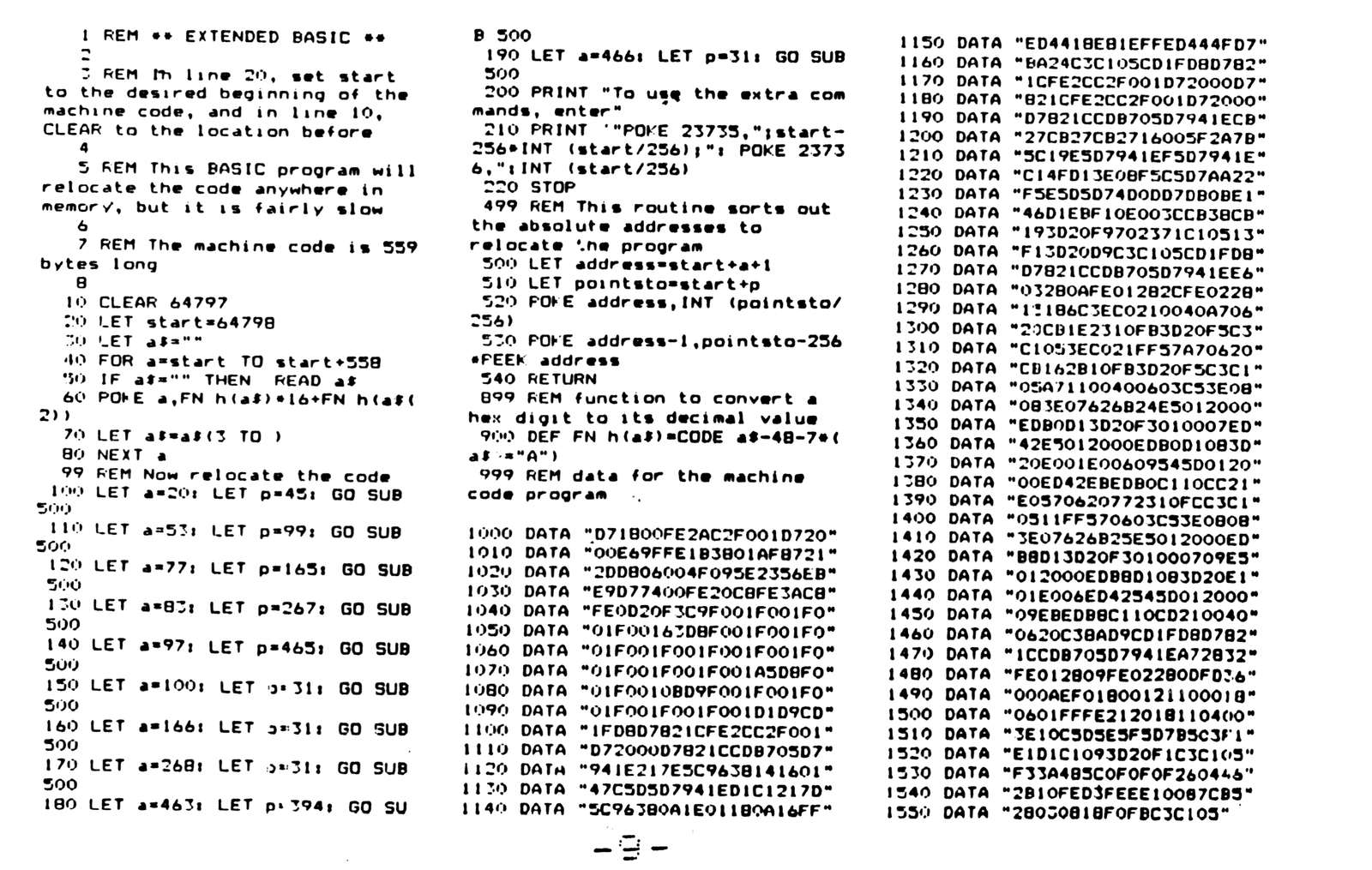
This is the machine code disassembly of a series of extended Basic routines which expand Sinclair Basic by up to 26 new commands, of the form “name”, ie., commencing with an asterisk, followed by a letter (upper or lower case) or word and any necessary parameters. (Note that this program only works with Interface 1 attached, and the system variable vector at 23735 and 23736 should be set to point to START.)
START  RST 10 GETCHAR
       CP "*"
       ;make sure 1st char is *
       JP NZ ERR6
       RST 10 NXTCHAR
       AND 9F
       CP +27
       ;check 2nd is within
       ;alphabetic range
       ;(very simple test so may
       ;fail with some chars)
       JR C INDEX
       XOR A
INDEX  ADD A,A
       LD HL,TABLE
       LD B,0
       LD C,A
       ADD HL,BC
       LD E,(HL)
       INC HL
       LD D,(HL)
       EX DE,HL
       JP (HL)
       ;jump to specific routine
       ;for each of the new 26
       ;commands
       ;subroutine to find the
       ;end of a word
SPACE  RST 10 CHADD
       CP " "
       RET Z
       CP ":"
       RET Z
       CP 0D
       JR NZ SPACE
       RET

ERR6   ;error vector
ERR6   ;vector for *A...          ERR6    ;*N
ERR8   ;*B...                     ERR6    ;*O
ERR6   ;*C                        PRINT   ;*P
DRAW   ;*D                        ERR6    ;*Q
ERR6   ;*E                        ERR6    ;*R
ERR6   ;*F                        3CROL   ;*S
ERR6   ;*G                        ERR6    ;*T
ERR6   ;*H                        ERR8    ;*U
ERR6   ;*I                        ERR6    ;*V
ERR6   ;*J                        ERR6    ;*W
ERR6   ;*K                        ERR6    ;*X
ERR8   ;*L                        ERR6    ;*Y
ERR6   ;*M                        ZAP     ;*Z

DRAW   CALL SPACE
       RST 10 EXPT1NM
       CP ","
       ;check for separator
       JP NZ ERR6
       RST 10 NXTCHAR
       RST 10 EXPT1NM
       CALL STEND
       ;now x & y are on the top
       ;of the stack
       RST 10 FNDINT1
       ;y co-ord into A
       LD HL,COORDS+1
       ;address of previous y
       SUB (HL)
       ;find relative y
       JR C DRAW2
       ;if -ve, adjust it
       LD D,1
DRAW1  LD B,A
       PUSH BC
       PUSH DE
       RST 10 FNDINT1
       POP DE
       POP BC
       LD HL,COORDS
       SUB (HL)
       ;same for x co-ord
       JR C DRAW3
       LD E,1
       JR DRAW4
DRAW2  LD D,FF
       NEG
       JR DRAW1
DRAW3  LD E,FF
       NEG
DRAW4  LD C,A
       RST 10 DRAWR
       ;perform actual drawing
       JP END1

PRINT  CALL SPACE
       RST 10 EXPT1NM
       CP ","
       JP NZ ERR6
       RST 10 NXTCHAR
       RST 10 EXPT1NM
       CP ","
       JP NZ ERR6
       RST 10 NXTCHAR
       RST 10 EXPT1NM
       CALL STEND
       RST 10 FNDINT1
       SLA A
       SLA A
       SLA A
       LD D,0
       LD E,A
       LD HL,(UDG)
       ADD HL,DE
       ;HL contains the start
       ;of the required UDG data
       PUSH HL
       RST 10 FNDINT1
       PUSH AF
       RST 10 FNDINT1
       POP BC
       LD C,A
       ;BC contains the co-ords
       ;of the point to print to
       POP DE
       LD A,8
PRNT1  PUSH AF
       PUSH BC
       RST 10 PIXADD
       ;convert co-ords into an
       ;address and pointer in A
       PUSH AF
       PUSH HL
       PUSH DE
       RST 10 TEMPS
       ;set up colours
       RST 10 POATTR
       ;fill in attributes
       POP HL
       LD B,(HL)
       POP DE
       EX DE,HL
       POP AF
       LD C,0
       ;BC contains a byte of
       ;UDG data
       INC A
PRNT2  SRL B
       RR C
       DEC A
       JR NZ PRNT2
       ;shift data along to the
       ;correct pixel within the
       ;screen byte
       LD (HL),B
       INC HL
       LD (HL),C
       ;put it on the screen
       POP BC
       DEC B
       INC DE
       ;next line
       POP AF
       DEC A
       JR NZ PRNT1
       JP END1

SCROL  CALL SPACE
       RST 10 EXPT1NM
       CALL STEND
       RST 10 FNDINT1
       AND 3
       ;take n mod 4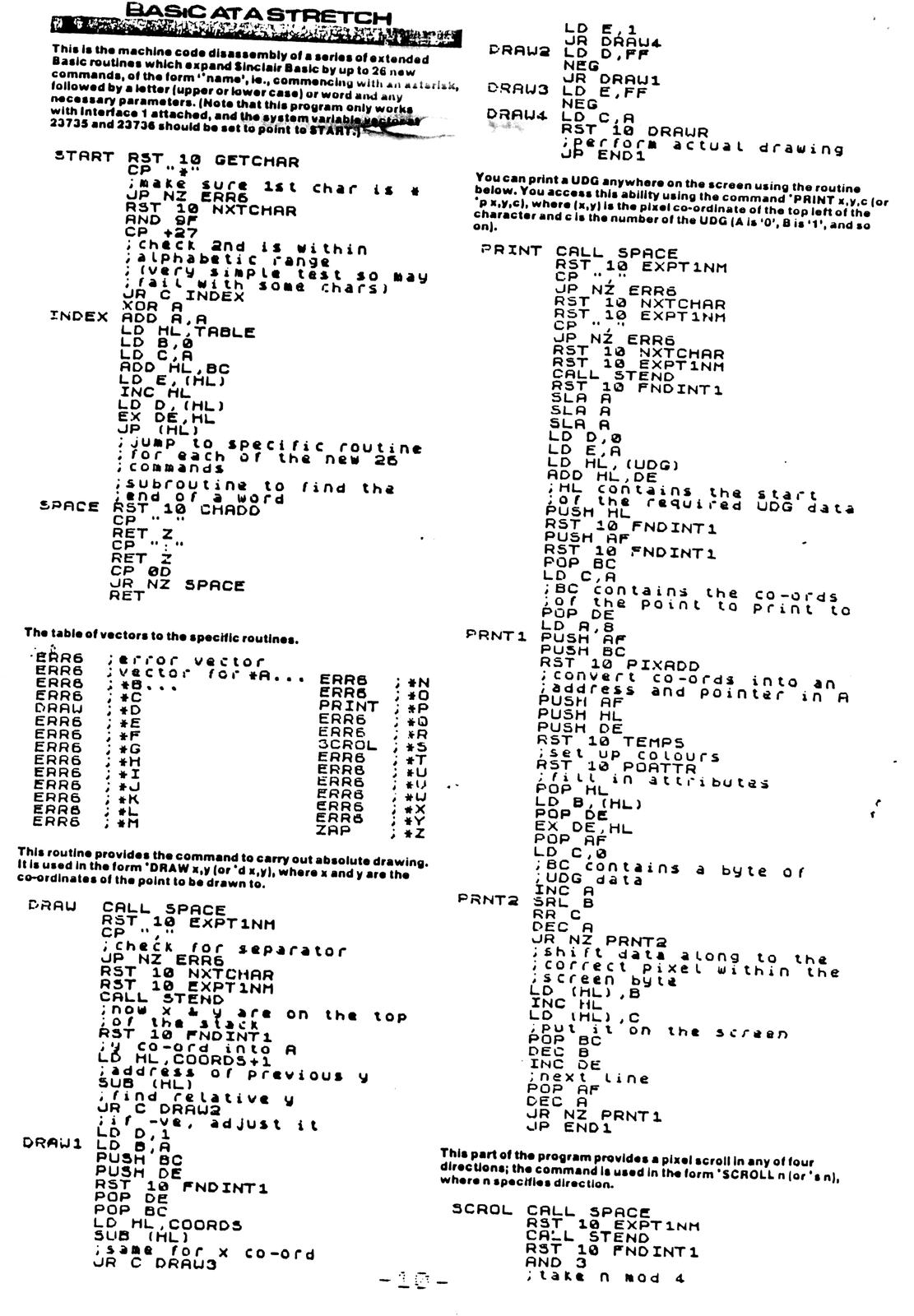
       JR Z SCRL0
       ;scroll right
       CP 1
       JR Z SCRL1
       ;scroll up
       CP 2
       JR Z SCRL2
       ;scroll left
       JR SCRLB
       ;scroll down
SCRL0  LD A,+192
       ;no of lines on screen
       LD HL,+16384
       ;start of screen
SCRL3  AND A
       ;clear carry
       LD B,+32
       ;no of bytes per line
SCRL4  RR (HL)
       ;shift 1 bit right
       INC HL
       ;next byte on line
       DJNZ SCRL4
       DEC A
       ;next line
       JR NZ SCRL3
       JP END1
SCRL2  LD A,+192
       LD HL,+22527
       ;end of screen
SCRL5  AND A
       LD B,+32
SCRL6  RL (HL)
       ;shift 1 pixel left
       DEC HL
       DJNZ SCRL6
       DEC A
       JR NZ SCRL5
       JP END1
SCRL1  AND A
       ;reset carry
       LD DE,+16384
       ;1st byte of screen
       LD B,3
       ;no of 'sections' to
       ;be scrolled
SCRL7  PUSH BC
       LD A,8
       ;no of character lines
       ;per section
SCRL8  EX AF
       LD A,7
       ;no of pixel lines per
       ;character - 1
SCRL9  LD H,D
       LD L,E
       INC H
       ;HL points to next pixel
       ;line
       PUSH HL
       LD BC,+32
       LDIR
       POP DE
       DEC A
       JR NZ SCRL9
       LD BC,+1792
       SBC HL,BC
       ;adjust pointer to start
       ;of next character line
       PUSH HL
       LD BC,+32
       LDIR
       POP DE
       EX AF
       DEC A
       JR NZ SCRL8
       LD BC,+1760
       ADD HL,BC
       LD D,H
       LD E,L
       LD BC,+32
       SBC HL,BC
       ;adjust pointer for next
       ;screen section
       EX DE,HL
       LDIR
       POP BC
       DJNZ SCRL7
       LD HL,+22496
       LD B,+32
       ;now clear the last line
SCRLA  LD (HL),A
       ;A already contains 0
       INC HL
       DJNZ SCRLA
       JP END1
SCRLB  LD DE,+22527
       ;last location on screen
       LD B,3
3CRLC  PUSH BC
       LD A,8
SCRLD  EX AF
       LD A,7
SCRLE  LD H,D
       LD L,E
       DEC H
       PUSH HL
       LD BC,+32
       LDDR
       POP DE
       DEC A
       JR NZ SCRLE
       LD BC,+1792
       ADD HL,BC
       PUSH HL
       LD BC,+32
       LDDR
       POP DE
       EX AF
       DEC A
       JR NZ SCRLD
       LD BC,+1760
       SBC HL,BC
       LD D,H
       LD E,L
       LD BC,+32
       ADD HL,BC
       EX DE,HL
       LDDR
       POP BC
       DJNZ SCRLC
       LD HL,+16384
       LD B,+32
       JP SCRLA
       ;clear top line

ZAP    CALL SPACE
       RST 10 EXPT1NM
       CALL STEND
       RST 10 FNDINT1
       AND A
       JR Z ZAP0
       CP 1
       JR Z ZAP1
       CP 2
       JR Z ZAP2
       LD (IY+0),0A
       RST 28
       ;integer out of range
       ;error code
ZAP1   LD BC,180
       LD HL,10
       JR ZAP3
ZAP2   LD BC,FEFF
       LD HL,1820
ZAP3   LD DE,4
       LD A,10
ZAP4   PUSH BC
       PUSH DE
       PUSH HL
       PUSH AF
       RST 10 BEEPER
       ;make short burst of tone
       POP AF
       POP HL
       POP DE
       POP BC
       ADD HL,BC
       ;change frequency
       DEC A
       JR NZ ZAP4
       JP END1
ZAP0   DI
       LD A,(BORDCR)
       RRCA
       RRCA
       RRCA
       ;A=border colour
       LD H,4
ZAP5   LD B,(HL)
       DEC HL
ZAP6   DJNZ ZAP6
       ;'random' delay to
       ;produce white noise
       OUT FE,A
       ;activate speaker
       XOR 10
       ;toggle speaker on/off
       EX AF
       LD A,H
       OR L
       JR Z ZAP7
       EX AF
       JR ZAP5
ZAP7   EI
       JP END1