
The Timex/Sinclair 2068, with its built-in sound chip is capable of producing sound and music in three parts. The program included here will allow you to create, enter, and play music in three-part harmony. It doesn’t have the visual appeal of the famous Music Construction Set (made for lesser computers), but it does allow you to vary the volume of the sound within a musical composition, which the aforementioned program lacks. The Music Editing Program, given in listing 1, includes a couple of machine language routines stored in lines 1200 through 1260.
Typing Music In
Music is entered in a straight-forward numerical fashion directly in the program between the lines numbered 500 and 895. It may be typed in directly or merged in from tape (more about this later). In general, you will have a line that defines a measure or two of music (in the character string M$), followed by a line that calls the encoding routine at line 900. Look at line 510 in listing 1. The first group of letters (VFED) is called a volume group and it sets the volume of the three channels. A volume group starts off with the letter V followed by three hexadecimal digits (0-F) with 0 being minimum volume (esentially off) and F representing maximum volume. Once the volume of the three channels is set, it will remain until changed.
The next thing you will notice in line 510 (243C3E3G) is called a note group. The first two numbers (the 24) is the length of the note group. A 24 represents a quarter note. Twice that, or 48 would represent a half note, and 96 would represent a whole note. Likewise, a 12 represents an eighth note and a 06 (must have 2 digits) represents a 16th note. Following the note length, you will have 3 sets of note specifiers, each of which consists of an octave specifier (the 3), followed by the actual note itself (A through G), and possibly followed by either a “b” or a “#” for either a flat or a sharp (natural notes don’t need to be followed by anything). See figure 1 for the octave specifier.
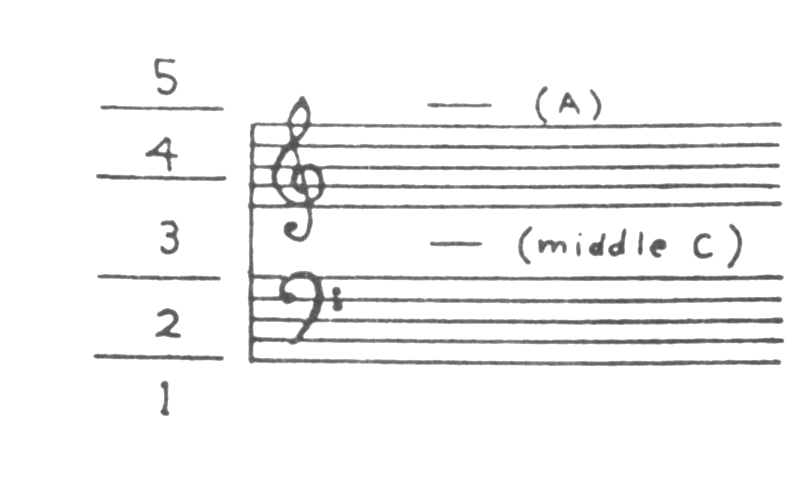
Further along in line 510 you will see a group consisting of an R04. This is called a repeat group and it is a short cut method of representing the same notes as before with a possibly different length. This is useful when varying the volume of a note or group of notes, or for representing dotted notes or tied notes.
Finally, at the end of line 510, you will notice a period just before the ending quotes. Each line of music must end with a period. (If you forget, you will get an error #3, Subscript Error in line 950, when you try to run the program later.)
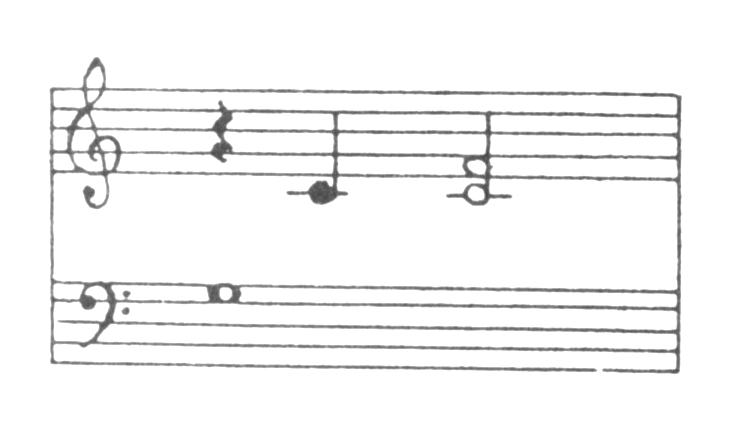
If you only have one or two notes to play at a time, use a volume group to turn the other notes off; the note values you give them then does’t matter. As an alternative, you could leave the volume the same, in which case you can give them the same note value as the one (or two) notes you are playing. Another problem that will come up is what to do when the notes you want to play are not the same in length, such as when the bass staff has a whole note and the treble staff has 4 quarter notes. In this case, you need to convert the whole note into 4 “tied” quarter notes. Figure 2 illustrates some of these problems, and would be encoded thusly:
"242G2G2G 242G2G3C 482G3C3E."With a little practice, you’ll be writing music fairly quickly.
Running the Program
First make sure you save and verify your entered program before you try to run it! Now with some music entered between lines 500 and 885 (the listing includes a couple of measures of sample music), type RUN. The program will take about 10 seconds to poke in the machine code portions, then it will ask you to “Input Tempo” with suggested values of .5 to 1.5. Smaller numbers will make the music play faster while larger numbers will make it play slower. For now, enter a 1. The program will then say “Please wait…”. It is now converting your music code into numbers that the computer can understand. Each call to the subroutine at 900 will draw one more dot on the screen, so if you have any errors, you can count dots (minus the first 3) to determine which line has the error in it. Usually the error will be in a note group; you may have typed a 6 for the length when it should be a 06, or you specified a note in small letters when they should be in capitals. Also, if you entered a long piece of music, you may get an error 3–Subscript Wrong. In this case, you need to enlarge the dimension of L$ in line 20. If the computer completely crashes during any part of this (or the next part when you actually play the music), you’ve made a mistake somewhere in the data statements in lines 1200 to 1260. Re-load your program, find and correct the error(s), re-save your program, and try running it again.
Assuming you’ve got all the bugs out, the computer will finally say, “Music is now ready to be played. Hit ENTER.” Go ahead, hit ENTER, and sit back and enjoy your masterpiece!
Saving Your Music
Once you have your music entered and sounding the way you like, you’ll want to save it. The simplest, most convenient way would be to save the whole program, but if you’re worried about saving tape, there is another way. Assuming that you have already saved the basic Music Editing Program, type:
DELETE 1,490         <ENTER>
DELETE 890,1260      <ENTER>
SAVE "some name"     <ENTER>
Then later on, you can LOAD your Music Editing Program, and then type:
MERGE "some name" <ENTER>and your program will be ready to run! Then if you want to merge in a different music score, type:
DELETE 500,885 <ENTER>to delete your old music (VERY IMPORTANT!), then type:
MERGE "new name" <ENTER>where “new name” is the filename for another music file.
If you would like to save yourself some typing, and get several songs as well, send a check for $6.00 to: Ronald Rissel 2967 Lynx Lake Drive Prescott Vly., AZ 86314
I’ll send you a tape containing the Music Editing Program, three songs already encoded and ready to be merged, along with their corresponding sheet music, and complete instructions. I’ll also be glad to answer any questions that you may have, if you’ll write to me at the above address.
LISTING 1: THE MUSIC EDITING PROGRAM
 1 REM MUSIC EDITING PROGRAM
 2 REM Music starts at line 50
0; Adjust DIM L$(*) as needed.
 10 CLEAR 65100
 20 DIM L$(3000): DIM M$(200):
DIM C$(1)
 30 GO TO 1000
 40 PAUSE 20: SOUND 7,56
 45 LET HL=6+PEEK 23627+256*PEE
K 23628: REM Get start of L$
 50 POKE 65109,HL-256*INT (HL/2
56): POKE 65110,INT (HL/256): RE
M Poke in value for CHRPTR
 55 POKE 65111,L-256*INT (L/256
): POKE 65112,INT (L/256): REM P
oke in value for NCHARS
 60 PAUSE USR 65115
 65 IF (PEEK 65111+PEEK 65112)>
0 THEN GO TO 60
 70 SOUND 7,63;8,0;9,0;10,0
 75 INPUT "A)gain or Q)uit? ";C
$
 80 IF C$="Q" OR C$="q" THEN ST
OP
 85 GO TO 40
 100 REM CALCULATE TIME TO PAUSE
 110 LET L=L+1: LET TM=INT (1.5*
T*VAL M$(M TO M+1))
 120 IF NOT TM THEN LET TM=1
 130 LET L$(L)=CHR$ TM: LET M=M+
2
 140 RETURN
 150 REM NOTE GROUP
 160 GO SUB 100
 170 FOR I=1 TO 3: REM 3 Channel
s
 180 LET OCTAVE=12*VAL M$(M)-12
 190 LET M=M+1: LET C$=M$(M)
 200 IF C$<"A" OR C$>"G" THEN BE
EP .2,20: PRINT "**ERROR** Wrong
 note received at M = ";M;": ";
C$: STOP
 210 IF C$="A" THEN LET NOTE=0
 211 IF C$="B" THEN LET NOTE=2
 212 IF C$="C" THEN LET NOTE=3
 213 IF C$="D" THEN LET NOTE=5
 214 IF C$="E" THEN LET NOTE=7
 215 IF C$="F" THEN LET NOTE=8
 216 IF C$="G" THEN LET NOTE=10
 217 IF M$(M+1)="#" THEN LET NOT
E=NOTE+1: LET M=M+1
 218 IF M$(M+1)="b" THEN LET NOT
E=NOTE-1: LET M=M+1
 220 POKE 65106,OCTAVE+NOTE: REM
 INPUT NO.
 230 RANDOMIZE USR 65200
 240 LET L$(L+1)=CHR$ (PEEK 6510
8): REM FINE NO.
 250 LET L=L+2: LET M=M+1
 260 LET L$(L)=CHR$ (PEEK 65107)
: REM COARSE NO.
 270 NEXT I
 280 LET N$=L$(L-5 TO L): REM Sa
ve notes for possible repeat gro
up
 290 GO TO 950
 300 REM VOLUME CONTROL GROUP
 310 LET L=L+1: LET M=M+1: LET L
$(L)=CHR$ 255
 320 FOR I=1 TO 3
 330 LET V=CODE M$(M)-48: IF V>9
 THEN LET V=V-7
 340 LET L=L+1: LET M=M+1: LET L
$(L)=CHR$ V
 350 NEXT I
 360 GO TO 950
 400 REM REPEAT GROUP
 410 LET M=M+1: GO SUB 100
 420 LET L=L+6: LET L$(L-5 TO L)
=N$
 430 GO TO 950
 500 REM Name of Song
 510 LET M$="VFED 243C3E3G 243C3
F4A 123C3E3G VEDC R04 VCBA R04 V
A98 R04 V876 R04 V654 R04 V432 R
04 V211 R04."
 515 GO SUB 900
 520 LET M$="V000 063Bb3Eb3G# VF
DC 243Bb3Eb3G# 243Bb3Eb3G V000."
 525 GO SUB 900
 530 LET M$="243G2G1G VFDC R12 V
00C 003G2E1G VFDC R06 V0DC R00 V
FEC R06 V00C 003G2G1G VFDC R12 1
23G3A1G 123G3B1G 123G3D1G."
 535 GO SUB 900
 890 BEEP .2,20: PRINT : PRINT
 892 PRINT "Music is now ready t
o be played.Hit ENTER."
 894 INPUT C$
 896 CLS : GO TO 40
 900 LET M=1: REM Index into M$
 950 LET C$=M$(M)
 960 IF C$>="0" AND C$<="9" THEN
 GO TO 150
 965 IF C$="R" THEN GO TO 400
 970 IF C$="V" THEN GO TO 300
 975 IF C$=" " THEN LET M=M+1: G
O TO 950
 980 IF C$="." THEN PRINT ".";:
RETURN
 990 BEEP .2,20: PRINT "**ERROR*
*AT M= ";M;": ";C$: STOP
1000 PRINT "Loading machine code
 portion..."
1010 FOR A=65115 TO 65355
1020 READ D: POKE A,D
1030 NEXT A
1100 INPUT "Input Tempo (try .5
to 1.5): ";T
1110 CLS : PRINT "Tempo = ";T
1120 PRINT : PRINT "Please wait.
..";
1130 LET L=0
1140 GO TO 500
1200 DATA 42,85,254,205,164,254,
254,255,32,11,62,8,205,147,254,2
54,11,56,249,24,19,50,89,254,151
,205,147,254,254,6
1210 DATA 56,249,58,89,254,6,0,7
9,24,12,58,87,254,183,32,213,58,
88,254,183,32,207,34,85,254,201
1220 DATA 1,245,0,237,121,245,20
5,164,254,1,246,0,237,121,241,60
,201,126,35,237,75,87,254,11,237
,67,87,254,201
1230 DATA 33,204,254,205,195,254
,50,83,254,33,12,255,205,195,254
,50,84,254,201,58,82,254,6,0,79,
9,126,201
1240 DATA 7,7,6,6,6,5,5,5,4,4,4,
4,3,3,3,3,3,2,2,2,2,2,2,2,1,1,1,
1,1,1,1,1,1,1,1,1,0,0,0,0,0,0,0,
0,0,0,0,0,0,0,0,0,0,0,0,0,0,0,0,
0,0,0,0,0
1250 DATA 196,85,235,136,42,209,
126,47,228,158,92,29,226,170,117
,68,21,232,191,151,114,79,46,14,
241,213,186,162,138,116
1260 DATA 95,75,57,39,23,7,248,2
34,221,209,197,186,175,165,156,1
47,139,131,124,117,110,104,98,93
,87,82,78,73,69,65,62,58,55,52```

### LISTING 2: SAMPLE MUSIC CODE from "The Music Box Dancer" by Frank Mills

```code
 500 REM
 510 FOR J=1 TO 3
 515 REM (Included in case you
 forgot to type DELETE 500,885
 before merging this music.)
 520 LET M$="V9E0 123C3C3C 123E3
E3E 123G3G3G 123E3E3E 124C4C4C 1
23G3G3G 123E3E3E 123G3G3G."
 525 GO SUB 900
 530 NEXT J
 535 REM (another safeguard)
 540 LET M$="123C3C3C 123E3E3E 1
23G3G3G 123E3E3E 124C4C4C 123G3G
3G 123E3E3E VED0 124C3G3G."
 545 GO SUB 900
 550 LET M$="V7C0 004C3C3C VED0
R12 123G3E3E 124C3G3G 124E4C4C 1
24C3E3E 124E3G3G 124G4C4C 124C3G
3G."
 555 GO SUB 900
 560 LET M$="125C3F3F 125B4A4A 1
25A4C4C 124G4F4F VDD0 124G3C3C V
CD0 124G3E3E V8D0 124G3G3G V7D0
124G4C4C."
 565 GO SUB 900
 570 LET M$="VED0 124G2G2G 124F3
B3B 124D3D3D 124B3G3G 123G3B3B 1
24B3D3D 124D3G3G 124F3D3D."
 575 GO SUB 900
 580 LET M$="124E3C3C 124C3E3E 1
25A4C4C 124G3G3G VDD0 124G3E3E V
CD0 124G3G3G V8D0 124G4C4C 004C3
G3G VED0 R12."
 585 GO SUB 900
 590 LET M$="V7C0 004C3C3C VED0
R12 123G3E3E 124C3G3G 124E4C4C 1
24C3E3E 124E3G3G 124G4C4C 124C3G
3G."
 595 GO SUB 900
 600 LET M$="125C3F3F 125B4A4A 1
25A4C4C 124G4F4F VDD0 124G3C3C V
CD0 124G3E3E V8D0 124G3G3G V7D0
124G4C4C."
 605 GO SUB 900
 610 LET M$="VED0 124G2G2G 124F3
B3B 124D3D3D 124B3G3G 123G3B3B 1
24B3D3D 124D3G3G 124B3D3D."
 615 GO SUB 900
 620 LET M$="124C3C3C 123G3E3E 1
24E3G3G 124C4C4C VDD0 124C3E3E V
CD0 124C3G3G V8D0 124C4C4C 004C2
G2G VE0D R12."
 625 GO SUB 900
 630 LET M$="V808 004C2C2C VEDC
R12 123G2G2C 124C3E3C 124E3E3C 1
24C2G2C 124E2G2C 124G3E3C 124C2C
2C."
 635 GO SUB 900
 640 LET M$="125C1F1F 125B2F1F 1
25A3C3A 124G2G1F VDDC 124G2C2C V
CDC 124G2G2G V8DC 124G3E3C V7D0
124G2D2D."
 645 GO SUB 900
 650 LET M$="005G1G1G VEDC R12 1
25F2G1G 125D3D3B 125B3D3B 124G2G
1G 125B2G1G 125D3D3B 125F2G1G."
 655 GO SUB 900
 660 LET M$="125E2C2C 125C2G2C 1
26A3E3C 125G3E3C VDDC 125G2G1G V
C8C R00 VCDC R12 V7CB 125G3E3C 0
04C2G1C VEDC R12."
 665 GO SUB 900
 670 LET M$="V808 004C2C2C VEDC
R12 123G2G2C 124C3E3C 124E3E3C 1
24C2G2C 124E2G2C 124G3E3C 124C2C
2C."
 675 GO SUB 900
 680 LET M$="125C1F1F 125B2F1F 1
25A3C3A 124G2G1F VDDC 124G2C2C V
CDC 124G2G2G V8DC 124G3E3C V7D0
124G2D2D."
 685 GO SUB 900
 690 LET M$="005G1G1G VEDC R12 1
25F2G1G 125D3D3B 125B3D3B 124G2G
1G 125B2G1G 125D3D3B 125B2G1G."
 695 GO SUB 900
 700 LET M$="125C2C2C 124G2G2C 1
25E3E3C 125C3E3C 125C2G1C V7A9 R
00 VEDC R11 V7CB 005C3E3C VEDC R
11 V7CB 005C2G1C VEDC R11."
 705 GO SUB 900
 710 LET M$="025C1F1F 025E5C1F 0
26A5E1F 066C6A1F 126A2F1F 125F3C
3A 125C3C3A 125A2F1F 125C2F1F 12
5F3C3A 126A2G1F."
 715 GO SUB 900
 720 LET M$="125G2C2C 125C2G2C 1
26A3E3C 125G3E3C VDDC 125G2G2C V
E88 R00 VDDC R12 V8DC 125G3E3C V
7DC 125G2G2D."
 725 GO SUB 900
 730 LET M$="VEDC 024G1G1G 025B4
G1G 025D5B1G VFDC 065G5D1G 125F2
G1G 125D3D3B 125B3D3B 124G2G1G 1
25B3B1G 125D3D3B 125F2G1G."
 735 GO SUB 900
 740 LET M$="125E2C2C 125C3C2C 1
26A3E3G 125G3E3G 125G3C2C 125E3C
2C V7BA 005E3G3C VEDC R11 V7BA 0
05E2F2C VEDC R11."
 745 GO SUB 900
 750 LET M$="025C1F1F 025E5C1F 0
26A5E1F 066C6A1F 126A2F1F 125F3C
3A 125C3C3A 125A2F1F 125C2F1F 12
5F3C3A 126A2G1F."
 755 GO SUB 900
 760 LET M$="125G2C2C 125C2G2C 1
26A3E3C 125G3E3C VDDC 125G2G2C V
EDC 125C2G1C V8CB 005C3E3C VEDC
R12 V8CB 005C2G2C VFEC R12."
 765 GO SUB 900
 770 LET M$="024G1G1G 025B4G1G 0
25D5B1G 065G5D1G 125F2G1G 125D3D
3B 125B3D3B 124G2G1G 125B2G1G 12
5D3D3B 125B2G1G."
 775 GO SUB 900
 780 LET M$="135C2C2C 134G2G2C 1
45E3E3C 145C2G2C VDDC 155C3E3C V
DCB R06 VCBA R06 VBA9 R06 VA98 R
06 V987 R02 V876 R01 V765 R01 V5
43 R01."
 785 GO SUB 900
Note: Type-in program listings on this website use ZMAKEBAS notation for graphics characters.