
The 8K Basic ROM and the 16K-Byte RAM pack are now available from Sinclair Research (see Resources column). The specifications for these units are as follows.
ZX80 8K BASIC ROM
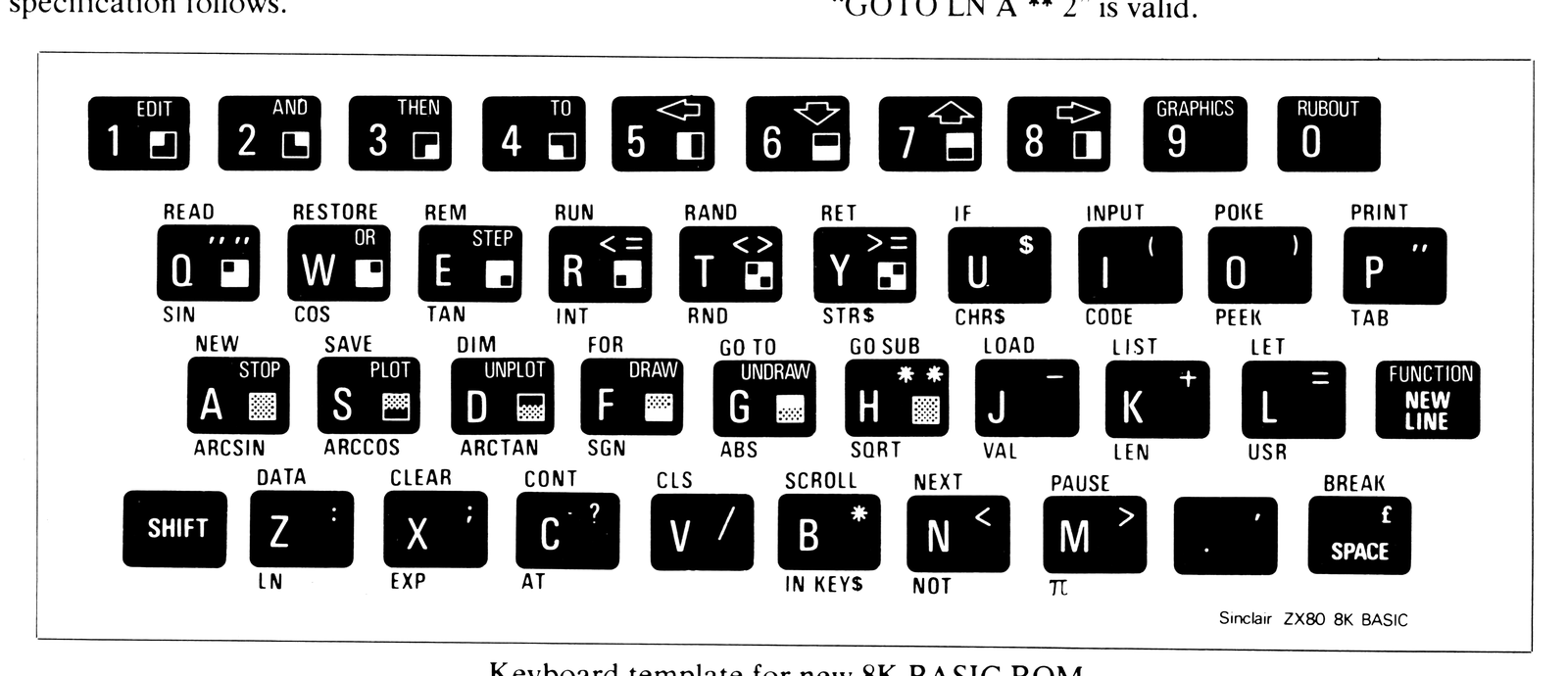
The 8K Basic ROM for the ZX80 is designed for high-level, full-facility computing. The chip—a drop-in replacement for the existing 4K Basic ROM—comes with a new keyboard template and a supplementary operating manual.
Key features of the new 8K BASIC ROM include –
- fully floating-point arithmetic to 9-digit accuracy,
- logs, trig, and their inverse functions,
- graph plotting facility,
- animated displays using PAUSE n,
- full set of string-handling facilities,
- n dimensional arrays,
- n dimensional string arrays,
- cassette LOAD and SAVE with named programs.
Full specification follows.
Numbers
Stored in 5 bytes in floating point binary form giving 9 x 10^-44 to 1.1 x 10^43 accurate to 9 1/2 decimal digits.
Variables
Numeric:           Any letter, followed by alphanumerics.
String:            A$ - Z$.
FOR-NEXT:          A - Z.
Numeric arrays:    A - Z.
String arrays:     A$ - Z$.
Arrays
Numeric arrays:        'n' dimension, subscript range starts
                       at 0.
String arrays:         'n' dimension, subscript range starts
(more correctly,       at 0. If the last subscript is omitted it's
character arrays)      treated as a fixed length string.
Strings
Undimensioned strings can be any length.
Can be concatenated (+).
Substring eg B$ = A$ (2 TO 4).
Literal strings eg C$ = “QWERTY”.
Statements available
In this list,
v          represents a variable.
x,y,z      represent numerical expressions.
m,n        represent numerical expressions that
           are rounded to the nearest integer.
e          represents an expression.
f          represents a string valued expression.
s          represents a statement.
Note that arbitrary expressions are allowed everywhere (except for the line number at the beginning of a statement). Thus “GOTO LN A ** 2” is valid.
CLEAR           Deletes all variables, freeing the space
                they occupied.
CLS             (Clear Screen) deletes all PRINT output
                in the display file.
CONTINUE        Resumes execution of the last run pro-
                gram—repeats the last statement if an
                error was detected, otherwise restarts at
                the next one. Note that a command
                (immediate execution) statement counts
                as a program and so destroys the re-
                entry data.
DATA...         Standard, but no unquoted strings.
DIM...          Deletes any array or string with the same
                name, sets up space for a new array in
                the usual way, and initialises its element
                to 0 or " ".
DRAW m,n        Let (u,v) be the current PLOT (q.v.) posi-
                tion. Draws a line as straight as possible
                from (u,v) to (u + m, v + n) by blacking
                in pixels (quarter character squares).
                Changes the PLOT and PRINT posi-
                tions.
FOR A TO B      Generally standard, but entirely
STEP C          dynamic in its action.
NEXT            The effect of a NEXT statement is to
                look up the corresponding FOR-vari-
                able, increment its value by the STEP,
                check whether the limit is exceeded and
                if not jump to the looping line number.
GOSUB n         Transfers control to BASIC subroutine.
GOTO n          Jumps to line n.
IF x THEN s     If x is true (defined to mean greater in
                absolute value then 2^-112) then s is
                executed. The standard values of true
                and false as yielded by relational opera-
                tors are 1 and 0.
INPUT v         Outputs the display file to the screen
                with no special INPUT prompt; the rest
                is standard. Cannot be used as a com-
                mand (immediate execution) statement.
LIST            Lists from start of program.
LIST n          Lists program starting at line n with pro-
                gram cursor pointing at line n.
LOAD f          Looks for a program called f on tape and
                loads it and its variables.
NEW             Default n = 0. Erases BASIC program
                and variables.
NEW n           n is used to alter a system variable
                known as RAM TOP, which is the
                address of a byte in RAM. The area
                from RAM TOP on is untouched by the
                BASIC system, and POKEd programs
                can be left there in safety.
PAUSE n         Sends the display file to the TV screen
                for n frames (50 frames per second) or
                until a key is pressed.
PLOT m,n        Sends the PLOT position (a system vari-
                able) to (m,n) and blacks in that pixel.
                Also changes the PRINT position.
POKE m,n        Writes n in byte m in RAM.
PRINT...        Mostly standard. The display file has 22
                lines of 32 characters each (2 zones of 16
                characters) and when this is filled it is
                sent to the TV with error 5. CONTINUE
                carries on with the program with no loss
                of data.
PRINT AT m,n    Moves the PRINT position to line m,
                character n.
PRINT TO de     Alters the PRINT format. Here d is an
                optional digit between 1 and 8 (default
                value 8) and e is an optional letter E.
                From now until another such formatting
                item, numbers will be printed to d signi-
                ficant digits, and if E is present they will
                always be printed using scientific nota-
                tion.
                On switch-on, the format is initialised so
                that numbers are printed to 8 digits and
                scientific notation is avoided where pos-
                sible. Note that PRINT does not change
                the PLOT position.
RANDOMIZE       Standard
RANDOMIZE n     If n is given this is made the value of the
                seed of the random number generator.
READ v          Reads v from a data statement.
REM...          Remember, for program comments.
RESTORE         Reinitialises the data (so it can be read
                again).
RETURN          Return from subroutine.
RUN             RUNs the BASIC program.
RUN n           CLEAR followed by GOTO n.
SAVE f          Saves program and variables on tape
                and calls it f.
SCROLL          Scrolls display file up one line, losing
                top line and making space at bottom.
STOP
UNDRAW m,n      These are like DRAW and PLOT, but
UNPLOT m,n      blank out pixels instead of blacking them
                in.
Functions   Type of Operand   Result
-           number            Negate
ABS         number            Absolute magnitude
ARCOS       number            In Radians
ARCSIN      number            In Radians
ARCTAN      number            In Radians
CHR$        number            The character whose code
                              is x.
CODE        number            The code of the first char-
                              acter is x (or 0 if x is empty)
COS         number            In radians.
EXP         number            e^x .
INKEY $     number            Reads the keyboard. The
                              result is a character repre-
                              senting the key pressed,
                              otherwise the empty string.
INT         number            Integer.
LEN         string            The length of x.
LN          number            Natural log
NOT         number            Exclusive—ORs the first
                              byte of x with 113, so that
                              NOT 0 = 1, NOT 1 - 0.
                              Unlike the other functions,
                              NOT has binding power 4
                              (between AND and the rela-
                              tional operators) NOT A =
                              B has the same value as
                              NOT (A=B) (and A < >B).
PEEK        number            The value of the byte in
                              store whose address is x.
PI                            π (3.1415927)
RND                           A random number between
                              0 and 1.
SGN         number            Yields -1, 0, +1.
SIN         number            In Radians.
SQRT        number            Square root.
STR$        number            The string of characters that
                              would appear on the screen
                              if x were PRINTed.
TAN         number            In Radians.
USR         number            Converts x to an address in
                              store and calls that address
                              as a machine code sub-
                              routine. On return, the
                              result is the contents of the
                              hl register pair.
VAL         string            Evaluates x as a numerical
                              expression (x must not con-
                              tain the quote image char-
                              acter).
AND                           Logical AND
OR                            Logical OR
Relational operators
=     Equal
>     Greater than
<     Less than
<=    Less than or equal to
=>    Greater than or equal to
<>    Not equal
Graphics
All characters, their reverses, and all graphics can be entered directly from the keyboard.
ZX80 16K-BYTE RAM PACK
The complete module is designed to provide massive add-on memory capacity.
The 16K-BYTE RAM pack can be used for program storage or as a database. Yet it costs up to half the price of competitive additional memory.
Measuring approximately 3″ x 3″ x 1.25″ the RAM pack plugs into the existing expansion port on the rear of the Sinclair ZX80 via an edge connector. No additional power supply is needed.