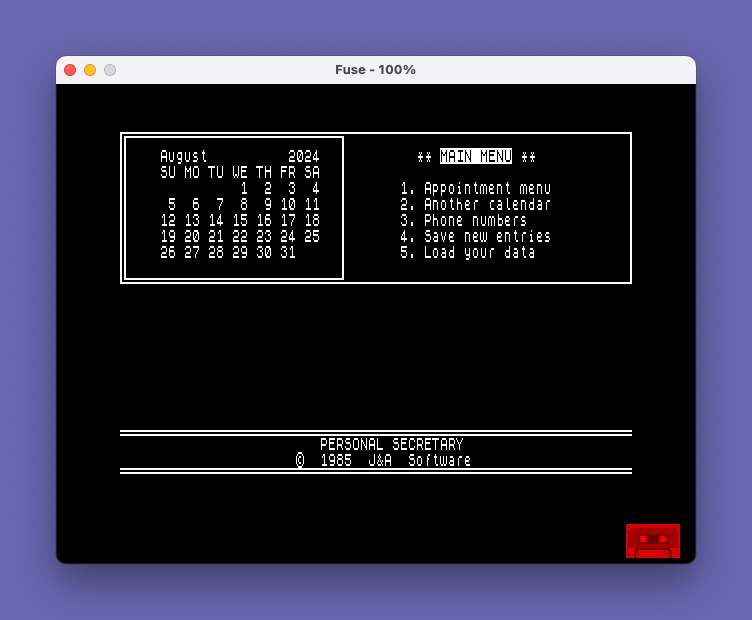
OS-64 is a ROM that supports the Timex/Sinclair’s 64-column mode. It is fully compatible with 32 column commands and functions.
The original Zebra manual is available on archive.org.
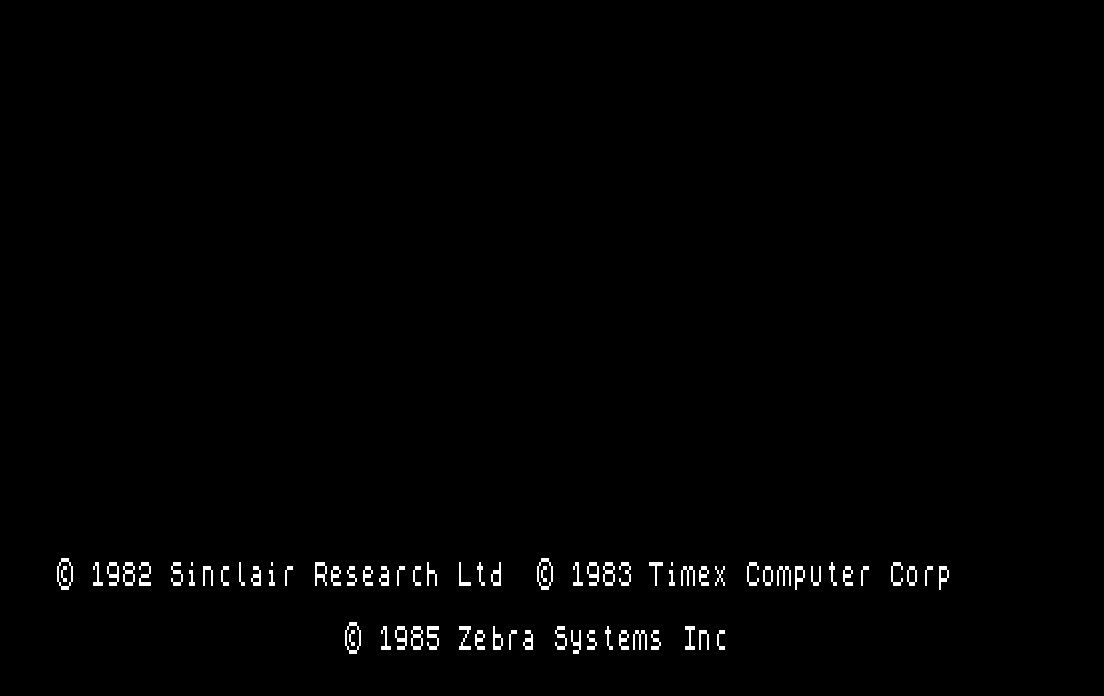
OS-64 is supplied on cartridge. Insert in the TS2068’s cartridge slot (with the power turned off), then turn your computer on. The boot screen will be black with white characters and the OS64 copyright message will be displayed along with the Sinclair and Timex messages.
- PRINT, PRINT AT, PRINT TAB, LIST, LLIST, LPRINT and program editing commands work in 64 columns.
- You lose nearly 5K of free memory at the bottom of BASIC.
- Loading programs larger than 33K will crash the 2068.
- FLASH, BRIGHT and INVERSE do not work with OS-64.
- OS-64 uses Display File 2, so a normal SCREEN$ will not work to SAVE or LOAD. You must SAVE/LOAD two separate CODE files in order to deal with a SCREEN in 64 column mode.
- If you have a TS 2040 printer, LPRINTs and LLISTs to the printer will be in 64 columns.
Once you set either PAPER or INK, the other is set to its compliment (i.e. PAPER 4 [green] will set the INK to 2 [red]). This change affects all the ink on the page, so that it’s impossible to have more than one color of INK on any page. The BORDER is automatically set to the same color as PAPER.
If you have a TS 2040 printer, LPRINTs and LLISTs to the printer will be in 64 columns.
Jeff Street, the Zebra programmer who wrote OS-64, included printer drivers for four Centronics interfaces. OS-64 supports LLIST, LPRINT and COPY (COPY will dump to EPSON compatible printers only). Most programs will work with OS-64’s built-in 80 column printer drivers without modification.
You can also load your own custom driver; the documentation tells you where to load it and how to call it (can be either Centronics or serial).
ROM Analysis
The Zebra OS-64 ROM changes:
- Enable 64-column text by patching column counts, rewriting pixel handling for 4-pixel-wide characters, and implementing dual-bank display operations
- Fix the NMI handler bug — a single-byte correction that Timex never shipped
- Remove the attribute system — 64-column mode has no per-character color attributes; paper color is set globally via the DECR port
- Replace ZX Printer support with Centronics — full LPRINT/LLIST/COPY through a channel-based system supporting five interface types (Aerco, Tasman-B, Tasman-C, A&J, Oliger) plus custom drivers
- Relocate the character set to RAM ($7800) — the original ROM font area ($3D00-$3FFF) is repurposed for init code and the entire Centronics printer subsystem
- Provide Epson-compatible COPY — screen dumps use ESC @ (reset), ESC A (line spacing), and ESC L (graphics mode) for dot-addressable output
1. LROS Cartridge Header ($0000-$0007)
The original cold-start code (DI; XOR A; LD DE,$FFFF; JP $0D31) is replaced with a standard LROS cartridge header:
| Offset | Value | Meaning |
|---|---|---|
| $0000 | $00 | Unused |
| $0001 | $01 | Cartridge type = LROS |
| $0002-$0003 | $05 $00 | Starting address = $0005 |
| $0004 | $FC | Chunk spec: bits = 11111100 (chunks 0-1 from cartridge) |
| $0005-$0007 | $C3 $9E $0D | JP $0D9E — the actual LROS entry point |
The HOME ROM’s init scans the DOCK connector, finds this LROS header, maps chunks 0-1 from the cartridge, and jumps to $0005 which executes JP $0D9E.
2. NMI Bug Fix ($006D) — Single Byte
The infamous inverted-logic bug in the NMI handler is fixed.
| Address | Original | Zebra | Mnemonic |
|---|---|---|---|
| $006D | $20 | $28 | JR NZ → JR Z |
The original code jumps to the user NMI handler when USRNMI is zero (no handler set) and falls through to RETN when it’s non-zero — exactly backwards. The Zebra ROM corrects this so JR Z skips JP (HL) when HL=0.
3. 64-Column Display Adaptations
Column Count Patches
| Address | Original | Zebra | Context |
|---|---|---|---|
| $054F | LD C,$21 (33) | LD C,$41 (65) | Screen wrap column in output routine |
| $06B7 | LD A,$21 (33) | LD A,$41 (65) | Column count in character print routine |
| $08D5 | LD BC,$1721 | LD BC,$1741 | CLS parameters: line 23, col 33→65 |
| $09C1 | LD C,$21 (33) | LD C,$41 (65) | Post-scroll column reset |
ATTBYT Rewrite ($0710-$073E)
The original ATTBYT routine computes attribute addresses from display file addresses. In 64-column mode there are no per-character attributes — the display uses two interleaved 8K banks ($4000 and $6000).
Zebra replacement:
$0710: RET                    ; original ATTBYT entry returns immediately
$0711: CP $04                 ; new 64-col pixel handler entry
       JR C,$0717
       SET 5,H                ; toggle to secondary bank (+$2000)
$0717: AND $03
       LD B,A
       INC B
       LD A,$FC
$071D: RRCA
       RRCA
       DJNZ $071D             ; rotate pixel mask into position
$0721: LD B,A
       LD A,(HL)              ; read display byte
       ...                    ; pixel operations
       LD (HL),A              ; write back
       RET
$0733-$073E: NOP x12          ; freed space
SET 5,H adds $2000 to the address, switching between the primary ($4000) and secondary ($6000) display banks.
Scroll Routine Dual-Bank Copy ($0940-$097C)
Original LDIR instructions at $0952 and $0965 are replaced with CALL $04E8:
$04E8: PUSH BC,DE,HL
       LDIR                   ; copy in primary bank ($4000)
       POP HL,DE,BC
$04F0: SET 5,D
       SET 5,H                ; switch both src and dst to secondary bank
       LDIR                   ; copy in secondary bank ($6000)
$04F6: RES 5,H
       RES 5,D
       RET
PAPER Color via DECR Port ($23F0-$2401)
The attribute-based color system is bypassed entirely. Paper color is written directly to the DECR register (port $FF) bits 5-3:
$23F0: LD A,C
       RLCA
       RLCA
       RLCA                   ; shift color into bits 5-3
$23F4: LD C,$06
       ADD A,C                ; add 64-col mode enable bits
$23F7: OUT ($FF),A            ; write to DECR
       RET
$23FA-$2401: NOP x8
PLOT Redirect ($2645-$265F)
Standard PLOT replaced with a call to the new 64-col pixel handler:
$2645: CALL $0711             ; 64-col pixel handler
       RET
       NOP x11                ; freed space
Nibble Swap Utility ($002B-$002F)
A small utility installed in RST $28 padding space:
$002B: RRCA
       RRCA
       RRCA
       RRCA                   ; swap high/low nibbles of A
       RET
Used by 64-column display code for pixel manipulation with half-width (4-pixel) characters.
RST $10 Alternate Entry ($0013-$0017)
Installed in what was padding/version-byte space after the WRCH jump:
$0013: LD E,A                 ; preserve A in E
       EX AF,AF'              ; switch to alternate AF
       JP $06FA               ; jump into 64-col character print loop
4. Centronics Printer Support
The OS-64 replaces the original ZX Printer (Timex 2040) support with a full Centronics parallel printer system. The original inline ZX Printer test at $06BC is NOPped out because LPRINT/LLIST/COPY now go through a new channel-based printer output system at $3D4A.
Supported Interfaces
Five Centronics interfaces are supported, selected via POKE 65523,value:
| Interface | POKE value | Driver Address | I/O Ports |
|---|---|---|---|
| Aerco | 167 | $3FA7 | $7F (serial) |
| Tasman-B | 135 | $3F87 | $BF (busy), $FB/$7B (control/data) |
| Tasman-C | 122 | $3F7A | $FB (busy/control), $7B (data) |
| A & J | 185 | $3FB9 | $41 (control), $42 (data) |
| Oliger | 167 | $3FA7 | $7F (serial, same as Aerco) |
The POKE values are the low byte of the driver ROM address — all drivers live in page $3F, so only the low byte needs to change. Custom drivers can be installed by POKEing a 16-bit address into IFDR_addr ($FFF3-$FFF4).
ZX Printer Inline Test Removal ($06BC-$06C6)
The BIT PR,(IY+FLAGS) test and CALL $0A23 printer flush are replaced with 11 bytes of NOP. This removes the old ZX Printer path — Centronics output now goes through the channel/stream system instead.
COPY Command Dispatcher ($0A02-$0A08)
Replaces the original K_DUMP (screen-to-ZX Printer dump) routine:
$0A02: LD HL,(COPY_addr)      ; $FFE8 — Centronics COPY routine address
       LD A,H
       OR L
       RET Z                  ; return if no COPY routine installed
       JP (HL)                ; dispatch to COPY routine (default: $3ED4)
Cursor Flash Routine ($0A09-$0A37)
Adjacent to the COPY dispatcher in the freed K_DUMP space. Called during the interrupt/keyboard scan cycle to blink the cursor:
$0A09: LD HL,(COPYtab)        ; $FFF8 — reused for cursor screen address
       ...
       DEC counter at $FFFD   ; COPYtab+5, reused as flash countdown
       ...                    ; invert 8 scan lines at cursor position
       SET 5,H                ; handle dual-bank addressing
       CPL                    ; invert pixels
       ...
       CALL $02E1             ; standard keyboard scan
The COPYtab RAM ($FFF8-$FFFF) is dual-purposed: during COPY operations it holds printer centering control codes, during normal operation it’s reused for cursor flash state. This is safe because cursor flashing and COPY printing never happen simultaneously.
CLS Channel Setup ($08D9-$08E9)
17 bytes of original channel setup code replaced with NOPs. The Zebra init at $3D07 handles channel setup differently, redirecting the printer channel to the Centronics output handler.
Centronics LPRINT/LLIST Handler ($3D4A-$3EC4)
The main printer output routine, installed as the printer channel handler. It:
- Checks PRDAT_typ ($FFEE) — if bit 0 set, sends raw bytes (control codes/graphics); if clear, processes as printable characters
- Handles control codes (AT, TAB, CR) through a dispatch table at $3D7A
- Buffers characters in the print buffer at $5B00
- On newline: flushes the buffer by sending each character via the interface driver, then sends CR ($FFE6) and LF ($FFE7) codes
- Tracks MAXcl ($FFED) to avoid sending trailing spaces
Epson-Compatible Control Sequences ($3EC5-$3ED3)
Data tables used by the COPY routine:
| Address | Bytes | Meaning |
|---|---|---|
| $3EC5 | 02 1B 40 | ESC @ — printer reset |
| $3EC8 | 03 1B 41 08 | ESC A 8 — set line spacing to 8/72 inch |
| $3ECC | 04 1B 4C 00 02 | ESC L 0 2 — enter 512-dot graphics mode |
| $3ED1 | 02 0D 0A | CR LF |
Centronics COPY Routine ($3ED4-$3F54)
The screen dump routine dispatched from $0A02 via COPY_addr ($FFE8):
- Sets bit 7 of FLAGSnew ($FFF7) to indicate printing active
- Sends printer reset (ESC @) and line spacing (ESC A 8) commands
- Loops through 24 screen lines, for each:
- Sends COPYtab ($FFF8) centering codes (user-configurable margin)
- Sends graphics mode command (ESC L, 512 dots)
- Reads 512 vertical 8-pixel columns from the display (handling dual-bank addressing) and sends each byte via the interface driver
- Sends CR+LF
- Tracks LINE ($FFEF) for current screen line and Xpos ($FFE4) for current pixel column
Pixel Column Reader ($3F55-$3F6A)
Reads a vertical 8-pixel column from the display — extracts one bit from each of 8 scan lines at a given horizontal position, assembling them into a byte for the printer’s graphics mode.
Interface Drivers ($3F76-$3FCD)
Output byte dispatcher ($3F76-$3F79):
$3F76: LD HL,(IFDR_addr)      ; $FFF3
       JP (HL)                ; jump to selected interface driver
Tasman-C driver ($3F7A): Waits for busy on port $FB bit 0, then sends via ports $FB (control) and $7B (data) with strobe handshake.
Tasman-B driver ($3F87): Same as Tasman-C but checks busy on port $BF bit 0.
Timex 2040 / Aerco / Oliger serial driver ($3FA7, default): Waits for ready on port $7F bit 4, sends data via OUT ($7F),A.
A & J parallel driver ($3FB9): Waits for busy on port $41 bit 2, sends data via OUT ($42),A, strobes via port $41.
5. Attribute System Removal
FLASHA ($1612-$161B)
10 bytes of attribute manipulation code (PUSH HL, RES 7,H, SET 7,L, LD (ATTRT),HL) replaced with NOPs. In 64-column mode there are no per-character attributes, so flash handling is meaningless.
6. Init & Character Set Relocation
Character Set Area ($3D00-$3D49)
The original 768-byte font (96 characters, 8×8 pixels) begins at $3D00. In the Zebra ROM, this area is replaced with init and printer code (the Centronics system from Section 4 occupies $3D4A-$3FFF). The font is copied to RAM at $7800 during initialization.
- $3D00 (ZEBRA_INIT): Calls $3D07 (ZEBRA_SETUP) and $3D33 (ZEBRA_CHANNELS)
- $3D07 (ZEBRA_SETUP): Reads WDTH ($FFF5) to set MAXcl ($FFED), configures UDG pointer, clears print area, patches channel table to redirect printer output to $3D4A
- $3D33 (ZEBRA_CHANNELS): Initializes Centronics system variables:
- COPY_addr ($FFE8) → $3ED4 (COPY routine)
- IFDR_addr ($FFF3) → $3FA7 (default Timex 2040 serial driver)
- CR ($FFE6) → $0D (carriage return)
- LF ($FFE7) → $0A (line feed)
- Clears FLAGSnew ($FFF7) and PRDAT_typ ($FFEE)
Modified NEW Routine ($0D7F-$0D93)
       LD HL,$7800
       DEC H                  ; HL = $7700
       LD ($5C36),HL          ; CHARS = $7700 (font data at $7800)
       LD A,$01
       LD (COPYtab),A         ; $FFF8 — init first byte of centering table
       LD A,$40               ; 64 decimal
       LD (WDTH),A            ; $FFF5 — set printer width to 64 columns
       CALL $3D00             ; init charset, channels, and printer system
       RET
CHARS is set to $7700 per Sinclair convention (CHARS points $100 below the actual font data). The value $40 (64 decimal) stored in WDTH is the default printer output width, matching the 64-column screen.
LROS Entry Routine ($0D9E-$0DD5)
       CALL $0D33             ; bank-switch setup & copy code
       CALL $08A6             ; screen setup
       XOR A
       SET 4,(IY+$01)         ; set FLAGS bit 4 (TOKEN mode)
       LD DE,$1117
       CALL $073F             ; display original Timex copyright
       LD DE,$0DD6
       CALL $073F             ; display Zebra copyright
       SET 5,(IY+$02)         ; set TVFLAG bit 5
       JP $0E2F               ; continue BASIC init
Copyright Message ($0DD6-$0DF4)
Sinclair-encoded text: (C) 1985 Zebra Systems Inc
Displayed during startup alongside the original Timex Sinclair copyright.
F_SCRN Wrapper ($0DF5-$0E05)
Adjusts the SCREEN$ function for 64-column mode:
$0DF5: CALL $2660             ; original GET_XY
       LD HL,($5C36)          ; get CHARS pointer
       LD DE,$0100
       ADD HL,DE              ; point to actual charset start
       LD A,C                 ; Y coordinate
       LD (IY+$77),B          ; save X coordinate
       SRL B                  ; divide X by 2 for 64-col
       RET
Called from $288E (SCREEN$ function) instead of directly calling $2660.
7. Extended System Variables
The Zebra ROM uses RAM at $FFE2-$FFFF for printer and system state:
| Address | Hex | Size | Name | Purpose |
|---|---|---|---|---|
| 65506 | $FFE2 | 2 | — | Unused |
| 65508 | $FFE4 | 2 | Xpos | COPY routine: current pixel column |
| 65510 | $FFE6 | 1 | CR | Carriage return code sent by LPRINT/LLIST (default $0D) |
| 65511 | $FFE7 | 1 | LF | Linefeed code (default $0A) |
| 65512 | $FFE8 | 2 | COPY_addr | Address of Centronics COPY routine (default $3ED4) |
| 65514 | $FFEA | 1 | — | Unused |
| 65515 | $FFEB | 1 | Hpos | COPY routine internal |
| 65516 | $FFEC | 1 | COLM | COPY routine internal |
| 65517 | $FFED | 1 | MAXcl | Highest column in printer buffer with data |
| 65518 | $FFEE | 1 | PRDAT_typ | Printer data type: 0=character, 1=control/graphics |
| 65519 | $FFEF | 1 | LINE | COPY routine: current screen line |
| 65520 | $FFF0 | 1 | Ypos | COPY routine internal |
| 65521 | $FFF1 | 2 | USRNMI | NMI handler address (inherited from original ROM) |
| 65523 | $FFF3 | 2 | IFDR_addr | Interface driver routine address (default $3FA7) |
| 65525 | $FFF5 | 1 | WDTH | Printer output width (default 64, max 255) |
| 65526 | $FFF6 | 1 | — | Unused |
| 65527 | $FFF7 | 1 | FLAGSnew | Control flags (bit 7 = printing active) |
| 65528 | $FFF8 | 8 | COPYtab | COPY centering control codes; reused for cursor state |
BASIC Usage Examples (from manual)
REM Select Centronics interface:
POKE 65523, 167    : REM Aerco or Oliger
POKE 65523, 135    : REM Tasman-B
POKE 65523, 122    : REM Tasman-C
POKE 65523, 185    : REM A & J

REM Send printer control codes:
POKE 65518, 1      : REM PRDAT_typ = control code mode
LPRINT CHR$ 27; CHR$ 69;  : REM send ESC E (emphasized)
POKE 65518, 0      : REM PRDAT_typ = character mode

REM Change printer width:
POKE 65525, width  : RANDOMIZE USR 15623

REM Suppress CR/LF:
POKE 65510, 0      : REM suppress linefeed
POKE 65511, 0      : REM suppress carriage return

REM COPY centering (Star Micronics SG10):
POKE 65528, 3      : REM length of control sequence
POKE 65529, 27     : REM ESC
POKE 65530, 77     : REM set left margin code
POKE 65531, 19     : REM left margin at column 19