
TV Check is a TV and monitor alignment utility that displays five test patterns: color bars, horizontal lines, vertical lines, a crosshatch grid, and a dot grid. The program uses PLOT and DRAW commands to render the geometric patterns at pixel level, stepping in increments of 17 pixels to produce evenly spaced lines and dots across the 256×176 display area. Color bars are drawn using PRINT AT with PAPER attribute changes, cycling through all eight Spectrum colors with abbreviated labels read from DATA statements. The variable Z is initialized to 0 via NOT PI in the DATA list, a compact idiom for producing a zero value without the literal digit.
Program Structure
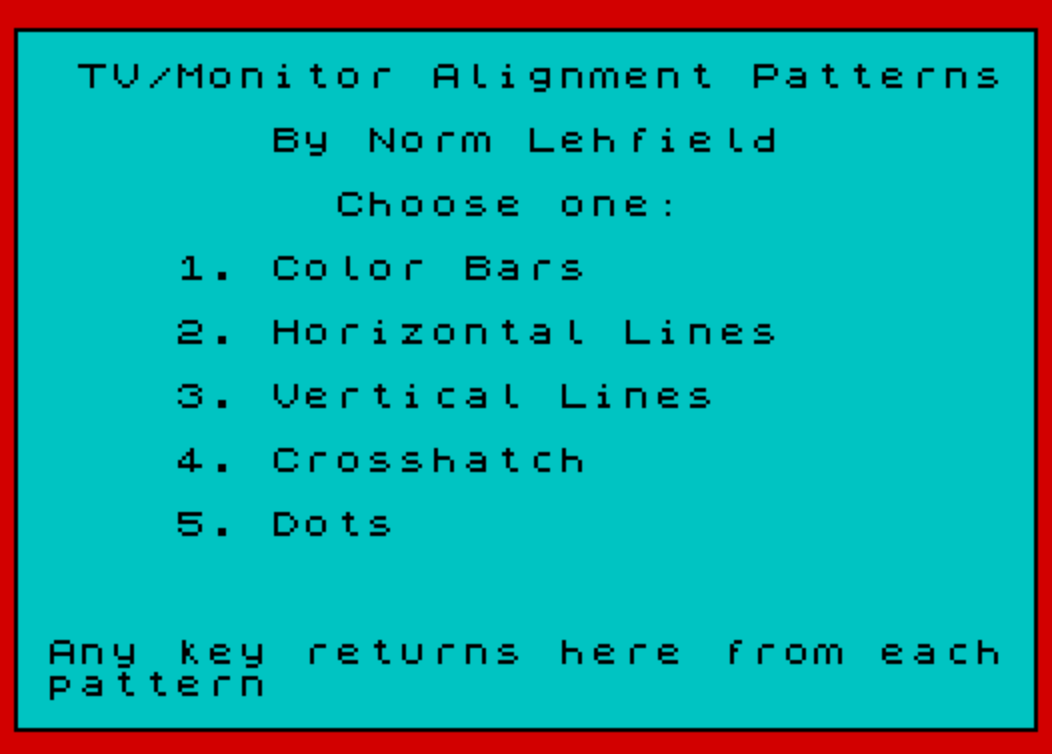
The program is organized as a menu-driven dispatcher. Lines 30–80 set up the display and print the menu; line 90 waits for a valid keypress (1–5); line 100 uses GO TO 30+r*80 to jump to one of five pattern sections. The computed GO TO targets are:
| Choice | Target Line | Pattern |
|---|---|---|
| 1 | 110 | Color Bars |
| 2 | 190 | Horizontal Lines |
| 3 | 270 | Vertical Lines |
| 4 | 350 | Crosshatch |
| 5 | 430 | Dots |
After each pattern, the program waits for any keypress at line 150 (IF INKEY$="" THEN GO TO 150), then executes RUN at line 160 to restart from the beginning.
Variable Z and the NOT PI Idiom
The variable Z is used throughout as a convenient zero. It is initialized by reading the last DATA item, which is NOT PI. Since PI is non-zero, NOT PI evaluates to 0 in Sinclair BASIC. This avoids the need to write LET Z=0 and saves a few bytes while also serving as a mildly obfuscated constant. Z is then used wherever a literal 0 would appear in PLOT, DRAW, PAPER, and loop arguments, keeping the code compact.
Color Bar Pattern (Lines 110–180)
The color bar routine loops x from 0 to 7, calling the subroutine at line 170 for each color. The subroutine prints a column of 22 rows (the full character height) using PRINT AT y,Z; PAPER x;" ", producing a four-character-wide colored stripe. After printing the stripe, it overlays the color name from the c$() array in INK 9 (transparent/contrast ink). The position variable Z is incremented by 4 after each call at line 140 (LET Z=Z+4), advancing the column position across the screen.
Note that this modifies Z away from zero during the color bar routine. Since the program restarts via RUN, Z is re-read from DATA each time, but within a single run of the color bar section Z doubles as the current column index — a somewhat fragile reuse of the variable.
Geometric Pattern Routines
Horizontal lines (line 210–230) use PLOT and DRAW 254,Z to draw lines across the full screen width, stepping y from 3 to 173 in steps of 17 — giving approximately 10 evenly spaced horizontal lines.
Vertical lines (lines 290–300) use PLOT x,3 and DRAW Z,170 to draw vertical lines, stepping x from 0 to 255 in steps of 17 — approximately 15 lines across the width.
The crosshatch pattern (line 350–360) simply jumps to line 200, executing horizontal lines first, then falls through via IF r=4 THEN GO TO 290 at line 240 to also draw the vertical lines — combining both sets.
The dot grid (lines 450–460) uses nested loops over both axes at step 17, plotting a single pixel at each grid intersection.
Border Subroutine
The subroutine at line 490 draws a rectangular border around the display using four DRAW commands from the origin: right 255, up 175, left 255, down 175. This is called before showing the menu to frame the screen.
Data Initialization
Line 40 dimensions c$(8, PI). Since PI ≈ 3.14159, Sinclair BASIC truncates this to 3, giving a string array of 8 strings of length 3 — exactly matching the three-character color abbreviations (“Blk”, “Blu”, “Red”, etc.) read from DATA in line 50.
Anomalies and Notable Points
- Line 160 uses
RUNrather thanGO TO 30to return to the menu; this fully reinitializes variables, which is necessary becauseZwas mutated during the color bar routine. - The REM labels (lines 110, 190, 270, 350, 430, 480) use numbers that hint at the intended line numbers but are not structurally significant.
- Line 100’s computed
GO TOtargets line 110 for choice 1, but the REM at line 110 means execution immediately falls through to line 120 — the REM lines act as harmless no-ops. - The
PAUSE Zat line 80 (with Z=0) isPAUSE 0, which on the Spectrum waits indefinitely for a key — though the program then separately reads INKEY$ in a loop at line 90, making this pause redundant with the explicit wait loop. - Lines 270 and 350 are REM/redirect stubs; the actual vertical line code begins at 280–300, and the crosshatch redirect at 360 jumps to 200.
Image Gallery
Source Code
  10 REM   TV/MONITOR   SCREEN CHECKUse to test and adjust the colorand convergance of your tv or   monitorFrom the 11/84 TIMELINEZ issueFrom the Timex/Sinclair UserGroups in the SF-Oakland-SanJose Ca. areas
  20 REM   COPIED BY ALGIS E. GEDRISFOR    CLEVELAND LIBRARYadditional messing about by PaulHolmgren
  30 BORDER 2:PAPER 5:INK 0:CLS
  40 DIM c$(8, PI)
  50 FOR y= SGN PI TO 8:READ c$(y):NEXT y:READ Z:DATA "Blk","Blu","Red","Mag","Grn","Cyn","Yel","Wht", NOT PI
  60 PRINT '"  TV/Monitor Alignment Patterns"'' TAB 8;"By Norm Lehfield"'' TAB 10;"Choose one:"
  70 PRINT '"     1. Color Bars"''"     2. Horizontal Lines"''"     3. Vertical Lines"''"     4. Crosshatch"''"     5. Dots"''''" Any key returns here from each  pattern"
  80 GO SUB 490:PAUSE Z
  90 LET r= CODE INKEY$-48:IF r<1 OR r>5 THEN GO TO 90
 100 GO TO 30+r*80:REM 1 TO 5
 110 REM  1
 120 PAPER Z:BORDER Z:CLS
 130 FOR x=Z TO 7
 140 GO SUB 170:LET Z=Z+4:NEXT x
 150 IF INKEY$="" THEN GO TO 150
 160 RUN
 170 FOR y=0 TO 21:PRINT AT y,Z; PAPER x;"    ":NEXT y
 180 INK 9:PRINT AT 10,Z; PAPER x;c$(x+1):RETURN
 190 REM  2
 200 BORDER Z:PAPER Z:INK 7:CLS
 210 FOR y=3 TO 173 STEP 17
 220 PLOT Z,y:DRAW 254,Z
 230 NEXT y
 240 IF r=4 THEN GO TO 290
 250 GO TO 150
 270 REM  3
 280 BORDER Z:PAPER Z:INK 7:CLS
 290 FOR x=Z TO 255 STEP 17
 300 PLOT x,3:DRAW Z,170:NEXT x
 310 GO TO 150
 350 REM  4
 360 GO TO 200
 430 REM  5
 440 BORDER Z:PAPER Z:INK 7:CLS
 450 FOR x=Z TO 255 STEP 17:FOR y=3 TO 173 STEP 17
 460 PLOT x,y:NEXT y:NEXT x
 470 GO TO 150
 480 REM BORDER
 490 PLOT Z,Z:DRAW 255,Z:DRAW Z,175:DRAW -255,Z:DRAW Z,-175:RETURN
 500 SAVE "tv check" LINE 10
Note: Type-in program listings on this website use ZMAKEBAS notation for graphics characters.