
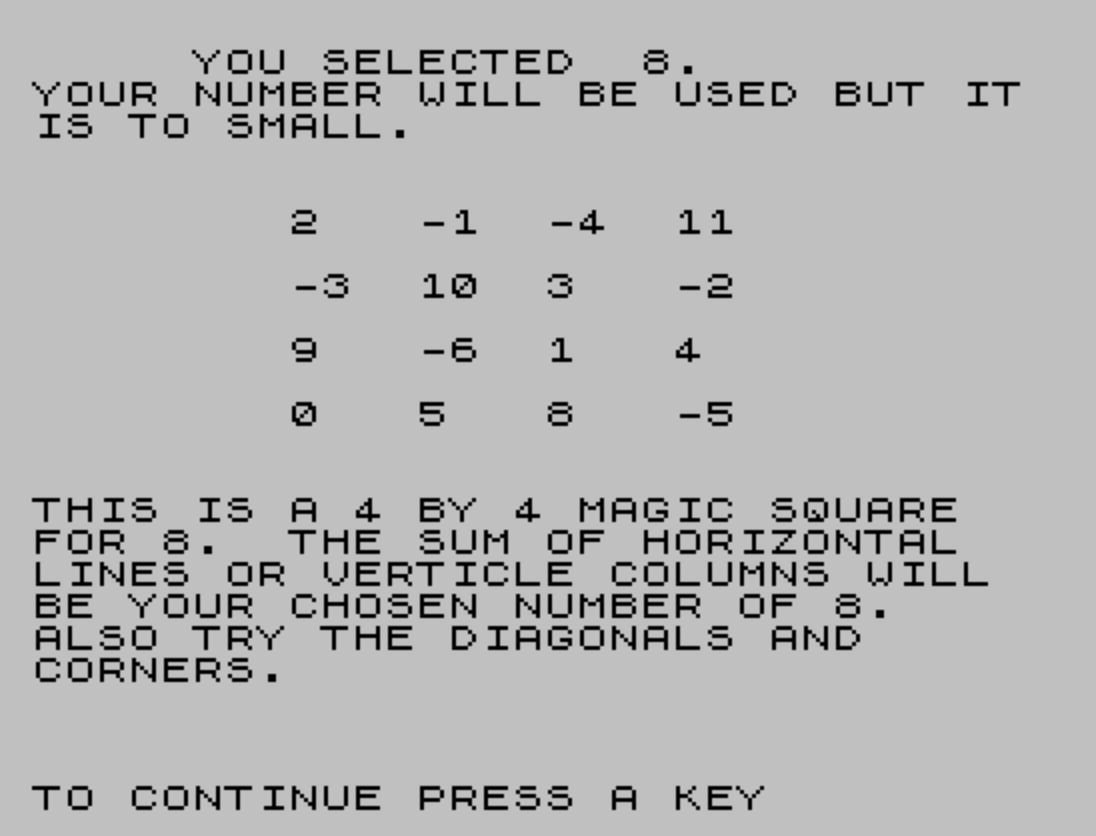
This program generates a 4×4 magic square whose rows, columns, and diagonals all sum to a user-supplied number. After accepting input, it evaluates the number against four ranges (below 15, 15–30, 31–54, 55–99, and 100+) and prints a suitability comment. The magic square construction uses a base value derived from `INT((A-30)/4)` and then places 16 computed cell values at fixed screen positions using `PRINT AT`. Four fractional-remainder cases (0, .25, .5, .75) detected by comparing `(A-30)/4` against `B` plus quarter increments adjust four specific cells to ensure the constant sum property holds for any integer input. The program loops continuously via `RUN` after a keypress pause.
Program Structure
The program is organized into four broad phases: input and validation (lines 20–90), magic square computation (line 100), grid display (lines 110–200), and explanatory output with loop-back (lines 210–280). Line 280 uses RUN to restart the whole program, creating an infinite loop. Line 290 saves the program with an auto-run entry point at line 10.
Magic Square Construction Algorithm
The algorithm is a parameterized adaptation of a classic 4×4 magic square template. A base value B is computed at line 100 as INT((A-30)/4). The 16 cell values are then offsets from B, placed at fixed PRINT AT coordinates representing a 4×4 grid. The target sum for any row, column, or diagonal equals the user’s chosen number A.
Because integer division discards the fractional part of (A-30)/4, four residue cases must be handled to keep the square valid. Lines 140, 160, 180, and 200 test whether the fractional part is .25, .5, .75, or 0 respectively, and each adjusts four specific cells (at rows 5, 7, 9, 11 in column 20 and column 12/8/16) by incrementing their offsets to compensate. Lines 120 and 130 are special-case overrides for A=31 and A=32, suggesting those two values were found to require hand-tuned corrections.
Grid Layout
The 4×4 grid occupies screen rows 5, 7, 9, and 11, at columns 8, 12, 16, and 20. The mapping of cell offsets to positions is:
| Row\\Col | Col 8 | Col 12 | Col 16 | Col 20 |
|---|---|---|---|---|
| Row 5 | B+8 | B+5 | B+2 | (residue-dependent) |
| Row 7 | B+3 | (residue-dependent) | B+9 | B+4 |
| Row 9 | (residue-dependent) | B | B+7 | B+10 |
| Row 11 | B+6 | B+11 | (residue-dependent) | B+1 |
The four “residue-dependent” cells are the ones varied across the four fractional cases to maintain the magic property.
Input Validation
Lines 50–90 print advisory messages based on five ranges. The conditions use separate IF statements rather than IF/ELSE chaining, so each is evaluated independently. The boundary checks are slightly inconsistent: the range 15–30 is described as “too small” but accepted, while the ideal range appears to be 31–54 based on the “reasonable” message at line 70. Values below 15 will produce small or negative cell values but are still processed.
Notable Techniques and Idioms
- Multiple values are printed in a single
PRINT ATstatement by chainingAT row,col;value; AT row,col;value, which is efficient and compact. - Line 270 uses
PRINT #1;to write to the lower status line area, combined withPAUSE 0for a keypress-to-continue idiom. - The
RUNat line 280 restarts execution from line 10, re-issuingCLSandINPUT, effectively creating an infinite interactive loop without aGO TO. - Line 210 uses
''(two barePRINTnewlines in a single statement) to add a blank line before the explanatory text.
Bugs and Anomalies
- The
REMat line 10 contains the string"NUMBER"in quotes, but the program title is “Square” — the REM reflects a working title or copy-paste artifact. - The
SAVEfilename at line 290 is"SQARE", which is a misspelling of “SQUARE” (missing the second S). - Lines 120 and 130 hard-code values for
A=31andA=32that overlap with the general residue logic in lines 140–200. ForA=31,(A-30)/4 = 0.25, so line 140 would also fire; forA=32,(A-30)/4 = 0.5, so line 160 would also fire. This means those cells get printed twice, with the special-case values overwritten by the general formula values, or vice versa depending on execution order — a likely latent bug. - The word “VERTICLE” in line 230 is a misspelling of “VERTICAL”.
- The phrase “IT IS TO SMALL” in line 50 should read “TOO SMALL”.
Image Gallery
Source Code
  10 REM "NUMBER" BY CECIL K.   JOHNSON, GARLAND,TX.  2/9/83"
  20 CLS
  30 INPUT "INPUT A NUMBER. ";a
  40 PRINT "     YOU SELECTED  ";A;"."
  50 IF A<15 THEN PRINT "YOUR NUMBER WILL BE USED BUT IT IS TO SMALL."
  60 IF A<31 AND A>14 THEN PRINT "WE WILL ACCEPT YOUR NUMBER BUT WOULD PREFER A LARGER NUMBER."
  70 IF A>30 AND A<55 THEN PRINT "THAT IS A REASONABLE NUMBER."
  80 IF A>54 AND A<100 THEN PRINT "WE WILL ACCEPT YOUR NUMBER BUT  WOULD PREFER A SMALLER NUMBER."
  90 IF A>99 THEN PRINT "YOUR NUMBER IS TOO LARGE BUT IT WILL BE USED."
 100 LET B= INT ((A-30)/4)
 110 PRINT AT 5,8;B+8; AT 5,12;B+5; AT 5,16;B+2
 120 IF A=31 THEN PRINT AT 5,20;16; AT 7,12;15; AT 9,8;14; AT 11,16;13
 130 IF A=32 THEN PRINT AT 11,16;14; AT 9,8;15; AT 5,20;17; AT 7,12;16
 140 IF (A-30)/4=B+.25 THEN PRINT AT 5,20;B+16; AT 7,12;B+15; AT 9,8;B+14; AT 11,16;B+13
 150 PRINT AT 7,8;B+3; AT 7,16;B+9; AT 7,20;B+4
 160 IF (A-30)/4=B+.5 THEN PRINT AT 5,20;B+17; AT 7,12;B+16; AT 9,8;B+15; AT 11,16;B+14
 170 PRINT AT 9,12;B; AT 9,16;B+7; AT 9,20;B+10
 180 IF (A-30)/4=B+.75 THEN PRINT AT 5,20;B+18; AT 7,12;B+17; AT 9,8;B+16; AT 11,16;B+15
 190 PRINT AT 11,8;B+6; AT 11,12;B+11; AT 11,20;B+1
 200 IF (A-30)/4=B THEN PRINT AT 5,20;B+15; AT 7,12;B+14; AT 9,8;B+13; AT 11,16;B+12
 210 PRINT ''"THIS IS A 4 BY 4 MAGIC SQUARE"
 220 PRINT "FOR ";A;".  THE SUM OF HORIZONTAL"
 230 PRINT "LINES OR VERTICLE COLUMNS WILL"
 240 PRINT "BE YOUR CHOSEN NUMBER OF ";A;"."
 250 PRINT "ALSO TRY THE DIAGONALS AND "
 260 PRINT "CORNERS."
 270 PRINT #1;"TO CONTINUE PRESS A KEY":PAUSE 0
 280 RUN
 290 SAVE "SQARE" LINE 10
Note: Type-in program listings on this website use ZMAKEBAS notation for graphics characters.