
Secret Agent turns a typed message into a string of two-digit numbers and back again. You choose CODE or DECODE and one of four coding options, then type up to about 100 characters. Each letter, digit or symbol is shifted by an amount set by the chosen option and printed as a number followed by a comma, so the result can be copied down or passed on. Decoding reverses the shift, as long as the other person knows which of the four options was used.
The REM lines credit the program to Bill Harmer of Ottawa, April 1985, and call this copy the “revised TS 2068 version 2”. The published listings describe it as Bill Harmer’s original, converted to the 2068 by David Solly, and it appeared in several user-group newsletters between 1985 and 1989.
Program Analysis
Structure
After the title screen, lines 100–106 explain the program and lines 115–330 ask for the mode and the code number. The four options set an extra increment I of 1, 5, 3 or 7 (codes 1, 2, 3 and 4). The encoding routine at line 1000 walks the message one character at a time, adds 7+I to each character code from 33 to 90, wraps values above 90 back down by 58, and appends STR$ of the result and a comma to F$. The decoding routine at line 2000 reads the numbers back three characters at a time into the array X(), subtracts the same amount, and rebuilds the text in G$.
Notable Techniques
POKE 23658,8at line 30 turns on CAPS LOCK, so every message is typed in upper case and stays within the 33–90 range the code handles.- Entering
0000as the coded text decodes the message just encoded, a built-in self-test (lines 2230–2235). - Typing
SESAMEat the first prompt jumps to line 9000, which saves two copies of the program to tape, a back-up routine hidden from the user. - REM lines note the changes needed for other BASICs (
MID$) and for the ZX81 character set.
Potential Issues
- Spaces, and any character outside codes 33–90, are dropped when a message is encoded, so decoded text comes back without word breaks. The decoding screen warns about this.
- Entering
0000before anything has been encoded appears to stop with a “Variable not found” error, becauseF$is only created by the encoding routine. - The decoder assumes every number has exactly two digits followed by a comma. A mistyped or missing comma shifts the rest of the message.
- Line 950 is never reached.
This copy came from an Oliger (JLO SAFE) disk in Joe’s collection. It is plain TS2068 BASIC and runs from tape unaltered, and it was tested in ZEsarUX by encoding a message and decoding it again.
Image Gallery

Source Code
    0 REM SECRET AGENT PROGRAM MAKES CODING AND DECODING CHILDSPLAY,PROGRAM BY BILL HARMER,APR.1985.ALL RIGHTS RESERVED
    1 REM                        SECRET AGENT IS A PROGRAM FOR   THE SINCLAIR 2068 WHICH IS      DESIGNED TO MAKE CODING AND DE- CODING CHILDSPLAY. ORIGINAL PRO-GRAM BY BILL HARMER CONVERTED TOTHE 2068 BY DAVID SOLLY, OTTAWA,ONTARIO, 1985.
    2 REM SECRET AGENT COPYRIGHT    1985 BY BILL HARMER,OTTAWA-     NON-COMMERCIAL NON-PROFIT USE   AND THE MAKING OF ONE PERSONAL  COPY ALLOWED BY TIMEX-SINCLAIR  USER GROUP MEMBERS
    5 REM REVISED TS 2068             VERSION 2.
   11 REM SECRET AGENT 8              (FINISHED)
   30 CLS : POKE 23658,8
   50 DIM X(100)
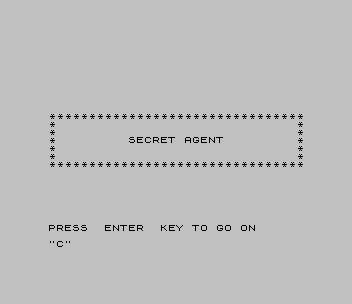
   60 PRINT AT 10,0;"*         SECRET AGENT         *"
   65 PRINT AT 9,0;"*                              *"
   67 PRINT AT 11,0;"*                              *"
   70 PRINT AT 8,0;"*                              *"
   72 PRINT AT 12,0;"*                              *"
   75 PRINT AT 7,0;"********************************"
   77 PRINT AT 13,0;"********************************"
   90 PRINT ; FLASH 1;AT 21,0;"PRESS  ENTER  KEY TO GO ON"
   95 INPUT A$
   96 CLS
   97 IF A$="SESAME" THEN GO TO 9000
  100 PRINT "SECRET AGENT IS A PROGRAM       DESIGNED TO ENCODE AND DECODE   SECRET MESSAGES"
  101 PRINT
  102 PRINT "A MESSAGE IS ENTERED AND THE    COMPUTER WILL CONVERT IT TO A   SEQUENCE OF UNINTELLIGIBLE      NUMBERS. THE MESSAGE CAN BE     DECIPHERED BY ANOTHER PERSON    HAVING THE SAME PROGRAM"
  103 PRINT
  104 PRINT "ONE MUST KNOW HOWEVER WHICH OF  THE FOUR CODING OPTIONS HAVE    BEEN USED"
  105 PRINT
  106 PRINT "VARYING THE CODING OPTION MAKES THE CODE MORE SECURE"
  110 PRINT ; FLASH 1;AT 21,0;"PRESS ENTER TO GO ON"
  112 INPUT A$
  114 CLS
  115 PRINT ; FLASH 1;"ENTER"; FLASH 0;"  CODE  OR  DECODE  DEPEND-ING ON WHETHER YOU WISH TO CODE A NEW MESSAGE OR DECODE A CODED MESSAGE"
  120 INPUT M$
  130 CLS
  140 PRINT ; FLASH 1;"ENTER"; FLASH 0;" WHICH CODE YOU  ARE USING (1, 2, 3, OR 4)"
  150 INPUT W
  155 PRINT
  160 IF W<>1 AND W<>2 AND W<>3 AND W<>4 THEN PRINT AT 10,0;"ENTER ONLY ONE OF THE NUMBERS 1,2,3 OR 4. TRY AGAIN"
  170 IF W<>1 AND W<>2 AND W<>3 AND W<>4 THEN GO TO 150
  180 LET I=W
  190 IF W=2 THEN LET I=5
  200 IF W=4 THEN LET I=7
  210 REM "I" IS EXTRA INCREMENT OF SUBSTITUTION,HERE SET TO 1,3,5 OR 7 (BY CODE 1,3,2,4)
  220 CLS
  300 IF M$="CODE" OR M$="C" THEN GO TO 1000
  310 IF M$<>"CODE" AND M$<>"DECODE" AND M$<>"C" AND M$<>"D" THEN GO TO 115
  320 IF M$="D" OR M$="DECODE" THEN GO TO 2000
  330 GO TO 115
  950 PRINT : PRINT "THIS PROGRAM USES ";38912-~;"BYTES"
  990 STOP
 1000 REM ENCODING ROUTINE
 1010 PRINT "PROGRAM TO CODE A NEW MESSAGE"
 1020 PRINT "USING CODE NUMBER ";W
 1030 PRINT
 1040 PRINT "ENTER YOUR MESSAGE NOW (UP TO   100 CHARACTERS=APPROX. 20 WORDS)"
 1045 PRINT
 1050 PRINT "IF YOUR MESSAGE IS LONGER BREAK IT UP INTO SMALLER MESSAGES AND CODE THEM SEPARATELY"
 1055 PRINT
 1060 PRINT ; FLASH 1;"ENTER MESSAGE NOW"
 1070 INPUT R$
 1080 CLS : PRINT ; FLASH 1;"WAIT"
 1085 PRINT : PRINT : PRINT
 1100 LET F$=""
 1110 REM IN OTHER COMPUTERS LINE 1210 WOULD BE- U$=MID$(R$,N,1)
 1200 FOR N=1 TO (LEN R$)
 1210 LET U$=R$(N TO N)
 1220 LET Y=(CODE (U$))
 1225 IF Y<33 OR Y>90 THEN GO TO 1300
 1226 REM Y<33 OR Y>90 WOULD BE USED FOR LINE 1225 FOR ASCII
 1230 LET Y=Y+7+I
 1232 REM ZX-81 VALUES 63 & 53            IN LINE 1240
 1240 IF Y>90 THEN LET Y=Y-58
 1245 REM IF Y>90 THEN LET Y=Y-58 WOULD BE USED FOR LINE 1240 FORASCII
 1250 LET T$=STR$ Y
 1270 LET F$=F$+T$+","
 1300 NEXT N
 1310
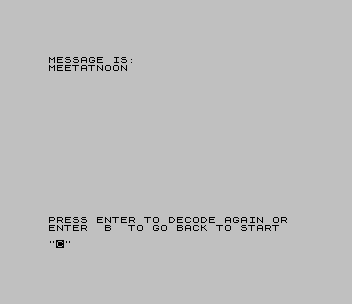
 1340 CLS : PRINT "MESSAGE IS:",,F$
 1400 PRINT AT 20,0;"PRESS ENTER TO CODE AGAIN OR    ENTER  B  TO GO BACK TO START"
 1410 INPUT A$
 1420 CLS
 1440 IF A$="B" OR A$="BEGIN" THEN GO TO 100
 1460 GO TO 1000
 2000 REM DECODING ROUTINE
 2010 PRINT "PROGRAM TO DECODE A NEW MESSAGE"
 2020 PRINT "USING CODE NUMBER ";W
 2030 PRINT
 2040 PRINT "ENTER THE CODED TEXT COMPLETE   WITH COMMAS BETWEEN THE NUMBERS"
 2045 PRINT
 2050 PRINT "UP TO 100 NUMBERS ARE ALLOWED INTHE TEXT";
 2055 PRINT "(NO SPACES ARE PLACED IN THE DECODED TEXT)"
 2060 PRINT
 2065 PRINT ; FLASH 1;"ENTER MESSAGE NOW"
 2070 INPUT P$
 2080 CLS : PRINT ; FLASH 1;"WAIT"
 2085 PRINT : PRINT : PRINT
 2090 LET G$=""
 2100 REM IN OTHER COMPUTERS FOR LINE 2210 SAY-U$=MID$(P$,N,1) AND 2215 V$=MID$(P$,N+1,1)
 2200 FOR N=1 TO (LEN P$) STEP 3
 2210 LET U$=P$(N TO N)
 2215 LET V$=P$(N+1 TO N+1)
 2217 LET M=((N-1)/3)+1
 2220 LET X(M)=VAL (U$+V$)
 2230 IF X(1)=0 THEN LET P$=F$
 2235 IF X(1)=0 THEN GO TO 2090
 2237 LET X(M)=(X(M)-7)-I
 2240 IF X(M)<=32 THEN LET X(M)=X(M)+58
 2250 REM IF X(M)<33 THEN LET X(M)=X(M)+58 FOR ASCII IN LINE 2240
 2260 LET G$=G$+CHR$ (X(M))
 2290 NEXT N
 2295
 2300 REM "0000"(4 ZEROS) ENTERED WILL RESULT IN PREVIOUSLY CODED TEXT BEING ENTERED FOR DECODING AS A TEST
 2320 CLS : PRINT "MESSAGE IS:",,G$
 2350 PRINT AT 20,0;"PRESS ENTER TO DECODE AGAIN OR  ENTER  B  TO GO BACK TO START"
 2360 INPUT A$
 2365 CLS
 2370 IF A$="B" OR A$="BEGIN" THEN GO TO 100
 2380 GO TO 2000
 9000 CLS : CLEAR
 9010 PRINT "Cassette save begins"
 9020 SAVE "Spy" LINE 30
 9030 SAVE "Spy" LINE 30
 9040 CLS : PRINT "Verification. Rewind and play"
 9050 VERIFY "": VERIFY ""
Note: Type-in program listings on this website use ZMAKEBAS notation for graphics characters.