
SECONDS is a maze-navigation game in which the player steers a character through a field of obstacles to locate hidden treasure before a countdown timer reaches zero. The playing field is built using a 21×31 array to track cell states: empty (0), solid block (1), trap (−1), and treasure (10). Movement is handled via keys 5–8 with a computed GO TO using `100 * VAL l$`, routing to one of four direction subroutines at lines 500, 600, 700, and 800. The program defines three custom UDG characters (a, b, c) by POKEing pixel data read from DATA statements into the UDG address table, giving the player avatar and treasure distinct appearances. A bomb mechanic at line 825 uses SOUND to produce a multi-voice explosion effect and clears a 3×3 area around the player, with detection of whether the treasure falls within that radius triggering an instant loss.
Program Structure
The program is organized into several functional regions:
- Initialization (lines 1–9): Calls the UDG setup subroutine, sets border/paper colors, and initializes the score counter
c=50. - Map generation (lines 10–90): Randomly populates a 21×31 array
a()with solid blocks (value 1) and traps (value −1, displayed as*). - Game setup (lines 100–163): Places the treasure (value 10) and the player avatar at random positions, then enters the main game loop.
- Main loop (lines 160–250): Reads keypress, dispatches movement, and deducts from
con each cycle. - Movement handlers (lines 500–820): Four direction routines (left, down, up, right) each check array bounds and cell occupancy before moving.
- Bomb mechanic (lines 825–1090): Clears a 3×3 area, checks for treasure collision, and updates the array.
- End conditions (lines 1100–1170): Handles win, loss-by-treasure-destruction, and loss-by-timer, then prompts for replay.
- UDG subroutine (lines 1180–1200): Reads pixel data and POKEs it into the UDG table for characters a, b, and c; additional DATA at lines 1210–1220 covers the remaining two UDGs.
Array State Encoding
The array a(21,31) acts as the entire game map, using numeric values as cell-type flags:
| Value | Meaning |
|---|---|
| 0 | Empty / passable |
| 1 | Solid block (impassable) |
| −1 | Trap (costs points, displayed as *) |
| 10 | Treasure (win condition) |
When the player steps on a trap cell, line 163 subtracts a(y,x) from c, which subtracts −1 (i.e., adds 1). Line 164 then resets that cell to 1 so it becomes a normal block, preventing repeated scoring from the same trap.
Computed GO TO for Movement Dispatch
Line 170 uses the idiom GO TO 100 * VAL l$ to branch directly to one of the four movement handlers based on the key pressed. Keys 5, 6, 7, and 8 map to lines 500, 600, 700, and 800 respectively. This avoids a chain of IF statements and is a common BASIC efficiency technique on this platform.
Movement Collision Detection
Each direction handler (e.g., line 510) checks two conditions before updating a coordinate: the player must not be at the edge of the map, and the destination cell must be non-zero (occupied). The coordinate update itself uses a boolean arithmetic idiom such as LET x = x - (x > 2), where the boolean expression evaluates to 1 (true) or 0 (false), neatly clamping movement without an extra IF.
UDG Definition
The subroutine at lines 1180–1200 reads 8 bytes of pixel data per UDG from DATA statements and POKEs them into the UDG memory region starting at USR "a". The loop runs for 24 iterations, covering three UDGs (a, b, c) — 8 bytes each. Additional DATA at lines 1210–1220 provides 16 more bytes, suggesting two further characters are defined (or that the subroutine is intended to run multiple times, though only one RETURN is present at line 1200). UDG \b represents the treasure and \c represents the player avatar.
Bomb Mechanic
Pressing 0 at line 190 triggers a bomb at the player’s current position. Lines 825–840 animate a brief flash pattern and play a SOUND sequence using multiple channels to simulate an explosion. Lines 1000–1080 then iterate over the 3×3 grid centered on the player, setting each cell to 1 (solid) and decrementing c by 1 per cell. If any cell in that region contains the treasure (value 10), the game immediately jumps to the loss screen at line 1100.
End-Condition Logic
Line 1100 handles both the timer-exhausted and treasure-destroyed loss conditions in a single PRINT, using an OR check. Lines 1110 and 1120 then print more specific messages. A notable inconsistency is that lines 1100–1120 use uppercase variable names A(Q,N), C, A(Y,X), while the rest of the program uses lowercase — on this platform, variable names are case-insensitive, so this works correctly but is stylistically inconsistent.
Notable Bugs and Anomalies
- The DATA at lines 1210–1220 (16 bytes) is never READ by the subroutine at line 1200, which only reads 24 bytes total for three UDGs and then RETURNs. Those 16 bytes are unreachable dead data.
- The variable
l$is initialized to"x"at line 155 before the movement loop, but this serves no purpose sincel$is immediately overwritten at line 166 by INKEY$. - Line 162 checks
a(y,x)=10(player has reached the treasure) as a loss condition mixed in with the timer check, before displaying the win message at 1120 — the routing logic is correct but the condition ordering at 1100–1120 requires careful reading to follow. - The map array dimensions are
a(21,31)but the player is constrained to rows 2–18 and columns 2–29, leaving outer rows/columns as an invisible border margin.
Image Gallery
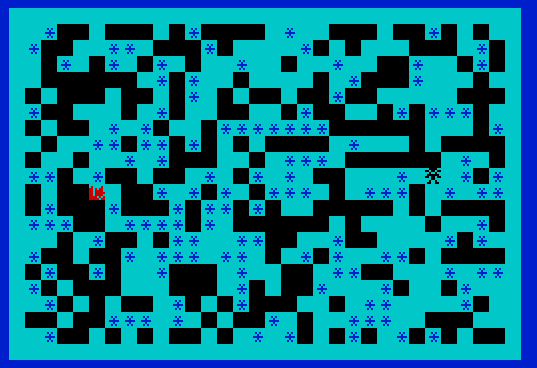
Source Code
    1 REM ***Program SECONDS ****
    2 GO SUB 1180
    4 BORDER 1:PAPER 5:CLS
    9  LET c=50
   10 DIM a(21,31)
   20 FOR n=1 TO 30
   30 FOR q=1 TO 20
   40 IF INT (RND*10)>5 THEN GO TO 70
   42 LET a(q,n)=1
   45 IF INT (RND*10)>5 THEN GO TO 61
   50 NEXT q
   55 NEXT n
   60 GO TO 100
   61 PRINT AT q,n; INK 1;"*"
   64 LET a(q,n)=-1
   65 GO TO 50
   70 PRINT AT q,n;"\::"
   90 GO TO 50
  100 LET x= INT (RND*28)+2
  110 LET y= INT (RND*18)+2
  120 PRINT AT y,x; INK 2;"\b"
  130 LET a(y,x)=10
  140 LET x= INT (RND*28)+2
  150 LET y= INT (RND*18)+2
  155 LET l$="x"
  160 PRINT AT y,x; INK 0;"\a"
  162 IF c <=0 OR a(y,x)=10 THEN GO TO 1100
  163 PAUSE 40:BEEP .05,69:LET c=c-a(y,x)
  164 IF a(y,x)=-1 THEN LET a(y,x)=1
  166 LET l$= INKEY$
  170 IF l$ >="5" AND l$ <="8" THEN GO TO 100* VAL l$
  180 PRINT AT y,x;" "
  190 IF INKEY$="0" THEN GO TO 825
  250 GO TO 160
  500 PRINT AT y,x;" "
  510 IF x>2 THEN IF a(y,x-1) <>0 THEN LET x=x-(x>2)
  520 GO TO 160
  600 PRINT AT y,x;" "
  610 IF y<20 THEN IF a(y+1,x) <>0 THEN LET y=y+(y<20)
  620 GO TO 160
  700 PRINT AT y,x;" "
  710 IF y>2 THEN IF a(y-1,x) <>0 THEN LET y=y-(y>2)
  720 GO TO 160
  800 PRINT AT y,x;" "
  810 IF x<30 THEN IF a(y,x+1) <>0 THEN LET x=x+(x<30)
  820 GO TO 160
  825 PRINT AT y-1,x-1;" * "; AT y,x-1;"*\c*"; AT y+1,x-1;" * "; AT y-1,x-1;"    "; AT y,x-1;" \c "; AT y+1,x-1;"    "
  830 SOUND 6,6;7,7;8,16;9,16;10,16;12,56;13,8
  835 PAUSE 90
  840 SOUND 8,0;9,0;10,0
 1000 FOR q=y-1 TO y+1
 1010 PRINT AT y,x;"*"
 1020 FOR n=x-1 TO x+1
 1030 IF a(q,n)=10 THEN GO TO 1100
 1040 LET a(q,n)=1
 1050 PRINT AT y,x;"\c"
 1060 LET c=c-1
 1070 NEXT n
 1080 NEXT q
 1090 GO TO 160
 1100 IF A(Q,N)=10 OR C <=0 THEN PRINT AT 10,0;"\{20}\{1}            YOU LOSE",\{20}\{0}:PAUSE 100
 1110 IF A(Q,N)=10 THEN PRINT AT 10,0;"    YOU BLEW UP THE TREASURE   ":GO TO 1130
 1120 IF A(Y,X)=10 THEN PRINT AT 10,0;"\{18}\{1}\::\::\::\::\::\::\::\::\::\::* YOU WON *\::\::\::\::\::\::\::\::\::\::\{18}\{0}"
 1130 PRINT TAB 1;"  TIME REMAINING: ";C*(C>0);" SECONDS"
 1140 PRINT AT 21,0;"PLAY AGAIN? PRESS <ENTER> ."
 1150 INPUT A$
 1160 CLS
 1170 GO TO 4
 1180 DATA 60,219,36,126,219,24,36,102
 1190 FOR a=0 TO 23
 1200 READ b:POKE USR "a"+a,b:NEXT A:RETURN
 1210 DATA 0,66,214,222,223,222,245,251
 1220 DATA 129,24,126,90,126,66,60,129
 1230 SAVE "SECONDS" LINE 0
Note: Type-in program listings on this website use ZMAKEBAS notation for graphics characters.