
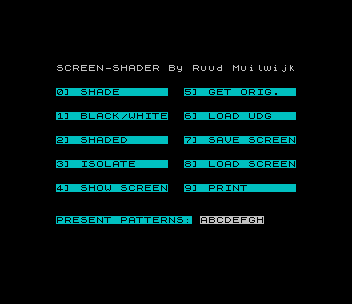
Prepares color screens for printing by replacing the paper and ink colors with pixel patterns, so that a COPY dump shows the picture in shades instead of solid black and white. The HELP text says this works on any printer that uses COPY. The eight shade patterns are the UDGs A–H, one per color 0–7, and are shown on the menu as “PRESENT PATTERNS”. They can be set to two shades (Black/White) or to a graded set (Shaded), loaded from a file of your own UDGs, or set with Isolate so that only the colors you choose are shaded, which is useful for merging screens. The menu also offers Shade, Show Screen, Get Original, Save Screen, Load Screen and Print. A separate HELP program explains each option and loads when you type HELP at any of the filename prompts.
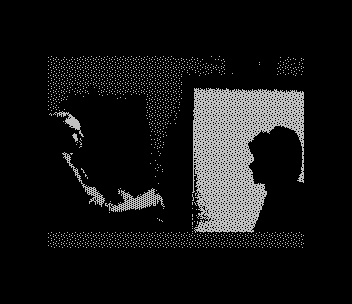
The menu reads “SCREEN-SHADER By Ruud Muilwijk”. The program loads a 112-byte machine code routine, shade, at 60000. The download also has three sample 6912-byte screens, JC, @WIT.S and @MARTYM. @WIT.S is a digitized photograph. To try one, choose 8, type its name at the prompt, choose 5 to copy it to the working screen, and then choose 0 to shade it.
Program Analysis
Structure
Line 20 sets CLEAR 29999 and line 25 loads the shading code. Lines 30–40 poke a 12-byte block copy routine at 60200: LD HL, LD DE, LD BC,6912, LDIR, RET. The subroutines at 9000, 9100 and 9200 poke source and destination addresses into it before each call. 9000 copies the working buffer at 30000 to the screen, 9100 copies the screen back to the buffer, and 9200 copies the original at 40000 to the working buffer. The menu at lines 50–90 is printed over the working picture, and line 100 dispatches with GO TO 500+500*(VAL C$+1), so keys 0–9 go to lines 1000–5500.
Options
- 0 Shade (1000): shows the working picture, calls the machine code at 60000 and stores the shaded screen back in the buffer.
- 1 Black/White (1500): fills UDGs A–D solid and clears E–H.
- 2 Shaded (2000): sets A solid, H blank and B–G from the 48 bytes of
DATAin line 2000. - 3 Isolate (2500): clears all eight UDGs, then fills solid the UDG for each color number entered until a blank line is entered.
- 4 Show Screen (3000): shows the working picture without the menu until a key is pressed.
- 5 Get Original (3500): copies the loaded original back to the working buffer.
- 6 Load UDG, 7 Save Screen and 8 Load Screen (4000–5010): load a pattern file to
USR "A", save the working buffer as 6912 bytes ofCODE, or load a screen to 40000. - 9 Print (5500): shows the picture and dumps it with
COPY.
Notable Techniques
- One small poked
LDIRroutine, re-addressed byPOKEbefore each call, handles all three screen-sized block moves. - The shade patterns live in the UDG area, so they can be changed from BASIC, saved and reloaded as ordinary
CODEfiles. - The computed
GO TOin line 100 replaces a chain ofIFtests for the ten menu keys.
Potential Issues
- Load Screen puts the file in the original buffer at 40000, so it does not appear until Get Original (5) is chosen. Choosing 5 before any screen is loaded copies whatever is in memory at 40000.
- The filename prompts for Load UDG and Load Screen accept an empty name, which loads the next
CODEfile on the tape.
This copy came from an Oliger (JLO SAFE) disk. For tape, the Oliger / was removed from every LOAD and SAVE in both programs, and the three “cat” filename shortcuts, which listed the disk catalog, were replaced by REMs. It was tested in ZEsarUX by loading the @WIT.S sample by name and showing it.
Image Gallery
Source Code
   10 POKE 23658,8:
   11 REM SCREEN-SHADER by
   12 REM   Ruud Muilwijk
   13:
   15 BORDER 0: PAPER 0: INK 0
   20 CLEAR 29999
   25 LOAD /" shade"CODE 60000
   30 DATA 33,0,0,17,0,0,1,0,27,237,176,201
   40 FOR f=60200 TO 60211: READ a: POKE f,a: NEXT f
   50 GO SUB 9000: PRINT AT 1,1; PAPER 0; INK 7;"SCREEN-SHADER By Ruud Muilwijk": PAPER 5
   60 PRINT AT 4,1;"0] SHADE      ";AT 7,1;"1] BLACK/WHITE";AT 10,1;"2] SHADED     ";AT 13,1;"3] ISOLATE    ";AT 16,1;"4] SHOW SCREEN"
   70 PRINT AT 4,17;"5] GET ORIG.  ";AT 7,17;"6] LOAD UDG   ";AT 10,17;"7] SAVE SCREEN";AT 13,17;"8] LOAD SCREEN";AT 16,17;"9] PRINT      "
   80 PRINT AT 20,1;"PRESENT PATTERNS:";: PAPER 7: PRINT AT 20,19;CHR$ 144;CHR$ 145;CHR$ 146;CHR$ 147;CHR$ 148;CHR$ 149;CHR$ 150;CHR$ 151
   90 LET C$=INKEY$: IF C$<"0" OR C$>"9" THEN GO TO 90
  100 GO TO 500+500*(VAL C$+1)
 1000 GO SUB 9000
 1010 RANDOMIZE USR 60000
 1020 GO SUB 9100
 1030 GO TO 50
 1500 FOR F=USR "A" TO USR "D"+7
 1510 POKE F,255: NEXT f
 1520 FOR F=USR "E" TO USR "H"+7
 1530 POKE F,0: NEXT F
 1540 GO TO 50
 2000 DATA 239,127,251,222,251,127,239,253,221,119,221,119,221,119,221,119,221,182,213,174,213,182,221,182,85,170,85,170,85,170,85,170,34,136,34,136,34,136,34,136,16,128,4,33,4,128,16,2
 2010 FOR F=USR "A" TO USR "A"+7: POKE F,255: NEXT F: FOR F=USR "H" TO USR "H"+7: POKE F,0: NEXT F
 2020 RESTORE 2000: FOR F=USR "B" TO USR "G"+7: READ A: POKE F,A: NEXT F: GO TO 50
 2500 FOR F=USR "A" TO USR "H"+7: POKE F,0: NEXT F
 2501 INPUT "ENTER COLOR (RETURN=STOP):"; LINE C$
 2505 IF C$="" THEN GO TO 50
 2510 IF C$<"0" OR C$>"7" THEN GO TO 2501
 2520 LET UDG=USR "A"+8*VAL C$
 2530 FOR F=UDG TO UDG+7: POKE F,255: NEXT F
 2540 GO TO 2501
 3000 GO SUB 9000
 3001 IF INKEY$<>"" THEN GO TO 3001
 3002 IF INKEY$="" THEN GO TO 3002
 3010 GO TO 50
 3500 GO SUB 9200: GO TO 50
 4000 INPUT "ENTER FILENAME:"; LINE N$: IF LEN N$>10 THEN GO TO 4000
 4004 PRINT AT 17,0;
 4005 IF n$="cat" OR N$="CAT" THEN CAT : PAUSE 0: GO TO 4000
 4009 IF N$="HELP" THEN LOAD /"HELP"
 4010 LOAD /N$CODE USR "A": GO TO 50
 4500 INPUT "ENTER FILENAME:"; LINE N$: IF N$="" OR LEN N$>10 THEN GO TO 4500
 4505 IF n$="cat" OR N$="CAT" THEN CAT : PAUSE 0: GO TO 4500
 4507 IF N$="HELP" THEN LOAD /"HELP"
 4510 SAVE /N$CODE 30000,6912: GO TO 50
 5000 INPUT "ENTER FILENAME:"; LINE N$: IF LEN N$>10 THEN GO TO 5000
 5005 PRINT AT 17,0;
 5006 IF n$="cat" OR N$="CAT" THEN CAT : PAUSE 0: GO TO 5000
 5007 IF N$="HELP" THEN LOAD /"HELP"
 5010 LOAD /N$CODE 40000: GO TO 50
 5500 GO SUB 9000: COPY
 5510 GO TO 50
 9000 POKE 60201,48: POKE 60202,117: POKE 60204,0: POKE 60205,64: RANDOMIZE USR 60200: RETURN
 9100 POKE 60201,0: POKE 60202,64: POKE 60204,48: POKE 60205,117: RANDOMIZE USR 60200: RETURN
 9200 POKE 60201,64: POKE 60202,156: POKE 60204,48: POKE 60205,117: RANDOMIZE USR 60200: RETURN
 9998 STOP
 9999 SAVE /"SHADES" LINE 0: SAVE /" shade"CODE 60000,112
Note: Type-in program listings on this website use ZMAKEBAS notation for graphics characters.