
Name Address Files is a menu-driven personal database program that stores up to 150 records, each with five 32-character fields, in a three-dimensional string array declared as DIM F$(150,5,32). The first record of the array (F$(1,1)) is used as a metadata slot to track the current file count as a string, which is converted back to a number with VAL. Deleted records are flagged by writing an asterisk into their first field rather than compacting the array, and a subroutine at line 9000 scans for these slots to reuse them when new entries are added. The program supports both screen and printer output, toggled by prefixing a menu choice with the letter “P,” and uses RANDOMIZE USR 100 before SAVE and LOAD operations, suggesting a machine-code routine is present at that address. Search functionality performs a prefix match by comparing a user-supplied string against the leading characters of a chosen field using the TO slice syntax.
Program Structure
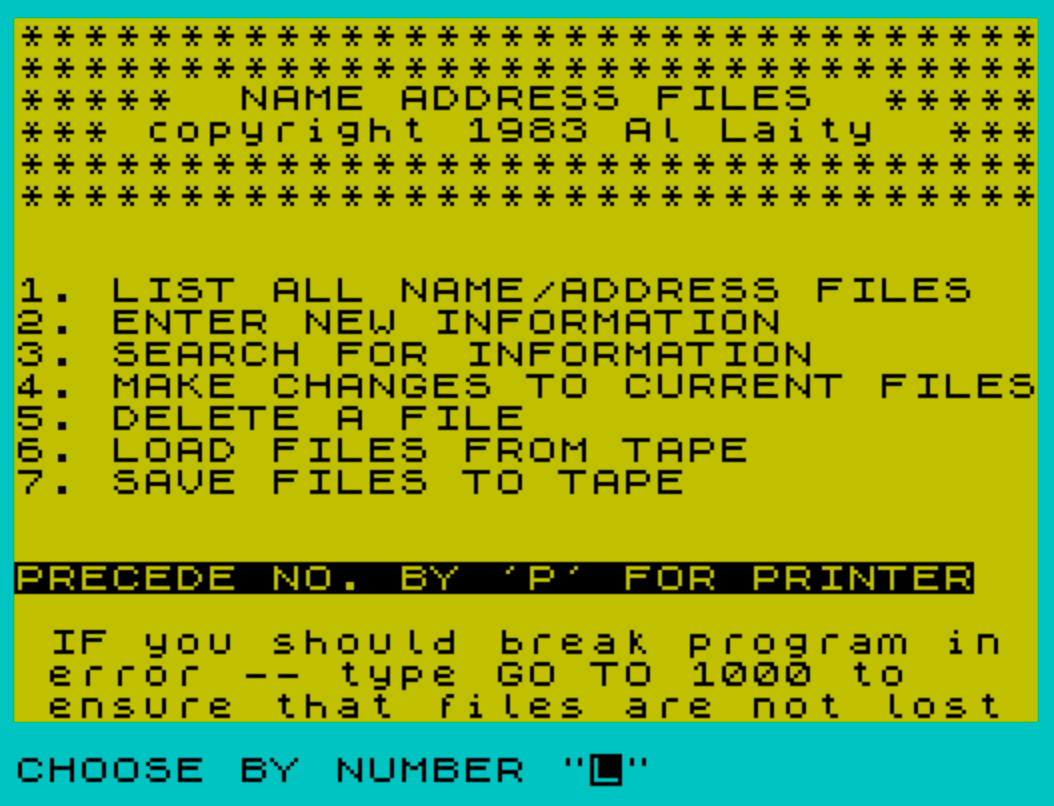
The program is organized into well-separated subroutines and sections addressed by GO TO or GO SUB from a central menu dispatcher at line 1000. Lines 1–5 initialize global state. Line 90 jumps immediately to the menu. Lines 100–150 draw a title banner as a reusable subroutine. The functional blocks are:
| Lines | Function |
|---|---|
| 1000–1180 | Main menu and dispatch |
| 1800–1840 | Printer header subroutine |
| 1900–1940 | Screen header subroutine |
| 2000–2900 | Enter new record |
| 3000–3560 | Edit existing record |
| 4000–4690 | Search records |
| 5000–5600 | List all records |
| 6000–6100 | Save to tape |
| 7000–7050 | Load from tape |
| 8000–8300 | Delete a record |
| 9000–9070 | Find a deleted slot for reuse |
| 9800–9810 | Common “press ENTER” return to index |
Data Storage Design
The central data structure is DIM F$(150,5,32) — a three-dimensional string array holding up to 150 records, each with 5 fields of up to 32 characters. This is a compact way to simulate a flat-file database entirely within BASIC’s string array facilities.
Record 1 (F$(1,1)) is repurposed as a metadata cell: it stores the current highest file index as a string, read back with VAL F$(1,1) at lines 1090, 4250, and elsewhere. This avoids needing a separate numeric variable that might be lost on a program break.
Deletion and Slot Reuse
Deleted records are marked by writing "*" into F$(N+1,1) (line 8100). The array is never compacted. Instead, subroutine 9000 scans from index 2 upward, looking for a record whose first field begins with "*", and if found, stores that index in flag and clears fields 2–5 of that slot. The entry routine at line 2026 then uses the reclaimed slot index instead of incrementing FL, preventing unbounded growth of the in-use counter.
Printer Toggle via Prefix Character
The program implements a dual screen/printer output mode using a single global variable P$. At the menu input (line 1100), if the user enters a two-character string, the first character is treated as a “P” prefix flag: P$ is set to "1" and the actual menu digit is taken from A$(2) (line 1105). Throughout the listing and search routines, IF P$="1" branches to LPRINT paths rather than PRINT paths. This is an economical approach that avoids duplicating entire routines.
Search Implementation
The search at lines 4000–4690 performs a prefix match using BASIC’s string-slice syntax. Line 4280 reads:
IF F$(X,FI, TO LEN S$)=S$ THEN GO SUB 4500
This takes the first LEN S$ characters of the chosen field and compares them to the user’s search string, so the search is always a leading-substring (prefix) match rather than a full-field or anywhere-in-field match. The user is informed of this behavior at line 4160.
Machine Code Hook
Both the save (line 6090) and load (line 7045) routines call RANDOMIZE USR 100 before the tape operation. This implies a machine-code routine is expected to reside at address 100. The purpose is not explained in the listing, but a commented-out line at 9992 also references RANDOMIZE USR 100 alongside a SAVE with a LINE 1 autostart parameter, suggesting the routine may relate to tape or system initialization.
Key BASIC Idioms
VAL F$(1,1)— reading a stored integer back from a string array cell, used as a record count.STR$ FL— converting the updated count back to a string for storage inF$(1,1).IF INKEY$="C" ... / IF INKEY$="" THEN GO TO 7027— a polling loop waiting for a specific keypress at lines7027–7028.INVERSE 1 / INVERSE 0— used for highlighted prompts and status messages on screen.FLASH 1 / FLASH 0— used at line7025to draw attention to a data-loss warning before loading.
Bugs and Anomalies
- Line
4600is referenced byGO TO 4600at line4505, but the actual code for the printer output path begins at line4610. Line4600does not exist, so the printer branch in the search-found subroutine silently falls into4610— this works only because there is no code between4600and4610that would cause an error, but it is fragile. - Line
3560(LET Z= VAL Z$+1:IF Z>NF THEN GO TO 3530) is unreachable dead code: theGO TO 3060at line3550always transfers control before reaching it, andNFis never defined anywhere in the program. - Lines
4210and4230are both present, but line4210usesGO TO 4230after theLPRINTstatements, meaning both the printer and screen paths always print to screen as well — the printer path falls through into the screen output at line4230. - The
IFcondition at line3040(IF Z$="" THEN GO TO 3040) is duplicated at line3045, which is redundant but harmless.
Image Gallery
Source Code
    1 LET fl=1
    2 DIM F$(150,5,32)
    3 LET F$(1,1)="1"
    5 LET P$=""
   90 GO TO 1000
  100 BORDER 5:PAPER 6:INK 0:CLS
  110 FOR x=1 TO 2:PRINT "********************************":NEXT x
  120 PRINT "*****  NAME ADDRESS FILES  *****"
  130 PRINT "*** copyright 1983 Al Laity  ***"
  140 FOR x=1 TO 2:PRINT "********************************":NEXT x
  150 RETURN
 1000 GO SUB 100
 1010 PRINT :PRINT :PRINT
 1020 PRINT AT 8,0;"1. LIST ALL NAME/ADDRESS FILES"
 1030 PRINT "2. ENTER NEW INFORMATION"
 1040 PRINT "3. SEARCH FOR INFORMATION"
 1050 PRINT "4. MAKE CHANGES TO CURRENT FILES"
 1060 PRINT "5. DELETE A FILE"
 1070 PRINT "6. LOAD FILES FROM TAPE"
 1075 PRINT "7. SAVE FILES TO TAPE"
 1080 PRINT :PRINT :INVERSE 1:PRINT "PRECEDE NO. BY 'P' FOR PRINTER":INVERSE 0
 1085 PRINT :PRINT "IF you should break program in  error -- type GO TO 1000 to     ensure that files are not lost"
 1090 LET FL= VAL F$(1,1)
 1100 INPUT "CHOOSE BY NUMBER ";A$:IF LEN A$>2 THEN GO TO 1100
 1101 IF a$="" THEN GO TO 1100
 1102 IF LEN A$<2 THEN LET A= VAL A$:LET P$="":GO TO 1110
 1105 LET P$="1":LET A= VAL A$(2)
 1110 IF A=1 THEN GO TO 5000
 1111 IF A=0 THEN GO TO 9998
 1120 IF A=2 THEN GO TO 2000
 1130 IF A=3 THEN GO TO 4000
 1140 IF A=4 THEN GO TO 3000
 1150 IF A=5 THEN GO TO 8000
 1160 IF A=6 THEN GO TO 7000
 1170 IF A=7 THEN GO TO 6000
 1180 GO TO 1000
 1800 FOR X=1 TO 3:PRINT "\{20}\{1}       DATA TO PRINTER          ":NEXT x\{20}\{0}
 1805 FOR X=1 TO 2:LPRINT "********************************":NEXT X
 1810 LPRINT A$
 1820 FOR X=1 TO 2:LPRINT "********************************":NEXT X
 1830 LPRINT
 1840 RETURN
 1900 CLS
 1910 FOR X=1 TO 2:PRINT "********************************":NEXT X
 1920 PRINT A$
 1930 FOR X=1 TO 2:PRINT "********************************":NEXT X
 1940 PRINT :PRINT :RETURN
 2000 REM MAKE ENTRIES
 2010 LET A$="******** MAKING ENTRIES ********":GO SUB 1900
 2020 LET fl= VAL F$(1,1)+1:LET g=fl-2
 2025 GO SUB 9000
 2026 IF flag <>0 THEN LET fl=flag
 2030 PRINT "NEW FILE BEING CREATED WILL BE":PRINT "FILE NUMBER - ";FL-1:PRINT "there are ";g;" files open":PRINT "including deleted files which   (will be filled as you open new files)"
 2035 FOR X=1 TO 5
 2037 PRINT INVERSE 1;"FIELD ";X; INVERSE 0
 2040 INPUT "TYPE FIELD ";X$
 2050 IF LEN X$>32 THEN GO TO 2040
 2055 LET F$(FL,X)=X$
 2060 PRINT F$(FL,X)
 2065 IF F$(FL,X, TO 4)="QUIT" THEN GO TO 1000
 2070 NEXT X
 2100 IF FLAG=0 THEN LET F$(1,1)= STR$ FL
 2900 GO TO 9800
 3000 REM MAKE CHANGES
 3010 LET A$="*** MAKING CHANGES TO FILES ****":GO SUB 1900
 3015 IF FL=1 THEN PRINT "THERE ARE NO FILES ":GO TO 9800
 3020 PRINT "ENTER FILE NUMBER"
 3030 PRINT "PRESS 'U' IF UNKNOWN"
 3040 INPUT Z$:IF Z$="" THEN GO TO 3040
 3045 IF Z$="" THEN GO TO 3040
 3050 IF z$="u" OR Z$="U" THEN GO TO 3500
 3055 IF z$(1)="q" OR Z$(1)="Q" THEN GO TO 1000
 3060 LET Z= VAL Z$+1:IF Z>FL THEN GO TO 3000
 3065 CLS :PRINT "\{20}\{1}FILE NUMBER ";Z-1;"  \{20}\{0}"
 3070 FOR X=1 TO 5
 3080 PRINT X;"..";F$(Z,X)
 3090 NEXT X
 3100 INPUT "FIELD # TO BE CHANGED";Z$:IF Z$="" THEN GO TO 3100
 3101 IF Z$(1)="Q" OR Z$(1)="q" THEN GO TO 1000
 3105 LET J= VAL Z$:IF J<1 OR J>5 THEN GO TO 3100
 3110 PRINT "\{20}\{1}NEW FIELD NUMBER \{20}\{0}\{20}\{0}\{20}\{1}";J;"  \{20}\{0}"
 3120 INPUT "type new field ";x$
 3130 IF LEN x$>32 THEN GO TO 3120
 3140 LET f$(z,j)=x$
 3145 PRINT X$
 3150 INPUT "any other changes to this file";z$
 3160 IF z$="y" OR z$="Y" THEN GO TO 3100
 3170 CLS
 3180 PRINT "\{20}\{1}NEW FILE NUMBER  ";Z-1;"  \{20}\{0}":PRINT
 3190 FOR X=1 TO 5
 3195 PRINT F$(Z,X)
 3200 NEXT X
 3210 GO TO 9800
 3500 FOR X=2 TO FL
 3505 IF f$(x,1,1)="*" THEN GO TO 3520
 3510 PRINT X-1;"..";F$(X,1)
 3520 NEXT X
 3530 PRINT "ENTER FILE # TO BE CHANGED"
 3540 INPUT Z$:IF Z$="Q" OR z$="q" THEN GO TO 1000
 3545 IF Z$="" THEN GO TO 3540
 3550 GO TO 3060
 3560 LET Z= VAL Z$+1:IF Z>NF THEN GO TO 3530
 4000 REM SEARCH
 4010 LET A$="********* FILE  SEARCH *********":GO SUB 1900
 4015 IF P$="1" THEN GO SUB 1800
 4020 PRINT "WHEN FOUND DO YOU WANT ":PRINT
 4040 PRINT "1. OUTPUT FIELD 1 OF FOUND FILES"
 4045 PRINT :PRINT "2. OUTPUT ALL FIELDS IN FILE"
 4050 INPUT "CHOOSE BY NUMBER ";Z$
 4060 IF Z$="" THEN GO TO 4050
 4070 IF Z$(1)="q" OR Z$(1)="Q" THEN GO TO 1000
 4080 IF z$(1) <>"1" AND z$(1) <>"2" THEN GO TO 4050
 4090 LET z= VAL z$
 4100 INPUT "enter field number to be        searched ";q$
 4110 IF q$="" THEN GO TO 4100
 4120 IF q$(1)="q" OR q$(1)="Q" THEN GO TO 1000
 4130 LET A$=Q$(1):IF A$ <>"1" AND A$ <>"2" AND A$ <>"3" AND A$ <>"4" AND A$ <>"5" THEN GO TO 4100
 4140 LET FI= VAL A$
 4150 LET A$="******* SEARCH FIELD "+ STR$ FI+" *********":GO SUB 1900
 4160 PRINT "YOU MAY ENTER ANY NUMBER OF     CHARACTERS. I WILL SEARCH FIELD ";FI;" TO FIND ANY THAT BEGIN WITH   THE CHARACTERS YOU ENTER"
 4170 INPUT "ENTER YOUR DATA TO BE SEARCHED  FOR ";S$
 4175 IF S$="QUIT" THEN GO TO 1000
 4180 IF S$="" THEN GO TO 4170
 4190 IF LEN S$>32 THEN GO TO 4180
 4200 GO SUB 1900
 4210 IF P$="1" THEN LPRINT "SEARCH CONDUCTED - FIELD ";FI;" FOR":LPRINT S$:LPRINT :GO TO 4230
 4230 PRINT "SEARCH CONDUCTED - FIELD ";FI;" FOR":PRINT S$:PRINT
 4240 LET FO=0
 4250 LET FL= VAL F$(1,1)
 4260 FOR X=2 TO FL
 4265 IF F$(X,1,1)="*" THEN GO TO 4350
 4280 IF F$(X,FI, TO LEN S$)=S$ THEN GO SUB 4500
 4350 NEXT X
 4360 IF P$="" THEN PRINT :PRINT FO;" FILES FOUND"
 4370 IF P$="1" THEN LPRINT :LPRINT FO;" FILES FOUND"
 4380 GO TO 9800
 4500 LET FO=FO+1
 4505 IF P$="1" THEN GO TO 4600
 4510 IF Z=1 THEN PRINT F$(X,1)
 4520 IF Z <>2 THEN GO TO 4590
 4530 FOR J=1 TO 5
 4540 IF F$(X,J)="                                " THEN GO TO 4580
 4550 PRINT F$(X,J)
 4580 NEXT J
 4585 PRINT
 4590 RETURN
 4610 IF Z=1 THEN LPRINT F$(X,1)
 4620 IF Z <>2 THEN GO TO 4690
 4630 FOR J=1 TO 5
 4640 IF F$(X,J)="                                " THEN GO TO 4680
 4650 LPRINT F$(X,J)
 4680 NEXT J
 4685 LPRINT
 4690 RETURN
 5000 LET A$="******** LISTING FILES *********":GO SUB 1900
 5001 LET FL= VAL F$(1,1)
 5002 IF fl<2 THEN PRINT "THERE ARE NO FILES ":GO TO 9800
 5010 PRINT "1. LIST ALL NAMES ONLY"
 5020 PRINT :PRINT "2. LIST ALL FIELDS"
 5030 INPUT "CHOOSE BY NUMBER ";Z$:IF z$="q" OR Z$="Q" THEN GO TO 1000
 5040 IF Z$="1" THEN GO TO 5100
 5050 IF Z$="2" THEN GO TO 5500
 5060 GO TO 5030
 5100 LET A$="******* LISTING ALL NAMES ******":GO SUB 1900:IF P$="1" THEN GO SUB 1800
 5109 FOR X=2 TO FL
 5110 IF P$="1" THEN GO TO 5300
 5120 IF f$(x,1,1)="*" THEN GO TO 5310
 5150 PRINT F$(X,1)
 5160 GO TO 5310
 5300 IF f$(x,1,1)="*" THEN GO TO 5310
 5305 LPRINT F$(X,1)
 5310 NEXT X
 5320 GO TO 9800
 5500 LET A$="***** LISTING OF ALL FILES *****":GO SUB 1900:IF P$="1" THEN GO SUB 1800
 5510 FOR x=2 TO fl
 5520 FOR y=1 TO 5
 5521 IF f$(X,1,1)="*" THEN GO TO 5540
 5525 IF f$(x,y)="                                " THEN GO TO 5540
 5526 IF p$="1" THEN GO SUB 5600:GO TO 5540
 5530 PRINT f$(x,y)
 5540 NEXT y
 5545 IF p$="1" THEN LPRINT :GO TO 5550
 5546 PRINT
 5550 NEXT x
 5560 GO TO 9800
 5600 LPRINT f$(x,y):RETURN
 6000 REM SAVE FILES
 6010 LET A$="***** SAVING FILES TO TAPE *****"
 6020 GO SUB 1900
 6030 INPUT "YOUR FILE NAME ? ";N$
 6035 IF N$="QUIT" THEN GO TO 1000
 6040 IF LEN N$ >=11 THEN GO TO 6030
 6050 PRINT "SAVE FILES UNDER THE NAME ....":PRINT N$
 6060 INPUT "VERIFY (Y OR N)? ";Z$:IF Z$="N" OR Z$="n" THEN GO TO 6000
 6065 IF Z$="QUIT" THEN GO TO 1000
 6070 PRINT :PRINT "SAVING ...";N$
 6090 RANDOMIZE USR 100:SAVE N$+".A$"DATA F$()
 6100 GO TO 1000
 7000 REM LOAD FILES
 7010 LET A$="**** LOADING FILES FROM TAPE ***":GO SUB 1900
 7020 INPUT "NAME OF FILE TO BE LOADED  ?    ";N$
 7021 IF N$="QUIT" THEN GO TO 1000
 7022 PRINT "LOAD ......";N$:INPUT "VERIFY (Y OR N)? ";Z$:IF Z$="N" OR Z$="n" THEN GO TO 7000
 7023 IF z$="quit" THEN GO TO 1000
 7025 PRINT :PRINT FLASH 1;"LOADING WILL DESTROY ANY DATA   CURRENTLY IN THE COMPUTER       "; FLASH 0
 7026 PRINT :PRINT "PRESS: 'C' TO CONTINUE                 'Q' TO QUIT"
 7027 IF INKEY$="C" OR INKEY$="c" THEN GO TO 7040
 7028 IF INKEY$="" THEN GO TO 7027
 7030 GO TO 1000
 7040 PRINT :PRINT "PRESS PLAY ON RECORDER "
 7045 RANDOMIZE USR 100:LOAD N$+".A$"DATA F$()
 7050 GO TO 1000
 8000 REM DELETE
 8010 LET a$="********** DELETE FILE *********":GO SUB 1900
 8020 PRINT "FILE NUMBER TO BE DELETED.."
 8030 INPUT "FILE NUMBER ? - TYPE 'U' IF FILENUMBER IS UNKNOWN ";N$
 8035 IF n$="" THEN GO TO 8030
 8040 IF N$(1)="Q" THEN GO TO 1000
 8050 IF n$="u" OR N$="U" THEN GO SUB 8200:GO TO 8020
 8060 LET N= VAL N$
 8070 FOR X=1 TO 5
 8080 PRINT F$(N+1,X):NEXT X
 8090 INPUT "VERIFY (Y OR N) ?";Z$:IF Z$ <>"Y" AND Z$ <>"y" THEN CLS :GO TO 8010
 8095 IF Z$="" THEN GO TO 8090
 8100 LET F$(N+1,1)="*"
 8110 PRINT "\{20}\{1}\{20}\{1}\{20}\{1}   FILE      DELETED     \{20}\{0}"
 8120 GO TO 9800
 8200 CLS
 8210 PRINT "\{20}\{1} OPEN FILES : \{20}\{0}":PRINT
 8220 LET FL= VAL F$(1,1)
 8230 FOR X=2 TO FL
 8235 IF f$(x,1,1)="*" THEN GO TO 8290
 8240 PRINT X-1;"...";F$(X,1)
 8290 NEXT X
 8300 RETURN
 9000 REM fill deleted file
 9010 FOR x=2 TO fl
 9020 IF f$(x,1,1) <>"*" THEN GO TO 9060
 9030 LET flag=x
 9040 FOR y=2 TO 5:LET f$(x,y)="  ":NEXT y:RETURN
 9060 NEXT x
 9065 LET flag=0
 9070 RETURN
 9800 PRINT :INPUT "PRESS \{20}\{1}ENTER\{20}\{0} FOR INDEX";Z$
 9810 GO TO 1000
 9992 REM CLEAR :RANDOMIZE USR 100:SAVE "NAME.B1" LINE 1
 9998 REM RANDOMIZE USR 100:LOAD "L.B1"
Note: Type-in program listings on this website use ZMAKEBAS notation for graphics characters.