
Majesti-Calc is a personal finance manager for tracking bills and income, implemented in BASIC with a machine code component loaded from tape. The program maintains two parallel data sets — bills and income — each split across five arrays per set (date, description, code, payee, and numeric amount), allowing up to 300 bill entries and 200 income entries. It supports tape-based saving and loading of all array data, on-screen display with optional simultaneous LPRINT output to a printer, and filtering records by a user-supplied code string. A change-data routine allows in-place editing of any record by line number. The machine code block, loaded at address 64719, is invoked at startup via RANDOMIZE USR before the BASIC initializes its arrays.
Program Analysis
Program Structure
The program is organized into clearly delineated sections, each introduced by a REM statement. The entry point at line 10 jumps to line 40, which fires the machine code routine. Lines 20–30 handle tape setup and are only reached if the machine code bootstrap at line 40 redirects execution there. After machine code returns, the main BASIC program initializes variables and arrays starting at line 100.
| Line Range | Section |
|---|---|
| 10–40 | Bootstrap / machine code loader |
| 100–150 | Variable and array initialization |
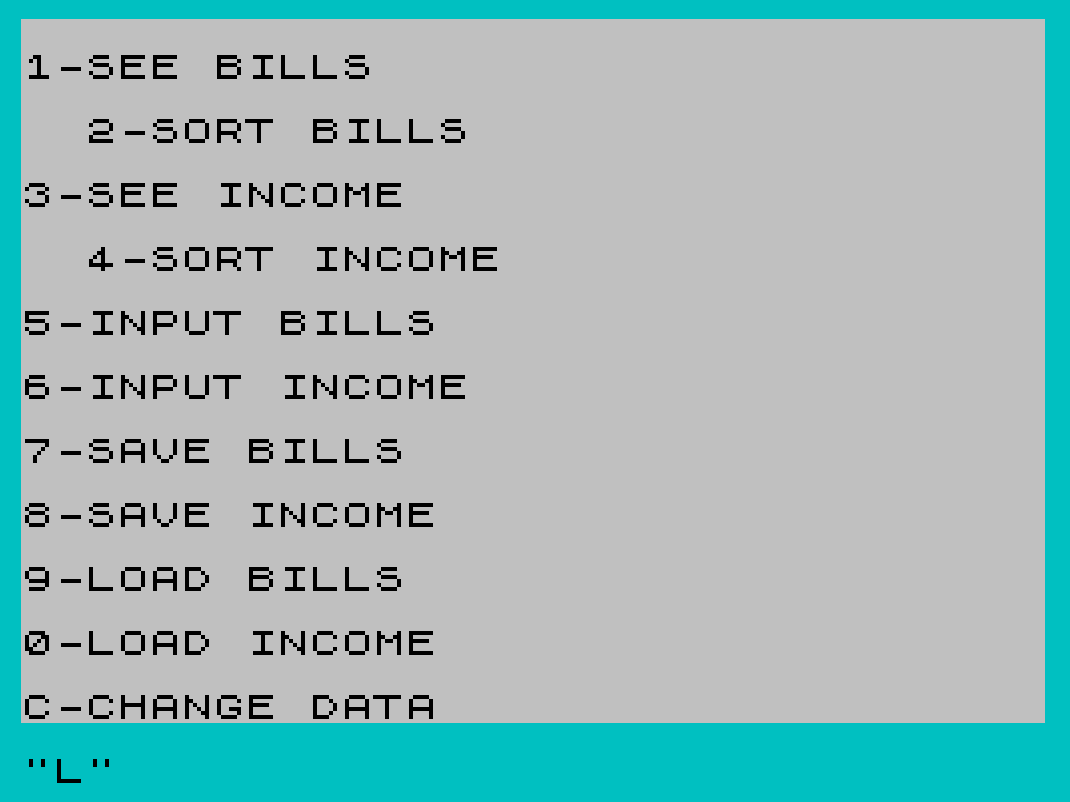
| 1000–1090 | Main menu |
| 1300–1350 | Save bills |
| 1400–1450 | Save income |
| 1600–1675 | Load bills |
| 1800–1875 | Load income |
| 2000–2115 | Display all bills |
| 2300–2385 | Sort (filter) bills by code |
| 2500–2610 | Display all income |
| 2800–2885 | Sort (filter) income by code |
| 3000–3080 | Input bills |
| 3500–3580 | Input income |
| 3600–3730 | Change (edit) existing record |
Data Model
Bills and income are each held in five parallel arrays, indexed by record number. The bills counter is W and the income counter is Q; both are initialized to zero and incremented on each new entry.
- Bills:
D$(300,5)date,C$(300,1)code,b$(300,20)payee,I$(300,20)description,C(300)amount - Income:
E$(200,5)date,F$(200,1)code,a$(200,20)payee,J$(200,20)description,D(40)amount
Note a significant anomaly: the income numeric array D(40) is dimensioned to only 40 elements, while its companion string arrays allow up to 200 records. This means entering more than 40 income records will cause a subscript-out-of-range error. The load loop at lines 1855–1870 also iterates up to 500, which would overflow both the bills array (C(300)) and the income array (D(40)).
Tape Save and Load
Each data set is saved as five separate named DATA blocks. The bills set uses names "BILLS", "BILL", "BIL", "billsa", and "BI"; income uses "INCOME", "INCOM", "INCO", "incomea", and "INC". After loading bills, the program scans the numeric array to find the first zero element to determine the active record count, storing it in W (line 1670) or Q (line 1870). This approach relies on the convention that unused numeric array slots remain zero, which is guaranteed by DIM initialization.
Display and Printing
Both the “see” and “sort” sections offer a dual-output mode: option "1" sends output to both the screen and the printer via LPRINT, while option "2" displays on screen only. The printer output uses wider TAB stops to take advantage of a full-width printer line. The screen display uses \:: (█, a solid block graphic) as a visual separator between fields. Running totals are accumulated into L (bills) or Y (income) across the display loop.
Sort / Filter Routine
The “sort” feature is actually a filter: the user inputs a code string Z$, and the loop at lines 2325–2360 (bills) or 2827–2860 (income) prints only records whose code field matches. There is a structural bug in the bills sort at line 2345: the display line references b$(J) (using loop variable J from the “see bills” section) instead of b$(B) (the current sort loop variable B). This would display incorrect payee data.
Record Editing
The change-data routine (lines 3600–3730) prompts for a record index q and new values for all five fields, then writes them back into the appropriate arrays based on whether the user typed "B" (bills) or "I" (income). Each field assignment is a separate IF statement rather than an IF/THEN block, leading to five sequential conditional checks per data set. At line 3705, the bills numeric array is referenced as c(q) (lowercase) rather than C(q) — on this platform, variable names are case-sensitive for numeric arrays, so this would generate a “variable not found” error if that branch were taken. The correct array is C().
Image Gallery
Source Code
   10 GO TO 40
   20 CLEAR 64715
   30 LOAD ""CODE
   40 RANDOMIZE USR 64719
  100 LET W=0
  105 LET Q=0
  110 DIM D$(300,5)
  115 DIM I$(300,20)
  120 DIM C$(300,1)
  122 DIM b$(300,20)
  125 DIM C(300)
  130 DIM E$(200,5)
  135 DIM J$(200,20)
  140 DIM F$(200,1)
  142 DIM a$(200,20)
  145 DIM D(40)
  150 BORDER 5: PAPER 7: INK 0
 1000 REM MENU
 1002 CLS
 1005 PRINT ,,"1-SEE BILLS"
 1007 PRINT ,,"  2-SORT BILLS"
 1010 PRINT ,,"3-SEE INCOME"
 1012 PRINT ,,"  4-SORT INCOME"
 1015 PRINT ,,"5-INPUT BILLS"
 1020 PRINT ,,"6-INPUT INCOME"
 1025 PRINT ,,"7-SAVE BILLS"
 1030 PRINT ,,"8-SAVE INCOME"
 1033 PRINT ,,"9-LOAD BILLS"
 1038 PRINT ,,"0-LOAD INCOME"
 1039 PRINT ,,"C-CHANGE DATA"
 1040 INPUT M$
 1050 IF M$="1" THEN GO TO 2000
 1055 IF M$="2" THEN GO TO 2300
 1060 IF M$="3" THEN GO TO 2500
 1065 IF M$="4" THEN GO TO 2800
 1070 IF M$="5" THEN GO TO 3000
 1075 IF M$="6" THEN GO TO 3500
 1080 IF M$="7" THEN GO TO 1300
 1085 IF M$="8" THEN GO TO 1400
 1086 IF M$="9" THEN GO TO 1600
 1088 IF M$="0" THEN GO TO 1800
 1089 IF M$="C" THEN GO TO 3600
 1090 GO TO 1040
 1300 REM SAVE BILLS
 1305 CLS
 1310 PRINT ,,"Position Tape In Correct Place": PRINT ,,"And Press ENTER"
 1320 INPUT K$
 1330 SAVE "BILLS" DATA D$()
 1335 SAVE "BILL" DATA I$()
 1340 SAVE "BIL" DATA C$()
 1342 SAVE "billsa" DATA b$()
 1345 SAVE "BI" DATA C()
 1350 GO TO 1000
 1400 REM SAVE INCOME
 1405 CLS
 1410 PRINT ,,"Position Tape In Correct Place": PRINT ,,"And Press ENTER"
 1420 INPUT k$
 1430 SAVE "INCOME" DATA E$()
 1435 SAVE "INCOM" DATA J$()
 1440 SAVE "INCO" DATA F$()
 1442 SAVE "incomea" DATA a$()
 1445 SAVE "INC" DATA D()
 1450 GO TO 1000
 1600 REM LOAD BILLS
 1605 CLS
 1610 PRINT ,,"Position Tape In Correct Place": PRINT ,,"And Press ENTER "
 1620 INPUT k$
 1630 LOAD "BILLS" DATA D$()
 1635 LOAD "BILL" DATA I$()
 1640 LOAD "BIL" DATA C$()
 1642 LOAD "billsa" DATA b$()
 1645 LOAD "BI" DATA C()
 1650 PRINT ,,"Stop Tape Recorder": PAUSE 100
 1655 FOR I=1 TO 500
 1660 IF C(I)=0 THEN GO TO 1670
 1665 NEXT I
 1670 LET W=I-1
 1675 GO TO 1000
 1800 REM LOAD INCOME
 1805 CLS
 1810 PRINT ,,"Position Tape In Correct Place": PRINT ,,"And Press ENTER"
 1820 INPUT K$
 1830 LOAD "INCOME" DATA E$()
 1835 LOAD "INCOM" DATA J$()
 1840 LOAD "INCO" DATA F$()
 1842 LOAD "incomea" DATA a$()
 1845 LOAD "INC" DATA D()
 1850 PRINT ,,"Stop Tape Recorder": PAUSE 100
 1855 FOR I=1 TO 500
 1860 IF D(I)=0 THEN GO TO 1870
 1865 NEXT I
 1870 LET Q=I-1
 1875 GO TO 1000
 2000 REM SEE BILLS
 2005 CLS
 2010 PRINT "1-Print Copy & On Screen": PRINT ,,"2-Print Just On Screen"
 2015 INPUT N$: CLS
 2020 PRINT TAB 10;"TOTAL BILLS"
 2022 PRINT TAB 10;"-----------"
 2025 IF N$="1" THEN LPRINT TAB 30;"TOTAL BILLS"
 2027 IF N$="1" THEN LPRINT TAB 30;"-----------"
 2030 PRINT : IF N$="1" THEN LPRINT
 2035 PRINT "DATE";TAB 5;"CODE";TAB 11;"DESCRIPTION";TAB 23;"COST": PRINT
 2040 IF N$="1" THEN LPRINT "DATE";TAB 7;"CODE";TAB 20;"TO";TAB 40;"DESCRIPTION";TAB 60;"COST":
 2042 IF N$="1" THEN LPRINT "---------------------------------------------------------------------"
 2045 LET L=0
 2050 FOR J=1 TO 150
 2055 IF C(J)=0 THEN GO TO 2080
 2060 PRINT D$(J);TAB 5;"\::";C$(J);"-";I$(J);"      \::";b$(J);TAB 23;"\::";C(J)
 2063 PRINT
 2065 IF N$="1" THEN LPRINT D$(J);TAB 9;C$(J);TAB 16;b$(J);TAB 39;I$(J);TAB 61;C(J)
 2070 LET L=L+C(J)
 2075 NEXT J
 2080 PRINT : IF N$="1" THEN LPRINT
 2085 PRINT TAB 10;"TOTAL=$";L
 2090 IF N$="1" THEN LPRINT TAB 50;"TOTAL=$";L
 2095 PRINT : IF N$="1" THEN LPRINT
 2100 PRINT "1-Return To Main Menu": PRINT "2-Sort Bills"
 2105 INPUT m$
 2110 IF m$="1" THEN GO TO 1000
 2113 IF m$="2" THEN GO TO 2300
 2115 GO TO 2105
 2300 REM SORT BILLS
 2305 CLS : LET L=0
 2310 PRINT "1-Print Copy & On Screen": PRINT ,,"2-Print Just On Screen"
 2315 INPUT N$: PRINT
 2320 PRINT "Input Code To Sort By": INPUT Z$: PRINT Z$: CLS
 2321 PRINT "DATE";TAB 5;"CODE";TAB 11;"DESCRIPTION";TAB 23;"COST": PRINT
 2323 IF N$="1" THEN LPRINT "DATE";TAB 7;"CODE";TAB 20;"TO";TAB 40;"DESCRIPTION";TAB 60;"COST":
 2324 IF N$="1" THEN LPRINT "---------------------------------------------------------------------"
 2325 FOR B=1 TO 200
 2330 IF C(B)=0 THEN GO TO 2370
 2335 IF C$(B)=Z$ THEN GO TO 2345
 2340 NEXT B
 2345 PRINT D$(B);TAB 5;"\::";C$(B);"-";I$(B);"      \::";b$(J);TAB 23;"\::";C(B)
 2348 PRINT
 2350 IF N$="1" THEN LPRINT D$(B);TAB 9;C$(B);TAB 16;b$(B);TAB 39;I$(B);TAB 61;C(B)
 2355 LET L=L+C(B)
 2360 NEXT B
 2370 PRINT : PRINT TAB 10;"TOTAL=$";L
 2375 IF N$="1" THEN LPRINT : LPRINT TAB 50;"TOTAL=$";L:
 2380 PRINT : PRINT "Press Any Key To Continue": INPUT a$
 2385 GO TO 1000
 2500 REM SEE INCOME
 2505 CLS : LET Y=0
 2510 PRINT "1-Print Copy & On Screen": PRINT ,,"2-Print Just On Screen"
 2515 INPUT N$: CLS
 2520 PRINT TAB 10;"TOTAL INCOME": PRINT
 2525 IF N$="1" THEN LPRINT TAB 30;"TOTAL INCOME": LPRINT TAB 30;"------------"
 2530 PRINT "DATE";TAB 6;"CODE";TAB 13;"DESCRIPTION";TAB 25;"AMOUNT": LPRINT
 2535 IF N$="1" THEN LPRINT "DATE";TAB 7;"CODE";TAB 20;"TO";TAB 40;"DESCRIPTION";TAB 61;"AMOUNT":
 2537 IF N$="1" THEN LPRINT "---------------------------------------------------------------------"
 2540 LET Y=0
 2545 FOR J=1 TO 200
 2550 IF D(J)=0 THEN GO TO 2580
 2555 PRINT E$(J);TAB 5;"\::";F$(J);"-";J$(J);"  \::    ";a$(J);TAB 23;"\::";D(J)
 2558 PRINT
 2560 IF N$="1" THEN LPRINT E$(J);TAB 9;F$(J);TAB 16;a$(J);TAB 39;J$(J);TAB 61;D(J)
 2565 LET Y=Y+D(J)
 2570 NEXT J
 2580 PRINT : PRINT TAB 10;"TOTAL=$";Y
 2585 IF N$="1" THEN LPRINT : LPRINT TAB 50;"TOTAL=$";Y
 2590 PRINT : IF N$="1" THEN LPRINT
 2595 PRINT "1-Return To Main Menu": PRINT "2-Sort Income"
 2600 INPUT m$
 2605 IF m$="1" THEN GO TO 1000
 2608 IF m$="2" THEN GO TO 2800
 2610 GO TO 2600
 2800 REM SORT INCOME
 2805 CLS : LET Y=0
 2810 PRINT "1-Print Copy & On Screen": PRINT ,,"2-Print Just On Screen"
 2815 INPUT N$: PRINT
 2820 PRINT "Input Code To Sort By": INPUT Z$: CLS
 2822 PRINT "DATE";TAB 5;"CODE";TAB 11;"DESCRIPTION";TAB 23;"COST": PRINT
 2824 IF N$="1" THEN LPRINT "DATE";TAB 7;"CODE";TAB 20;"TO";TAB 40;"DESCRIPTION";TAB 60;"COST":
 2825 IF N$="1" THEN LPRINT "---------------------------------------------------------------------"
 2827 FOR B=1 TO 200
 2830 IF D(B)=0 THEN GO TO 2870
 2835 IF F$(B)=Z$ THEN GO TO 2845
 2840 NEXT B
 2845 PRINT E$(B);TAB 5;"\::";F$(B);"-";J$(B);"  \::    ";a$(B);TAB 23;"\::";D(B)
 2848 PRINT
 2850 IF N$="1" THEN LPRINT E$(B);TAB 9;F$(B);TAB 16;a$(B);TAB 39;J$(B);TAB 61;D(B)
 2855 LET Y=Y+D(B)
 2860 NEXT B
 2870 PRINT : PRINT TAB 10;"TOTAL=$";Y: PRINT
 2875 IF N$="1" THEN LPRINT : LPRINT TAB 50;"TOTAL=$";Y: LPRINT
 2880 PRINT ,,"Press Any Key To Continue": INPUT a$
 2885 GO TO 1000
 3000 REM INPUT BILLS
 3005 LET W=W+1
 3007 CLS
 3010 PRINT ,,"Input Date"
 3015 INPUT D$(W): PRINT D$(W)
 3020 PRINT ,,"Input Code"
 3025 INPUT C$(W): PRINT C$(W)
 3027 PRINT ,,"Input Who To "
 3028 INPUT b$(W): PRINT b$(W)
 3030 PRINT ,,"Input Description"
 3035 INPUT I$(W): PRINT I$(W)
 3040 PRINT ,,"Input Cost"
 3045 INPUT C(W): PRINT C(W)
 3050 PRINT : PRINT "Information Correct ?": INPUT M$
 3055 IF M$="n" OR M$="no" THEN GO TO 3007
 3065 PRINT ,,"1-Input More Bills": PRINT "2-Return To Main Menu":
 3068 INPUT m$
 3070 IF m$="1" THEN GO TO 3000
 3075 IF m$="2" THEN GO TO 1000
 3080 GO TO 3068
 3500 REM INPUT INCOME
 3502 LET Q=Q+1
 3505 CLS
 3510 PRINT ,,"Input Date"
 3515 INPUT E$(Q): PRINT E$(Q)
 3520 PRINT ,,"Input Code"
 3525 INPUT F$(Q): PRINT F$(Q)
 3527 PRINT ,,"Input Who To"
 3528 INPUT a$(Q): PRINT a$(Q)
 3530 PRINT ,,"Input Description"
 3535 INPUT J$(Q): PRINT J$(Q)
 3540 PRINT ,,"Input Amount"
 3545 INPUT D(Q): PRINT D(Q)
 3550 PRINT : PRINT "Information Correct ?": INPUT M$
 3555 IF M$="n" OR M$="no" THEN GO TO 3505
 3565 PRINT : PRINT "1-Input More Income": PRINT "2-Return To Main Menu":
 3568 INPUT m$
 3570 IF m$="1" THEN GO TO 3500
 3575 IF m$="2" THEN GO TO 1000
 3580 GO TO 3568
 3600 REM CHANGE DATA
 3605 CLS
 3610 PRINT "Do You Want To Change The": PRINT "Bills Or Income ? (B or I)": PRINT
 3615 INPUT u$
 3620 PRINT ,,"Input Line Number": PRINT "You Want To Change": PRINT
 3625 INPUT q
 3630 PRINT "Input New Date"
 3635 INPUT q$: PRINT q$: PRINT
 3640 PRINT "Input New Code"
 3645 INPUT w$: PRINT w$: PRINT
 3650 PRINT "Input New <who to>"
 3655 INPUT p$: PRINT p$: PRINT
 3660 PRINT "Input New Description"
 3665 INPUT r$: PRINT r$: PRINT
 3670 PRINT "Input New Cost"
 3675 INPUT t: PRINT t: PRINT
 3680 PRINT ,,"Is This Correct ?"
 3685 INPUT y$
 3690 IF y$="n" OR y$="no" THEN GO TO 3600
 3695 IF u$="B" THEN LET D$(q)=q$
 3697 IF u$="B" THEN LET C$(q)=w$
 3700 IF u$="B" THEN LET b$(q)=p$
 3702 IF u$="B" THEN LET I$(q)=r$
 3705 IF u$="B" THEN LET c(q)=t
 3710 IF u$="I" THEN LET E$(q)=q$
 3712 IF u$="I" THEN LET F$(q)=w$
 3715 IF u$="I" THEN LET a$(q)=p$
 3717 IF u$="I" THEN LET J$(q)=r$
 3720 IF u$="I" THEN LET D(q)=t
 3730 GO TO 1000
Note: Type-in program listings on this website use ZMAKEBAS notation for graphics characters.