
List Phone is a telephone directory program that stores names and numbers as DATA statements (lines 9010–9900) and retrieves them by sequentially reading through the DATA list with READ/RESTORE. The program is organized into four functional areas: a name lookup routine (line 1000), a print-to-LPRINT routine (line 2000), a save/exit routine (line 3000), and an on-screen help system (line 400). Navigation uses INKEY$ polling throughout rather than INPUT for menu selections, and decorative block graphics are drawn using both PRINT statements and PLOT/DRAW commands. The data structure relies on a sentinel record (“bob”,”000-0000″) at line 9000 to detect the end of the list, and the program uses ON ERR to redirect runtime errors back to the area menu.
Program Structure
The program is divided into clearly delineated subroutines, each handling a distinct function:
- Lines 10–20: Initialization — sets border color, keyboard repeat rate via
POKE 23609,10, and calls the help/intro subroutine. - Lines 100–170: Main area menu loop, using
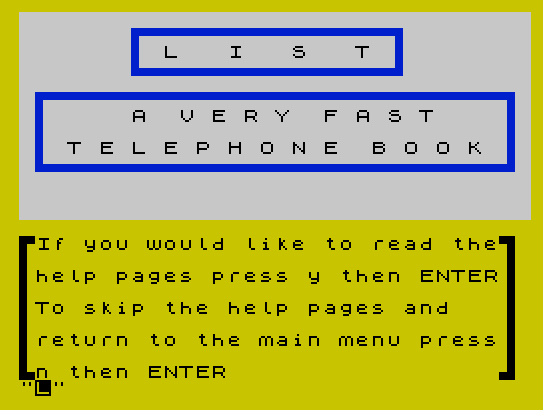
INKEY$polling to dispatch to one of four subroutines. - Lines 400–499: Help pages — explains how to add DATA statements and use the program. Uses
PAUSE 8000for paged display. - Lines 1000–1080: Name lookup — reads through DATA sequentially to find a matching name and display its number.
- Lines 2000–2090: Print area — iterates through all DATA entries, offering per-entry LPRINT control via
INPUT. - Lines 3000–3060: Save/exit section — offers a tape save (tripled for reliability) or a farewell exit sequence ending with
STOP. - Lines 6000–6070: Shared display subroutines — masthead logo and area menu rendering.
- Lines 7000, 9000, 9999: Data section and error handler.
Data Storage Strategy
Phone entries are stored as paired DATA statements beginning at line 9000, with names and numbers as string pairs. The program reserves lines 9010–9900 for user entries. A sentinel record DATA "bob","000-0000" at line 9000 marks the end of the list; when the lookup routine reads x$="bob", it knows no match was found (line 1045). This approach is simple but means all searches are linear O(n) scans requiring RESTORE before each new search.
The help pages walk the user through entering BASIC DATA lines manually by breaking into the program — the instructions direct the user to press Caps Shift + Edit (to invoke BREAK/STOP), then type line 9000 and RUN to re-enter the program. This is a practical self-editing workflow.
Menu Navigation and INKEY$ Idiom
The main menu (line 135) and most sub-menus use INKEY$ polling rather than INPUT, which avoids requiring the user to press ENTER for single-key choices. The pattern used is:
- Assign
LET G$=INKEY$ - Test each valid key with
IF G$="x" THEN ... - Re-loop on empty string (
IF G$="" THEN GO TO 135) - Display a flashing error indicator for invalid input at line 160
Line 156 correctly handles the null-key case, but lines 160 and 1080 contain a logical error: the condition IF G$<"1" OR G$>"3" (or INKEY$<>"y" OR INKEY$<>"n") is always true because any single character is either less than “1” or greater than “3” (and similarly, no character can simultaneously equal both “y” and “n”). The intended logic should use AND rather than OR. The same bug appears at lines 2035 and 3040.
Display Techniques
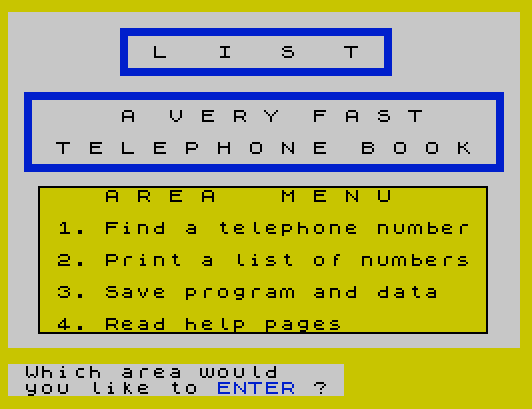
The program makes heavy use of block graphics characters embedded in PRINT strings to draw decorative bordered boxes around menus and the “LIST” logo. The masthead subroutine at line 6000 and the lookup section at line 1000 both render a framed title block this way.
Line 1005–1015 additionally uses PLOT/DRAW commands to draw ruled lines beneath the title in the lookup area, mixing pixel-level graphics with character-cell display. The lower status line (stream #0) is used at several points to display context-sensitive prompts without disturbing the main screen content.
Line 6060 uses PRINT OVER 1; PAPER 6; AT l,2 inside a FOR loop to paint a colored background band over the area menu text, creating a highlight effect without erasing the characters beneath.
Save Behavior
The save routine at line 3050 calls SAVE "list" LINE 1 three consecutive times. This is a deliberate redundancy — writing three copies to tape improves the chance of a successful load on a worn or misaligned tape. The LINE 1 parameter causes the program to auto-run from line 1 when loaded.
Error Handling
Line 9999 uses ON ERR GO TO 6055 as a global error trap. If a DATA exhaustion error occurs (e.g., reading past the last entry), the program jumps to the area menu print subroutine at line 6055 rather than crashing. This is a pragmatic fallback, though it may produce a slightly disorienting user experience since it lands mid-subroutine rather than at the top of the menu.
Notable Anomalies
- Line 445 branches to line 110, which does not exist in the listing. Since
GO TOto a non-existent line number falls through to the next available line (line 120, the secondGO SUB 6050), this effectively returns to the main menu — a functional if unintentional shortcut. - Line 3040 references
S$(uppercase) instead ofs$(lowercase); on the Spectrum these are the same variable, but it is inconsistent with the rest of the code style. - Subroutine 2090 (
RETURN) is unreachable in normal program flow since the print loop at line 2000 is called directly and exits viaGO TO 2000orGO TO 100, never viaRETURN. - The lookup loop at line 1080 calls
INKEY$twice in the same condition, meaning each call may return a different key — a subtle race condition in fast loops.
Image Gallery
Source Code
   10  REM  L I S T
   11 REM  by Lloyd Goad
   12 BORDER 6
   15 POKE 23609,10
   20 GO SUB 400
  100 CLS : REM  Area Menu
  105 GO SUB 6000
  120 GO SUB 6050
  130 PRINT #0; PAPER 7;" Which area would    "'" you like to ENTER ? "
  135 LET G$= INKEY$
  140 IF G$="1" THEN GO SUB 1000
  145 IF G$="2" THEN GO SUB 2000
  150 IF G$="3" THEN GO SUB 3000
  155 IF G$="4" THEN GO SUB 400
  156 IF G$="" THEN GO TO 135
  160 IF G$<"1" OR G$>"3" THEN CLS :PRINT FLASH 1; AT 9,8;"             "; AT 10,8;"             "; AT 11,8;"> > WRONG < <"; AT 12,8;"             "; AT 13,8;"             "
  170 PAUSE 60:GO TO 100
  400 CLS :REM   help pages
  410 GO SUB 6000
  440 INPUT "▜If you would like to read the▛ ▐                             ▌ ▐help pages press y then ENTER▌ ▐                             ▌ ▐To skip the help pages and   ▌ ▐                             ▌ ▐return to the main menu press▌ ▐                             ▌ ▟n then ENTER                 ▙"'h$
  443 IF h$="y" THEN CLS :GO TO 450
  445 IF h$="n" THEN GO TO 110
  447 IF h$ <>"y" OR h$ <>"n" THEN GO TO 440
  450 PRINT "H O W  D O E S  L I S T  W O R K"
  455 PRINT :PRINT "How do I get names and numbers   into my phone book ?"
  460 PRINT :PRINT "At any prompt(when you see the  flashing L)                     press BOTH the caps shift and   the edit keys at the same time  Then press the symbol shift and A keys at the same time.                                        The word STOP will appear       at the bottom of your screen."
  461 PRINT :PRINT "When this has happened                                          Press the K key                                                 Type in the number 9000                                         Press ENTER"
  462 PAUSE 8000:CLS :PRINT "H O W  D O E S  L I S T  W O R K"
  463 PRINT :PRINT "the  D A T A"
  464 PRINT :PRINT "The line numbers 9010 to 9900                                   have been set aside for your                                    names and telephone numbers                                     U S E  T H I S  F O R M  ! ! ! "
  465 PRINT :PRINT "DATA ""Name Name"";""0-000-000-0000"""
  466 PRINT :PRINT "to enter your data into LIST                                    Note : some people will have    more than one phone number.     This mean that you must add a   symbol of some kind on to that  person's name.                                                  Example :                       9010 DATA ""John Smyth"",""555-1212"""''"9011 DATA ""John Smyth wk"",""555-1313"""
  467 PRINT :PRINT "Any symbol that you choose is    O.K.  The important thing is    to be consistant.                                              After typing in your data          press RUN then ENTER         this will take you back into    the program"
  470 PRINT :PRINT :PRINT :PRINT "G O O D  L U C K"
  499 PAUSE 8000:CLS :GO TO 410
 1000 CLS :PRINT AT 1,7;"▜▀▀▀▀▀▀▀▀▀▀▀▀▀▀▀▛               ▐               ▌               ▟▄▄▄▄▄▄▄▄▄▄▄▄▄▄▄▙"; AT 2,9;"L   I   S   T"
 1005 PLOT 36,140:DRAW 160,0:DRAW 0,-5:PLOT 36,140:DRAW 0,-50:DRAW 10,0
 1010 PLOT 48,135:DRAW 160,0:DRAW 0,-5:PLOT 48,135:DRAW 0,-50:DRAW 10,0
 1015 PLOT 60,130:DRAW 160,0:DRAW 0,-50:PLOT 60,130:DRAW 0,-50:DRAW 160,0
 1020 PRINT AT 7,10;"The Automatic"
 1025 PRINT AT 9,10;"Telephone Book"
 1030 INPUT "  "; PAPER 7;" Whose number do you want ? "''n$
 1035 READ x$,y$
 1040 IF x$=n$ THEN GO TO 1055
 1045 IF x$="bob" THEN PRINT AT 14,0;"     This person is not LISTed":PAUSE 100:PRINT AT 14,0;"                                ":RESTORE :GO TO 1060
 1050 IF x$ <>n$ THEN GO TO 1035
 1055 PRINT BRIGHT 1; INVERSE 1; AT 14,1;" ";x$;":";y$;" "
 1060 PRINT #0; PAPER 7;"                     "'"  Would you like to  "'"  see another number "'"                     "'""'"    ENTER [y]or[n]   "
 1065 LET a$= INKEY$
 1070 IF a$="y" THEN PRINT AT 14,0;"                                                                ":RESTORE :GO TO 1000
 1075 IF a$="n" THEN GO TO 100
 1080 IF INKEY$ <>"y" OR INKEY$ <>"n" THEN GO TO 1065
 2000 CLS : REM  Print out Area
 2010 PRINT "▀▀▀▀▀▀▀▀▀▀▀▀▀▀▀▀▀▀▀▀▀▀▀▀▀▀▀▀▀▀▀▀";"T E L E P H O N E  N U M B E R S";"▄▄▄▄▄▄▄▄▄▄▄▄▄▄▄▄▄▄▄▄▄▄▄▄▄▄▄▄▄▄▄▄"
 2020 PRINT #0; PAPER 7;"[PRINT out a LIST ?][ y ]or[ n ]"
 2021 LET s$= INKEY$
 2022 IF s$="" THEN GO TO 2021
 2025 IF s$="n" THEN GO TO 100
 2030 IF s$="y" THEN LPRINT "▀▀▀▀▀▀▀▀▀▀▀▀▀▀▀▀▀▀▀▀▀▀▀▀▀▀▀▀▀▀▀▀T E L E P H O N E  N U M B E R S▄▄▄▄▄▄▄▄▄▄▄▄▄▄▄▄▄▄▄▄▄▄▄▄▄▄▄▄▄▄▄▄":GO TO 2037
 2035 IF s$ <>"y" OR s$ <>"n" THEN GO TO 2010
 2037 RESTORE
 2040 READ x$,y$
 2042 IF x$="bob" THEN RESTORE
 2045 PRINT AT 5,0;x$,y$
 2050 INPUT PAPER 7;"       P R E S S      "'"[ 1. to LPRINT NAME  ]"'"[ 2. to SKIP NAME    ]"'"[ 3. to SKIP LINE    ]"'"[ 4. to MENU         ]"'"       your choice ?  ";p$
 2055 IF p$="1" THEN LPRINT x$,y$:PRINT AT 5,0;"                                                                ":GO TO 2040
 2060 IF p$="2" THEN PRINT AT 5,0;"                                                               ":GO TO 2040
 2063 IF p$="3" THEN LPRINT :GO TO 2050
 2065 IF p$="4" THEN GO TO 2000
 2070 IF p$<"1" OR p$>"4" THEN GO TO 2050
 2090 RETURN
 3000 CLS :REM  E N D  S E C T I O N
 3010 GO SUB 6000
 3015 PRINT AT 11,0;"▜▀▀▀▀▀▀▀▀▀▀▀▀▀▀▀▀▀▀▀▀▀▀▀▀▀▀▀▀▀▀▛";"▐   Will you save to tape ?    ▌";"▟▄▄▄▄▄▄▄▄▄▄▄▄▄▄▄▄▄▄▄▄▄▄▄▄▄▄▄▄▄▄▙"
 3020 INPUT "           to SAVE                                [ ENTER ][ y ]                                           to EXIT                                [ ENTER ][ n ]                            ";s$
 3030 IF s$="n" THEN CLS :PRINT AT 10,8;"G o o d b y e":PAUSE 100:CLS :PRINT AT 10,8;"S o  L o n g":PAUSE 100:CLS :PRINT AT 10,2;"T h a n k s  f o r  u s i n g                                              L I S T":PAUSE 300:STOP
 3035 IF s$="y" THEN CLS :GO TO 3050
 3040 IF S$ <>"n" OR s$ <>"y" THEN GO TO 3000
 3050 SAVE "list" LINE 1:SAVE "list" LINE 1:SAVE "list" LINE 1
 3060 RETURN
 6000 REM  mast
 6005 PRINT AT 1,7;"▜▀▀▀▀▀▀▀▀▀▀▀▀▀▀▀▛               ▐               ▌               ▟▄▄▄▄▄▄▄▄▄▄▄▄▄▄▄▙"; AT 2,9;"L   I   S   T"
 6010 PRINT AT 5,1;"▜▀▀▀▀▀▀▀▀▀▀▀▀▀▀▀▀▀▀▀▀▀▀▀▀▀▀▀▀▛  ▐                            ▌  ▐                            ▌  ▐                            ▌  ▟▄▄▄▄▄▄▄▄▄▄▄▄▄▄▄▄▄▄▄▄▄▄▄▄▄▄▄▄▙"
 6015 PRINT AT 6,7;"A  V E R Y  F A S T"; AT 8,3;"T E L E P H O N E  B O O K"
 6020 RETURN
 6050 REM  area menu
 6055 INK 0:PRINT AT 11,0;"      A R E A    M E N U     "''"   1. Find a telephone number"''"   2. Print a list of numbers"''"   3. Save program and data"''"   4. Read help pages"
 6060 FOR l=11 TO 19:PRINT OVER 1; PAPER 6; AT l,2;"                            ":NEXT l
 6065 PLOT 15,15:DRAW 0,73:DRAW 224,0:DRAW 0,-73:DRAW -224,0
 6070 RETURN
 7000   REM  the D A T A
 9000 DATA "bob","000-0000"
 9999 ON ERR GO TO 6055
Note: Type-in program listings on this website use ZMAKEBAS notation for graphics characters.