
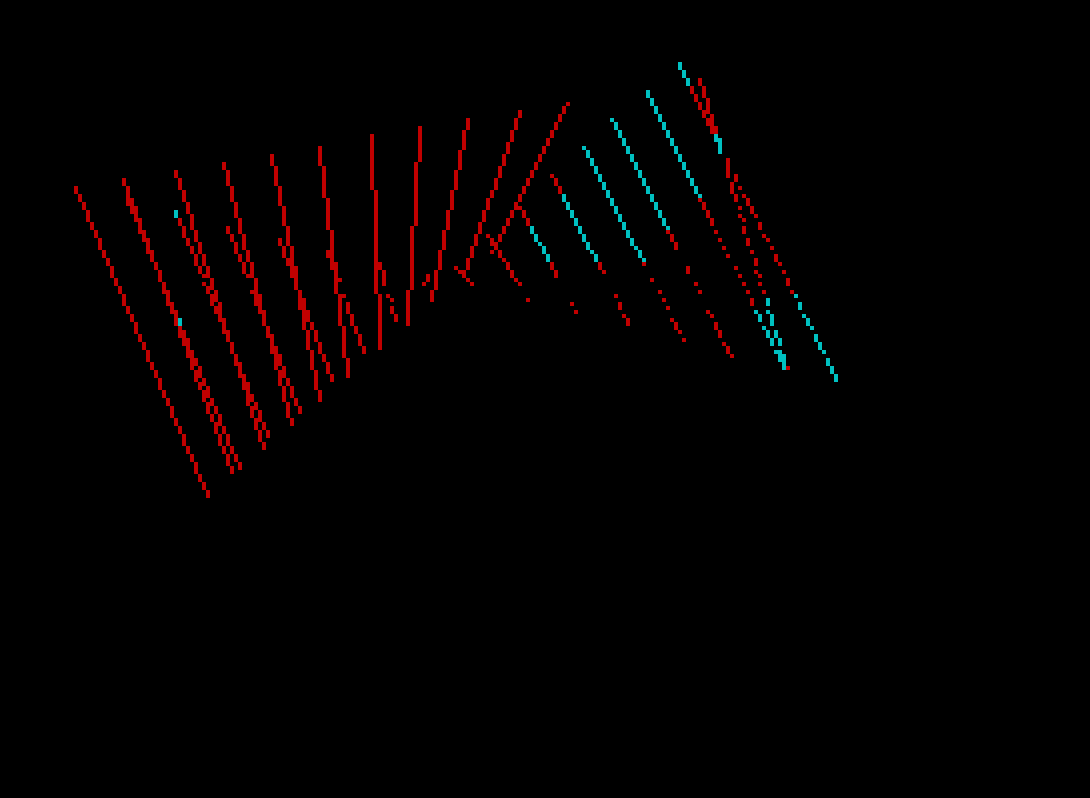
This program draws a continuously animated series of straight lines connecting two paths that traverse the screen, creating a ruled-surface or “string art” visual effect. It maintains a rolling buffer of 30 line segments in arrays e, f, g, and h, erasing the oldest line using INVERSE 1 (XOR-style plotting) before drawing the new one. Two pairs of points stored in the 2×2 arrays x and y define start and end positions for each path segment, and after each set of lines is drawn, both endpoints are updated to new random positions so the animation evolves continuously. The screen uses black paper with white ink and operates in a tight loop without any delay, producing smooth motion within BASIC’s plotting speed constraints.
Program Analysis
Program Structure
The program is organized into four logical phases that repeat in a continuous loop:
- Initialization (lines 10–90): Sets array sizes, display attributes, and clears the screen.
- Random point setup (lines 100–160): Fills a 2×2 matrix of (x, y) coordinates with random screen positions; each row represents one of the two paths, and each column represents start/end of a segment.
- Line drawing loop (lines 200–530): Interpolates between the two paths, drawing lines while erasing old ones from the circular buffer.
- Endpoint update and loop (lines 600–700): Advances each path’s start to the old end, picks a new random end, and restarts the drawing phase.
Circular Erase Buffer
Arrays e, f, g, and h (each of length t=30) store the origin and displacement of the 30 most recently drawn lines. The pointer p advances each iteration (line 440) and wraps at t (line 450). Before drawing a new line, lines 460–470 replay the stored PLOT/DRAW with INVERSE 1, which toggles the pixels back to their original state, effectively erasing only that specific line without disturbing anything else on screen.
Ruled-Surface Interpolation
The program does not draw random lines; it constructs a discrete ruled surface. Two line segments are defined — one from (x(1,1), y(1,1)) to (x(1,2), y(1,2)) and another from (x(2,1), y(2,1)) to (x(2,2), y(2,2)). Step increments tx, ty, bx, and by (lines 200–230) are computed so that exactly s = t/2 = 15 lines connect the two paths at evenly spaced intervals. The variable a drives the FOR loop along the first path’s x-axis, while b, c, d track the corresponding y and second-path coordinates.
Key Variables
| Variable | Role |
|---|---|
t | Buffer size (30); also controls number of interpolation steps via s=t/2 |
p | Circular buffer pointer (1–30) |
s | Number of lines per frame (15) |
x(q,1/2), y(q,1/2) | Start/end coordinates for path q (1=top path, 2=bottom path) |
tx, ty | Per-step increments along path 1 |
bx, by | Per-step increments along path 2 |
e, f, g, h | Erase buffer: plot x, plot y, draw Δx, draw Δy |
Notable Techniques
- INVERSE 1 erasing: Using
PLOT INVERSE 1andDRAW INVERSE 1to erase a previously drawn line is a well-known pixel-toggle technique that avoids full screen clears and enables smooth animation in BASIC. - Circular buffer with modular wrap: The combination of
LET p=p+1andIF p>t THEN LET p=1is a compact manual ring-buffer idiom. - Continuous endpoint migration: After each frame, lines 610–640 shift old endpoints to become new starts and assign fresh random ends, so the animation flows smoothly without jumps.
- Black paper/border:
BORDER 0: PAPER 0: INK 7sets up a high-contrast black background, maximizing visibility of the white line art.
Potential Anomalies
The FOR loop on line 330 uses STEP tx, which is derived from dividing the x-distance by s. If x(1,1) and x(1,2) are very close together (or equal), tx could be zero or near-zero, causing either a divide-by-zero situation or an infinite loop. On average this is unlikely given random values over 0–255, but it is a theoretical edge case the program does not guard against. Similarly, if x(1,1) > x(1,2), tx will be negative, which is handled correctly by the FOR…STEP construct.
The buffer pointer p starts at 1 (line 15) but the erase operation at lines 460–470 runs before the buffer is fully populated on the very first pass, meaning it will attempt to erase zero-initialized array entries. Since PLOT 0,0 with DRAW 0,0 is harmless, this does not cause a visible glitch.
Image Gallery
Source Code
   10 LET t=30
   15 LET p=1
   20 DIM e(t)
   25 DIM f(t)
   40 DIM g(t)
   50 DIM h(t)
   60 DIM x(2,2)
   70 DIM y(2,2)
   80 BORDER 0: PAPER 0: INK 7: OVER 0
   90 CLS
  100 FOR s=1 TO 2
  110 FOR q=1 TO 2
  120 LET x(s,q)=RND*255
  130 LET y(s,q)=RND*175
  140 NEXT q
  150 NEXT s
  160 LET s=t/2
  200 LET tx=(x(1,2)-x(1,1))/s
  210 LET ty=(y(1,2)-y(1,1))/s
  220 LET bx=(x(2,2)-x(2,1))/s
  230 LET by=(y(2,2)-y(2,1))/s
  300 LET b=y(1,1)
  310 LET c=x(2,1)
  320 LET d=y(2,1)
  330 FOR a=x(1,1) TO x(1,2) STEP tx
  400 LET e(p)=a
  410 LET f(p)=b
  420 LET g(p)=c-a
  430 LET h(p)=d-b
  440 LET p=p+1
  450 IF p>t THEN LET p=1
  460 PLOT INVERSE 1;e(p),f(p)
  470 DRAW INVERSE 1;g(p),h(p)
  480 PLOT a,b
  490 DRAW c-a,d-b
  500 LET b=b+ty
  510 LET c=c+bx
  520 LET d=d+by
  530 NEXT a
  540 INK RND*6+1
  600 FOR q=1 TO 2
  610 LET x(q,1)=x(q,2)
  620 LET y(q,1)=y(q,2)
  630 LET x(q,2)=RND*255
  640 LET y(q,2)=RND*175
  650 NEXT q
  700 GO TO 200
Note: Type-in program listings on this website use ZMAKEBAS notation for graphics characters.