
This program draws a randomly moving block graphic character on screen, bouncing around until it hits the edge of the display. Each frame, the program randomly selects one of four movement directions (lines 40, 50, 60, 70) by jumping to a computed line number using `GO TO 31+40*RND`, which resolves to one of the four direction blocks. The moving pixel is drawn using ZX Spectrum block graphics — a half-block for horizontal movement and a side-block for vertical — with random INK and PAPER colors applied for a colorful light-show effect. When the cursor reaches any screen edge (x=0, x=21, y=0, or y=31), the display is cleared with a new background color and the position resets to the center. A user-defined pause duration entered at startup controls the animation speed, and pressing “p” skips the pause to jump immediately to the next frame.
Program Analysis
Program Structure
The program is organized into an input phase, a direction-selection dispatcher, four movement blocks, and a rendering/reset block. Control flow is driven almost entirely by computed GO TO targets rather than structured loops or subroutines.
- Lines 2–17: Initialization — seed the random number generator, prompt for pause duration, set starting position (
x=12,y=16, near screen center), and choose a random background color. - Line 20: Central dispatcher — jumps to one of four direction blocks.
- Lines 40–42, 50–52, 60–62, 70–71: Four movement blocks, one per direction.
- Lines 100–110: Rendering, pause, edge detection, and loop-back.
Computed GO TO Dispatch
Line 20 uses GO TO 31+40*RND to randomly select a direction. Since RND returns a value in [0, 1), the expression yields a value in [31, 71). The four target lines are 40, 50, 60, and 70. Because BASIC’s GO TO jumps to the next line at or after the computed number, values in [31,40) → line 40, [40,50) → line 50, [50,60) → line 60, and [60,71) → line 70 — each with equal probability of roughly 25%. This is a compact and efficient dispatch idiom.
Movement Logic
Each direction block nudges a coordinate by ±1 using a boolean-arithmetic idiom. For example, LET x=x+(x<>21) increments x only when it has not yet reached the boundary value 21; the boolean expression (x<>21) evaluates to 1 (true) or 0 (false) in Sinclair BASIC, so no explicit IF is needed. This keeps the coordinate clamped without branching.
| Lines | Direction | Coordinate changed | Graphic used |
|---|---|---|---|
| 40–42 | Right | x +1 (clamped at 21) | ▄ (lower half-block) |
| 50–52 | Down | y +1 (clamped at 31) | ▌ (left half-block) |
| 60–62 | Left | x −1 (clamped at 0) | ▄ (lower half-block) |
| 70–71 | Up | y −1 (clamped at 0) | ▌ (left half-block) |
Rendering and Color
Line 100 prints the current block graphic character stored in c$ at position (x, y) with a randomly chosen INK color (INK RND*7). The background PAPER color is set randomly at startup (line 17) and again on each edge-triggered reset (line 107), producing a varied light-show appearance over time.
Edge Detection and Reset
Line 107 checks whether x or y has reached any of the four screen boundaries (0 or 21 for rows, 0 or 31 for columns). On a hit, it sets a new random PAPER color, clears the screen, and resets the cursor to the center — effectively restarting the animation with a fresh background.
User Interaction
Line 103 checks for the key "p" via INKEY$; if pressed, it immediately jumps back to the dispatcher (line 20), skipping the PAUSE z on line 105. The pause duration z entered at startup (line 5) controls the baseline animation speed in 50ths of a second per frame.
Bugs and Anomalies
- The coordinate roles of
xandyappear swapped relative to the direction label comments: lines 40/60 (labeled as horizontal movement) modifyx, which is theATrow parameter (vertical on screen), while lines 50/70 modifyy, the column (horizontal). The program still works consistently, but the variable naming is counterintuitive. - The boundary clamp (e.g.
x<>21) only prevents incrementing beyond the boundary; it does not stop the program from printing at the boundary coordinate on the same step. The edge reset on line 107 handles the actual boundary response, making the clamp’s role purely cosmetic for the movement variables. - Line 5’s prompt text contains a stray
RESTOREtoken mid-string ("Numb RESTORE r of Frames to Pause?"), which appears to be an editing artifact — the keyword was accidentally embedded in the string literal and will display literally as part of the prompt.
Image Gallery
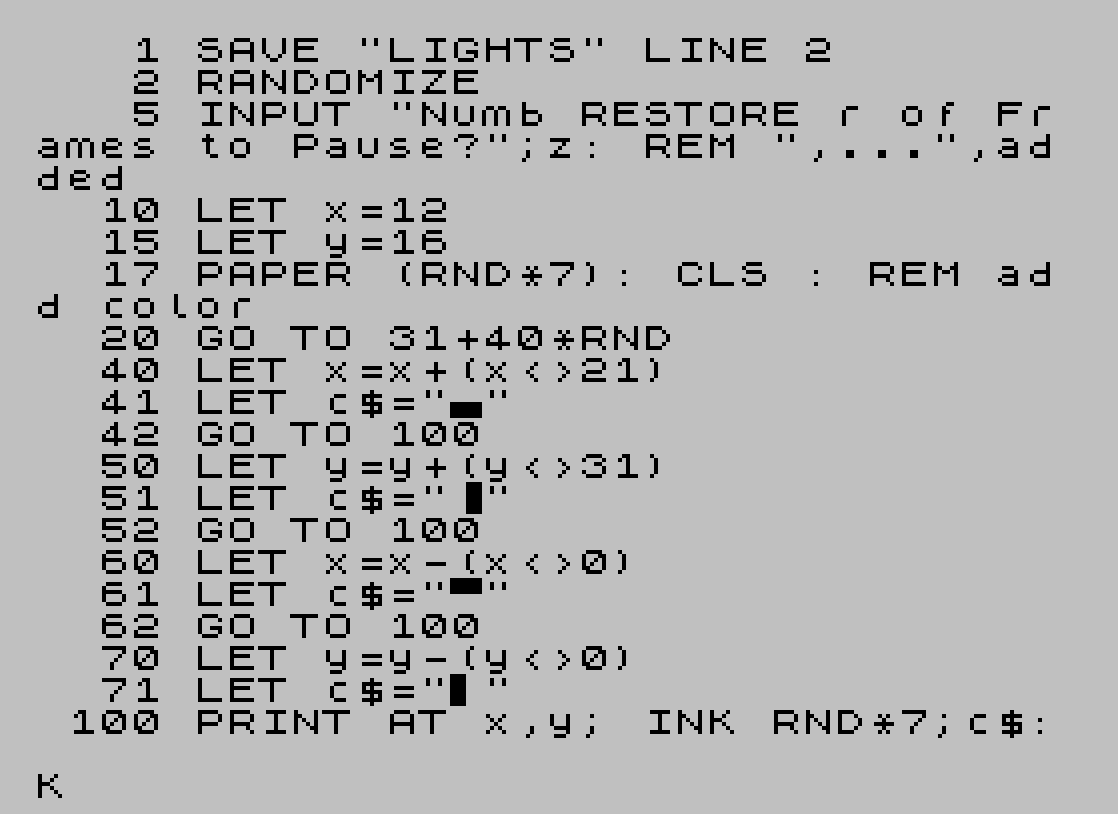
Source Code
    1 SAVE "LIGHTS" LINE 2
    2 RANDOMIZE
    5 INPUT "Numb RESTORE r of Frames to Pause?";z: REM ",...",added
   10 LET x=12
   15 LET y=16
   17 PAPER (RND*7): CLS : REM add color
   20 GO TO 31+40*RND
   40 LET x=x+(x<>21)
   41 LET c$="\.."
   42 GO TO 100
   50 LET y=y+(y<>31)
   51 LET c$="\: "
   52 GO TO 100
   60 LET x=x-(x<>0)
   61 LET c$="\.."
   62 GO TO 100
   70 LET y=y-(y<>0)
   71 LET c$="\: "
  100 PRINT AT x,y; INK RND*7;c$: REM ink added for color
  103 IF INKEY$="p" THEN GO TO 20
  105 PAUSE z
  107 IF x=0 OR x=21 OR y=0 OR y=31 THEN PAPER RND*7: CLS : LET x=12: LET y=16: REM Restart if touch edge of screen
  110 GO TO 20
Note: Type-in program listings on this website use ZMAKEBAS notation for graphics characters.