
This program is a joystick-controlled drawing tool that moves a cursor around the screen, leaving a trail of randomly colored characters. The cursor position is tracked with variables `A` (row, 0–21) and `B` (column, 0–31), and at each step the character is printed using a random INK color chosen via `INT(RND*7)`. Movement is handled by reading the joystick with the `STICK` function using port 1, checking standard directional values for up, down, left, and right, including diagonal combinations. Pressing the second joystick button randomizes the drawn character to a random printable symbol from CHR$ 91–143, allowing the user to vary the trail glyph.
Program Analysis
Program Structure
The program is a tight 10-line main loop. Lines 10–20 initialize the cursor position and the drawing character. Lines 30–80 form the core loop: print the current character at the current position, then test joystick directions and update row (A) and column (B) accordingly. Line 90 handles a button press to change the drawing character, and line 100 loops back to line 30 unconditionally.
- Line 10 — Initialize row
Aand columnBto 0. - Line 20 — Set the drawing character
Z$to the copyright/block symbol (char 127, the © escape resolving to the checkerboard graphic). - Line 30 — Print
Z$at rowA, columnBwith a random INK color 0–6. - Line 40 — Ensure FLASH is off (defensive reset each loop iteration).
- Lines 50–80 — Four directional tests using
STICK. - Line 90 — If fire button 2 is pressed, randomize
Z$. - Line 100 — Return to line 30.
STICK Function Usage
Direction input is read using the STICK keyword (|), a TS2068 extension. The call |(1,2) reads joystick port 1 in digital mode, returning a bitmask. Standard directional values tested are:
| Value | Direction | Lines tested |
|---|---|---|
| 1 | Up | 50 |
| 2 | Down | 70 |
| 4 | Left | 60 |
| 8 | Right | 80 |
| 5 | Up+Left diagonal | 50, 60 |
| 6 | Down+Left diagonal | 60, 70 |
| 9 | Up+Right diagonal | 50, 80 |
| 10 | Down+Right diagonal | 70, 80 |
Diagonals are handled by listing the combined bitmask value alongside the cardinal values in each directional line, so a diagonal press moves both the row and the column simultaneously across two separate IF tests.
Drawing Mechanics
The program works as a persistent drawing tool: because there is no screen clear, each printed character remains on screen as the cursor moves, building up a trail. The INK color for each character is randomized independently with INK INT(RND*7) directly inside the PRINT AT statement, producing a multicolored trail without any extra lines of code.
Boundary clamping is performed inline within each directional IF block. If a movement would take A below 0 or above 21, or B below 0 or above 31, the value is clamped and a GO TO 30 is issued immediately to skip the remaining direction tests and redraw at the clamped position.
Brush Character Selection
Line 90 reads |(2,2), the second joystick’s fire button. When pressed (value = 1), Z$ is set to CHR$(INT(RND*53)+91), yielding a random character in the range CHR$ 91–143. This range spans punctuation, uppercase letters, and the block graphic characters (128–143), giving the user a variety of brush shapes.
Notable Techniques and Anomalies
FLASH 0on line 40 is reset every loop iteration, which is defensive but redundant since FLASH is not set anywhere else in the program.- The
GO TO 30within the boundary-clamping sub-expressions short-circuits the remaining direction checks. This is an efficient but slightly unconventional use ofGO TOinside a compoundIFchain. - Value 5 appears in both line 50 (up) and line 60 (left), which correctly represents the diagonal up-left bitmask being detected in both axes simultaneously.
- The initial character
Z$="\*"uses the zmakebas escape\*for the © character (char 127 in Spectrum character set), which renders as a checkerboard block graphic — a visually solid default brush. - No
PAPERattribute is set, so the background color defaults to whatever was last used, which may cause minor color attribute bleed depending on screen state at startup.
Image Gallery
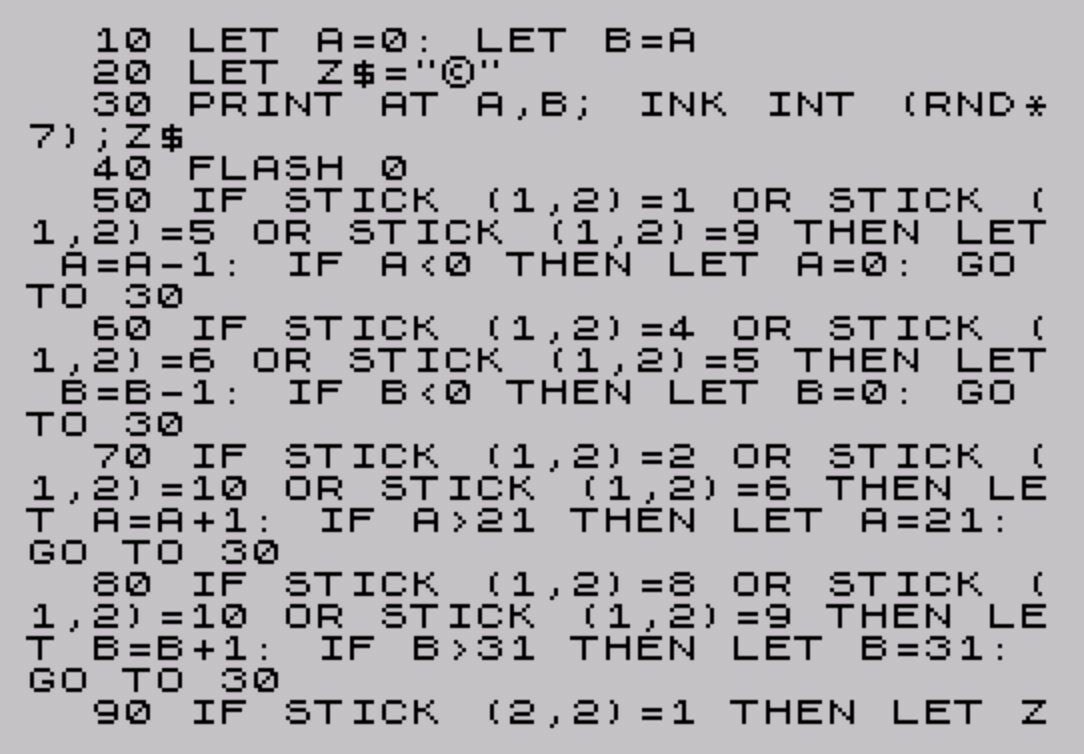

Source Code
   10 LET A=0: LET B=A
   20 LET Z$="\*"
   30 PRINT AT A,B; INK INT (RND*7);Z$
   40 FLASH 0
   50 IF |(1,2)=1 OR |(1,2)=5 OR |(1,2)=9 THEN LET A=A-1: IF A<0 THEN LET A=0: GO TO 30
   60 IF |(1,2)=4 OR |(1,2)=6 OR |(1,2)=5 THEN LET B=B-1: IF B<0 THEN LET B=0: GO TO 30
   70 IF |(1,2)=2 OR |(1,2)=10 OR |(1,2)=6 THEN LET A=A+1: IF A>21 THEN LET A=21: GO TO 30
   80 IF |(1,2)=8 OR |(1,2)=10 OR |(1,2)=9 THEN LET B=B+1: IF B>31 THEN LET B=31: GO TO 30
   90 IF |(2,2)=1 THEN LET Z$=CHR$ (INT (RND*53)+91)
  100 GO TO 30
Note: Type-in program listings on this website use ZMAKEBAS notation for graphics characters.