
This program creates a scrolling display effect using a user-entered string of up to 20 characters. After accepting input, it repeatedly prints the string followed by its inverse-video copy at coordinates controlled by two counters that increment and bounce when they exceed the screen boundaries. Line 30 uses POKE 23692,255 to disable the “scroll?” prompt, preventing the program from pausing when output reaches the bottom of the screen. The position counters bounce by negating themselves (e.g., `LET e=-e`) rather than resetting to zero, creating an asymmetric traversal pattern across the 22-row by 32-column display area.
Program Structure
The program is short and self-contained, divided into two phases: a one-time setup/input phase (lines 10–40) and an infinite display loop (lines 50–100).
- Lines 10–20: Set screen attributes and solicit a string from the user.
- Line 30: Disables the scroll prompt via a system variable POKE.
- Line 40: Initializes the two position counters.
- Lines 50–100: The main loop — prints, increments, bounces, and repeats indefinitely.
Screen Setup
Line 10 sets OVER 0, INK 0, PAPER 7, and BORDER 7, establishing a clean black-on-white display. CLS clears the screen after all attributes are applied. The OVER 0 reset ensures no transparent overlay from any prior state.
Scroll Suppression
Line 30 POKEs system variable address 23692 (the scroll counter, SCRCT) with 255. This tells the ROM that 255 lines can still scroll before prompting the user, effectively suppressing the “scroll?” prompt for the duration of the program. Without this, the continuous PRINT AT activity could eventually trigger a pause.
Bouncing Position Logic
The horizontal counter d and vertical counter e each increment by 1 per loop iteration. When e exceeds 20 (line 70) or d exceeds 30 (line 90), the counter is negated rather than reset to zero. This means after the first bounce, the counter becomes a large negative number and then climbs back toward zero and beyond, producing an irregular traversal rather than a simple wrap-around.
| Variable | Axis | Threshold | Bounce Action |
|---|---|---|---|
e | Row | > 20 | LET e=-e |
d | Column | > 30 | LET d=-d |
Dual String Display
Line 50 prints a$ normally, then immediately prints it again with INVERSE 1 active (set inline within the PRINT statement). This places the string and its inverse-video copy side by side at the same screen position, creating a visually distinctive paired display without any additional variables or screen manipulation.
Bugs and Anomalies
- The bounce negation (
LET e=-e,LET d=-d) produces large negative values after the first trigger. Negative row/column values passed toPRINT ATwill cause an error (error code B — integer out of range). The program will therefore crash on the first bounce rather than continuing to loop smoothly. This is a logic bug: the intended behavior would require clamping or proper directional reversal. - The column threshold of 30 is just within the 32-column screen width, but the printed output (two copies of up to 20 characters) can be up to 40 characters wide, which would wrap or cause an error even before any bouncing occurs if
dis nonzero. - The INPUT prompt asks for “1 – 20 characters” but does not enforce a maximum length; entering a longer string will not be rejected.
Image Gallery
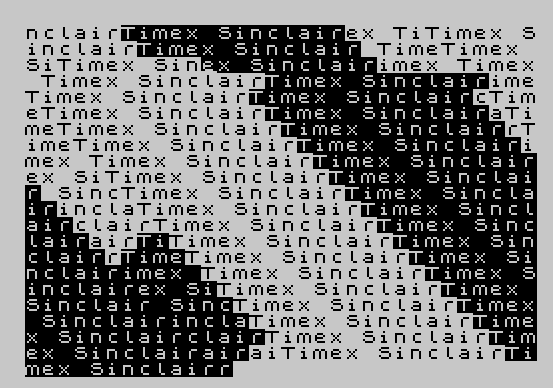
Source Code
  10 OVER 0:INK 0:PAPER 7:BORDER 7:CLS
  20 INPUT "Enter 1 - 20 characters"'a$
  30 POKE 23692,255
  40 LET d=0:LET e=0
  50 PRINT AT e,d;a$; INVERSE 1;a$
  60 LET e=e+1
  70 IF e>20 THEN LET e=-e
  80 LET d=d+1
  90 IF d>30 THEN LET d=-d
 100 GO TO 50
Note: Type-in program listings on this website use ZMAKEBAS notation for graphics characters.