
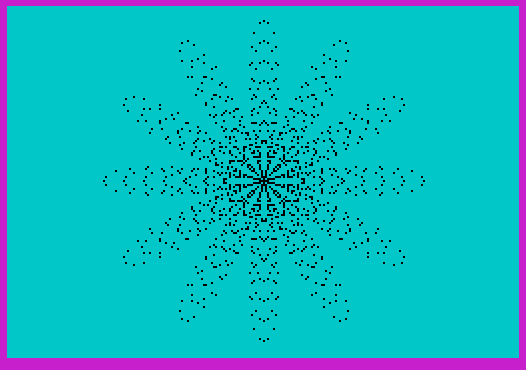
Ice Star draws a series of polar rose curves on screen, iterating through radii from 20 to 80 (step 10) using the parametric equations S = K·cos(L·6), H = S·sin(L), V = S·cos(L), which traces a six-petaled star or snowflake pattern centered at screen coordinates (128, 88). A 703-character string of spaces is pre-built in a loop (lines 40–60) to serve as a full-screen PAPER color overlay, applied repeatedly with OVER 1 to cycle the background through random colors without erasing the drawn figure. The animation loop at lines 240–260 continuously picks a random ink color and re-prints the space string over the graphic, creating a color-cycling effect on the ice star pattern. A FLAG variable (lines 90, 200–230) is used to re-enter the inner FOR–NEXT loop at line 150 after resetting, though this technique interacts with the BASIC loop control in a non-standard way.
Program Structure
The program divides into four logical phases:
- Setup (lines 10–80): Sets display colors, then builds a 703-character string
P$of spaces in a loop, large enough to cover the entire 22×32 character screen (704 characters including the initial space at line 30). - Drawing (lines 90–230): Plots a family of polar rose curves at increasing radii using a nested loop structure controlled by
K(outer) andL(inner), with aFLAGvariable managing re-entry. - Color animation (lines 240–260): Continuously overlays the pre-built space string using
OVER 1with a randomPAPERcolor, cycling the background without clearing the graphic. - Dead code (lines 9992–9998): REM statements containing commented-out SAVE and LOAD commands, preserved as developer notes.
Mathematical Technique
The star shape is generated using a polar rose in parametric form. For each radius step K, the parameter L sweeps from 0 to π (stored as Y and Z). The equations are:
S = K * COS(L * 6)— the polar radius modulated by a 6× frequency cosine, producing 6 petals.H = S * SIN(L)— horizontal Cartesian component.V = S * COS(L)— vertical Cartesian component.- The point is plotted at
(128 + H, 88 + V), centering the figure on the 256×176 pixel display.
Sweeping only from 0 to π (rather than 0 to 2π) is sufficient because the cosine modulation with even multiplier 6 produces a symmetric figure; the second half would retrace the first.
FLAG-Based Loop Re-entry
Lines 90–230 use an unusual control flow pattern. FLAG is initialized to 0 before the outer FOR K loop. Inside the inner FOR L loop, FLAG is incremented each iteration (line 200). When FLAG reaches 101, execution jumps to line 230, which resets FLAG to 0 and executes NEXT K. The GO TO 150 at line 220 re-enters the FOR L ... NEXT L loop body mid-execution. This is a deliberate (if fragile) technique to exit and re-enter the inner loop body, effectively running the inner loop 101 times before advancing K. The step value E is recalculated once per K iteration at line 130 as (π - 0) / 100, giving 100 steps plus the initial value — consistent with the FLAG limit of 101.
Full-Screen String Overlay
Lines 30–60 pre-allocate P$ as a string of spaces. The loop runs X from 0 to 702, concatenating one space per iteration, resulting in 704 characters total (1 initial + 703 added). At PRINT AT 0,0, this fills all 22 rows × 32 columns = 704 character cells. Using OVER 1 means the spaces are XOR’d with the existing pixel data, so the star graphic is preserved while the paper attribute of each cell is repainted with the chosen random color.
Color Cycling Animation
The animation loop (lines 240–260) picks a random integer from 1–6 for COL (excluding black=0 and white=7), prints the full-screen space string with that paper color and OVER 1, pauses for approximately 2 seconds (PAUSE 100 = 100/50 s), then repeats indefinitely. This gives the illusion of the star glowing in shifting colors without any redrawing of the graphic.
Notable Observations
- The pre-building of
P$via repeated concatenation (line 50) is slow but avoids the need for a second full-screen print loop during animation. - The
INK 9at line 20 sets ink to transparent/contrast mode on some systems; combined with colored paper overlays, this affects how the plotted points appear. - The
FLAGmechanism is an unconventional substitute for a proper exit condition and relies on the interpreter retaining loop state when re-entered viaGO TO. - The REM at line 10 contains control characters (escape codes
\\{20}\\{1}and\\{20}\\{0}) used for display formatting of the title within the listing.
Image Gallery
Source Code
   10 REM \{20}\{1}ICESTAR\{20}\{0}
   20 INK 9:BORDER 3:PAPER 1:CLS
   30 LET P$=" ":LET T$=" "
   40 FOR X=0 TO 702
   50 LET P$=P$+T$
   60 PRINT ".";:NEXT X
   70 REM CREATED STRING OF               SPACES SIZE OF SCREEN
   80 CLS
   90 LET FLAG=0
  100 FOR K=20 TO 80 STEP 10
  110 LET Y=0:LET Z= PI
  120 LET C=100
  130 LET E=(Z-Y)/C
  140 FOR L=Y TO Z STEP E
  150 LET S=K* COS (L*6)
  160 LET H=S* SIN L
  170 LET V=S* COS L
  180 PLOT 128+H,88+V
  190 NEXT L
  200 LET FLAG=FLAG+1
  210 IF FLAG=101 THEN GO TO 230
  220 GO TO 150
  230 LET FLAG=0:NEXT K
  240 LET COL= INT (RND*6)+1
  250 PRINT AT 0,0; PAPER COL; OVER 1;P$
  260 PAUSE 100:GO TO 240
 9992 REM PRINT USR 100:SAVE "ICESTR.B1" LINE 1
 9998 REM PRINT USR 100:LOAD "L.B1"
Note: Type-in program listings on this website use ZMAKEBAS notation for graphics characters.