
This program draws a high-resolution 3D hat-shaped surface using the PLOT command. Lines 20 draws a full-screen border rectangle, then the main nested loop (lines 60–160) iterates over a circular domain in the k and t variables to compute a parametric surface where height is defined by a sum-of-sines formula: SIN(xt) + 0.4·SIN(3·xt). The x and y screen coordinates are derived via an oblique isometric-style projection using scaling factors xs=0.78 and ys=0.85, with centre point p=128, q=95. No machine code is used; the program relies entirely on BASIC floating-point maths, making it computationally intensive but straightforward to follow.
Program Structure
The program is divided into three logical phases:
- Border drawing (line 20): uses
PLOT/DRAWto trace a rectangle around the full 256×176 pixel screen area. - Parameter initialisation (lines 35–50): pre-computes all scaling and frequency factors to avoid repeated arithmetic inside the loops.
- Surface rendering (lines 60–160): a double nested loop iterates over the circular domain and plots each surface point individually.
Mathematical Surface Definition
The surface is a classic “sombrero” or hat function. For each column slice k (ranging from -zp to zp, i.e. −64 to 64), the half-width of the circular cross-section is computed at line 80:
xl = INT(0.5 + SQR(xp*xp - zt*zt))
where zt = k * xq scales k into the same coordinate space as the x-axis radius xp=144. This enforces a circular boundary on the (t, k) domain. The height at each point is then:
yy = (SIN(xt) + 0.4 * SIN(3*xt)) * yf
where xt = SQR(t*t + zt*zt) * xf is the radial distance scaled by frequency factor xf = xr/xp (with xr = 1.5*PI). The second harmonic term 0.4*SIN(3*xt) adds a secondary ripple ring around the central peak.
Projection and Scaling
The 3D-to-2D projection is an oblique parallel (cabinet-style) projection rather than true isometric. Screen coordinates are computed as:
| Variable | Formula | Purpose |
|---|---|---|
x | xs*(t+k) + p | Horizontal screen position; t+k gives the oblique axis blend |
y | ys*(yy-k) + q | Vertical screen position; yy is height, -k recedes into the screen |
The factors xs=0.78 and ys=0.85 compress the axes to keep the image within the bordered area. The centre offsets p=128 and q=95 place the origin near the middle of the screen.
Pre-computed Constants
All derived constants are computed once in lines 35–50 rather than inside the loops, which is good practice for BASIC performance:
xf = xr/xp— radial-to-angle frequency scaleyf = yp/yr— height amplitude scale (evaluates to 56 sinceyr=1)zf = xr/zp— defined but never used (see anomalies below)xq = xp/zp— ratio used to scalekrelative toxp
Notable Techniques
- Using
INT(0.5 + SQR(...))at line 80 is a standard rounding idiom, avoiding a dedicatedROUNDfunction. - The circular loop limit (
FOR t=-xl TO xl) ensures only points inside the circular base are plotted, keeping the rendered surface geometrically clean.
Image Gallery
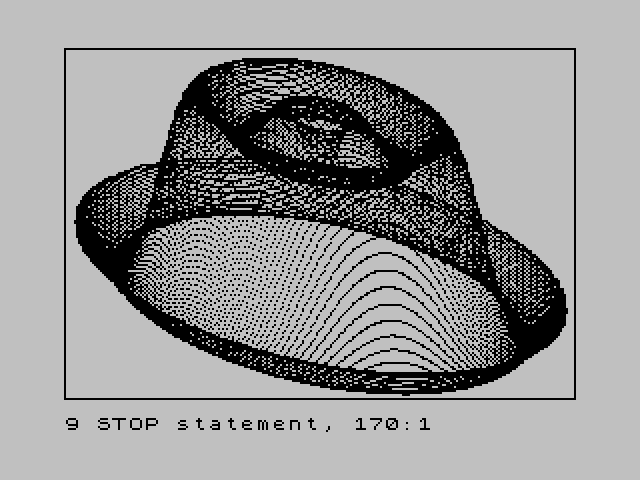
Source Code
    5 SAVE "HI RES HAT"
   10 REM HI RES HAT
   20 PLOT 0,0: DRAW 0,175: DRAW 255,0: DRAW 0,-175: DRAW -255,0:
   30 REM Lines 40 to 130 calcu X and Y for Plotting
   35 LET xs=.78: LET ys=.85
   40 LET p=128: LET q=95: LET xp=144: LET xr=1.5*PI: LET yp=56: LET yr=1
   50 LET zp=64: LET xf=xr/xp: LET yf=yp/yr: LET zf=xr/zp: LET xq=xp/zp
   60 FOR k=-zp TO zp
   70 LET zt=k*xq
   80 LET xl=INT (.5+SQR (xp*xp-zt*zt))
   90 FOR t=-xl TO xl
  100 LET xt=SQR (t*t+zt*zt)*xf
  110 LET yy=(SIN (xt)+.4*SIN (3*xt))*yf
  120 LET x=(xs*(t+k))+p
  130 LET y=(ys*(yy-k))+q
  140 PLOT x,y
  150 NEXT t
  160 NEXT k
  170 STOP
Note: Type-in program listings on this website use ZMAKEBAS notation for graphics characters.