
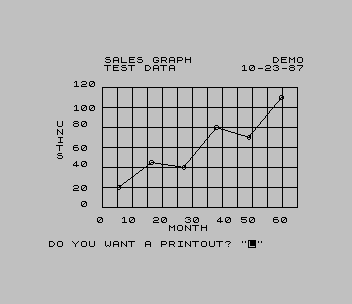
Turns a series of X,Y readings into a labelled line graph. You give the graph a title and a second title line, your name, the date, full-scale values for both axes (multiples of 6 work best) and an axis label for each. You then type up to 100 pairs of X and Y values, ending with 0 and 0. The program draws a 6 by 6 grid with scaled axis numbers, marks each point with a small circle and joins the points in order. Finally it can copy the graph to the printer and print the X and Y values as a two-column table.
REMs name the program “Graphic Point-to-Point Display & Print” (GPTPDP) and credit Dick Ptak of the Cleveland Sinclair Users Group. It shares its title and axis layout with his GDAP, which plots a function instead of entered data.
Program Analysis
Structure
- Lines 10–90: credits, four 100-element arrays and the title, name, date, scale and label prompts, then the data entry subroutine at 700.
- Lines 110–440: axes, titles, the X label along the bottom, the Y label printed down the left side one letter per row, the axis numbers at sixths of full scale, and the grid lines.
- Lines 500–550: scale and plot the points, joining each to the previous one.
- Lines 560–695: the printout:
COPYand thenLPRINTof the labels and value pairs. - Lines 700–750: data entry, stopping at a 0,0 pair.
Scaling
The plot area runs from x=54 to 249 and y=24 to 144 in pixels. Each point is placed at 195*X/XFS+54 and 120*Y/YFS+24, and the grid has a line every 20 pixels up and every 15 pixels across. The axis numbers are the full-scale value divided by 6, 3, 2 and so on, rounded to two decimals.
Notable Techniques
- Each segment is drawn with a relative
DRAWfrom the previous point, using the screen positions stored inP()andQ(). - The vertical axis label is printed one character per line with
Y$(L), giving a stacked label without rotating any text. - The data table goes out with comma-separated
LPRINTfor two aligned columns.
Potential Issues
- A real data point at 0,0 ends the input early.
- Entering 100 points without the closing 0,0 runs past the end of the arrays and stops with a subscript error.
- Values above the full-scale setting are plotted off the grid and can stop the program with an out-of-screen error.
This program came from an Oliger (JLO SAFE) disk and was converted to load from tape. It needed no changes apart from an autostart at line 10, and was tested in ZEsarUX.
Image Gallery
Source Code
   10 REM GRAPHIC POINT-TO-POINT DISPLAY & PRINT "GPTPDP"
   12 REM PROGRAM BY DICK PTAK CLEVELAND SINCLAIR USERS GROUP
   15 DIM X(100): DIM Y(100): DIM P(100): DIM Q(100)
   20 INPUT "TITLE OF GRAPH (17 SPACES TOTAL) ";T$
   30 INPUT "OTHER TITLE INFORMATION (17 SPACES TOTAL) ";O$
   32 INPUT "ENTER YOUR NAME";N$
   35 INPUT "DATE XX-XX-XX ";D$
   40 INPUT "X-AXIS FULL SCALE VALUE, USE MULTIPLES OF 6 ";XFS
   50 INPUT "X-AXIS LABEL ";X$
   60 INPUT "Y-AXIS FULL SCALE VALUE, USE MULTIPLES OF 6 ";YFS
   70 INPUT "Y-AXIS LABEL ";Y$
   80 CLS
   90 GO SUB 700
  110 PLOT 249,24
  120 DRAW -195,0
  130 DRAW 0,120
  150 PRINT AT 0,7;T$
  160 PRINT AT 1,7;O$
  170 PRINT AT 0,(32-LEN N$);N$
  180 PRINT AT 1,24;D$
  190 PRINT AT 21,15;X$
  200 FOR L=1 TO LEN Y$
  210 PRINT AT (L+7),1;Y$(L)
  220 NEXT L
  230 PRINT AT 20,6;"0"
  240 PRINT AT 20,9;INT ((XFS/6)*100)/100
  250 PRINT AT 20,13;INT ((XFS/3)*100)/100
  260 PRINT AT 20,17;INT ((XFS/2)*100)/100
  270 PRINT AT 20,21;INT ((2*XFS/3)*100)/100
  280 PRINT AT 20,24;INT ((5*XFS/6)*100)/100
  285 PRINT AT 20,28;INT (XFS*100)/100
  290 PRINT AT 18,4;"0"
  310 PRINT AT 16,3;INT ((YFS/6)*100)/100
  320 PRINT AT 13,3;INT ((YFS/3)*100)/100
  330 PRINT AT 11,3;INT ((YFS/2)*100)/100
  340 PRINT AT 8,3;INT ((2*YFS/3)*100)/100
  350 PRINT AT 6,3;INT ((5*YFS/6)*100)/100
  360 PRINT AT 3,3;INT (YFS*100)/100
  370 FOR I=44 TO 144 STEP 20
  380 PLOT 54,I
  390 DRAW 195,0
  400 NEXT I
  410 FOR J=69 TO 249 STEP 15
  420 PLOT J,24
  430 DRAW 0,120
  440 NEXT J
  500 LET I=0
  510 LET I=I+1
  515 IF X(I)=0 AND Y(I)=0 THEN GO TO 560
  520 LET P(I)=(195*X(I)/XFS)+54
  530 LET Q(I)=(120*Y(I)/YFS)+24
  532 CIRCLE P(I),Q(I),2
  535 PLOT P(I),Q(I)
  540 LET I=I+1
  543 IF X(I)=0 AND Y(I)=0 THEN GO TO 560
  545 LET P(I)=(195*X(I)/XFS)+54
  546 LET Q(I)=(120*Y(I)/YFS)+24
  548: DRAW (P(I)-P(I-1)),(Q(I)-Q(I-1))
  549 CIRCLE P(I),Q(I),2: PLOT P(I),Q(I)
  550 GO TO 540
  560 INPUT "DO YOU WANT A PRINTOUT? ";Z$
  570 IF Z$<>"Y" AND Z$<>"N" THEN GO TO 560
  580 IF Z$="Y" THEN GO TO 600
  590 IF Z$="N" THEN STOP
  600 COPY
  610 LPRINT
  620 LPRINT
  630 LPRINT
  640 LPRINT X$,Y$
  650 LPRINT
  655 LET I=0
  660 LET I=I+1
  665 IF X(I)=0 AND Y(I)=0 THEN GO TO 690
  670 LPRINT X(I),Y(I)
  675 GO TO 660
  690 FOR K=1 TO 8: LPRINT : NEXT K
  695 STOP
  700 LET I=0
  710 LET I=I+1
  720 INPUT "INPUT ""X"" VALUE FIRST THEN PRESS ""ENTER"" THEN INPUT ""Y"" VALUE AND PRESS ""ENTER"". WHEN COMPLETED ENTER ""0"" PRESS ""ENTER"" THEN INPUT ""0"" AND PRESS ""ENTER""";X(I),Y(I)
  730 IF X(I)=0 AND Y(I)=0 THEN GO TO 750
  740 GO TO 710
  750 RETURN
 9998 SAVE "GPTPDP" LINE 10
Note: Type-in program listings on this website use ZMAKEBAS notation for graphics characters.