
This program generates a graphic pattern on screen by drawing a series of lines from points along a horizontal axis, creating a symmetric geometric figure. The user inputs a numeric step value, which controls the spacing of iterations in a FOR loop running from 0 to 85. Four DRAW commands per iteration radiate lines from two anchor points (x=214, x=44) through a central horizontal baseline at y=88, forming diamond- or fan-like shapes that vary dramatically depending on the step value entered. Entering “c” clears the screen and prompts for a new value, allowing the user to experiment with different patterns. After each pattern completes, a PAUSE of 120 frames holds the display before automatically clearing and looping back.
Program Analysis
Program Structure
The program is organized as a simple interactive loop. Lines 10–90 are REM comments crediting the author and publisher. Line 100 prompts for user input as a string, line 110 handles the special case of entering "c" to clear the screen, and lines 120–220 perform the drawing loop. Line 225 pauses briefly and clears, then line 230 returns to the input prompt.
- User enters a step value (or
"c"to clear) - The FOR loop runs
ifrom 0 to 85 in steps ofn - Four PLOT/DRAW pairs draw symmetric lines per iteration
- After the loop, the screen pauses for 2 seconds then clears
Drawing Geometry
Each iteration of the loop draws four line segments anchored at two x-positions: approximately x=213−i (varying) and x=44 (fixed, with a minor bug — see below). The lines extend vertically by amounts proportional to i, creating a pattern that fans outward as the loop progresses. The baseline is y=88, which is roughly the vertical center of the 176-pixel-tall display.
| Line | Start Point | Draw Vector | Direction |
|---|---|---|---|
| 140–150 | PLOT 213−i, 88 | DRAW i−85, 1 | Up-left |
| 160–170 | PLOT 44, 88 | DRAW 85−i, i | Right and up |
| 180–190 | PLOT 213−i, 88 | DRAW i−85, −i | Down-left |
| 200–210 | PLOT 44, 88 | DRAW 85−i, −i | Right and down |
Key BASIC Idioms
- String input for dual purpose:
n$is read as a string first, allowing the single input to serve as either a command ("c") or a numeric value converted withVAL n$. - AT 0,0 status line: Line 120 uses
PRINT AT 0,0to display the current step value without disturbing the drawing area. - PAUSE then GO TO loop: The
PAUSE 120at line 225 holds the completed pattern visible for approximately 2 seconds beforeCLSand returning to the input prompt.
Notable Techniques
The choice of 85 as the loop limit and the x-offsets 213 and 43/44 are not arbitrary: 85 is one quarter of 340, the notional pixel width scaled for the display, and the two anchor points are roughly symmetric about the horizontal center (x=128). The varying step value n dramatically changes the visual output — a step of 1 produces dense concentric shapes while a step of 17 produces only five widely spaced lines.
Bugs and Anomalies
There is a minor inconsistency in lines 160 and 200: the PLOT command uses 43+1 (i.e., 44) as a literal arithmetic expression rather than simply 44. This is functionally identical but suggests a possible editing artifact where the original expression may have included a variable or offset that was later simplified incompletely.
Additionally, the DRAW on line 150 adds only 1 to the y-coordinate (DRAW i−85, 1), which is asymmetric with the other three draws. The upper-left set of lines is nearly horizontal while the lower-left and both right-side sets fan out proportionally with i. This asymmetry may be intentional for artistic effect or could be a typographic error for i.
Image Gallery
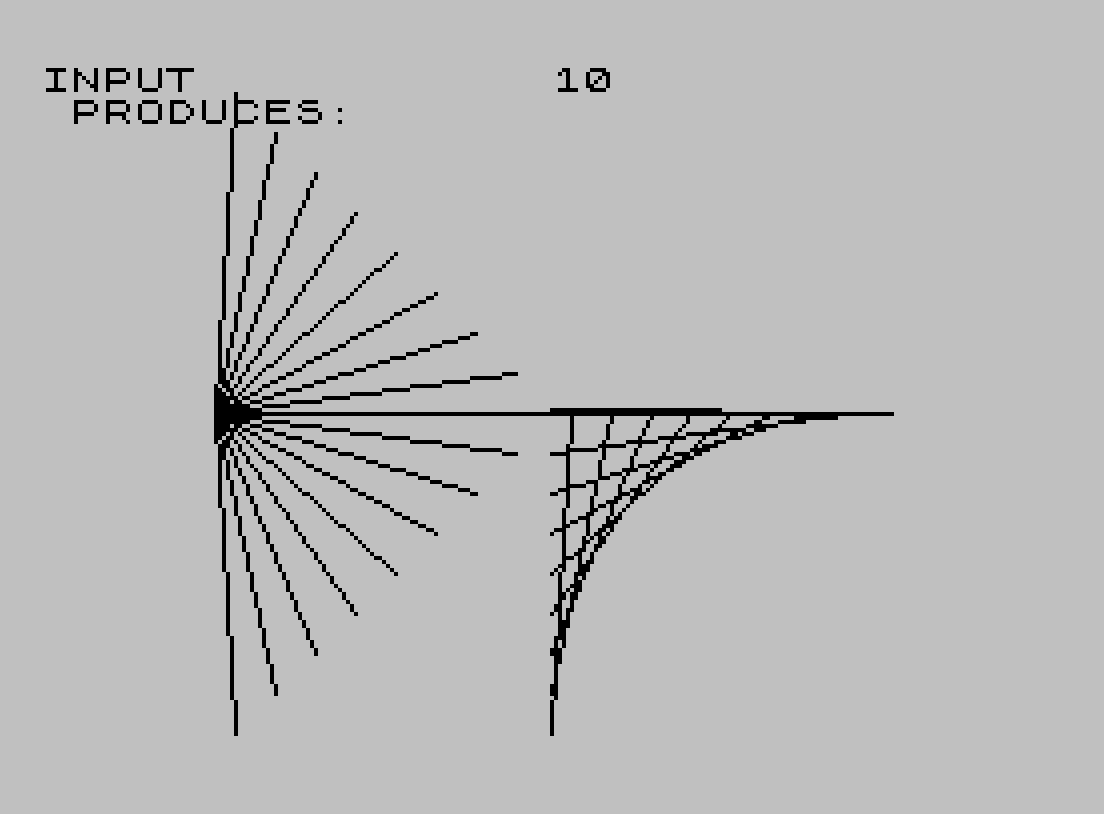
Source Code
   10 REM ** A GRAPHIC PASTIME
   20 REM ** A TS2068 PGM BY
   30 REM ** STEVEN SCOVILLE
   50 REM ** ORIGINALLY PUBLISHED
   60 REM ** BY THE TRIANGLE SINCLAIR
   70 REM ** USERS GROUP, NORTH
   80 REM ** CAROLINA
   90 REM **
  100 INPUT n$
  110 IF n$="c" THEN CLS : GO TO 100
  120 LET n=VAL n$: PRINT AT 0,0;"INPUT ",n," PRODUCES:  "
  130 FOR i=0 TO 85 STEP n
  140 PLOT 213-i,88
  150 DRAW i-85,1
  160 PLOT 43+1,88
  170 DRAW 85-i,i
  180 PLOT 213-i,88
  190 DRAW i-85,-i
  200 PLOT 43+1,88
  210 DRAW 85-i,-i
  220 NEXT i
  225 PAUSE 120: CLS
  230 GO TO 100
Note: Type-in program listings on this website use ZMAKEBAS notation for graphics characters.