
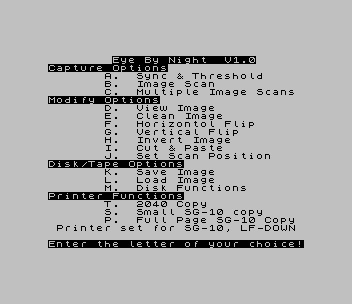
Drives the video digitizer circuit that was published in the January/February and March/April 1987 issues of SINC-LINK, the newsletter of the Toronto Timex-Sinclair Users Club. Under Capture, the menu sets the board’s sync and threshold, takes a single image scan, or runs repeated scans until a key is pressed. The Modify options view, clean, flip horizontally or vertically, invert and cut and paste the stored image, and set the left/right and up/down scan position. Images are saved and loaded as SCREEN$ files. Printer options give a 2040 COPY and small or full-page Star SG-10 dumps, and a Disk Functions menu catalogs or formats disks and loads ZPRINT. Capturing an image needs the digitizer hardware on the expansion port.
The title line reads “Eye By Night V1.0”, and the program carries no author’s name. A REM says that its save and load lines were written for the Larken disk system and should be changed for tape; this copy uses Oliger disk syntax instead. Curt Carlson described building and adjusting this board, and the software that came with it, in “The 2068 Video Digitizer” in the Mile High Chapter newsletter (June 1991).
Program Analysis
Structure
The BASIC is a menu shell around two machine code blocks: eye1 (8192 bytes at 38912) and eye2 (1300 bytes at 64000). The loader line 9910 sets CLEAR 32767, loads both and runs. Line 100 names eleven entry points in eye1 as variables (SYNC, SCAN, HCON, VIEW, CLEA, HORF, VERF, INVT, CUTP, STOR, FIXX). Lines 120–150 turn the key pressed into a number and call GO SUB 900+a*100, so A–L reach lines 1000–2100. Most options call VIEW, then the routine, then STOR to keep the result. Option J reads and pokes the scan position bytes at 39311 and 39417. The printer keys go to line 7000, which uses COPY for the 2040 and calls 64006 or 64009 in eye2 for the SG-10 dumps. M goes to the disk menu at line 8000.
Notable Techniques
- Machine code entry points are held in named variables, so each menu line reads as
RANDOMIZE USR VIEW: RANDOMIZE USR HORF: RANDOMIZE USR STOR. - The
GO SUB 900+a*100dispatch maps twelve menu letters to subroutines without a chain ofIFtests. - Line 2120 pokes 23540–23543 before saving or loading the image as
SCREEN$.
Potential Issues
- Only lower-case letters work for M (Disk Functions) and the printer keys S, T and P: line 130 converts only a–l to upper case, and line 140 rejects other upper-case codes.
- Line 2110 jumps to the non-existent line 1910 when an empty or over-long name is entered, so the program falls through to
STOPat line 1999. - The
REMin line 20 refers to lines 9000–9020, which are not in the program.
This copy came from an Oliger (JLO SAFE) disk. For tape, the Oliger / was removed from the image save and load, the ZPRINT load and the loader and save lines, and the disk FORMAT statement was removed from line 8210. Without the digitizer hardware, only the menu could be tested in ZEsarUX.
A later Larken build of Eye By Night, © S.M.U.G. 1989 with a new graphic menu screen, is on the S.M.U.G. Video Digitizer program disk, archived with Videotex and Video 3-D as Videotex and Video 3-D (S.M.U.G. Video Digitizer).
Image Gallery
Source Code
   10 REM   This is a program to be used in conjuction with the  digitizer circuit described in  the Jan/Feb and Mar/Apr 1987    issues of SINC-LINK, the news-  letter of the TORONTO TIMEX-    SINCLAIR USERS CLUB
   15 BORDER 7: INK 0: PAPER 7: CLS
   20 REM Program lines 2000 to  2170, and 9000 to 9020 refer to the LARKEN Disk System. They    should be modified for tape use.
   25 REM LET /p=t
  100 LET SYNC=39504: LET SCAN=41120: LET HCON=39296: LET VIEW=40234: LET CLEA=40410: LET HORF=39440: LET VERF=40261: LET INVT=40213: LET CUTP=40670: LET STOR=40246: LET FIXX=41104
  110 CLS : PRINT TAB 8; INVERSE 1;"Eye By Night  V1.0"; INVERSE 0' INVERSE 1;"Capture Options"; INVERSE 0'TAB 7;"A.  Sync & Threshold";TAB 7;"B.  Image Scan";TAB 7;"C.  Multiple Image Scans"' INVERSE 1;"Modify Options"; INVERSE 0'TAB 7;"D.  View Image";TAB 7;"E.  Clean Image";TAB 7;"F.  Horizontol Flip";TAB 7;"G.  Vertical Flip";TAB 7;"H.  Invert Image";TAB 7;"I.  Cut & Paste";TAB 7;"J.  Set Scan Position"' INVERSE 1;"Disk/Tape Options"; INVERSE 0'TAB 7;"K.  Save Image";TAB 7;"L.  Load Image";TAB 7;"M.  Disk Functions";#0;AT 1,0; INVERSE 1;"Enter the letter of your choice!"; INVERSE 0
  113 PRINT AT 17,0; INVERSE 1;"Printer Functions"; INVERSE 0
  114 PRINT AT 18,7;"T.  2040 Copy";TAB 7;"S.  Small SG-10 copy";TAB 7;"P.  Full Page SG-10 Copy";TAB 1;"Printer set for SG-10, LF-DOWN"
  117 FOR a=1 TO 50: NEXT a
  120 LET a$=INKEY$: IF a$="" THEN GO TO 120
  130 LET a=CODE a$: IF a>96 AND a<109 THEN LET a=a-32
  135 IF a>110 THEN GO TO 7000
  138 IF a=109 THEN GO TO 8000
  140 IF a<65 OR a>76 THEN GO TO 120
  150 CLS : LET a=a-64: GO SUB 900+a*100
  160 GO TO 100
 1000 RANDOMIZE USR SYNC: RETURN
 1100 RANDOMIZE USR SCAN: RANDOMIZE USR STOR: BEEP .01,30: PAUSE 0: RETURN
 1200 RANDOMIZE USR HCON: RANDOMIZE USR STOR: IF INKEY$="" THEN GO TO 1200
 1210 RETURN
 1300 RANDOMIZE USR VIEW: PAUSE 0: RETURN
 1400 RANDOMIZE USR VIEW: RANDOMIZE USR CLEA: RANDOMIZE USR STOR: BEEP .01,30: PAUSE 0: RETURN
 1500 RANDOMIZE USR VIEW: RANDOMIZE USR HORF: RANDOMIZE USR STOR: PAUSE 0: RETURN
 1600 RANDOMIZE USR VIEW: RANDOMIZE USR VERF: RANDOMIZE USR STOR: PAUSE 0: RETURN
 1700 RANDOMIZE USR VIEW: RANDOMIZE USR INVT: RANDOMIZE USR STOR: PAUSE 0: RETURN
 1800 RANDOMIZE USR VIEW: RANDOMIZE USR CUTP: PAUSE 0: RETURN
 1900 CLS : PRINT "Current L/R position is ";PEEK 39311''"Current U/D position is ";PEEK 39417'''"Enter new value for L/R: ";: INPUT x: POKE 39311,x: PRINT x''"Enter new value for U/D: ";: INPUT x: POKE 39417,x: PRINT x: RETURN
 1999 STOP
 2000 LET A=0: GO TO 2102
 2100 LET A=1
 2102 CLS : PRINT AT 10,2;"PRESS ""T"" FOR TAPE OR ""ENTER""           FOR DISK SAVE"
 2104 LET z=0: PAUSE 0: IF INKEY$="t" THEN LET z=1
 2105 GO TO 2110
 2110 CLS : PRINT "Enter Name (Max 10 Chars): ";: INPUT a$: IF a$="" OR LEN a$>10 THEN GO TO 1910
 2120 POKE 23540,0: POKE 23541,64: POKE 23542,0: POKE 23543,24: PRINT a$: PAUSE 50: BEEP .1,20: IF a=0 THEN RANDOMIZE USR VIEW
 2125 IF z=1 AND a=1 THEN LOAD a$SCREEN$ : RANDOMIZE USR stor
 2130 IF a=1 AND z=0 THEN LOAD /a$SCREEN$ : RANDOMIZE USR stor
 2135 IF a=0 AND z=1 THEN SAVE a$SCREEN$
 2140 IF a=0 AND z=0 THEN SAVE /a$SCREEN$
 2170 RETURN
 7000 RANDOMIZE USR VIEW
 7010 IF a$="" THEN GO TO 110
 7020 IF a$="s" THEN RANDOMIZE USR 64006
 7030 IF a$="t" THEN COPY
 7040 IF a$="p" THEN RANDOMIZE USR 64009
 7100 GO TO 110
 8000 REM DISK FUNCTIONS
 8001 CLS
 8010 PRINT TAB 12; INVERSE 1;"DISK MENU"
 8020 PRINT ''''"1.  CATALOG TO SCREEN"
 8030 PRINT '"2.  CATALOG TO 2040 PRINTER"
 8040 PRINT '"3.  FORMAT A BLANK DISK"
 8050 PRINT '"4.  LOAD ZPRINT SOFTWARE"
 8060 PRINT '"5.  MAIN MENU"
 8080 LET A$=INKEY$: IF A$<"1" OR A$>"5" THEN GO TO 8080
 8090 IF a$="1" THEN CAT : PAUSE 0: GO TO 8000
 8100 IF a$="2" THEN LET /p=t: OPEN #2,"p": CAT : CLOSE #2: GO TO 8000
 8110 IF a$="3" THEN GO TO 8200
 8130 IF a$="4" THEN LOAD /"ZPRINT"
 8140 IF a$="5" THEN GO TO 110
 8190 GO TO 8080
 8200 INPUT "ENTER DISK NAME:";a$: IF LEN a$<1 OR LEN a$>16 THEN GO TO 8200
 8210 LET /t=80: FORMAT /a$
 8220 PAUSE 0: GO TO 8000
 8900 STOP
 9910 CLEAR 32767: LOAD /" eye1"CODE : LOAD /" eye2"CODE : RUN
 9920 RUN
 9930 CLEAR 32767: LOAD " eye1"CODE : LOAD " eye2"CODE : RUN
 9995 STOP
 9996 VERIFY "": VERIFY ""CODE : VERIFY ""CODE
 9997 STOP
 9998 SAVE /"EYBYN" LINE 9910: SAVE /" eye1"CODE 38912,8192: SAVE /" eye2"CODE 64000,1300: STOP
 9999 SAVE "EYBYN" LINE 9930: SAVE " eye1"CODE 38912,8192: SAVE " eye2"CODE 64000,1300: VERIFY "": VERIFY ""CODE : VERIFY ""CODE : STOP
Note: Type-in program listings on this website use ZMAKEBAS notation for graphics characters.