
This program is an interactive drawing tool that lets the user navigate a cursor around the screen using a joystick, plotting pixels and performing geometric operations including lines, circles, and arcs. The cursor position is continuously read via the STICK function with fire-button presses triggering sub-menus for input, graphics commands, and output options. The program supports two drawing modes, “d” (draw) and “e” (erase/inverse), toggled via keyboard, along with an optional bell feature that plays a random-pitch beep each time the cursor moves. Output options include saving the screen to tape by name, printing a hard copy via COPY, or clearing the screen to start fresh.
Program Analysis
Program Structure
The program is organized into a main loop and a set of subroutines branched via GO SUB and GO TO. The overall flow is:
- Initialization (lines 5–15): set border/paper/ink, zero cursor coordinates, set default mode and bell state, call the status-bar subroutine at line 1000.
- Main loop (lines 20–32): poll the keyboard for mode changes, check/plot the cursor pixel, update the coordinate display, and delegate joystick movement to the movement subroutine at line 33.
- Movement subroutine (lines 33–200): decode STICK axis/button values and update
xandywith wraparound. - Status/menu subroutine (lines 1000–1060): draw the sidebar menu labels and flash the active mode indicator.
- Command dispatcher (lines 2000–2095): reads a second keypress to choose Input, Bell, Graphics, or Output sub-menus.
- Input sub-menu (lines 2050–2495): Move cursor, Line, Circle, Arc — each accepting coordinate input via
INPUT. - Bell toggle (lines 2500–2540): flips the
bellflag and updates the display. - Graphics sub-menu (lines 2600–3270): joystick-driven interactive line and circle drawing with two-click endpoint selection.
- Output sub-menu (lines 4000–4130): Print (hard copy), New (clear screen), or Save (tape
SCREEN$).
STICK Usage
The TS2068 STICK keyword is called repeatedly rather than storing the result. STICK(1,2) reads the joystick port 1 direction/fire value, and STICK(2,2) reads the fire button alone. The direction encoding decoded in lines 80–110 follows a standard bitmask convention:
| STICK value | Direction |
|---|---|
| 0 | No input / fire only check |
| 1, 5, 9 | Up (y+1) |
| 2, 6, 10 | Down (y−1) |
| 4–6 | Left (x−1) |
| 8–10 | Right (x+1) |
The fire button is specifically tested with STICK(2,2)=1 to detect a button press that triggers mode-change or endpoint selection.
Cursor Display and Pixel Preservation
The program uses a common technique to display a cursor without permanently altering the canvas: variable p records whether the pixel under the cursor was already set before the cursor landed on it (lines 24, 2651, 2661, etc.). If p=1, the cursor PLOT is skipped in draw mode so the pre-existing pixel is not double-toggled. The cursor is then erased with PLOT INVERSE 1;x,y (line 28, 50), which XORs the pixel back to its original state. The coordinate readout at column 0, row 0 is printed with inverted paper/ink colours (PAPER 0: INK 7) and then immediately restored to maintain the status area appearance.
Drawing Modes
Variable M$ holds either "d" (draw) or "e" (erase/inverse). In draw mode, the joystick cursor plots pixels directly as it moves. In erase mode (M$="e"), geometric commands (line, circle, arc) apply INVERSE 1 before drawing, effectively erasing by XOR. The mode indicator on the right sidebar is flashed using FLASH 1 at lines 1040–1050.
Interactive Line and Circle Drawing
The graphics sub-menu (lines 2600–3270) implements a two-click endpoint selection idiom: the user moves the joystick to the first point and presses fire (STICK(2,2)=1), which records xo,yo; then navigates to the second point and fires again to record xf,yf. For lines, DRAW xf-xo,yf-yo is used (relative drawing). For circles, the radius is computed as the Euclidean distance between the two points: r=SQR((xf-xo)^2+(yf-yo)^2) (line 3210). A bounds check at line 3220 ensures the circle fits on screen before drawing.
Arc Drawing
The arc sub-option (lines 2400–2480) uses BASIC’s three-argument DRAW command: DRAW xf-xo,yf-yo,2*PI/f, where f is a user-supplied fraction-of-circle value. This is the TS2068/Spectrum extension to DRAW that accepts an angle parameter to produce circular arcs.
Bell Feature
When bell=1, line 75 executes BEEP .01,60*RND each time the movement subroutine is called, producing a random-pitch click. This is toggled via the "b" keypress in the command dispatcher (lines 2500–2540).
Screen Wraparound
Lines 169–190 implement toroidal wraparound for the cursor: x is clamped to 0–247 and y to 0–167, matching the full 256×176 pixel resolution minus the coordinate display row and sidebar column. The right column (31) is reserved for the sidebar menu, so the effective drawing width is 0–247.
Subroutine at Line 35
Lines 33–200 form the movement subroutine. However, lines 2670, 2740, 3090, and 3195 call GO SUB 35 — which falls into the middle of this same subroutine block at line 35 (between 34 and 50), bypassing the fire-button draw/erase checks at lines 33–35 and jumping directly to the movement decode at line 50 onward. This is an intentional entry-point shortcut rather than a bug.
Notable Anomalies
- Line 20 checks
INKEY$=""and skips to line 24, while lines 21–23 re-readINKEY$independently. Because INKEY$ is re-evaluated on each call, a key released between line 20 and lines 21–23 could be missed, but at normal execution speed this is unlikely to cause problems. - Line 2045 (
IF z$="" THEN GO TO 2000) re-enters the dispatcher if no key was captured on the first read of INKEY$ at line 2000, acting as a debounce retry. - The
SAVE s$SCREEN$at line 4100 saves the current screen display to tape under a user-specified name, preserving artwork between sessions. - Line 4140 contains a
REMcrediting the author: Owen Christianson, 822 Richmond Ave., Buffalo, NY 14222 — an address embedded directly in the source code.
Image Gallery
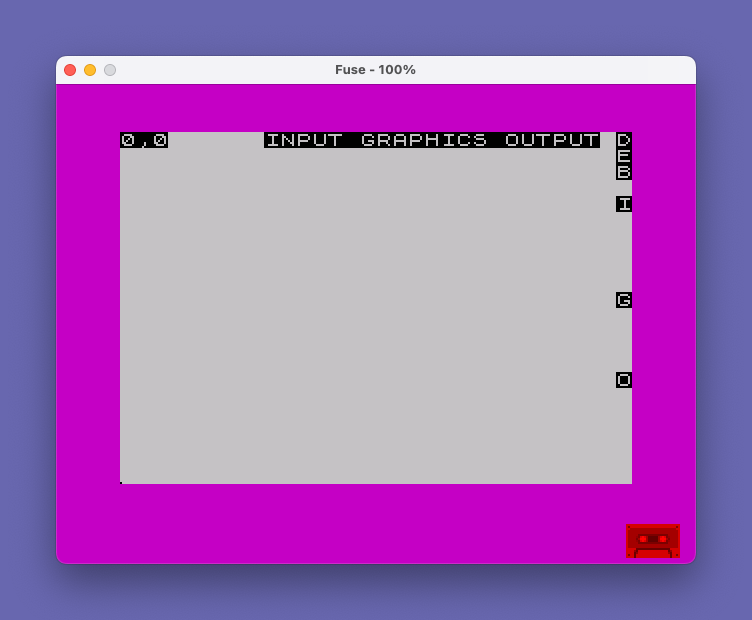
Source Code
    5 BORDER 3
    6 PAPER 7: INK 0
    7 CLS
   10 LET x=0: LET y=x
   14 LET M$="d": LET p=0: LET bell=p
   15 GO SUB 1000
   20 IF INKEY$="" THEN GO TO 24
   21 IF INKEY$="d" THEN LET M$="d": GO SUB 1000
   22 IF INKEY$="e" THEN LET M$="e": GO SUB 1000
   23 IF INKEY$="i" OR INKEY$="b" OR INKEY$="g" OR INKEY$="o" THEN GO SUB 2000
   24 IF POINT (x,y)=1 THEN LET p=1
   25 PLOT x,y
   26 PAPER 0: INK 7: PRINT AT 0,0;x;",";y;: PAPER 7: INK 0: PRINT "  "
   27 IF p=1 THEN GO TO 30
   28 PLOT INVERSE 1;x,y: LET p=0
   30 IF |(1,2)=0 THEN GO TO 20
   31 GO SUB 33
   32 GO TO 20
   33 IF M$="d" AND |(2,2)=1 THEN GO TO 50
   34 IF |(2,2)=1 THEN GO TO 40
   35 IF p=1 THEN GO TO 50
   50 PLOT INVERSE 1;x,y
   65 LET p=0
   75 IF bell=1 THEN BEEP .01,60*RND
   80 IF |(1,2)=1 OR |(1,2)=5 OR |(1,2)=9 THEN LET y=y+1
   90 IF |(1,2)>=8 AND |(1,2)<=10 THEN LET x=x+1
  100 IF |(1,2)>=4 AND |(1,2)<=6 THEN LET x=x-1
  110 IF |(1,2)=2 OR |(1,2)=6 OR |(1,2)=10 THEN LET y=y-1
  169 IF x>247 THEN LET x=0
  170 IF y>167 THEN LET y=0
  180 IF x<0 THEN LET x=247
  190 IF y<0 THEN LET y=167
  200 RETURN
 1000 BEEP .01,60: BEEP .01,20: INVERSE 1
 1010 PRINT AT 0,31;"\d"
 1020 PRINT AT 1,31;"\e"
 1021 PRINT AT 2,31;"B"
 1022 PRINT AT 4,31;"I"
 1025 PRINT AT 15,31;"O"
 1027 PRINT AT 10,31;"G"
 1028 PRINT AT 0,9;"INPUT GRAPHICS OUTPUT"
 1030 INVERSE 0
 1040 IF M$="d" THEN PRINT AT 0,31; FLASH 1;"D"
 1050 IF M$="e" THEN PRINT AT 1,31; FLASH 1;"E"
 1055 IF bell=1 THEN PRINT AT 2,31; FLASH 1;"B"
 1060 RETURN
 2000 LET z$=INKEY$: BEEP .01,60: BEEP .01,20
 2010 IF z$="i" THEN GO TO 2050
 2020 IF z$="b" THEN GO TO 2500
 2030 IF z$="g" THEN GO TO 2600
 2040 IF z$="o" THEN GO TO 4000
 2045 IF z$="" THEN GO TO 2000
 2050 PRINT AT 4,31; FLASH 1;"I"
 2060 PRINT INVERSE 1;AT 5,31;"M";AT 6,31;"L";AT 7,31;"C";AT 8,31;"A"
 2061 PRINT INVERSE 1;AT 0,9;"MOVE LINE CIRCLE ARC";: PRINT " "
 2065 PAUSE 60
 2070 IF INKEY$="" THEN GO TO 2070
 2075 IF INKEY$="m" THEN GO TO 2100
 2080 IF INKEY$="l" THEN GO TO 2200
 2085 IF INKEY$="c" THEN GO TO 2300
 2090 IF INKEY$="a" THEN GO TO 2400
 2095 BEEP .3,-40: GO TO 2070
 2100 PRINT FLASH 1;AT 5,31;"M"
 2105 BEEP .01,60: BEEP .01,20
 2110 INPUT "Move cursor to x=";x
 2111 INPUT "Move cursor to y=";y
 2120 GO TO 2490
 2200 PRINT FLASH 1;AT 6,31;"L"
 2204 BEEP .01,60: BEEP .01,20
 2205 INPUT "Draw line from x=";xo
 2210 INPUT "Draw line from y=";yo
 2215 IF M$="e" THEN INVERSE 1
 2220 PLOT xo,yo
 2230 INPUT "Draw line to x=";xf
 2240 INPUT "Draw line to y=";yf
 2250 DRAW xf-xo,yf-yo
 2260 INVERSE 0
 2270 GO TO 2490
 2300 PRINT FLASH 1;AT 7,31;"C"
 2304 BEEP .01,60: BEEP .01,20
 2305 INPUT "Circle x=";xo
 2310 INPUT "Circle y=";yo
 2320 INPUT "Circle radius=";r
 2330 IF M$="e" THEN INVERSE 1
 2340 CIRCLE xo,yo,r
 2350 INVERSE 0
 2360 GO TO 2490
 2400 PRINT FLASH 1;AT 8,31;"A"
 2401 BEEP .01,60: BEEP .01,20
 2405 INPUT "Arc from x=";xo
 2410 INPUT "Arc from y=";yo
 2420 INPUT "Arc to x=";xf
 2430 INPUT "Arc to y=";yf
 2440 INPUT "Fraction of circle=";f
 2450 IF M$="e" THEN INVERSE 1
 2460 PLOT xo,yo
 2470 DRAW xf-xo,yf-yo,2*PI/f
 2480 INVERSE 0
 2490 PRINT INVERSE 1;AT 4,31;"I"
 2491 PRINT INVERSE 1;AT 0,9;"INPUT GRAPHICS OUTPUT"
 2492 PRINT AT 5,31;" ";AT 6,31;" ";AT 7,31;" ";AT 8,31;" "
 2495 RETURN
 2500 LET bl=bell
 2505 IF bl=1 THEN LET bell=0
 2510 IF bl=0 THEN LET bell=1
 2520 PRINT INVERSE 1;AT 2,31;"B"
 2530 IF bell=1 THEN PRINT FLASH 1;AT 2,31;"B"
 2535 FLASH 0
 2540 RETURN
 2600 PRINT INVERSE 1;AT 11,31;"L";AT 12,31;"C"
 2601 PRINT INVERSE 1;AT 0,9;"LINE CIRCLE";: PRINT "          "
 2605 PRINT FLASH 1;AT 10,31;"G"
 2610 IF INKEY$="" THEN GO TO 2610
 2620 IF INKEY$="c" THEN GO TO 3000
 2630 IF INKEY$<>"l" THEN GO TO 2610
 2635 BEEP .01,60: BEEP .01,20
 2640 PRINT FLASH 1;AT 11,31;"L"
 2650 IF |(2,2)=1 THEN GO TO 2690
 2651 IF POINT (x,y)=1 THEN LET p=1
 2652 IF M$="d" AND p=1 THEN GO TO 2655
 2653 PLOT x,y
 2655 PLOT INVERSE 1;x,y
 2660 IF |(1,2)=0 THEN GO TO 2650
 2661 IF POINT (x,y)=1 THEN LET p=1
 2662 PLOT x,y
 2663 PAPER 0: INK 7: PRINT AT 0,0;x;",";y;: PAPER 7: INK 0: PRINT " "
 2670 GO SUB 35
 2680 GO TO 2650
 2690 BEEP .01,60: BEEP .01,20: LET xo=x: LET yo=y
 2710 PLOT xo,yo
 2715 PAUSE 60
 2720 IF |(2,2)=1 THEN GO TO 2760
 2721 IF POINT (x,y)=1 THEN LET p=1
 2722 IF M$="d" AND p=1 THEN GO TO 2727
 2725 PLOT x,y
 2727 PLOT INVERSE 1;x,y
 2730 IF |(1,2)=0 THEN GO TO 2720
 2731 IF POINT (x,y)=1 THEN LET p=1
 2732 PLOT x,y
 2733 PAPER 0: INK 7: PRINT AT 0,0;x;",";y;: PAPER 7: INK 0: PRINT " "
 2740 GO SUB 35
 2750 GO TO 2720
 2760 BEEP .01,60: BEEP .01,20: LET xf=x: LET yf=y
 2770 IF M$="e" THEN INVERSE 1: PLOT xo,yo: DRAW xf-xo,yf-yo
 2771 IF M$="d" THEN PLOT xo,yo: DRAW xf-xo,yf-yo
 2780 INVERSE 1: PRINT AT 10,31;"G"
 2785 PRINT AT 0,9;"INPUT GRAPHICS OUTPUT": INVERSE 0
 2790 PRINT AT 11,31;" ";AT 12,31;" "
 2800 RETURN
 3000 BEEP .01,60: BEEP .01,20
 3010 PRINT FLASH 1;AT 12,31;"C"
 3020 IF |(2,2)=1 THEN GO TO 3100
 3025 PAPER 0: INK 7: PRINT AT 0,0;x;",";y;: PAPER 7: INK 0: PRINT "  "
 3030 IF POINT (x,y)=1 THEN LET p=1: GO TO 3060
 3040 PLOT x,y
 3045 PAUSE 2
 3060 PLOT INVERSE 1;x,y
 3080 IF |(1,2)=0 THEN GO TO 3020
 3090 GO SUB 35
 3095 GO TO 3020
 3100 BEEP .01,60: BEEP .01,20: LET xo=x: LET yo=y
 3105 PLOT xo,yo
 3110 PAUSE 60
 3120 IF |(2,2)=1 THEN GO TO 3200
 3125 PAPER 0: INK 7: PRINT AT 0,0;x;",";y;: PAPER 7: INK 0: PRINT "  "
 3130 IF POINT (x,y)=1 THEN LET p=1: GO TO 3160
 3140 PLOT x,y
 3145 PAUSE 2
 3160 PLOT INVERSE 1;x,y
 3180 IF |(1,2)=0 THEN GO TO 3120
 3190 GO SUB 35
 3195 GO TO 3120
 3200 BEEP .01,60: BEEP .01,20: LET xf=x: LET yf=y
 3210 LET r=SQR ((xf-xo)*(xf-xo)+(yf-yo)*(yf-yo))
 3220 IF r>167-yo OR r>yo OR r>247-xo OR r>xo THEN BEEP .2,-40: GO TO 3120
 3230 IF M$="e" THEN INVERSE 1
 3240 CIRCLE xo,yo,r
 3245 INVERSE 1: PLOT xo,yo
 3250 PRINT AT 10,31;"G"
 3255 PRINT AT 0,9;"INPUT GRAPHICS OUTPUT": INVERSE 0
 3260 PRINT AT 11,31;" ";AT 12,31;" "
 3270 RETURN
 4000 PRINT FLASH 1;AT 15,31;"O"
 4010 INVERSE 1: PRINT AT 16,31;"P";AT 17,31;"N";AT 18,31;"S"
 4015 PRINT AT 0,9;"PRINT NEW SAVE";: INVERSE 0: PRINT "       "
 4020 IF INKEY$="" THEN GO TO 4020
 4030 LET o$=INKEY$
 4035 IF o$<>"n" AND o$<>"p" AND o$<>"s" THEN GO TO 4020
 4036 BEEP .01,60: BEEP .01,20
 4040 IF o$="n" THEN CLS : GO TO 5
 4050 PRINT AT 0,0;"                               "
 4060 FOR i=0 TO 21
 4070 PRINT AT i,31;" "
 4080 NEXT i
 4090 IF o$="s" THEN INPUT "Screen name is ?";s$
 4100 IF o$="s" THEN SAVE s$SCREEN$
 4110 IF o$="p" THEN COPY
 4120 GO SUB 1000
 4130 RETURN
 4140 REM "draw" by Owen Christianson, 822 Richmond Ave. Buffalo  NY  14222
Note: Type-in program listings on this website use ZMAKEBAS notation for graphics characters.