
This program is a menu-driven front-end for printing screen captures on an Okidata OKI 20 dot-matrix printer using a machine code driver loaded from tape. It lets the user choose between black-and-white or color output, small or large size, and left/center/right/variable horizontal position, then loops for a specified number of copies. The machine code routines are stored at addresses starting around 64440 and are called via RANDOMIZE USR; different entry points handle header display, screen setup, and the four copy-mode combinations (B/W small, B/W large, color small, color large). Position values are patched directly into the machine code at runtime using POKE statements targeting four separate addresses (poka, pokb, pokc, pokd), one for each copy-mode routine. The program loads a SCREEN$ file by name from tape and supports reusing the last loaded screen for subsequent copy runs without reloading.
Program Analysis
Program Structure
The program is split across two BASIC line-10 entries (a loader and the main program), suggesting the listing represents two separately saved programs or program segments. The first line 10 bootstraps the system: it clears memory to 54711, loads a machine code block, and executes it. The second line 10 begins the interactive session after the machine code is resident. The main program then flows through parameter collection, screen loading, and the print loop.
- Lines 10–20: Initialization — stop-recorder prompt, variable setup mapping friendly names to machine code entry points.
- Lines 30–40: Wait for keypress release, then call the header-display routine at
hdld(64440) and set caps-lock off viaPOKE 23658,8. - Lines 50–330: Full parameter menu — mode, size, position, number of copies, confirmation.
- Lines 340–410: Screen$ load logic, with option to reuse the previously loaded screen.
- Lines 420–510: Printer-ready prompt, copy execution loop calling
RANDOMIZE USR copyfor each copy. - Line 520: Loops back to line 30 for another run.
Machine Code Entry Points
All machine code interaction is via RANDOMIZE USR. Ten named entry points are stored in variables at initialization:
| Variable | Address | Purpose |
|---|---|---|
hdld | 64440 | Header/title display routine |
scld | 64460 | Screen load/preparation routine |
scst | 64468 | Post-load screen setup routine |
poka | 64485 | Position byte for B/W small copy |
bwca | 64505 | B/W small copy routine |
pokb | 64586 | Position byte for B/W large copy |
bwcb | 64610 | B/W large copy routine |
pokc | 64759 | Position byte for color small copy |
clcc | 64782 | Color small copy routine |
pokd | 65002 | Position byte for color large copy |
clcd | 65029 | Color large copy routine |
The poka–pokd addresses are not entry points but operand bytes within the machine code. The program patches all four simultaneously with POKE regardless of which copy mode is selected, keeping all routines consistent.
Key BASIC Idioms
- Boolean arithmetic for positions: Line 220 uses
9+(16 AND s$="S")and line 230 uses16+(32 AND s$="S")to compute center and right positions differently for small vs. large output — a compact alternative to nested IF statements. INPUT #0: Used throughout for all user prompts, which directs input through stream 0 (keyboard) and allowsATpositioning of the prompt text on screen without disturbing the parameter display area.- Debounce pattern: Lines 30 and 480 wait for INKEY$ to clear before proceeding, preventing spurious keypresses from carrying over.
POKE 23658,8: Enables extended mode / caps-lock suppression by writing to the FLAGS2 system variable, ensuring clean keyboard behavior during INPUT prompts.
Position Validation
When variable positioning is selected (line 240–270), the program computes a max value of 16 (large) or 48 (small) using the same boolean arithmetic idiom, then validates the entered position with IF pos>max THEN GO TO 250. Note that line 270 always branches back to line 250 on out-of-range input even when the large-size prompt was at line 260 — this is a minor anomaly but functionally acceptable since both prompts accept the same variable pos.
Screen Reuse Logic
A flag variable scr is set to 1 at startup and on the first pass forces the screen-load path (line 340). Once a screen has been loaded, scr is cleared to 0 (line 470), and on subsequent copy runs the user is offered the choice to reuse the loaded screen or load a fresh one (lines 350–370). The screen filename is entered with caps-lock disabled and validated to a maximum of 10 characters (line 390).
Copy Loop
Lines 500–510 implement a simple counted loop: RANDOMIZE USR copy calls the selected machine code print routine, decrements num, and repeats until the count reaches zero. The screen-setup call at line 490 (RANDOMIZE USR scld) is made once before the loop begins, preparing the screen data for repeated printing without reloading it each pass.
Notable Techniques
- All four position-patch POKEs (line 280) are executed unconditionally, keeping all copy routines synchronized to the same position value regardless of which will be called.
- The use of named numeric variables (
hdld,bwca, etc.) instead of literal addresses throughout the copy loop and POKEs makes the code significantly more readable and maintainable than embedding raw numbers. - The
BEEPtriplet on line 10 provides an audible stop-recorder signal after the machine code loads, followed byPAUSE 150to give the user time to react.
Image Gallery

Source Code
   10 BORDER 7: PAPER 7: INK 7: CLEAR 54711: PRINT AT 11,7; INK 0;"LEAVE RECORDER ON.": PRINT AT 7,0;: LOAD ""CODE : RANDOMIZE USR 64440: PRINT AT 7,0;: LOAD ""
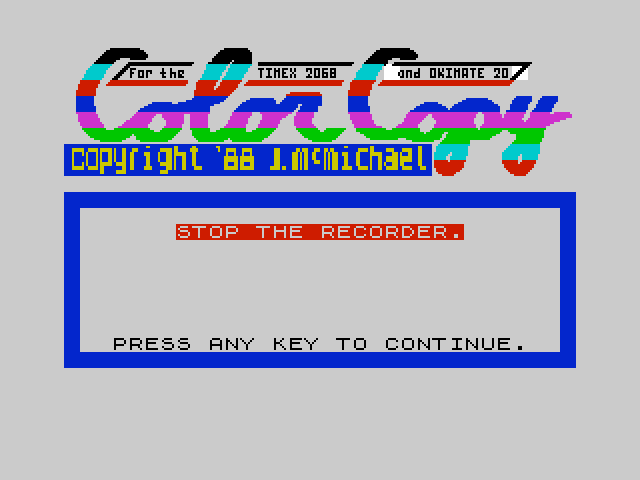
   10 INK 0: PRINT AT 11,7; FLASH 1; INK 2;"STOP THE RECORDER.": BEEP .03,20: BEEP .03,20: BEEP .03,20: PAUSE 150: PRINT AT 18,3;"PRESS ANY KEY TO CONTINUE.": PAUSE 0: LET scr=1
   20 LET hdld=64440: LET scld=64460: LET scst=64468: LET poka=64485: LET bwca=64505: LET pokb=64586: LET bwcb=64610: LET pokc=64759: LET clcc=64782: LET pokd=65002: LET clcd=65029: LET scr=1
   30 IF INKEY$<>"" THEN GO TO 30
   40 CLS : RANDOMIZE USR hdld: POKE 23658,8
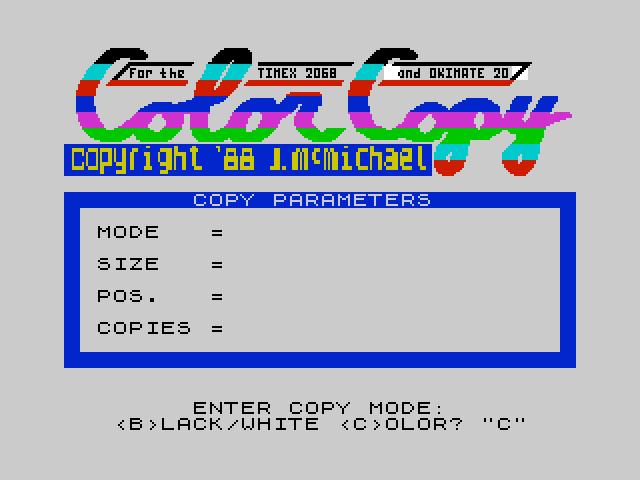
   50 PRINT AT 9,8; INK 7; PAPER 1;"COPY PARAMETERS"
   60 PRINT AT 11,2;"MODE   =            ";AT 13,2;"SIZE   =      ";AT 15,2;"POS.   =                     ";AT 17,2;"COPIES =     "''
   70 INPUT #0;AT 0,8;"ENTER COPY MODE:";AT 1,3;"<B>LACK/WHITE <C>OLOR? ";m$
   80 IF m$<>"B" AND m$<>"C" THEN GO TO 70
   90 IF m$="B" THEN PRINT AT 11,11; INVERSE 1;"BLACK/WHITE": GO TO 110
  100 PRINT AT 11,11; INVERSE 1;"COLOR"
  110 INPUT #0;AT 0,8;"ENTER COPY SIZE:";AT 1,6;"<S>MALL <L>ARGE? ";s$
  120 IF s$<>"S" AND s$<>"L" THEN GO TO 110
  130 IF s$="S" AND m$="B" THEN LET copy=bwca: GO TO 180
  140 IF s$="S" AND m$="C" THEN LET copy=clcc: GO TO 180
  150 IF s$="L" AND m$="B" THEN LET copy=bwcb: GO TO 170
  160 LET copy=clcd
  170 PRINT AT 13,11; INVERSE 1;"LARGE": GO TO 190
  180 PRINT AT 13,11; INVERSE 1;"SMALL"
  190 INPUT #0;AT 0,6;"ENTER COPY POSITION:";AT 1,0;"<L>EFT <C>NTR <R>IGHT <V>AR ";p$
  200 IF p$<>"L" AND p$<>"C" AND p$<>"R" AND p$<>"V" THEN GO TO 190
  210 IF p$="L" THEN LET pos=0: LET a$="LEFT": GO TO 280
  220 IF p$="C" THEN LET pos=9+(16 AND s$="S"): LET a$="CENTER": GO TO 280
  230 IF p$="R" THEN LET pos=16+(32 AND s$="S"): LET a$="RIGHT": GO TO 280
  240 LET max=16+(32 AND s$="S"): LET a$="VARIABLE SET TO "
  250 IF s$="S" THEN INPUT #0;AT 0,2;"ENTER POSITION # (0-48) ";pos: GO TO 270
  260 INPUT #0;AT 0,2;"ENTER POSITION # (0-16) ";pos
  270 LET pos=INT pos: IF pos>max THEN GO TO 250
  280 POKE poka,pos: POKE pokb,pos: POKE pokc,pos: POKE pokd,pos: PRINT AT 15,11; INVERSE 1;a$;: IF p$="V" THEN PRINT INVERSE 1;pos
  290 INPUT #0;AT 0,6;"NUMBER OF COPIES? ";num: IF num=0 THEN GO TO 290
  300 LET num=INT num: PRINT AT 17,11; INVERSE 1;num
  310 INPUT #0;AT 0,4;"ARE THE ABOVE PARAMETERS";AT 1,3;"CORRECT? <Y>ES OR <N>O ";a$
  320 IF a$<>"Y" AND a$<>"N" THEN GO TO 310
  330 IF a$="N" THEN GO TO 60
  340 IF scr=1 THEN GO TO 380
  350 INPUT #0;AT 0,4;"<L>OAD A NEW SCREEN$ OR";AT 1,4;"<U>SE LAST SCREEN$? ";a$
  360 IF a$="U" THEN GO TO 420
  370 IF a$<>"L" THEN GO TO 350
  380 POKE 23658,0: INPUT #0;AT 0,1;"NAME OF SCREEN$ TO BE LOADED?";AT 1,10;n$: POKE 23658,8
  390 IF LEN n$>10 THEN GO TO 380
  400 CLS : RANDOMIZE USR hdld: PRINT AT 14,5; FLASH 1;"LOAD THE SCREEN$ NOW."
  410 LOAD n$SCREEN$ : RANDOMIZE USR scst
  420 CLS : RANDOMIZE USR hdld
  430 PRINT AT 9,9; INK 7; PAPER 1;"PRINTER READY?"
  440 IF m$="B" THEN PRINT AT 11,3;"VERIFY BLACK RIBBON+SMOOTH";AT 12,2;"PAPER -OR- NO RIBBON+THERMAL": GO TO 460
  450 PRINT AT 12,3;"VERIFY COLOR RIBBON+SMOOTH"
  460 PRINT AT 13,6;"PAPER ARE INSTALLED.";AT 15,4;"VERIFY OKI 20 IS ON, AND";AT 17,5;"PRESS ANY KEY TO COPY."
  470 IF scr=1 THEN LET scr=0
  480 IF INKEY$<>"" THEN GO TO 480
  490 PAUSE 0: RANDOMIZE USR scld
  500 RANDOMIZE USR copy: LET num=num-1
  510 IF num>0 THEN GO TO 500
  520 GO TO 30
Note: Type-in program listings on this website use ZMAKEBAS notation for graphics characters.