
This is a joystick-driven color drawing program that lets the user plot pixels, draw lines, and stamp circles anywhere on the screen using a left-hand joystick port. The cursor position is tracked via pixel coordinates (x, y) with a range of 0–255 horizontally and 0–168 vertically, and the circle radius (c) is adjusted in real time using keys “6” and “7” with an audible pitch feedback via BEEP. The program supports saving the current screen to tape using a user-supplied filename via the INPUT/SAVE SCREEN$ mechanism, and can send output to a printer with the COPY command. Color cycling is handled both through joystick button 2 (incrementing ink color via subroutine at line 100) and through a border-color subroutine at line 150; ink color 8 suppresses plotting, functioning as a transparent or “no plot” mode. The ON ERR keyword (TS2068 extension) is used twice: once to silently resume the main loop on errors, and once to trigger a RESET on exit.
Program Analysis
Program Structure
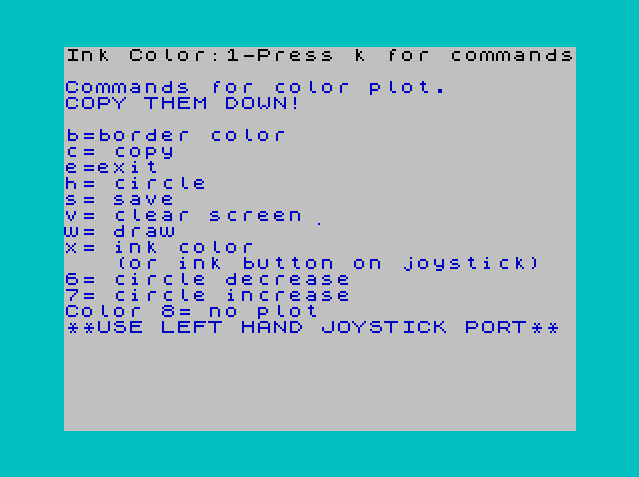
The program is organized around a tight main loop (lines 10–68) that polls joystick and keyboard input on every iteration, with utility subroutines branched to for specific functions. Initialization occurs at lines 7–9, where screen and variable state are set and the ink color subroutine is called for the first time.
| Lines | Purpose |
|---|---|
| 7–9 | Initialization: CLS, variable setup, initial ink call |
| 10–68 | Main event loop: joystick movement, key commands, boundary clamping, plot/draw |
| 70–90 | Help screen subroutine (key “k”) |
| 96–98 | Exit handler: ON ERR RESET, two beeps, STOP |
| 100–130 | Ink color increment subroutine (cycles 0–9) |
| 150–190 | Border color increment subroutine (cycles 0–7) |
| 200–250 | Save screen to tape subroutine |
| 300–350 | Printer copy subroutine |
Joystick Handling
Movement is read using the TS2068 STICK function (| keyword) with STICK(1,1) for the left joystick directional state. The return values correspond to standard Kempston-style bitmask directions: 1=down, 2=up, 4=left, 8=right, and diagonal values are combinations (e.g., 9=down+right, 10=up+right, 6=up+left, 5=down+left). Diagonal handling at lines 18–24 uses a double-test idiom — the condition is re-evaluated on the same line to apply both axis increments, which is slightly redundant but works in practice since the joystick state is unlikely to change mid-line.
STICK(2,1) at line 32 reads the fire button on the left joystick port; pressing it calls the ink color increment subroutine. STICK(1,2) at line 56 reads the right joystick and, if non-zero, triggers a short beep (line 58), acting as an optional audio marker.
Drawing Mechanics
The cursor is tracked as a pixel coordinate pair (x, y) initialized to screen center (127, 87). Movement increments or decrements these by 1 pixel per loop iteration. Boundary clamping at lines 48–54 constrains x to 0–255 and y to 0–168, matching the TS2068 high-resolution pixel grid.
Plotting at line 64 is conditional: ink color 10 is used as a sentinel — line 62 checks IF i=10 THEN GO TO 10, which bypasses the PLOT entirely, giving a “no plot” mode. However, the ink color subroutine (line 100) cycles i from 0 to 9 then resets to 0, so i would only reach 10 if initialized externally. Note that ink color 8 is mentioned in the help text as “no plot,” but the actual guard in the code uses i=10, which is an inconsistency between the documentation and the implementation.
The DRAW command at line 64 is invoked when key “w” is held; it draws from the current x,y back to itself (DRAW x,y), which is effectively a zero-length draw and likely a bug — the intent was probably to draw from a previous position to the current one, but no previous position variable is maintained.
Circle Radius Control
The variable c stores the circle radius, adjusted by keys “6” (decrease) and “7” (increase) at lines 26–28, clamped to the range 1–80. Line 30 plays a BEEP whose pitch is c-35 whenever either key is pressed, giving auditory feedback of the current radius. The CIRCLE command at line 38 (key “h”) stamps a circle of radius c centered at the current cursor position.
Error Handling with ON ERR
The TS2068-specific ON ERR keyword ({) is used in two places. At line 66, ON ERR GO TO 10 silently catches any runtime error (such as an out-of-range PLOT or CIRCLE coordinate) and resumes the main loop, providing robustness against edge conditions. At line 96, ON ERR RESET is used in the exit handler to trigger a full system reset when key “e” is pressed.
Save and Copy Subroutines
The save subroutine (lines 200–250) uses FLASH to highlight a prompt, collects a filename via DIM s$(10) and INPUT s$, validates it is non-empty, then executes SAVE s$ SCREEN$ to write the bitmap screen to tape. The copy subroutine (lines 300–350) issues a COPY command to dump the screen to a printer, bracketed by FLASH and PAUSE calls for user feedback.
Notable Techniques and Anomalies
- The
STOPstatements scattered at lines 69, 95, 149, 199, 299, 399 serve as guards between subroutines to prevent fall-through execution if the program counter somehow reaches them without a proper RETURN or GO TO. - The help text at line 84 mentions key “x” for ink color, but no handler for key “x” exists in the main loop; ink color is actually changed via joystick button 2 or subroutine call.
- The DRAW at line 64 draws from
(x,y)to(x,y)(zero displacement), which does not produce a visible line segment; the intended behavior of drawing from a prior cursor position is unimplemented. - Ink color 8 is described in the help screen as “no plot,” but the actual guard condition in line 62 tests for
i=10, creating a discrepancy. - The main loop calls
STICK(1,1)up to eight times per iteration (once per directional branch), which is inefficient; storing the result in a variable would reduce repeated function calls.
Image Gallery
Source Code
    7 CLS
    8 LET b=5: LET c=0: LET i=0: LET p=9: LET x=127: LET y=87
    9 GO SUB 100
   10 IF STICK(1,1)=1 THEN LET y=y+1
   12 IF STICK(1,1)=2 THEN LET y=y-1
   14 IF STICK(1,1)=8 THEN LET x=x+1
   16 IF STICK(1,1)=4 THEN LET x=x-1
   18 IF STICK(1,1)=9 THEN LET y=y+1: IF STICK(1,1)=9 THEN LET x=x+1
   20 IF STICK(1,1)=10 THEN LET x=x+1: IF STICK(1,1)=10 THEN LET y=y-1
   22 IF STICK(1,1)=6 THEN LET y=y-1: IF STICK(1,1)=6 THEN LET x=x-1
   24 IF STICK(1,1)=5 THEN LET x=x-1: IF STICK(1,1)=5 THEN LET y=y+1
   26 IF INKEY$="6" THEN LET c=c-1: IF c<=1 THEN LET c=1
   28 IF INKEY$="7" THEN LET c=c+1: IF c>=80 THEN LET c=80
   30 IF INKEY$="6" OR INKEY$="7" THEN BEEP .125,(c-35)
   32 IF STICK(2,1)=1 THEN GO SUB 100
   34 IF INKEY$="b" THEN GO SUB 150
   36 IF INKEY$="e" THEN GO TO 96
   38 IF INKEY$="h" THEN CIRCLE x,y,c: BEEP .125,-23
   40 IF INKEY$="k" THEN GO SUB 70
   42 IF INKEY$="s" THEN GO SUB 200
   44 IF INKEY$="v" THEN GO TO 7
   46 IF INKEY$="c" THEN GO SUB 300
   48 IF y>=168 THEN LET y=168
   50 IF y<=0 THEN LET y=0
   52 IF x>=255 THEN LET x=255
   54 IF x<=0 THEN LET x=0
   56 IF STICK(1,2)=0 THEN GO TO 60
   58 BEEP .0007,49
   60 BORDER b: PAPER p: INK i
   62 IF i=10 THEN GO TO 10
   64 PLOT x,y: IF INKEY$="w" THEN DRAW x,y
   65 IF INKEY$="w" THEN BEEP .125,-47
   66 ON ERR GO TO 10
   68 GO TO 10
   69 STOP
   70 PRINT AT 2,0;"Commands for color plot.": PRINT "COPY THEM DOWN!": PRINT
   72 PRINT "b=border color"
   74 PRINT "c= copy": PRINT "e=exit"
   76 PRINT "h= circle "
   78 PRINT "s= save"
   80 PRINT "v= clear screen"
   82 PRINT "w= draw"
   84 PRINT "x= ink color": PRINT "   (or ink button on joystick)"
   86 PRINT "6= circle decrease": PRINT "7= circle increase"
   88 PRINT "Color 8= no plot": PRINT "**USE LEFT HAND JOYSTICK PORT**"
   89 BEEP .125,13
   90 RETURN
   95 STOP
   96 ON ERR RESET
   97 BEEP .5,-23: BEEP .5,-35
   98 STOP
  100 LET i=i+1: IF i=10 THEN LET i=0
  110 PRINT AT 0,0;"Ink Color:";i;"-Press k for commands": BEEP .125,49
  120 PAPER 9: INK i
  130 RETURN
  149 STOP
  150 LET b=b+1
  160 IF b>=8 THEN LET b=0
  170 BEEP .125,25
  180 BORDER b
  190 RETURN
  199 STOP
  200 FLASH 1: IF INKEY$="s" THEN PRINT AT 0,12;"   Enter name       ": FLASH 0
  205 DIM s$(10)
  210 INPUT s$
  220 IF s$="" THEN GO TO 210
  230 PRINT AT 0,12;"    Name: ";s$;" "
  240 SAVE s$SCREEN$
  250 GO TO 110
  299 STOP
  300 FLASH 1: PRINT AT 0,12;"    Copying         "
  310 PAUSE 50
  320 COPY
  330 FLASH 0: PRINT AT 0,12;"    Copy complete   "
  340 PAUSE 50
  350 GO TO 110
  399 STOP
Note: Type-in program listings on this website use ZMAKEBAS notation for graphics characters.