
Codeloader is an interactive machine code entry and editing utility that allows users to load Z80 machine code into a reserved memory block above RAMTOP using either hexadecimal or decimal input, DATA statement lists, or by PEEKing an existing memory range. The program uses CLEAR to set RAMTOP at a user-specified address, then reads back the actual RAMTOP from system variables at addresses 23730–23731 to confirm the base address. A string array H$() with three-character-wide slots stores each byte’s representation during entry, supporting both hex and decimal display modes. The hex conversion routine manually maps digit values above 9 to letters A–F by adding offsets to ASCII codes rather than using string lookup tables. Additional features include a decimal-to-binary converter, USR execution of loaded code, and the ability to relocate PEEKed code to a new address range.
Program Analysis
Program Structure
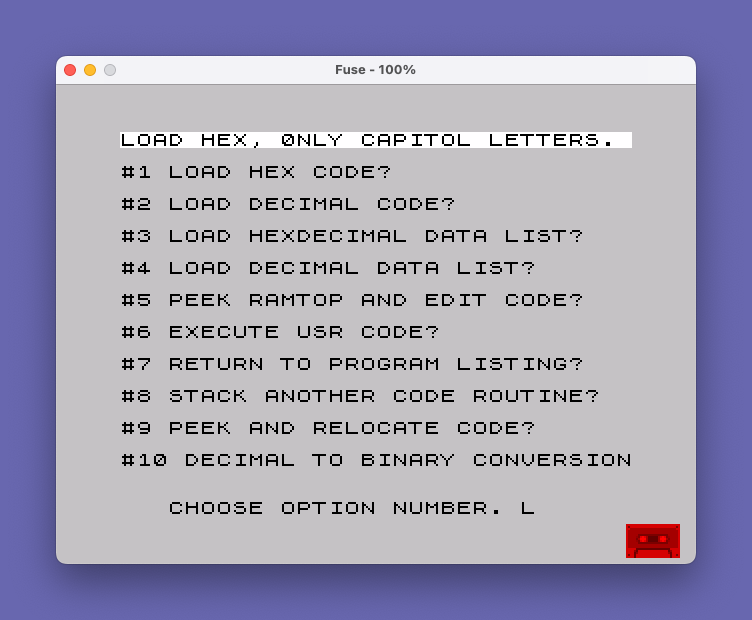
The program occupies lines 9400–9900, organized into a splash/setup phase, a main menu dispatcher, and a series of independent routines branched to by GO TO. Lines 9400–9435 display introductory notes. Lines 9500–9512 handle address setup and array initialization. Lines 9512–9553 present the ten-option menu and dispatch. The individual routines begin at line 9554 (hex entry), 9612 (decimal entry), 9664 (hex DATA list), 9686 (decimal DATA list), 9702 (peek/relocate), 9710 (peek/edit), 9796 (USR execute), 9810 (decimal-to-binary), and 9792 (completion handler).
Memory Management and Setup
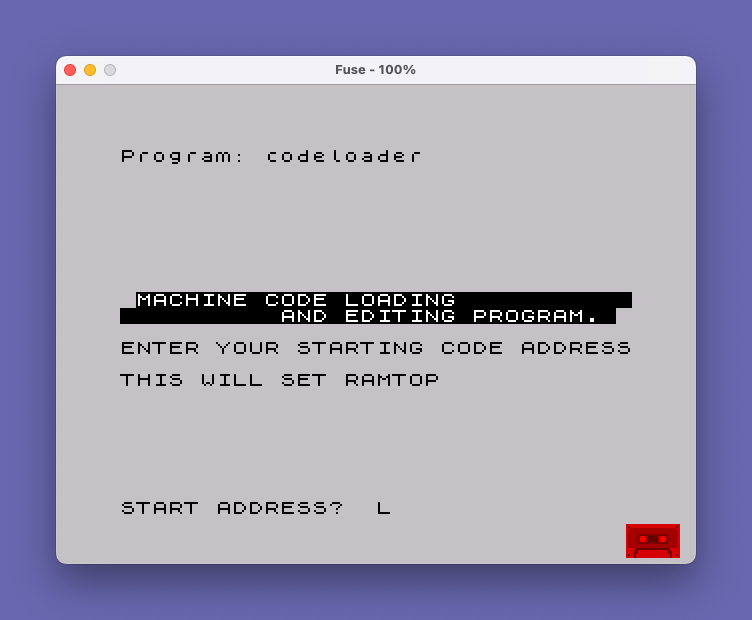
Line 9503 prompts for a start address, which is then passed to CLEAR X at line 9504 to set RAMTOP. Immediately after, the program reads the actual RAMTOP back from system variables at addresses 23730 and 23731 using PEEK 23730+256*PEEK 23731, storing the result in both X (the current write pointer) and Y (the base address preserved for later use). This two-variable design allows X to advance as bytes are POKEd while Y retains the original start for display and relocation.
Line 9510 allocates the central data structure: DIM H$(1+E-X,3), a string array sized to the address range with three characters per element, sufficient to hold a two-digit hex value or a three-digit decimal value. The variable D is initialized to 9500 here, used later in option 7 to LIST from the setup section.
Hex Entry and Conversion (Lines 9554–9610)
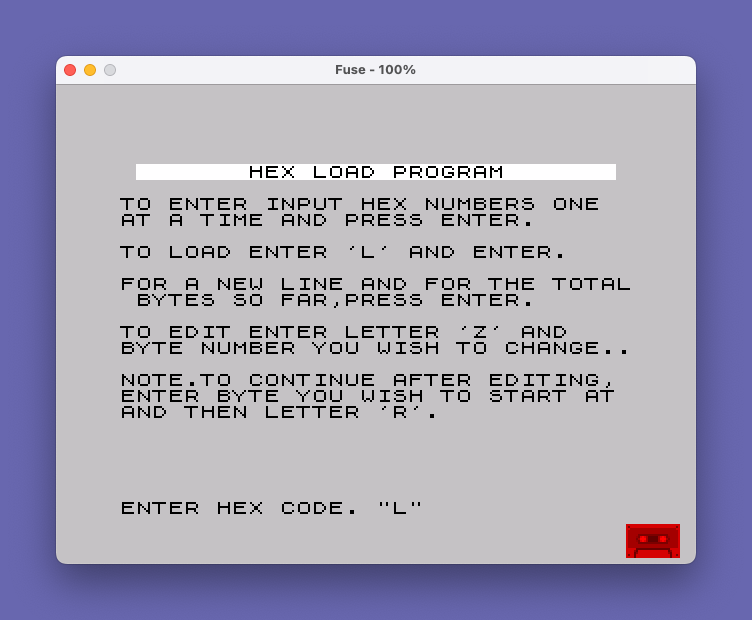
The hex entry loop at lines 9570–9582 collects two-character hex strings into H$(A). Three sentinel values terminate or redirect the loop: a blank string triggers a byte count display and re-prompt; "Z " enters edit mode; "L " triggers the load phase. Note that the string comparisons rely on the fixed-width three-character slots in H$, so single-character inputs like “L” are automatically padded to “L ” by the string array, making the comparisons work correctly.
The hex-to-decimal conversion at lines 9599–9604 uses an ASCII offset technique. The base offset K (for the high nibble) and L (for the low nibble) both start at 48 (ASCII ‘0’). If a character’s code exceeds 57 (ASCII ‘9’), an additional 7 is added, bridging the gap between ‘9’ (57) and ‘A’ (65) in ASCII. The POKE expression is then (CODE H$(A)-K)*16 + CODE H$(A,2)-L, which correctly decodes uppercase hex pairs A–F.
Decimal Entry (Lines 9612–9662)
The decimal entry routine mirrors the hex entry structure but stores numeric strings and converts them with VAL H$(A) at line 9657. Sentinel detection uses the same blank, “Z “, and “L ” strings. The termination check at line 9656 tests CODE H$(A)=76, which is the ASCII code for ‘L’, matching the load sentinel without needing to compare the full padded string.
DATA List Loading (Lines 9664–9700)
Options 3 and 4 load from embedded BASIC DATA statements. The user supplies a line number; the program calls RESTORE D and then reads values in a loop. The hex DATA loader (lines 9664–9684) reuses the same ASCII-offset conversion as the manual hex entry. Both loaders treat encountering a "C9" (hex, opcode RET) or 201 (decimal, opcode RET) as an automatic termination sentinel, stopping the load loop at the natural end of a Z80 routine. There is a minor anomaly at line 9700: POKE A,B is executed twice for each iteration — once at line 9696 and again at line 9700 before NEXT A — which is redundant but harmless.
Peek, Inspect, and Edit (Lines 9702–9790)
The peek/relocate path (option 9, line 9702) reads a start and end address, displays each address with its PEEK value and printable character (if PEEK P > 31), and copies the string representation of each byte into H$() using STR$. Option 5 (line 9710) adds a choice between decimal and hex display modes. The hex display conversion at lines 9726–9758 splits each byte into high and low nibbles using integer division, then replaces nibble values 10–15 with letters A–F via a FOR C=10 TO 15 loop with explicit IF tests — a straightforward but verbose approach compared to a lookup string.
The paginated display at lines 9760–9778 prints 20 lines before pausing with a three-option prompt: stop, edit, or continue. The edit sub-menu at line 9780 accepts a byte index or the special values 0 (continue), -1 (reload as decimal), or -2 (reload as hex), branching back into the respective load routines with LET X=Y to reset the write pointer to the base address.
USR Execution (Line 9796)
Option 6 simply executes PRINT USR Y, calling the machine code at the base address Y and printing whatever 16-bit value the routine returns in the BC register pair. A 200-frame pause follows before returning to the menu.
Decimal-to-Binary Converter (Lines 9810–9826)
This utility uses a standard bit-extraction loop iterating I from 15 down to 0. For each bit position it tests whether A < 2^I: if so, it prints “0”; otherwise it prints “1” and subtracts 2^I from A. This produces a fixed 16-bit binary representation. The exit condition IF A=-0 at line 9813 is equivalent to IF A=0 since -0 evaluates to zero in BASIC — entering 0 exits to the menu rather than converting it.
Notable Techniques and Observations
- Three-character fixed-width string array slots enable sentinel string matching without explicit length checks, leveraging automatic space-padding behavior.
- The ASCII offset trick (
+7for letters) for hex conversion avoids needing a lookup string orVAL. - The program variable
Dserves dual purpose: initialized to 9500 for theLISTcommand in option 7, then reused as the DATA statement line number for options 3 and 4. - The
PRINT USR Yat line 9796 will crash if the machine code atYdoes not return cleanly; no error protection is provided around it. - Lines 9800–9808 define a standalone peek viewer that is never reachable from the menu dispatcher (all ten menu options are accounted for at lines 9540–9553), making this a dead code block, likely an earlier version of the peek feature superseded by option 9.
- The
IF A=-0test at line 9813 is functionally correct but unusual; the author likely intended it as a mnemonic for “negative zero” as an exit flag.
Variable Summary
| Variable | Role |
|---|---|
X | Current POKE address (advances as bytes are loaded) |
Y | Base start address (preserved for relocation and USR) |
E | End address of the code block |
H$() | String array holding byte representations (hex or decimal) |
D | LIST start line / DATA restore line number |
W | Menu option selection |
A | Loop index / byte index into H$() |
K, L | ASCII conversion offsets for hex nibbles |
P | Address iterator in peek/display loops |
F | Format selector (1=decimal, 2=hex) in option 5 |
C$ | Pagination control string |
Content
Image Gallery
Source Code
 9400 REM "Codeloader---------by PATRICK FAGAN"
 9402 PRINT "YOU MUST SET A RAMTOP ADDRESS   AND BLOCK OF MEMORY TO USE THIS PROGRAM PROPERLY."
 9405 REM
 9410 PRINT '"PRESS ENTER TO START PROGRAM.   IF THE PROGRAM STOPS WITH AN    ERROR, YOU CAN RESTART WITH GOTO 9512."
 9415 REM
 9420 PRINT '"NOTE--THE PROGRAM IS FASTER IF  YOU RESERVE SMALL BLOCKS OF     MEMORY (100 OR 200 BYTES)ABOVE  THE RAMTOP YOU WISH TO SET."
 9425 REM
 9430 PRINT '"SPECIAL NOTE-IF YOU WANT TO PEEK AND RELOCATE CODE,YOU MUST HAVE A BLOCK OF MEMORY RESERVED     ABOVE RAMTOP THAT IS AS LARGE AS THE BLOCK OF MEMORY YOU WISH TO RELOCATE."
 9435 PAUSE 4000: CLS
 9500 PRINT AT 10,1; INVERSE 1; BRIGHT 1;"MACHINE CODE LOADING                     AND EDITING PROGRAM. "
 9502 PRINT : PRINT "ENTER YOUR STARTING CODE ADDRESS                                THIS WILL SET RAMTOP"
 9503 INPUT "START ADDRESS?  ";X
 9504 CLEAR X: LET X=(PEEK 23730+256*PEEK 23731): LET Y=X
 9506 PRINT AT 10,1;"ENTER YOUR ENDING CODE ADDRESS?"
 9507 INPUT "END ADDRESS?    ";E
 9508 PRINT AT 15,2; BRIGHT 1;"ADDRESS ";X;" TO ";E: PAUSE 150: CLS
 9510 DIM H$(1+E-X,3): LET D=9500
 9512 CLS
 9516 PRINT BRIGHT 1;"LOAD HEX, 0NLY CAPITOL LETTERS. "
 9518 PRINT '"#1 LOAD HEX CODE?"
 9520 PRINT '"#2 LOAD DECIMAL CODE?"
 9522 PRINT '"#3 LOAD HEXDECIMAL DATA LIST?"
 9524 PRINT '"#4 LOAD DECIMAL DATA LIST?"
 9526 PRINT '"#5 PEEK RAMTOP AND EDIT CODE?"
 9528 PRINT '"#6 EXECUTE USR CODE?"
 9530 PRINT '"#7 RETURN TO PROGRAM LISTING?"
 9532 PRINT '"#8 STACK ANOTHER CODE ROUTINE?"
 9534 PRINT '"#9 PEEK AND RELOCATE CODE?"
 9535 PRINT '"#10 DECIMAL TO BINARY CONVERSION"
 9538 INPUT "   CHOOSE OPTION NUMBER. ";W
 9540 IF W=1 THEN CLS : GO TO 9554
 9542 IF W=2 THEN CLS : GO TO 9612
 9544 IF W=3 THEN CLS : GO TO 9664
 9546 IF W=4 THEN CLS : GO TO 9686
 9548 IF W=5 THEN CLS : GO TO 9710
 9549 IF W=6 THEN CLS : GO TO 9796
 9550 IF W=7 THEN CLS : LIST D: STOP
 9551 IF W=8 THEN CLS : PRINT AT 6,3;"YOUR PREVIOUS END CODE WAS           ADDRESS ";E: GO TO 9500
 9552 IF W=9 THEN CLS : GO TO 9702
 9553 IF W=10 THEN CLS : GO TO 9810
 9554 PRINT AT 2,1; BRIGHT 1;"       HEX LOAD PROGRAM       "
 9556 PRINT '"TO ENTER INPUT HEX NUMBERS ONE  AT A TIME AND PRESS ENTER."
 9558 PRINT '"TO LOAD ENTER 'L' AND ENTER."
 9560 PRINT '"FOR A NEW LINE AND FOR THE TOTAL BYTES SO FAR,PRESS ENTER."
 9564 PRINT '"TO EDIT ENTER LETTER 'Z' AND    BYTE NUMBER YOU WISH TO CHANGE.."
 9566 PRINT '"NOTE.TO CONTINUE AFTER EDITING, ENTER BYTE YOU WISH TO START AT AND THEN LETTER 'R'."
 9570 FOR A=1 TO E-X
 9572 INPUT "ENTER HEX CODE. ";H$(A)
 9576 IF H$(A)="   " THEN PRINT TAB 28;"#";A-1: GO TO 9572
 9578 IF H$(A)="Z  " THEN GO TO 9584
 9580 IF H$(A)="L  " THEN GO TO 9594
 9581 PRINT H$(A);" ";
 9582 NEXT A
 9584 INPUT "ENTER BYTE# TO CHANGE ";C
 9586 LET A=C
 9588 INPUT "ENTER NEW HEX BYTE IN LOCATION.";H$(A)
 9590 IF H$(A)="R  " THEN LET H$(A)=H$(A-1): PRINT TAB 31;" ";: GO TO 9572
 9591 PRINT "C";C;"=";H$(A);" ";
 9592 GO TO 9584
 9594 LET A=0
 9596 LET A=A+1
 9597 IF A>1+E-Y THEN GO TO 9792
 9598 IF CODE H$(A)=76 THEN GO TO 9792
 9599 LET K=48: LET L=48
 9600 IF CODE H$(A)>57 THEN LET K=K+7
 9602 IF CODE H$(A,2)>57 THEN LET L=L+7
 9604 POKE X,(CODE H$(A)-K)*16+CODE H$(A,2)-L
 9608 LET X=X+1
 9610 GO TO 9596
 9612 PRINT AT 2,1; BRIGHT 1;"     DECIMAL LOAD PROGRAM     "
 9614 PRINT '"TO ENTER, INPUT DECIMAL NUMBERS ONE AT A TIME AND PRESS ENTER."
 9616 PRINT '"TO LOAD,ENTER 'L' AND PRESS ENTER."
 9618 PRINT '"FOR A NEW LINE AND FOR THE TOTAL BYTES SO FAR,PRESS ENTER."
 9622 PRINT '"TO EDIT ENTER LETTER 'Z' AND    BYTE NUMBER YOU WISH TO CHANGE.."
 9624 PRINT '"NOTE.TO CONTINUE AFTER EDITING,ENTER BYTE YOU WISH TO START AT  THEN LETTER 'R'."
 9628 FOR A=1 TO E-X
 9630 INPUT "ENTER DECIMAL CODE. ";H$(A)
 9632 IF H$(A)="Z  " THEN GO TO 9642
 9636 IF H$(A)="   " THEN PRINT TAB 28;"#";A-1: GO TO 9630
 9638 IF H$(A)="L  " THEN GO TO 9652
 9639 PRINT H$(A);" ";
 9641 NEXT A
 9642 INPUT "ENTER BYTE# TO CHANGE ";C
 9644 LET A=C
 9646 INPUT "ENTER NEW DECIMAL BYTE .";H$(A)
 9648 IF H$(A)="R  " THEN LET H$(A)=H$(A-1): PRINT TAB 31;" ";: GO TO 9630
 9649 PRINT "C";C;"=";H$(A);" ";
 9650 GO TO 9642
 9652 LET A=0
 9654 LET A=A+1
 9655 IF A>1+E-Y THEN GO TO 9792
 9656 IF CODE H$(A)=76 THEN GO TO 9792
 9657 POKE X,VAL H$(A)
 9660 LET X=X+1
 9662 GO TO 9654
 9664 PRINT AT 10,0; BRIGHT 1;"HEXDECIMAL DATA LOAD PROGRAM"
 9666 PRINT '"ENTER STARTING LINE# OF DATA     LIST TO LOAD."
 9668 INPUT "DATA LINE# ?  ";D
 9670 RESTORE D
 9672 FOR A=X TO E
 9674 READ B$: LET K=48: LET L=48
 9676 IF CODE B$>57 THEN LET K=K+7
 9678 IF CODE B$(2)>57 THEN LET L=L+7
 9680 POKE A,(CODE B$-K)*16+CODE B$(2)-L
 9682 IF B$="C9" THEN GO TO 9792
 9684 NEXT A
 9686 PRINT AT 10,0; BRIGHT 1;"DECIMAL DATA LOAD PROGRAM"
 9688 PRINT '"ENTER STARTING LINE# OF DATA     LIST TO LOAD."
 9690 INPUT "DATA LINE# ?  ";D
 9692 RESTORE D
 9694 FOR A=X TO E
 9696 READ B: POKE A,B
 9698 IF B=201 THEN GO TO 9792
 9700 POKE A,B: NEXT A
 9702 PRINT AT 10,0;"TO PEEK ANY CODE ADDRESS AREA,  ENTER THE START AND END ADDRESS IN DECIMAL."
 9703 INPUT " START & END ADDRESS?           ";J;" TO ";K: CLS
 9704 LET B=0: LET A=0: LET C$="0"
 9705 FOR P=J TO K: PRINT P;"  ";PEEK P;: IF PEEK P>31 THEN PRINT TAB 11;CHR$ PEEK P;
 9706 PRINT : LET B=B+1: LET A=A+1: LET H$(A)=STR$ PEEK P: NEXT P
 9707 INPUT "'1'RETURN TO MENU '2'LOAD CODE INTO NEW ADDRESS?";U: IF U=1 THEN GO TO 9512
 9708 IF U=2 THEN CLS : INPUT "START & END ADDRESS?             ";Y;" TO ";E: GO TO 9760
 9710 LET B=0: LET A=0: LET C$="0"
 9711 INPUT "1'VIEW & EDIT DECIMAL, 2'VIEW & EDIT HEX. ";F
 9712 PRINT TAB 5;"I'M WORKING ON IT NOW!"
 9714 IF F=1 THEN GO TO 9718
 9716 IF F=2 THEN GO TO 9726
 9718 FOR P=Y TO E
 9720 LET B=B+1: LET A=A+1
 9722 LET H$(A)=STR$ PEEK P
 9724 NEXT P: GO TO 9759
 9726 LET A=0
 9728 FOR P=Y TO E
 9730 LET G=PEEK P: LET A=A+1
 9732 LET J=INT (G/16)
 9734 LET K=INT (G-J*16)
 9736 LET H$(A,1)=STR$ J
 9738 LET H$(A,2 TO )=STR$ K
 9739 IF J<10 AND K<10 THEN GO TO 9758
 9740 FOR C=10 TO 15
 9742 IF C=10 THEN LET A$="A"
 9744 IF C=11 THEN LET A$="B"
 9746 IF C=12 THEN LET A$="C"
 9748 IF C=13 THEN LET A$="D"
 9750 IF C=14 THEN LET A$="E"
 9752 IF C=15 THEN LET A$="F"
 9754 IF J=C THEN LET H$(A,1)=A$
 9756 IF K=C THEN LET H$(A,2 TO )=A$
 9757 NEXT C
 9758 NEXT P
 9759 PRINT TAB 10;"EDIT,BYTE#"
 9760 LET A=0: LET B=0: LET I=0
 9762 FOR P=Y TO E
 9764 LET B=B+1: LET I=I+1
 9766 LET A=I: PRINT P;"  ";PEEK P;TAB 11;H$(A);"  ";I;"  ";
 9768 IF PEEK P>31 THEN PRINT CHR$ PEEK P;
 9770 PRINT
 9772 IF B=20 THEN INPUT "#1,STOP  #2,EDIT  #3,CONT ";C$: LET B=0
 9774 IF C$="1" THEN GO TO 9512
 9776 IF C$="2" THEN GO TO 9780
 9778 NEXT P: LET B=20: GO TO 9772
 9780 INPUT "0',CONT, OR ENT BYTE# TO CHANGE,RELOAD CODE,-1'DEC,-2'HEX. ";C: LET X=Y: LET C$="0"
 9782 IF C=0 THEN GO TO 9778
 9784 IF C=-1 THEN GO TO 9652
 9786 IF C=-2 THEN GO TO 9594
 9788 LET A=C: INPUT "ENT BYTES IN SAME CODE AS EDIT LIST ";H$(A)
 9790 GO TO 9780
 9792 PRINT AT 21,8; INVERSE 1;"CODE USR ";Y;" ENTERED"
 9794 PAUSE 70: GO TO 9512
 9796 PRINT USR Y
 9798 PAUSE 200: GO TO 9512
 9800 PRINT "ENTER START AND END ADDRESS OF   CODE YOU WISH TO VIEW."
 9801 INPUT "START & END ADDRESS?            ";Y;" TO ";E
 9802 FOR P=Y TO E
 9804 PRINT P;"  ";PEEK P;
 9805 IF PEEK P>31 THEN PRINT TAB 11;CHR$ PEEK P;
 9806 PRINT
 9807 NEXT P
 9808 INPUT "PRESS ENTER TO RETURN TO MENU.  ";Z$: IF Z$="" THEN GO TO 9512
 9810 PRINT "DECIMAL TO BINARY CONVERSION."
 9812 INPUT "ENT DEC#:ENT -0 TO EXIT: ";A: PRINT A;"= ";TAB 7;
 9813 IF A=-0 THEN GO TO 9512
 9814 FOR I=15 TO 0 STEP -1
 9816 IF A<2^I THEN GO TO 9824
 9818 PRINT "1";
 9820 LET A=A-2^I
 9822 GO TO 9826
 9824 PRINT "0";
 9826 NEXT I: PRINT : GO TO 9812
 9828 STOP
 9900 SAVE "codeloader" LINE 9500
Note: Type-in program listings on this website use ZMAKEBAS notation for graphics characters.