
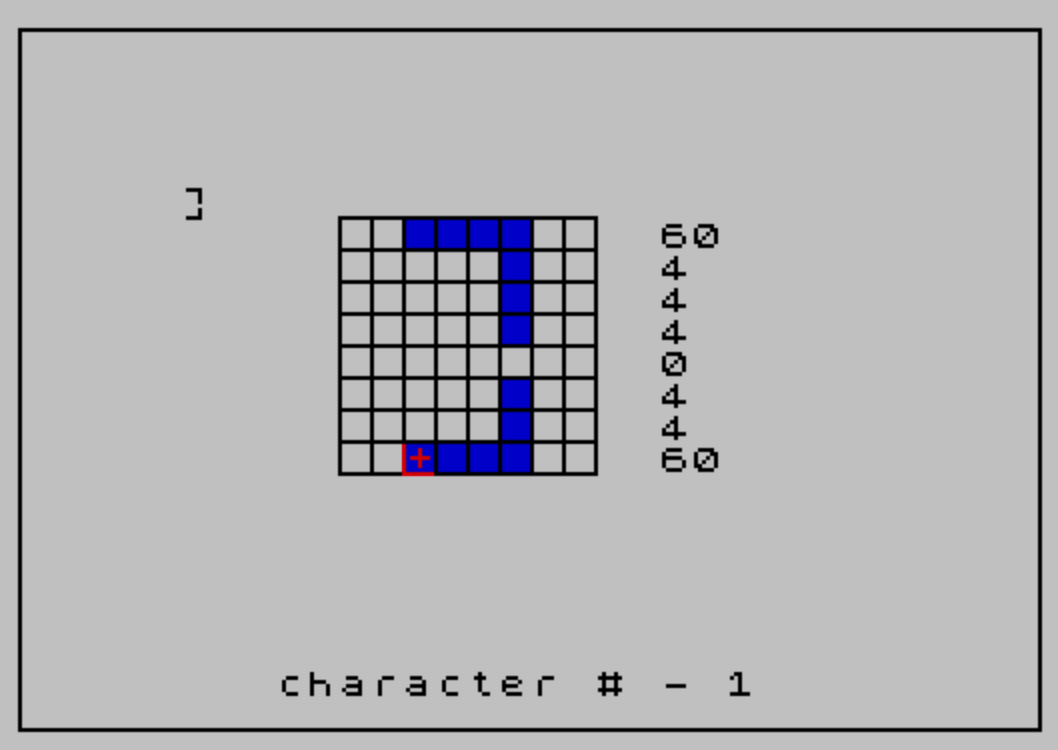
This program is a user-defined graphic (UDG) character editor for designing and modifying the 21 UDG characters (accessed via CHR$ 144 through CHR$ 164). The editor displays an 8×8 pixel grid drawn with PLOT and DRAW commands, allowing the user to navigate cells with keys 5–8 and set or clear pixels using “a” and “d” respectively. Pixel state is tracked in a DIM c(8) array representing the eight byte values of the character, which are POKEd directly into UDG RAM via USR CHR$(144+c) to give real-time preview. The border is drawn by a subroutine at line 2000 using a single PLOT/DRAW rectangle, and the grid lines are rendered with nested loops at lines 1310–1380.
Program Structure
The program is organized into a main loop with several subroutines and jump targets:
- Lines 110–290: Initialization — sets cursor position, dimensions array, draws border, prompts for character number, and draws the editing grid.
- Lines 300–610 (implied line 300): Main input/movement loop — reads keypresses, handles cursor movement (keys 5–8), pixel set (“a”), pixel clear (“d”), and restart (“n”). Note that line 300 is missing from the listing; the program jumps to it from several places, making it a ghost target that would cause an error unless line 300 is elsewhere (see anomalies).
- Lines 700–800: “Set pixel” handler — POKEs attribute memory and calls the update subroutine.
- Lines 900–950: “Clear pixel” handler — POKEs attribute memory and calls the update subroutine.
- Lines 1300–1450: Grid drawing subroutine — draws 8×8 grid lines and prints current byte values and a live UDG preview.
- Lines 1500–1800: Pixel data update subroutine — recalculates the affected byte in
c(), POKEs all 8 bytes into UDG RAM, and redraws the preview character. - Lines 2000–2060: Border drawing subroutine.
- Line 9000: SAVE statement.
Grid and Cursor Mechanics
The editing grid occupies character positions x=10–17 (columns) and y=6–13 (rows) in screen coordinates. The cursor is rendered as a crosshair using PLOT/DRAW with INVERSE 1 to erase the old position (lines 520–540) and normal PLOT/DRAW to draw the new one (lines 570–600). The crosshair is a 5-pixel horizontal line and 5-pixel vertical line centered on the cell.
Movement is constrained by boundary checks at lines 410–440, clamping x to 10–17 and y to 6–13, matching the 8×8 cell grid.
Pixel Set/Clear via Attribute Memory
Rather than using PRINT AT or direct bitmap manipulation for visual feedback on the grid, the program POKEs the Spectrum’s color attribute memory directly. The address is computed as q = x + 22528 + (32 * y), placing it in the attribute file. Setting a pixel POKEs value 10 (ink 2, paper 1 — red on blue), while clearing POKEs value 56 (white on black). Guards at lines 715–716 and 915 prevent redundant writes.
UDG Data Storage and Memory Write
The character’s eight row bytes are stored in the array c(8). When a pixel is toggled, subroutine 1500 calculates the bit position using z = 2^(7-(x-10)) (line 1520), then adds or subtracts z from the appropriate element c(v) where v = y - 5. The full 8-byte pattern is then written to UDG RAM with:
s = USR CHR$(144+c)— resolves the RAM address for the selected UDG character (line 1710).- A
FORloop at lines 1720–1740 POKEs all 8 bytes starting ats-1.
The live UDG preview is displayed at screen position (5,5) with PRINT AT 5,5; CHR$(144+c).
Key Mapping
| Key | Action |
|---|---|
5 | Move cursor left (decrease x) |
6 | Move cursor right (increase y — note: likely a swap bug) |
7 | Move cursor up (decrease y) |
8 | Move cursor down (increase x — note: likely a swap bug) |
a | Set pixel (color attribute = 10) |
d | Clear pixel (color attribute = 56) |
n | Restart / new character |
Bugs and Anomalies
- Movement axis confusion: Key
6incrementsy(line 360) and key8incrementsx(line 380). On the standard 5-6-7-8 cursor key layout these correspond to right, up-left, and down respectively — the x/y roles appear swapped relative to the conventional mapping, making diagonal movement behavior counterintuitive. - Off-by-one in POKE loop: Line 1730 POKEs
q+(s-1), iteratingqfrom 1 to 8. This results in addressessthroughs+7, which is correct for 8 bytes, but the expressionq+(s-1)is an unusual formulation ofs-1+qrather than the more naturals+q-1. - Pixel toggle uses addition/subtraction: Adding
zto set a bit and subtracting to clear it (lines 1550, 1610) works correctly only if the bit was not already set/cleared. There is no bitmask guard, so toggling a pixel that is already in the target state would corrupt the byte value.
Image Gallery
Source Code
  110 LET x=10:LET y=6
  120 DIM c(8)
  125 CLS :GO SUB 2000
  130 PRINT AT 20,6;"input character number ";
  140 INPUT c:PRINT c
  150 CLS
  160 GO SUB 2000
  280 GO SUB 1300
  290 GO TO 550
  310 IF INKEY$="" THEN GO TO 310
  320 LET xo=x:LET yo=y
  330 IF INKEY$="a" THEN GO TO 700
  340 IF INKEY$="d" THEN GO TO 900
  350 IF INKEY$="5" THEN LET x=x-1:GO TO 400
  360 IF INKEY$="6" THEN LET y=y+1:GO TO 400
  370 IF INKEY$="7" THEN LET y=y-1:GO TO 400
  380 IF INKEY$="8" THEN LET x=x+1:GO TO 400
  390 IF INKEY$="n" THEN GO TO 100
  392 GO TO 300
  395 REM
  405 REM
  410 IF x<10 THEN LET x=10
  420 IF x>17 THEN LET x=17
  430 IF y<6 THEN LET y=6
  440 IF y>13 THEN LET y=13
  495 REM
  510 LET xc=xo*8:LET yc=(21-yo)*8
  520 PLOT INVERSE 1;xc+2,yc+4
  530 DRAW INVERSE 1;4,0
  540 PLOT INVERSE 1;xc+4,yc+2
  550 DRAW INVERSE 1;0,4
  555 REM
  560 LET xc=x*8:LET yc=(21-y)*8
  570 PLOT xc+2,yc+4
  580 DRAW 4,0
  590 PLOT xc+4,yc+2
  600 DRAW 0,4
  610 GO TO 300
  695 REM
  710 LET q=x+22528+(32*y)
  715 IF PEEK (q)=10 THEN GO TO 300
  716 IF PEEK (q)=8 THEN GO TO 300
  720 POKE q,10
  730 LET p=0
  740 GO SUB 1500
  800 GO TO 300
  910 LET q=x+22528+(32*y)
  915 IF PEEK (q)=56 THEN GO TO 300
  920 POKE q,56
  930 LET p=1
  940 GO SUB 1500
  950 GO TO 300
 1310 FOR g=64 TO 128 STEP 8
 1320 PLOT 80,g
 1330 DRAW 64,0
 1340 NEXT g
 1359 FOR g=80 TO 144 STEP 8
 1360 PLOT g,64
 1370 DRAW 0,64
 1380 NEXT g
 1390 FOR q=1 TO 8
 1400 PRINT AT q+5,20;c(q)
 1410 NEXT q
 1420 PRINT AT 20,8;"character # - ";
 1430 PRINT c
 1440 PRINT AT 5,5; CHR$ (144+c)
 1450 RETURN
 1510 LET xv=7-(x-10)
 1520 LET z=2^xv
 1530 LET v=y-5
 1540 IF p=1 THEN GO TO 1600
 1550 LET c(v)=c(v)+z
 1560 GO TO 1650
 1600 REM
 1610 LET c(v)=c(v)-z
 1650 FOR q=1 TO 8
 1660 PRINT AT q+5,20;"   "
 1670 PRINT AT q+5,20;c(q)
 1680 NEXT q
 1700 REM
 1710 LET s= USR CHR$ (144+c)
 1720 FOR q=1 TO 8
 1730 POKE q+(s-1),c(q)
 1740 NEXT q
 1750 PRINT AT 5,5; CHR$ (144+c)
 1800 RETURN
 2000 REM draw border
 2005 REM
 2010 PLOT 0,0
 2020 DRAW 255,0
 2030 DRAW 0,175
 2040 DRAW -255,0
 2050 DRAW 0,-175
 2060 RETURN
 9000 SAVE "case swap" LINE 0
Note: Type-in program listings on this website use ZMAKEBAS notation for graphics characters.