
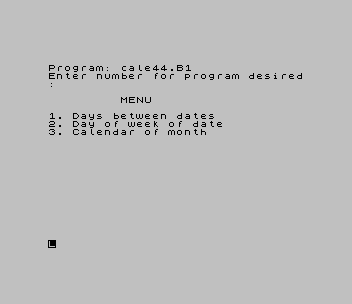
Offers three date calculations from a numbered menu: the number of days between two dates, the day of the week for a given date, and a calendar for a chosen month. Dates are typed as MM.DD.YYYY, or MM.YYYY for the month calendar. After each result, press C to send the screen to the printer with COPY, or any other key to go back to the menu.
The opening REMs credit “R.A. Schrack” (Roald Schrack).
Program Analysis
Program Structure
Lines 2000–2120 set up the day names w$, month names n$ and c$, a string of three-character cells (six blank cells, then “ 1.” to “31.”) used to print calendar rows. Line 90 uses GO TO 200*i to jump to option 2 (line 400) or option 3 (line 600). The subroutine at line 1000 asks for and parses a date, and lines 1060–1240 turn it into a day count f.
Day-Count Formula
The subroutine uses the Gregorian day-number method: 365×year + day + 31×(month−1), plus the leap days INT (y/4) minus the century correction INT (3/4*(INT (y/100)+1)). For March onward, INT (.4*m+2.3) is subtracted to allow for the short months; for January and February the year is reduced by one in the leap-day terms instead. The difference between two counts gives the days between dates, and f mod 7 indexes w$, which starts at Saturday.
Month Calendar
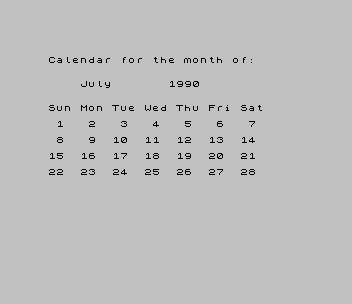
Option 3 finds the counts for the 1st of the month and the 1st of the next month (month 13 works in the formula), so the length of the month is l=f-f1. The weekday of the 1st sets a starting offset into c$, and lines 720–790 print up to six rows of seven two-character slices.
Notable Techniques
GO TO 200*ias a computed jump for the menu.("DD." AND i=2)in aPRINTto include part of the prompt only for one option.- Calendar rows printed by slicing a single preformatted string of day numbers.
- The autostart line plays a short
BEEPsequence before the menu.
Potential Issues
- The prompt adds “DD.” only when
i=2, so option 1 showsMM.YYYYeven though it reads the date asMM.DD.YYYY. - Option 3 shows “Give D as “01”.”, but that option asks for
MM.YYYYand takes the day as 1 regardless. - Only an upper-case C triggers
COPY, sinceINKEY$is case-sensitive.
It comes from a Larken disk in the TS User Group’s collection (disk l-23). For this release it was converted to load and run from tape on a stock TS2068: the LKDOS RANDOMIZE USR 100 before the SAVE line was removed. It was tested in ZEsarUX.
Image Gallery
Source Code
    8 REM ********************
   10 REM * R.A. Schrack     *
   12 REM * Calendar Program *
   14 REM ********************
   18 GO SUB 2000
   20 PRINT "Enter number for program desired:"
   22 PRINT : PRINT "         MENU"
   24 PRINT : PRINT "1. Days between dates"
   26 PRINT "2. Day of week of date"
   28 PRINT "3. Calendar of month"
   30 INPUT i
   70 IF i<1 OR i>3 THEN GO TO 30
   80 IF i=1 THEN GO TO 100
   90 GO TO 200*i
  100 CLS
  110 PRINT AT 7,4;"Give first date."
  112 LET s=8
  120 GO SUB 1000
  130 LET f1=f
  140 PRINT AT 12,4;"Give second date"
  142 LET s=13
  150 GO SUB 1000
  160 LET d=ABS (f-f1)
  170 PRINT AT 17,4;"Difference is ";d;" days."
  175 PRINT AT 20,0;"Give C for copy or M for menu."
  180 PAUSE 0
  190 IF INKEY$="C" THEN COPY
  195 CLS : GO TO 20
  400 CLS
  410 LET s=7
  420 GO SUB 1000
  430 LET i=1+f-INT (f/7)*7
  440 PRINT AT 11,4;"The day of the week is: ": PRINT : PRINT "          ";w$(i)
  460 GO TO 175
  600 CLS
  602 PRINT "Give D as ""01""."
  610 LET s=2
  615 GO SUB 1000
  618 PAUSE 200
  620 LET f1=f
  630 LET m=m+1
  640 LET d=1
  650 GO SUB 1060
  660 LET l=f-f1
  662 CLS
  670 PRINT AT 0,0;"Calendar for the month of:"
  680 PRINT AT 3,4;n$(m-1);"  ";y
  682 PRINT : PRINT
  684 FOR i=2 TO 7
  686 PRINT w$(i,1 TO 3);" ";
  688 NEXT i
  689 PRINT "Sat"
  690 LET i=1+f1-INT (f1/7)*7
  700 IF i=0 THEN LET i=7
  710 LET i=3*(8-i)+1
  720 FOR w=1 TO 6
  730 PRINT "   "
  740 FOR g=1 TO 6
  750 PRINT c$(i TO i+1);"  ";
  760 LET i=i+3
  762 IF i>(3*(6+l)) THEN GO TO 800
  770 NEXT g
  780 PRINT c$(i TO i+1);"  "
  782 LET i=i+3
  790 NEXT w
  800 GO TO 175
 1000 PRINT AT s,4;"Give date in the form:"
 1010 PRINT AT s+1,4;"MM.";("DD." AND i=2);"YYYY"
 1020 INPUT a$
 1022 PRINT AT s+2,4;a$
 1030 LET m=VAL a$( TO 2)
 1040 IF i=3 THEN LET d=1: LET y=VAL a$(4 TO 7): GO TO 1060
 1050 LET d=VAL a$(4 TO 5): LET y=VAL a$(7 TO 10)
 1060 IF m>2 THEN GO TO 1200
 1070 LET t=INT (3/4*INT (((y-1)/100)+1))
 1080 LET s=INT ((y-1)/4)
 1090 LET f=365*y+d+31*(m-1)+s-t
 1100 RETURN
 1200 LET t=INT (3/4*(INT (y/100)+1))
 1210 LET s=INT (y/4)
 1220 LET u=INT (.4*m+2.3)
 1230 LET f=365*y+d+31*(m-1)-u+s-t
 1240 RETURN
 2000 DIM w$(7,9)
 2010 DIM n$(12,9)
 2020 RESTORE 2080: FOR x=1 TO 7
 2030 READ w$(x)
 2040 NEXT x
 2050 FOR x=1 TO 12
 2060 READ n$(x)
 2070 NEXT x
 2080 DATA "Saturday","Sunday","Monday","Tuesday","Wednesday","Thursday","Friday"
 2090 DATA "January","February","March","April","May","June","July","August","September","October","November","December"
 2100 RESTORE
 2110 LET c$="  .  .  .  .  .  . 1. 2. 3. 4. 5. 6. 7. 8. 9.10.11.12.13.14.15.16.17.18.19.20.21.22.23.24.25.26.27.28.29.30.31"
 2120 RETURN
 9000 RANDOMIZE USR 100: SAVE "cale44.B1" LINE 9002
 9002 BEEP .5,0: BEEP .5,1: BEEP .5,2: BEEP .5,2: BEEP .5,2
 9004 GO TO 18
Note: Type-in program listings on this website use ZMAKEBAS notation for graphics characters.