
Bookworm is a book cataloging database program that stores up to 425 records, each 77 characters wide, tracking fields such as title, author (last and first name), publisher, publication date, edition, page count, subject, format, condition, value, source, number of copies, and notes. Records are stored in a string array `a$` dimensioned at 425×77, with fixed-width field slicing used throughout for all data access and display. The program supports alphabetical sorting via a selection-sort algorithm, substring searching across all records, adding, changing, and deleting entries, a summary report totaling copies and dollar value, and saving to tape. Both screen display and LPRINT hard-copy output are supported, with the hard-copy path using block graphic characters to draw bordered report frames.
Program Analysis
Program Structure
The program is organized into numbered REM-delimited modules, each handling a distinct function. Execution begins at line 10 with a GO TO f (where f=8000, the main menu), and variables are initialized at lines 9500–9540 which are reached on first run via the startup path. The modules are:
- Lines 1000–1400: Alpha sort
- Lines 1500–1600: Search
- Lines 2000–2100: Add new title
- Lines 3000–3300: Change existing data
- Lines 4000–4050: Delete title
- Lines 5000–5010: Recall title
- Lines 6000–6060: Save to tape
- Lines 7000–7990: Summary report
- Lines 8000–8130: Main menu and continuation logic
- Lines 9000–9400: Display/print subroutine
- Lines 9500–9540: Variable initialization and data setup
The first-run path relies on the fact that line 10 references f before it is defined; program flow must pass through lines 9500–9520 to initialize all variables before the menu is usable. This implies the program expects to be run from line 9500 on first load (or that GO TO f at line 10 triggers an error that jumps to initialization — more likely the listing is designed to be entered and RUN from line 9500 first, or GO TO f at line 10 is intentionally jumped over during initialization).
Variable Conventions
Single-letter numeric variables are used as named constants to improve readability and save memory. Their assignments at lines 9510–9520 are:
| Variable | Value | Purpose |
|---|---|---|
a | 0 (then count) | Current number of records |
c | 1500 | Line number of SEARCH subroutine |
d | 30 | End of Author Last Name field (cols 21–30) |
e | 8100 | Line number of “Any more?” prompt |
f | 8000 | Line number of main menu |
g | 9000 | Line number of display subroutine |
k | 1 | Constant 1 (loop increment, truth tests) |
o | 31 | Start of Author First Name field |
s | 77 | Record length (string array column count) |
u | 10 | AT row for prompts (middle of screen) |
v | 20 | End of Title field (cols 1–20) |
w | 0 | Constant 0 / false flag |
z | 21 | AT row for bottom-line prompts |
GO TO and GO SUB targets use these variables throughout (e.g. GO SUB g, GO TO e, GO TO f, GO SUB c), which is a standard memory-saving technique.
Data Storage Layout
All records are stored in the two-dimensional string array a$(425,77), where each row is one book record. Fields are accessed by fixed column slices:
| Columns | Field |
|---|---|
| 1–20 | Title |
| 21–30 | Author Last Name |
| 31–36 | Author First Name |
| 37–45 | Publisher |
| 46–49 | Publication Date |
| 50–51 | Edition |
| 52–55 | Pages |
| 56 | Subject (single char code) |
| 57 | Format (single char code) |
| 58 | Condition (single char code) |
| 59–63 | Value (5 chars: ###.##) |
| 64–67 | Source |
| 68–69 | Number of Copies |
| 70–77 | Notes |
Value is stored as a zero-padded 5-digit string (e.g. “01234” = $12.34), split at columns 59–61 (dollars) and 62–63 (cents) for display as c$(59 TO 61);".";c$(62 TO 63).
Sorting Algorithm
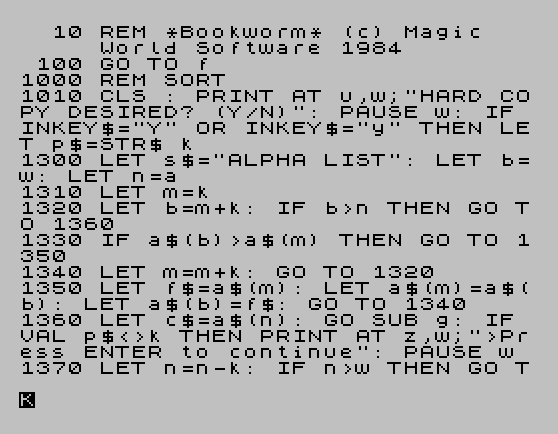
The sort at lines 1300–1400 implements a selection sort over the a$ array. Variable m tracks the index of the current minimum, and b scans ahead. When a$(b) > a$(m), the two rows are swapped using the temporary string f$. Because comparison starts from column 1 (the Title field), the sort is effectively alphabetical by title. The sorted record is then printed/LPRINTed via GO SUB g as each element is placed, providing a running output during sort — this doubles as the hard-copy generation pass.
Search Routine
The search (lines 1500–1600) accepts a substring query in d$ and scans every record and every starting position within each record using nested FOR loops. The match test is d$=a$(n,b TO b+m) where m=LEN d$-1. This is a brute-force linear scan but is straightforward and correct. On a match, the display subroutine is called and the user is asked to confirm the title; if not confirmed, the scan continues from the next position (line 1600 goes back to line 1570, bypassing the outer FOR loop re-initialization — meaning it continues from the current b and n values, which is intentional).
Menu Dispatch
The main menu (line 8050) reads a single keypress and validates it as characters ‘1’–’7′ using CODE x$<49 OR CODE x$>55. Dispatch to each module is then performed at line 8080 with GO TO VAL x$*1e3, which computes the target line number (1000, 2000, … 7000) arithmetically — an elegant and compact dispatch mechanism. The variable x$ is preserved so subroutines can later test which function was active (e.g. IF VAL x$=3 in the display subroutine to reload the current record).
Display and Print Subroutine
The subroutine at line 9000 handles both screen display and optional LPRINT hard copy. The hard-copy path (triggered when VAL p$=k, i.e. p$="1") uses block graphic characters to draw a bordered frame around the printed record, using the \:', \:.., and related escapes to produce top, side, and bottom border elements. The flag p$ is a string holding either "0" (no print) or "1" (print), toggled by LET p$=STR$ k and LET p$=STR$ w.
Notable Techniques and Idioms
PAUSE w: IF INKEY$=...(withw=0) is the standard efficient keypress-wait idiom.VAL x$*1e3for computedGO TOavoids a longIF...THENchain.- All subroutine and target line numbers are stored in single-letter variables, saving tokenized memory on each reference.
- Zero-padding of the value field uses the idiom
"0000"( TO 5-LEN d$)+d$to left-pad with zeros to a fixed width. - The blank template record
b$(77 underscores) is used to initializec$before a new entry, providing visible blank fields on screen. - Deletion marks a record with
"*Title Deleted*"in the title field and zeroes value/copies fields rather than physically removing the row, since string arrays cannot be resized at runtime.
Bugs and Anomalies
- Line 3210 sets
a$(n,59)for Condition but the field map (from the display at line 9050) places Condition at column 58. The same error appears in the display:c$(58)is shown as Condition. The Change routine at line 3210 writes to column 59, overlapping the start of the Value field — this is a genuine off-by-one bug. - Line 2050 contains
LET c$(70 TO )=d$with no upper bound specified for the slice, which relies on the interpreter accepting an open-ended upper slice to fill to end of string. This is valid BASIC but the same construct is used in the Change routine at line 3290 and in the display at line 9050. - The sort outputs each record as it is placed (via
GO SUB ginside the sort loop), which means the hard-copy print happens in partially-sorted order rather than after the sort completes. - Line 8060 checks
IF a=0 AND VAL x$<>2to prevent functions on an empty database, but function 1 (Sort) with an empty array would also be harmless — the check is slightly over-broad but not harmful.
Image Gallery
Source Code
   10 REM *Bookworm* (c) Magic        World Software 1984
  100 GO TO f
 1000 REM SORT
 1010 CLS : PRINT AT u,w;"HARD COPY DESIRED? (Y/N)": PAUSE w: IF INKEY$="Y" OR INKEY$="y" THEN LET p$=STR$ k
 1300 LET s$="ALPHA LIST": LET b=w: LET n=a
 1310 LET m=k
 1320 LET b=m+k: IF b>n THEN GO TO 1360
 1330 IF a$(b)>a$(m) THEN GO TO 1350
 1340 LET m=m+k: GO TO 1320
 1350 LET f$=a$(m): LET a$(m)=a$(b): LET a$(b)=f$: GO TO 1340
 1360 LET c$=a$(n): GO SUB g: IF VAL p$<>k THEN PRINT AT z,w;">Press ENTER to continue": PAUSE w
 1370 LET n=n-k: IF n>w THEN GO TO 1310
 1400 LET p$=STR$ w: GO TO e
 1500 REM SEARCH
 1520 CLS : PRINT AT u,w;"Enter Author or Title": INPUT d$: IF d$="" THEN GO TO c
 1530 PRINT AT u,w;;"  Now searching data .....": LET m=LEN d$-k: FOR n=k TO a: FOR b=k TO d-m
 1550 IF d$=a$(n,b TO b+m) THEN GO TO 1590
 1570 NEXT b: NEXT n
 1580 PRINT AT u,w;"  Unable to Locate Data": BEEP .05,k: IF VAL x$=3 OR VAL x$=4 THEN LET m=k
 1585 RETURN
 1590 LET c$=a$(n): GO SUB g: PRINT AT z,w;">Correct Title? (Y/N)": PAUSE w: IF INKEY$="y" OR INKEY$="Y" THEN RETURN
 1600 CLS : PRINT AT u,w;"  Continuing search .....": GO TO 1570
 2000 REM ADD
 2010 LET a=a+k: IF a>425 THEN CLS : PRINT AT u,w;">OUT OF MEMORY": BEEP .05,w: PRINT AT z,w;"Press ENTER for menu": PAUSE w: GO TO f
 2020 LET c$=b$: LET s$="ADD NEW TITLE": GO SUB g: LET c$( TO v)=d$: GO SUB g: LET c$(z TO d)=d$
 2030 GO SUB g: LET c$(o TO 36)=d$: GO SUB g: LET c$(37 TO 45)=d$: GO SUB g: LET c$(46 TO 49)=d$: GO SUB g: LET c$(50 TO 51)=d$
 2040 GO SUB g: LET c$(52 TO 55)=d$: GO SUB g: LET c$(56)=d$: GO SUB g: LET c$(57)=d$: GO SUB g: LET c$(58)=d$: GO SUB g: LET c$(59 TO 63)="0000"( TO 5-LEN d$)+d$
 2050 GO SUB g: LET c$(64 TO 67)=d$: GO SUB g: LET c$(68 TO 69)=d$: GO SUB g: LET c$(70 TO )=d$
 2100 GO SUB g: LET a$(a)=c$: GO TO e
 3000 REM CHANGE
 3020 LET s$="CHANGE DATA": LET m=w: GO SUB c: IF m=k THEN GO TO e
 3030 PRINT AT z,w;"TITLE     (or ""Enter"")": INPUT d$: IF d$<>"" THEN LET a$(n, TO v)=d$: GO SUB g
 3050 PRINT AT z,w;">LAST NAME": INPUT d$: IF d$<>"" THEN LET a$(n,z TO d)=d$: GO SUB g
 3070 PRINT AT z,w;">FIRST NAME": INPUT d$: IF d$<>"" THEN LET a$(n,o TO 36)=d$: GO SUB g
 3090 PRINT AT z,w;">PUBLISHER ": INPUT d$: IF d$<>"" THEN LET a$(n,37 TO 45)=d$: GO SUB g
 3110 PRINT AT z,w;">PUB. DATE": INPUT d$: IF d$<>"" THEN LET a$(n,46 TO 49)=d$: GO SUB g
 3130 PRINT AT z,w;">EDITION  ": INPUT d$: IF d$<>"" THEN LET a$(n,50 TO 51)=d$: GO SUB g
 3150 PRINT AT z,w;">PAGES  ": INPUT d$: IF d$<>"" THEN LET a$(n,52 TO 55)=d$: GO SUB g
 3170 PRINT AT z,w;">SUBJECT": INPUT d$: IF d$<>"" THEN LET a$(n,56)=d$: GO SUB g
 3190 PRINT AT z,w;">FORMAT ": INPUT d$: IF d$<>"" THEN LET a$(n,57)=d$: GO SUB g
 3210 PRINT AT z,w;">CONDITION": INPUT d$: IF d$<>"" THEN LET a$(n,59)=d$: GO SUB g
 3230 PRINT AT z,w;">VALUE    ": INPUT d$: IF d$<>"" THEN LET a$(n,59 TO 63)="0000"( TO 5-LEN d$)+d$: GO SUB g
 3250 PRINT AT z,w;">SOURCE": INPUT d$: IF d$<>"" THEN LET a$(n,64 TO 67)=d$: GO SUB g
 3270 PRINT AT z,w;"># COPIES": INPUT d$: IF d$<>"" THEN LET a$(n,68 TO 69)=d$: GO SUB g
 3290 PRINT AT z,w;">NOTES   ": INPUT d$: IF d$<>"" THEN LET a$(n,70 TO )=d$
 3300 GO SUB g: GO TO e
 4000 REM DELETE
 4010 LET s$="DELETE TITLE": LET m=w: GO SUB c: IF m=k THEN GO TO e
 4030 PRINT AT z,w;">Enter ""D"" to Delete": PAUSE w: IF INKEY$<>"d" AND INKEY$<>"D" THEN GO TO e
 4050 LET a$(n)="*Title Deleted*": LET a$(n,59 TO 63)="00000": LET a$(n,68 TO 69)="00": LET c$=a$(n): GO SUB g: BEEP .05,z: GO TO e
 5000 REM RECALL
 5010 LET s$="RECALL TITLE": GO SUB c: GO TO e
 6000 REM SAVE
 6050 SAVE "bookworm"
 6060 GO TO f
 7000 REM SUMMARY
 7010 CLS : PRINT AT u,w;"HARD COPY OF SUMMARY? (Y/N)": PAUSE w: IF INKEY$="Y" OR INKEY$="y" THEN LET p$=STR$ k
 7020 LET n=w: LET r=w: LET m=w: FOR b=k TO a
 7060 LET r=r+VAL a$(b,68 TO 69): LET n=n+((VAL a$(b,62 TO 63)/100)+VAL a$(b,59 TO 61))*VAL a$(b,68 TO 69): IF VAL a$(b,68)=w THEN LET m=m+k
 7100 NEXT b: CLS : PRINT AT k,w;" --> Action: Summary";AT 7,w;"No. of Titles: ";a-m''"Total No. of Copies: ";r''"Total Value: $";n''"No. Titles in Want List: ";m
 7110 IF VAL p$=k THEN LPRINT "\:'\..\..\..\..\..\..\..\..\..\..\..\..\..\..\..\..\..\..\..\..\..\..\..\..\..\..\..\..\..\..\..\. ";TAB u;"*SUMMARY*";TAB o;"\: TITLES: ";a-m;TAB o;"\: COPIES: ";r;TAB o;"\: VALUE: $";n;TAB o;"\: WANT LIST: ";m;TAB o;"\:.\..\..\..\..\..\..\..\..\..\..\..\..\..\..\..\..\..\..\..\..\..\..\..\..\..\..\..\..\..\..\.:": LET p$=STR$ w
 7990 GO TO e
 8000 REM SUBROUTINES
 8040 CLS : PRINT AT w,u;"Master Menu";TAB u;"------ ----"'''"(1) Alpha Sort"''"(2) Add New Title"''"(3) Change Existing Data"''"(4) Delete Title"''"(5) Recall Title"''"(6) Save to Tape"''"(7) Summary"
 8050 PRINT AT z,w;">Please Select Function": LET x$=INKEY$: IF CODE x$<49 OR CODE x$>55 THEN GO TO 8050
 8060 IF a=0 AND VAL x$<>2 THEN PRINT AT 19,w;">Cannot complete function        selected - data files empty": GO TO 8050
 8080 CLS : GO TO VAL x$*1e3
 8100 PRINT AT z,w;" >Any more? (Y,N,Z)          ": PAUSE w: IF INKEY$<>"N" AND INKEY$<>"n" AND INKEY$<>"Y" AND INKEY$<>"y" AND INKEY$<>"Z" AND INKEY$<>"z" THEN GO TO e
 8110 IF INKEY$="Y" OR INKEY$="y" THEN GO TO VAL x$*1e3
 8120 IF INKEY$="Z" OR INKEY$="z" THEN LET p$=STR$ k: GO SUB g: LET p$=STR$ w: GO TO e
 8130 GO TO f
 9000 REM DISPLAY
 9010 CLS : PRINT " --> Action: ";s$: IF VAL x$<>k AND VAL x$<>3 THEN PRINT AT z,w;">Please enter data"
 9020 IF VAL x$=3 THEN LET c$=a$(n)
 9050 PRINT AT 2,w;"TITLE: ";c$( TO v)''"Author: ";c$(z TO d);",";c$(o TO 36)''"PUBLISHER: ";c$(37 TO 45)''"PUB. DATE: ";c$(46 TO 49);TAB 17;"EDITION: ";c$(50 TO 51)''"PAGES: ";c$(52 TO 55);TAB 15;"SUBJECT: ";c$(56)''"FORMAT: ";c$(57);TAB 13;"CONDITION: ";c$(58)''"VALUE: $";c$(59 TO 61);".";c$(62 TO 63),"SOURCE: ";c$(64 TO 67)''"# COPIES: ";c$(68 TO 69);TAB 14;"NOTES: ";c$(70 TO )
 9070 IF VAL p$=k THEN LPRINT "\:'\..\..\..\..\..\..\..\..\..\..\..\..\..\..\..\..\..\..\..\..\..\..\..\..\..\..\..\..\..\..\. \: TITLE: ";c$( TO v);TAB o;"\: AUTHOR: ";c$(z TO d);",";c$(o TO 36);TAB o;"\: PUBLISHER: ";c$(37 TO 45);TAB o;"\: PUB. DATE: ";c$(46 TO 49);TAB 17;"EDITION: ";c$(50 TO 51);TAB o;"\: PAGES: ";c$(52 TO 55);"SUBJECT: ";c$(56);TAB o;"\: FORMAT: ";c$(57);TAB 14;"CONDITION: ";c$(58);TAB o;"\: VALUE: $";c$(59 TO 61);".";c$(62 TO 63),"SOURCE: ";c$(64 TO 67);TAB o;"\: # COPIES: ";c$(68 TO 69);TAB 14;"NOTES: ";c$(70 TO );TAB o;"\:.\..\..\..\..\..\..\..\..\..\..\..\..\..\..\..\..\..\..\..\..\..\..\..\..\..\..\..\..\..\..\..\.:"
 9110 IF VAL x$<>k THEN LET p$=STR$ w: IF VAL x$=2 AND c$(70)=" " THEN INPUT d$: IF d$="" THEN GO TO 9110
 9400 RETURN
 9490 STOP
 9500 REM VARIABLES
 9510 LET c=1500: LET d=30: LET o=31: LET s=77: LET u=10: LET v=20: LET w=0: LET p$=STR$ w
 9520 LET e=8100: LET f=8e3: LET g=9e3: LET k=1: LET a=w: LET z=21
 9530 DIM a$(425,s): DIM c$(s)
 9540 LET b$="_____________________________________________________________________________": LET c$=b$: GO TO f
Note: Type-in program listings on this website use ZMAKEBAS notation for graphics characters.