
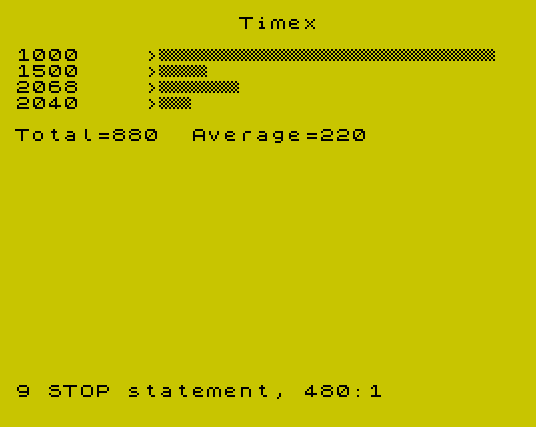
Bar Graph collects labeled numeric data items from the user and renders them as a horizontal bar chart on screen. Up to 15 items are supported, each with a name of up to 8 characters and an associated numeric value. The program scales each bar using a factor derived from the largest value divided by 21 screen rows, and prints bars using a custom UDG character (“a”) defined via POKE USR with a checkerboard pattern (DATA 0,170,85,170,85,170,85,0). After data entry, a correction loop allows individual items to be re-entered before the chart is drawn, and summary statistics (total and average rounded to two decimal places) are displayed below the graph.
Program Structure
The program is organized into a clear main flow with three subroutines and follows a classic data-entry-then-display pattern:
- Initialization (lines 10–30): Sets up constants
u=1,z=0,l=21and configures screen colors. - UDG Setup (lines 40, 590–620): Calls a subroutine that POKEs eight bytes into UDG slot “a” to create a checkerboard fill character.
- Title and item count input (lines 50–100): Prompts for a title string and a validated item count (≤15), then dimensions arrays
n$anda. - Data entry loop (lines 120–150): Calls the item-entry subroutine for each item index.
- Correction pass (lines 160–300): Displays all entered items and offers a correction loop, allowing any single item to be re-entered.
- Chart rendering (lines 310–470): Computes statistics and draws the horizontal bar chart.
- Subroutines: Item entry (490–560), title print (570–580), UDG definition (590–610).
Variable Usage
| Variable | Purpose |
|---|---|
u | Constant 1, used in place of literal 1 throughout (minor memory optimization) |
z | Constant 0, used in place of literal 0 throughout |
l | Constant 21, representing the lower screen row limit / scale height |
t$ | Chart title string |
q | Number of items (1–15) |
n$(q,8) | Fixed-length string array of item names |
a(q) | Numeric array of item values |
big | Maximum value, used to compute the scaling factor |
tot | Running total of all values |
ave | Computed average |
fac | Scale factor: l/big (21 divided by maximum value) |
UDG Definition
Lines 590–620 define UDG character “a” using a READ/POKE loop. The eight data bytes 0,170,85,170,85,170,85,0 produce a checkerboard stipple pattern (170 = 10101010₂, 85 = 01010101₂), which is used as the bar fill character printed at line 440 with PRINT "\a". This gives bars a visually distinctive hatched texture rather than a solid block.
Bar Scaling
The scaling factor is computed at line 380 as fac = l / big, i.e., 21 divided by the largest data value. Each bar’s length in characters is then INT(a(i) * fac + 0.5), which applies rounding to the nearest integer. This ensures the largest value always fills exactly 21 character positions while smaller values are scaled proportionally. The title print subroutine at lines 570–580 centers the title string using TAB((32 - LEN t$) / 2).
Correction Loop
After initial data entry, lines 160–300 print all items with their indices and ask whether a correction is needed. If the user confirms with “y” or “Y”, they enter an item number; the item-entry subroutine is called again for that index (line 270), and the updated line is reprinted in place using PRINT AT i+u,z. The loop returns to line 200 allowing multiple successive corrections before proceeding to chart rendering.
Key BASIC Idioms
- Use of
u,z, andlas named constants avoids repetitive literal values and slightly reduces program size. VAL-freeGO TOtargets are used throughout; line numbers are plain literals.- The
DIM n$(q,8)declaration creates a fixed-width string array, automatically padding or truncating names to 8 characters. - Average is rounded to two decimal places via
INT(ave * 100 + 0.5) / 100at line 470. - The PRINT at line 260 uses bare commas (
PRINT AT l-u,z,,,,) to blank out the correction prompt line using TAB columns rather than explicit spaces.
Bugs and Anomalies
- Line 260 uses
PRINT AT l-u,z,,,,(four trailing commas). On the Spectrum, commas in PRINT move to the next 16-column tab stop, so this may not reliably clear the full line depending on cursor position. Spaces or aPRINT ATwith spaces would be more dependable. - The item-entry subroutine (lines 490–560) PRINTs the input prompt at line 500 before the INPUT statement at line 510. The INPUT statement also carries its own prompt (“Name: “), resulting in the word “Name:” appearing twice on screen during entry.
- If the user enters a title longer than 32 characters, the TAB calculation at line 570 produces a negative argument, which will cause an error.
- Line 250 validates that
idoes not exceedqbut does not check thatiis at least 1, allowing a zero or negative index which would cause a subscript error when accessingn$(i).
Image Gallery
Source Code
  10 LET u=1:LET z=0:LET l=21
  20 BORDER 6:PAPER 6:CLS
  30 INK 0
  40 GO SUB 590
  50 INPUT "What is the title? ";t$
  60 PRINT AT 20,0;t$
  70 INPUT "How many items   (<=15 and  <=8 characters long)? ";q
  80 PRINT q
  90 IF q>15  THEN GO TO 70
 100 DIM n$(q,8):DIM a(q)
 110 CLS
 120 FOR i=u TO q
 130 GO SUB 490
 140 CLS
 150 NEXT i
 160 GO SUB 570
 170 FOR i=u TO q
 180 PRINT i;". ";n$(i);" ";a(i)
 190 NEXT i
 200 PRINT AT l-u,z;"Correction (y/n)?"
 210 INPUT a$
 220 IF a$ <>"y" AND a$ <>"Y" THEN GO TO 310
 230 PRINT AT l,z;"Which item number?"
 240 INPUT i
 250 IF i>q THEN GO TO 240
 260 PRINT AT l-u,z,,,,
 270 GO SUB 490
 280 PRINT AT i+u,z,,
 290 PRINT AT i+u,z;i;". ";n$(i);" ";a(i)
 300 GO TO 200
 310 LET big=z
 320 LET tot=z
 330 FOR i=u TO q
 340 IF a(i)>big THEN LET big=a(i)
 350 LET tot=tot+a(i)
 360 NEXT i
 370 LET ave=tot/q
 380 LET fac=l/big
 390 CLS
 400 GO SUB 570
 410 FOR i=u TO q
 420 PRINT n$(i);">";
 430 FOR j=u TO INT (a(i)*fac+.5)
 440 PRINT "\a";
 450 NEXT j:PRINT :NEXT i
 460 PRINT
 470 PRINT "Total=";tot;"  Average="; INT (ave*100+.5)/100
 480 STOP
 490 PRINT AT l-u,z;"Item ";i;
 500 PRINT "  Name: ";
 510 INPUT "Name: ";n$(i)
 520 PRINT n$(i)
 530 INPUT "Amount: ";a(i)
 540 PRINT a(i)
 550 PRINT AT l,z;"       "
 560 RETURN
 570 PRINT TAB ((32- LEN t$)/2);t$
 580 PRINT :RETURN
 590 FOR n=0 TO 7
 600 READ a:POKE USR "a"+n,a
 610 NEXT n:RETURN
 620 DATA 0,170,85,170,85,170,85,0
 630 SAVE "BAR GRAPH" LINE 10
Note: Type-in program listings on this website use ZMAKEBAS notation for graphics characters.