
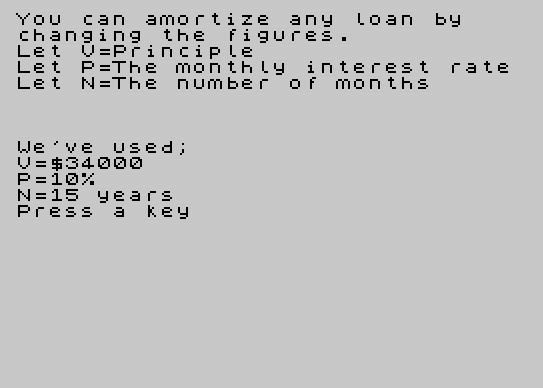
Amortize is a loan amortization calculator that computes the remaining principal balance and monthly interest payment for each of 180 months (15 years) on a $34,000 loan at 10% annual interest. The core calculation in line 60 multiplies the current balance by the monthly interest factor (P = 0.1/12 + 1) and subtracts a fixed monthly payment of $365.37. Line 73 derives the monthly interest portion by multiplying the balance by the constant 0.008333333 (1/12 of 10%). Display formatting uses TAB positioning and the comma separator to arrange principal and interest figures in columns, with INT(x*100)/100 used to truncate values to two decimal places. The program includes an introductory screen (lines 90–150) that explains the variables used, waits for a keypress via PAUSE 0 and INKEY$, then jumps to the main routine.
Program Structure
The program is split into two logical sections. Lines 1–89 form the main calculation and display loop, while lines 90–150 constitute an introductory explanation screen. The SAVE at line 9999 uses LINE 90, so when loaded and run, execution begins at the intro screen rather than jumping straight into the table.
- Intro screen (lines 90–150): Explains the variables, prints the loan parameters used, then waits for a keypress before jumping to line 1.
- Setup (lines 1–50): Clears the screen, prints a header, initializes principal
V=34000, and computes the monthly compounding factorP=0.1/12+1. - Amortization loop (lines 50–89): Iterates 180 times (15 years × 12 months), updating balance and printing month number, balance, and interest per month.
Mathematical Approach
The recurrence in line 60 (V = V * P - 365.37) applies standard declining-balance amortization: each month the balance is multiplied by the monthly interest factor (1 + 0.1/12 ≈ 1.008333) and then reduced by the fixed payment of $365.37. The monthly interest portion printed in line 75 is computed separately in line 73 as I = 0.008333333 * V, which is simply 1/12 of 10% of the current balance — giving the interest component of that month’s payment.
Note that P is precomputed once before the loop, which is more efficient than recalculating the interest factor each iteration. The constant 0.008333333 in line 73 is a hardcoded approximation of 1/120, and its use is slightly inconsistent with P being derived from 0.1/12 — a minor redundancy rather than a bug.
Display Formatting
Line 70 uses a sequence of \{18}\{0} character codes. Character 18 is the AT control code in ZX81/TS1000 BASIC when used in a PRINT statement context; however, outside a proper AT/TAB call this may produce unexpected display artifacts. The intent appears to be column separation or cursor control. TAB 5 then positions the principal value, and the trailing comma on line 70 and line 75 keeps output on the same line while moving to the next print zone.
Two-decimal-place truncation is achieved with the idiom INT(x * 100) / 100, which is standard BASIC practice since these machines lack a built-in formatting function for fixed decimal output.
Keypress Wait Idiom
Lines 140–150 implement the standard keypress-wait pattern: PAUSE 0 halts execution until any key is pressed (on ZX81/TS1000, PAUSE 0 waits indefinitely), and lines 145–150 then loop on INKEY$ to confirm a non-empty key before proceeding. This double-check avoids false triggers from key bounce or residual key state.
Variable Summary
| Variable | Role |
|---|---|
V | Current loan balance (principal remaining) |
P | Monthly compounding factor (1 + 0.1/12) |
N | Loop counter — current month number (1–180) |
I | Monthly interest portion of payment |
Bugs and Anomalies
- Line 6 prints
"Principle34000 Interest"— “Principle” is a misspelling of “Principal,” and the value 34000 is run together with the label rather than being separated or formatted. - The
\{18}\{0}sequences in line 70 are likely intended as cursor/column separators but may cause visual noise or unintended behavior depending on display state. - Lines 1–2 and lines 90–92 both print similar introductory text, creating slight redundancy between the intro screen and the main section header.
- Line 105 uses
PRINT '''"We've used;"— the trailing semicolon inside the string is a literal character, not a PRINT separator, which may not be the intended output formatting.
Image Gallery
Source Code
    1 CLS
    2 PRINT "You can amortize any   loan by  changing the figures."
    6 PRINT TAB 5;"Principle34000  Interest"
   30 LET V=34000
   40 LET P=.1/12+1
   50 FOR N=1 TO 180
   60 LET V=V*P-365.37
   70 PRINT N;\{18}\{0}\{18}\{0}\{18}\{0}\{18}\{0}\{18}\{0}\{18}\{0}\{18}\{0} TAB 5; INT (V*100)/100,
   73 LET I=.008333333*V
   75 PRINT ; TAB 20; INT (I*100)/100,
   80 NEXT N
   89 STOP
   90 CLS :PRINT "You can amortize any loan by    changing the figures."
  100 PRINT "Let V=Principle"
  101 PRINT "Let P=The monthly interest rate"
  102 PRINT "Let N=The number of months"
  105 PRINT '''"We've used;"
  110 PRINT "V=$34000"
  111 PRINT "P=10%"
  112 PRINT "N=15 years"
  120 PRINT "Press a key"
  140 PAUSE 0
  145 IF INKEY$ <>"" THEN GO TO 1
  150 GO TO 145
 9999 SAVE "Amortize 2" LINE 90
Note: Type-in program listings on this website use ZMAKEBAS notation for graphics characters.