
This program is a menu-driven loader and configuration utility for a Centronics parallel printer driver designed for the Timex 2068. It manages a 1,111-byte machine code print driver stored at address 64456, which hooks into the system’s printer output vector at addresses 26703–26704. The customization routine (lines 9800–9870) patches specific bytes within the machine code block to configure graphics modes, escape sequences, and line-feed behavior for seven different dot-matrix printer models including Seikosha, Epson, Gemini, Prowriter, and Olivetti variants. The initialization routine at line 9992 uses CLEAR to protect the machine code area, sets up the printer driver origin pointer, and then LOADs the code block from tape. Lines 9865–9867 include a DELETE command to remove temporary setup lines after customization is complete.
Program Analysis
Program Structure
The program is organized into distinct functional blocks separated by large line-number gaps:
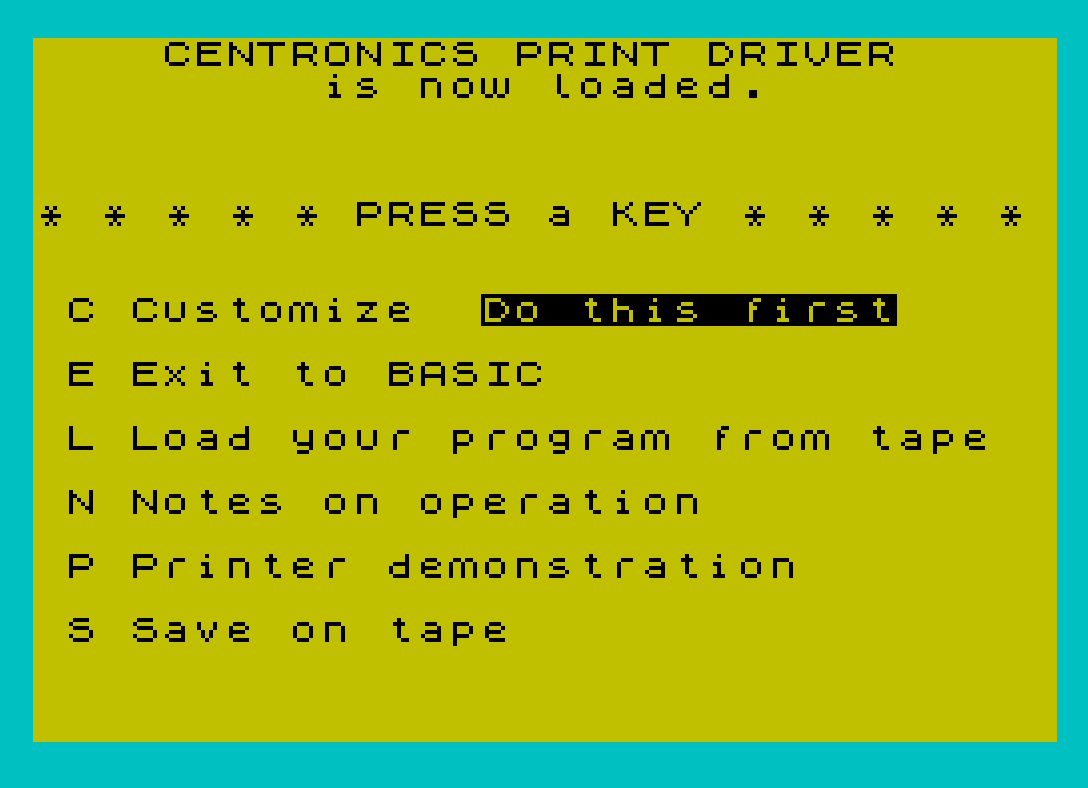
- Lines 1–29: Main menu — displays options and dispatches to sub-routines based on keypress.
- Lines 9034–9098: Notes/help section explaining POKE-based driver configuration and the COPY mechanism.
- Lines 9100–9199: Printer demonstration — collects width, POKEs it, displays an advertisement for AERCO products, then LPRINTs a list of humorous “Laws of Computer Programming” and LLISTs the program itself.
- Lines 9800–9869: Printer customization — presents a menu of supported printers and patches the machine code block with printer-specific escape sequences and control bytes.
- Lines 9870: Subroutine that POKEs the “Centronics mode” byte at 64464 and returns.
- Lines 9980–9996: Save/load infrastructure — REMs, a SAVE pair, and the initialization routine.
- Line 9998: Tape LOAD routine for the user’s own program.
Machine Code Driver Integration
The heart of the utility is a 1,111-byte machine code print driver residing at address 64456. The program interacts with it in several ways:
CLEAR 64455at line 9992 protects the machine code area from being overwritten by BASIC.- The system printer vector at addresses 26703–26704 is redirected to point to 64461 (the driver entry point, called
PRINTORG), hooking all LPRINT and LLIST output through the driver. POKE 64456,1selects “BASIC token expansion” mode;POKE 64456,0selects “LITERAL” mode for sending raw bytes and control characters.POKE 64459,W-1sets the printer width (entered by the user at line 9105).POKE 64460,10orPOKE 64460,0controls whether a line-feed is appended after each carriage return.
Printer Customization Subsystem
Lines 9848–9859 patch specific offsets within the machine code block to configure graphics escape sequences for each supported printer. Each model requires a different combination of POKE values at addresses in the 64782–64894 range. The table below summarizes the supported printers and their designations:
| Selection | Printer Group | LF after CR | Subroutine 9870 |
|---|---|---|---|
| 1 | Seikosha GP100 / Gorilla Banana | No (0) | Yes |
| 2 | Prowriter 8510 | Yes (10) | Yes |
| 3 | Gemini 10X / Epson older | Yes (10) | Yes |
| 4 | Epson newer / Mannesmann Tally | Yes (10) | Yes |
| 5 | Olivetti PR2300 (Zoom) | — | No |
| 6 | Olivetti PR2300 (Normal) | — | No |
| 7 | Seikosha GP250X | No (0) | Yes |
Subroutine 9870 simply POKEs 76 into address 64464 (selecting Centronics interface mode) before returning, and is called by all non-Olivetti printer types. The Olivetti paths instead POKE 238 into 64464 and write different values into 64980–64981, suggesting a separate code path in the machine code for that printer family.
Key BASIC Idioms and Techniques
- Keypress wait loop: Line 15 uses
IF INKEY$="" THEN GO TO 15to spin until a key is pressed, then line 17 captures it intoC$. This two-step approach (wait then read) is safer than a single read, avoiding race conditions. - Menu dispatch: Lines 18–27 compare
C$(1)against both uppercase and lowercase versions of each letter, providing case-insensitive input handling without any string manipulation functions. - FLASH for emphasis:
FLASH 1/FLASH 0pairs are used throughout to highlight prompts and “press any key” messages. - Key-debounce in subroutine 9090: Line 9092 waits for INKEY$ to go empty (key released) before line 9094 waits for a new keypress — a standard double-poll debounce pattern.
- Printer width formula:
POKE 64459,W-1at line 9110 stores width minus one, consistent with zero-based length encoding common in machine code routines.
DELETE Command Usage
Line 9867 contains DELETE 3,3: DELETE 9867,9867. The first call removes line 3 (the “Do this first” FLASH message, no longer needed after initial setup), and the second call deletes line 9867 itself — a self-modifying BASIC technique. This is a legitimate TS2068 BASIC extension not available on all Sinclair-family machines.
Save and Load Architecture
The program is designed to be distributed and saved as two separate tape blocks: SAVE "PRINT" LINE 9990 saves the BASIC program with auto-start at line 9990 (the initialization routine), and SAVE "PRCODE" CODE 64456,1111 saves the machine code driver separately. Line 9992 performs all necessary initialization — memory protection, vector patching, and loading the code block — before jumping to line 1 (the main menu) via line 9996. Lines 23 and 9984 duplicate this SAVE sequence, giving the user two paths to back up a customized copy.
Bugs and Anomalies
- Line 9865 tests
IF Pr=3.3 THEN GO TO 1. SincePris collected viaINPUTand compared to integer values 0–7, this condition can never be true under normal use. It appears to be dead code, possibly a leftover from development. - Line 9833 and 9834 display “Olivett1” (with a digit 1 instead of the letter i) — a typographical error in the printer menu.
- Line 9145 uses
it's(contraction) whereits(possessive) is grammatically correct — a punctuation error in the LPRINT demonstration text. - Line 9190 spells “enobled” where “ennobled” is correct — a spelling error in the demonstration output.
Image Gallery
Source Code
    1 REM Version 2.1  12/84
    2 BORDER 5: PAPER 6: INK 0: CLS
    3 FLASH 1: PRINT AT 8,14;"Do this first";: FLASH 0
    4 PRINT AT 0,0;"    CENTRONICS PRINT DRIVER              is now loaded.",,,,,,,
    5 PRINT "* * * * * PRESS a KEY * * * * *",,,,,
    6 PRINT " C Customize "
    8 PRINT AT 10,0;" E Exit to BASIC",,,
   10 PRINT " L Load your program from tape",,,
   11 PRINT " N Notes on operation",,,
   12 PRINT " P Printer demonstration",,,
   14 PRINT " S Save on tape"
   15 IF INKEY$="" THEN GO TO 15
   17 LET C$=INKEY$
   18 IF C$(1)="C" OR C$(1)="c" THEN GO TO 9800
   19 IF C$(1)="E" OR C$(1)="e" THEN CLS : PRINT "Timex BASIC awaiting Keyboard   entry ";: FLASH 1: PRINT "K";: FLASH 0: STOP
   21 IF C$(1)="L" OR C$(1)="l" THEN GO TO 9998
   23 IF C$(1)="S" OR C$(1)="s" THEN SAVE "PRINT" LINE 9990: SAVE "PRCODE"CODE 64456,1111
   25 IF C$(1)="P" OR C$(1)="p" THEN GO TO 9100
   27 IF C$(1)="N" OR C$(1)="n" THEN GO TO 9000
   29 GO TO 1
 9034 CLS : PRINT "The PRINT driver has 2 basic    modes. The default mode is for  use with the TIMEX BASIC system and automatically expands all   tokens as they are encountered.                                 Select this mode by             POKE 64456,1                                                    The other mode is LITERAL where characters are sent directly to the printer with no changes madeto them. Use the LITERAL mode tosend control characters to the  printer and for bit mapped      graphics.                                                       Select this mode by             POKE 64456,0"
 9040 GO SUB 9090
 9042 CLS : PRINT "To set the width of the printer:POKE 64459,width-1"
 9044 PRINT ,,,,"To send LINE FEED after CARRIAGERETURN: POKE 64460,10"
 9046 PRINT ,,,,"To suppress LINE FEED after     CARRIAGE RETURN: POKE 64460,0"
 9048 PRINT ,,,,"To select Timex 2040 printer:   POKE 26703,0; POKE 26704,5"
 9050 PRINT ,,,,"To select Centronics printer:   POKE 26703,205; POKE 26704,251"
 9055 GO SUB 9090
 9060 CLS : PRINT "To COPY the screen to the       Centronics printer:             LPRINT CHR$ 1"
 9062 PRINT ,,,,"Note that the details of the    COPY command are different for  various brands of printers.     This package needs to be        customized for your printer."
 9064 PRINT ,,,,"Please press the C key from the main menu to customize the      software for your printer."
 9070 GO SUB 9090
 9089 GO TO 1
 9090 FLASH 1: PRINT AT 21,3;"PRESS ANY KEY TO CONTINUE": FLASH 0
 9092 IF INKEY$<>"" THEN GO TO 9092
 9094 IF INKEY$="" THEN GO TO 9094
 9096 PRINT AT 21,3;"                         "
 9098 RETURN
 9100 PRINT AT 19,0;"                                ": FLASH 1: PRINT AT 21,0;"ENTER printer width";: FLASH 0: PRINT "        "
 9105 INPUT W
 9110 POKE 64459,W-1
 9115 CLS : PRINT "Welcome to the world of TIMEX   2068 APPLICATIONS!                                              AERCO currently also  offers a  dual channel RS 232 Serial      Interface, a family of four axisStepper Motor Controllers,      and a Floppy Disc Interface     with 64 K of RAM that runs CPM.                                                                 AERCO  Acme Electric Robot Co.  Box 18093                       Austin, TX 78760                                                (512) 451-5874"
 9118 LPRINT
 9120 LPRINT "LAWS OF COMPUTER PROGRAMMING"
 9122 LPRINT
 9125 LPRINT "Any given program, when running, is obsolete."
 9127 LPRINT
 9130 LPRINT "If a program is useless, it will have to be documented."
 9132 LPRINT
 9135 LPRINT "If a program is useful, it will have to be changed."
 9137 LPRINT
 9140 LPRINT "Any program will expand to fill all available memory."
 9142 LPRINT
 9145 LPRINT "The value of a program is proportional to the weight of it's output."
 9147 LPRINT
 9150 LPRINT "Program complexity grows until it exceeds the capability of the programmer to maintain it."
 9152 LPRINT
 9155 LPRINT "Make it possible for programmers to write in English and you will find that programmers cannot write in English."
 9157 LPRINT
 9160 LPRINT "If builders built buildings the way programmers wrote programs, then the first woodpecker that came along would destroy civilization."
 9162 LPRINT
 9165 LPRINT "Inside every large program is a small program struggling to get out."
 9167 LPRINT
 9170 LPRINT "The attention span of a computer is only as long as its power cord."
 9172 LPRINT
 9175 LPRINT "If a test installation functions perfectly, all subsequent systems will malfunction."
 9177 LPRINT
 9180 LPRINT "Not until a program has been in production for at least six months will the most harmful error be discovered."
 9182 LPRINT
 9185 LPRINT "One good reason that computers can do more work than people is that they never have to stop and answer the telephone."
 9187 LPRINT
 9190 LPRINT "If you put tomfoolery in a computer nothing comes out but tomfoolery. But this tomfoolery, having passed through a very expensive machine, is somehow enobled and none dare criticize it."
 9192 LPRINT ,,,,,,,,
 9195 LLIST
 9199 GO TO 1
 9800 CLS : PRINT " This program needs to be told   what kind of printer you have   in order to properly COPY the   screen.",,,,
 9802 PRINT "If you do not have a dot matrix printer with BIT MAPPED GRAPHIC capability, you cannot COPY the screen. LPRINT and LLIST should still work fine on your printer.",,,,
 9804 PRINT "In order to COPY the screen,    use the command LPRINT CHR$ 1.                                  Don't forget to change all      references in your programs     from COPY to LPRINT CHR$ 1",,,
 9810 GO SUB 9090
 9815 CLS : FLASH 1: PRINT AT 0,3;"PLEASE SELECT YOUR PRINTER": FLASH 0
 9820 PRINT ,,"Gorrilla Bananna . . . . . . . 1"
 9822 PRINT "Seikosha GP100 . . . . . . . . 1"
 9824 PRINT "Prowriter 8510 . . . . . . . . 2"
 9826 PRINT "Star Gemini  10X . . . . . . . 3"
 9828 PRINT "Epson (All older models) . . . 3"
 9830 PRINT "Epson (All newer models) . . . 4"
 9832 PRINT "Mannesmann Tally Spirit 80 . . 4"
 9833 PRINT "Olivett1  PR 2300 (Zoom) . . . 5"
 9834 PRINT "Olivett1  PR 2300 (Norm) . . . 6"
 9835 PRINT "Seikosha  GP250X . . . . . . . 7"
 9836 PRINT ,,"If your printer is not on this  list, try the various types.                                    Contact AERCO at Box 18093      Austin, TX 78760 for assistance."
 9837 PRINT ,,"Don't forget to SAVE your       customized version on a         DIFFERENT tape. (S on main menu)"
 9840 INPUT Pr
 9845 IF Pr<0 OR Pr>7 THEN GO TO 9815
 9848 IF Pr=1 THEN LET P$="Seikosha 100": GO SUB 9870: POKE 64460,0: POKE 64782,1: POKE 64783,8: POKE 64799,0: POKE 64834,1: POKE 64835,15: POKE 64850,25: POKE 64874,64: POKE 64886,251: POKE 64888,11: POKE 64894,11
 9850 IF Pr=2 THEN LET P$="Prowriter type": GO SUB 9870: POKE 64460,10: POKE 64782,6: POKE 64783,27: POKE 64784,84: POKE 64785,49: POKE 64786,54: POKE 64787,27: POKE 64788,62: POKE 64799,6: POKE 64800,27: POKE 64801,83: POKE 64802,48: POKE 64803,50: POKE 64804,53: POKE 64805,54: POKE 64834,4: POKE 64835,27: POKE 64836,60: POKE 64837,27: POKE 64838,65: POKE 64850,24: POKE 64874,128: POKE 64886,59: POKE 64888,251: POKE 64894,59
 9852 IF Pr=3 THEN LET P$="Gemini type": GO SUB 9870: POKE 64460,10: POKE 64782,3: POKE 64783,27: POKE 64784,51: POKE 64785,16: POKE 64799,4: POKE 64800,27: POKE 64801,75: POKE 64802,0: POKE 64803,1: POKE 64834,2: POKE 64835,27: POKE 64836,64: POKE 64850,24: POKE 64874,1: POKE 64886,35: POKE 64888,195: POKE 64894,35
 9854 IF Pr=4 THEN LET P$="Epson type": GO SUB 9870: POKE 64460,10: POKE 64782,3: POKE 64783,27: POKE 64784,51: POKE 64785,24: POKE 64799,4: POKE 64800,27: POKE 64801,75: POKE 64802,0: POKE 64803,1: POKE 64834,2: POKE 64835,27: POKE 64836,64: POKE 64850,24: POKE 64874,1: POKE 64886,195: POKE 64888,35: POKE 64894,35
 9856 IF Pr=5 THEN LET P$="Olivetti ": POKE 64464,238: POKE 64980,27: POKE 64981,47
 9858 IF Pr=6 THEN LET P$="Olivetti ": POKE 64464,238: POKE 64980,0: POKE 64981,0
 9859 IF Pr=7 THEN LET P$="Seikosha 250": GO SUB 9870: POKE 64460,0: POKE 64782,3: POKE 64783,27: POKE 64784,76: POKE 64785,2: POKE 64799,8: POKE 64800,27: POKE 64801,16: POKE 64802,0: POKE 64803,111: POKE 64804,27: POKE 64805,71: POKE 64806,1: POKE 64807,0: POKE 64834,3: POKE 64835,27: POKE 64836,76: POKE 64837,3: POKE 64850,24: POKE 64874,128: POKE 64886,59: POKE 64888,251: POKE 64894,59
 9865 IF Pr=3.3 THEN GO TO 1
 9867 DELETE 3,3: DELETE 9867,9867
 9869 GO TO 1
 9870 POKE 64464,76: RETURN
 9980 STOP
 9981 REM
 9982 REM   GOTO here to save BASIC program and machine code PRINTDRIVER on tape
 9983 REM
 9984 SAVE "PRINT" LINE 9990: SAVE "PRCODE"CODE 64456,1111
 9985 REM
 9986 REM  Jump to start of your BASIC program
 9987 REM
 9988 PRINT "Copy is completed. GOTO 1 to    make another copy.": STOP
 9989 REM
 9990 REM GOTO here to initialize BASIC and load machine code PRINT DRIVER
 9991 REM
 9992 CLEAR 64455: LET PRINTORG=64461: POKE 26704,INT (PRINTORG/256): POKE 26703,PRINTORG-(INT (PRINTORG/256))*256: POKE 64456,1: POKE 64458,0: POKE 64457,0: POKE 64459,79: LOAD ""CODE 64456,1111
 9993 REM
 9994 REM  Jump to start of your BASIC program
 9995 REM
 9996 GO TO 1
 9998 CLS : PRINT AT 8,0;"Looking for program from tape...",,,,,,,,"Start Tape Recorder": LOAD ""
Note: Type-in program listings on this website use ZMAKEBAS notation for graphics characters.