
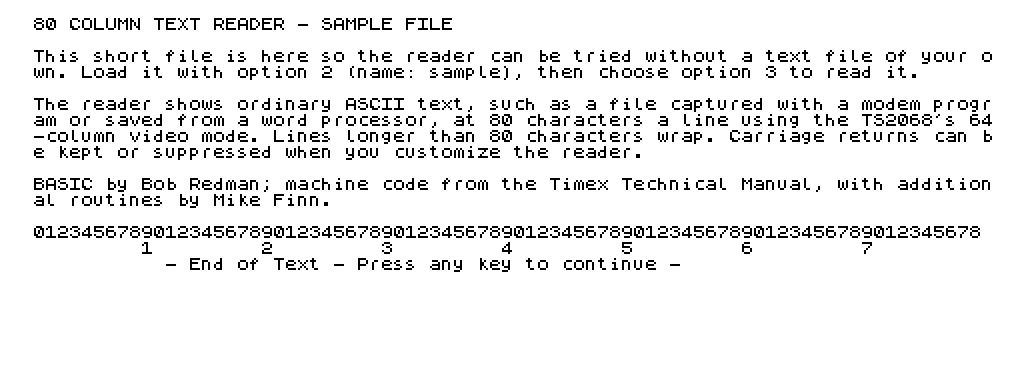
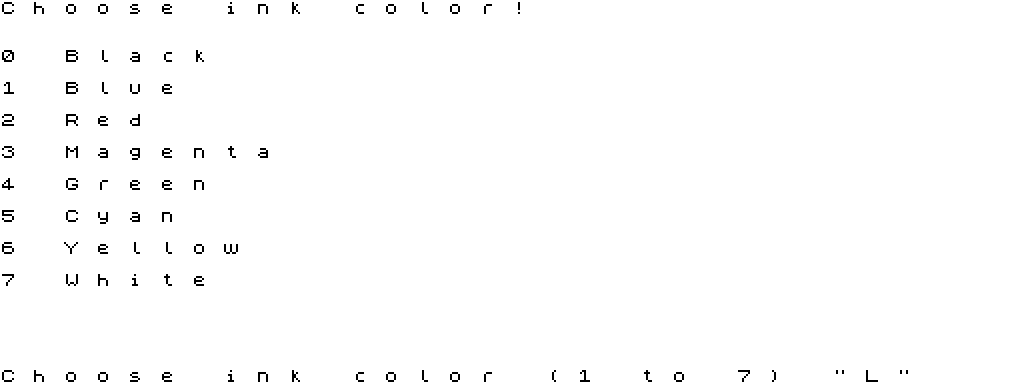
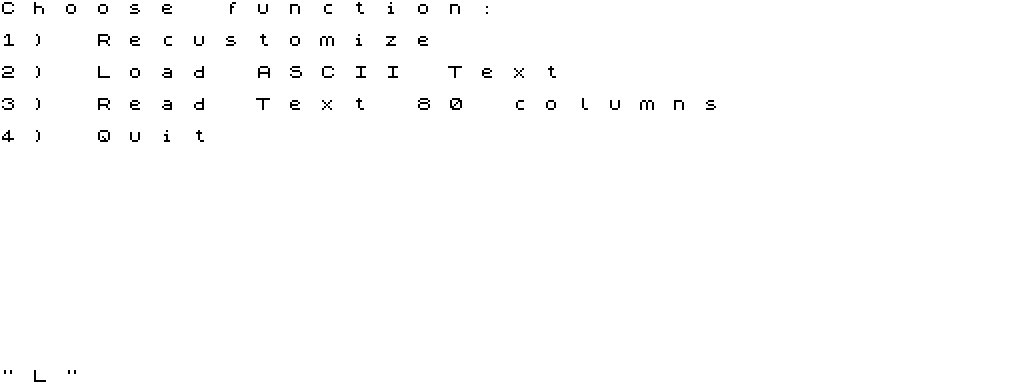
80 Column Text Reader loads a plain ASCII text file, such as one captured with a modem program or saved from a word processor, and shows it at 80 characters a line using the TS2068’s 64-column video mode. At start-up you choose the ink colour and whether carriage returns are kept or suppressed; a menu then lets you recustomize, load a text file, read it, or quit. The text is read page by page, ending with “End of Text – Press any key to continue”.
The opening REM credits the program: “80 Col. text reader BASIC by Bob Redman, M/C from Timex Tech Manual with Additional MC routines by M Finn”. The machine code is the 80-column display package published by Timex (see 40 and 80 Column Mode Support), with extra routines by Mike Finn. The copy here came from Bob Swoger’s Larken disks, which held three copies of the program.
Program Analysis
Structure
Line 9000 is the entry point: it clears memory to 57343, loads the 2,538-byte code block 80col at 57344, applies patches, initializes 80-column mode and asks for the colour. Text files load as CODE at 37800 after the buffer is cleared with RANDOMIZE USR 59767.
Notable Techniques
- Lines 1000–1045 READ a table of address/length/byte groups from DATA and POKE corrections into the bank-switching routines (Get_Status, PUT_WORD, BANK_ENABLE and others) – fixes to the code as printed in the Timex Technical Manual.
- The ink colour is set by POKEing 57361 and calling
USR 57362; carriage-return suppression POKEs four bytes at 59661. - Other entry points:
USR 57358clears the screen,USR 57381sets 80-column mode (after POKE 57380,8), andUSR 59648shows the text.
Potential Issues
- Menu choices are typed into an INPUT and need ENTER after the digit.
This copy came from a Larken disk and was converted to load from tape: the code is loaded from tape by name, the disk save line was made a REM, and a short sample text file was added to the tape (load it with option 2, name “sample”). It was tested in ZEsarUX: the colour and menu screens and the 80-column display of the sample file work.
Image Gallery
Source Code
    1 REM 80 Col. text reader    BASIC by Bob Redman,            M/C from Timex Tech Manual with Additional MC routines by M Finn
    2 GO TO 9000
 1000 REM ______patches__________
 1005 RESTORE 1105
 1010 FOR t=1 TO 12
 1015 READ add,len
 1020 FOR i=1 TO len
 1025 READ val: POKE add,val
 1030 LET add=add+1
 1035 NEXT i
 1040 NEXT t
 1045 RETURN
 1100 REM Get_Status Corrections
 1105 DATA 25610,2,40,36
 1110 DATA 25614,4,40,55,40,39
 1115 DATA 25648,26,14,255,219,255,230,128,40,18,24,8,14,255,219,255,230,128,32,8,219,244,47,24,2,219,244,79
 1300 REM  PUT_WORD      Corrects
 1305 DATA 25408,1,213
 1310 DATA 25424,6,193,209,115,35,114,43
 1400 REM  BANK_ENABLE   Corrects
 1405 DATA 25753,1,0
 1410 DATA 25757,1,243
 1415 DATA 25884,1,251
 1500 REM  RESTORE_STATUS Correct
 1505 DATA 25930,1,243
 1510 DATA 25968,1,251
 1600 REM  XFR_BYTES     Corrects
 1605 DATA 26474,1,95
 1700 REM  CALL_BANK     Corrects
 1705 DATA 26128,1,9
 1710 RETURN
 5000 GO SUB 8040: PRINT AT 0,0;"Choose function:"
 5010 RESTORE 5999
 5020 FOR i=1 TO 4: READ a$: PRINT AT 2*i,0;i;") ";a$: NEXT i
 5030 INPUT a$
 5040 IF a$<"1" OR a$>"4" THEN GO TO 5000
 5050 GO SUB 8040: GO SUB 5000+100*VAL a$(1)
 5060 IF a$="4" THEN STOP
 5070 GO TO 5000
 5100 GO SUB 7000: RETURN
 5200 GO SUB 8040
 5210 INPUT "Choose text file";n$: IF n$="" THEN RETURN
 5215 RANDOMIZE USR 59767: REM Zero Ram Buffer
 5220 LOAD n$CODE 37800
 5230 RETURN
 5300 RANDOMIZE USR 59648: RETURN
 5400 POKE 57380,0: RANDOMIZE USR 57381: RETURN
 5999 DATA "Recustomize","Load ASCII Text","Read Text 80 columns","Quit"
 7000 REM customize
 7010 PRINT AT 0,0;"Choose ink color!"
 7020 RESTORE 7120
 7030 FOR i=0 TO 7
 7040 READ a$
 7050 PRINT AT 2*i+3,0;i;" ";a$
 7060 NEXT i
 7070 INPUT "Choose ink color (1 to 7) ";a$: IF a$<"0" OR a$>"7" THEN GO TO 7070
 7080 POKE 57361,7*(8-VAL a$(1)): RANDOMIZE USR 57362: RANDOMIZE USR 57358
 7090 INPUT "Suppress carriage returns (Y or N)";a$: IF a$="y" OR a$="Y" THEN FOR i=0 TO 3: POKE 59661+i,0: NEXT I: RETURN
 7100 RESTORE 7130: FOR i=0 TO 3: READ a: POKE 59661+i,a: NEXT i: RETURN
 7120 DATA "Black","Blue","Red","Magenta","Green","Cyan","Yellow","White"
 7130 DATA 254,13,40,13
 8000 REM initialize 80 columns
 8010 POKE 57380,8: RANDOMIZE USR 57381: REM 80 column
 8020 POKE 57389,21: REM BOTLN
 8030 POKE 57390,1: REM SCRCNT
 8040 RANDOMIZE USR 57358: REM clrscr
 8050 RETURN
 9000 REM enter here
 9005 BORDER 4
 9010 CLEAR 57343
 9020 LOAD "80col"CODE 57344
 9030 GO SUB 1000: REM patches
 9040 GO SUB 8000: REM initialize
 9050 GO SUB 7000: REM customize
 9060 RANDOMIZE USR 57358: GO TO 5000
 9999 REM SAVE "80rdr" LINE 9005: SAVE "80col"CODE 57344,2538
Note: Type-in program listings on this website use ZMAKEBAS notation for graphics characters.