
This program demonstrates a windowing system for the TS2068, drawing up to three overlapping rectangular windows on screen using custom UDG (User Defined Graphic) characters for the window borders. Two machine code routines are embedded via DATA statements and POKEd into memory: one saves a 24×32 screen region to a buffer at address 59199, and the other restores it, enabling non-destructive window display using LDIR block-copy instructions. The program stores window geometry (row, column, width, depth) as formatted strings in a DIM array and parses them with VAL at runtime. A POKE to address 23659 (the lower-screen control) toggles between 0 and 2 to suppress or restore the lower display area during drawing. After the three demonstration windows, the user may enter custom window coordinates to test their own layout.
Program Structure
The program is organized into a linear demonstration flow followed by a subroutine block:
- Lines 20–30: Initialization — clear memory, call setup subroutine, fill screen with test pattern, save screen via machine code.
- Lines 40–130: Sequential display of three demo windows, each waiting for a specific keypress before proceeding.
- Line 150: Easter egg — prints “Move over MACintosh!” character by character from a DATA statement using
CHR$. - Lines 160–300: User-input loop allowing custom window coordinates, then drawing and pausing.
- Lines 170–260: Core window-drawing subroutine, handling UDG border rendering and lower-screen toggling.
- Lines 310–340: Setup subroutine — initializes DIM array, POKEs machine code, reads UDG pixel data, and reads default window coordinate strings.
Machine Code Routines
Two Z80 machine code routines are POKEd into memory starting at address 59199 (store) and 59211 (renew), each using the Z80 LDIR instruction (opcode ED B0) for a block memory copy of 24×32 = 768 bytes (the full text screen):
store(59199): Copies from display memory at 16384 ($4000) to buffer at 59223 ($E757). Parameters:BC=24(rows, though actually 768 bytes should useBC=0,24i.e.LD BC,24*32).renew(59211): Copies the buffer back to display memory, restoring the background screen before each new window is drawn.
The DATA sequence for these routines is: 1,0,24,17,87,231,33,0,64,237,176,201,1,0,24,17,0,64,33,87,231,237,176,201. Each 12-byte block decodes to: LD BC,6144 (note: 1,0,24 = LD BC,$1800 = 6144, covering the full character display); LD DE,$E757; LD HL,$4000; LDIR; RET. The second routine reverses source and destination.
A second block of 64 bytes is POKEd to addresses 65368–65431, containing UDG pixel patterns (read from DATA line 330) for the eight window-border characters (UDGs \\a through \\h, chars 144–151), defining corners and edge tiles.
Window Geometry Encoding
Window parameters are stored as fixed-format 11-character strings in a DIM w$(PI,11) array — using PI (≈3.14, truncated to 3) to dimension exactly three rows. Each string follows the pattern "RR,DD,CC,WW" (row, depth, column, width), parsed at line 170 with VAL w$(n, TO 2), VAL w$(n,4 TO 5), etc.
| Window | String | Row | Depth | Col | Width |
|---|---|---|---|---|---|
| 1 | “11,12,02,03” | 11 | 12 | 2 | 3 |
| 2 | “13,20,02,17” | 13 | 20 | 2 | 17 |
| 3 | “10,08,16,04” | 10 | 8 | 16 | 4 |
Lower Screen Control
The system variable at address 23659 (lower) controls the number of lines in the lower (INPUT/scrolling) display area. The program POKEs it to 0 before printing window graphics and restores it to 2 afterward. This prevents the lower screen from interfering with windows drawn near the bottom of the display. Line 130 explicitly wraps its PRINT between POKE lower,0 and POKE lower,2 for window 3, which is positioned in the lower region.
UDG Border Drawing
The window-drawing subroutine (lines 170–260) uses UDG characters 144–151 (\\a through \\h) for all eight border elements:
CHR$ 144/CHR$ 146: top-left and top-right cornersCHR$ 145: top horizontal fillCHR$ 147/CHR$ 148: left and right vertical sidesCHR$ 149/CHR$ 151: bottom-left and bottom-right cornersCHR$ 150: bottom horizontal fill
The interior of each window is filled with spaces. The subroutine also handles an edge case (line 250) where the window bottom row falls on line 22 or 23: it uses OVER 1 to XOR-print spaces across the remaining columns before printing the corner, avoiding scroll or display corruption.
Key BASIC Idioms
DIM w$(PI,11)exploits the fact thatPItruncates to 3 to define a 3-row string array without using the literal digit — a space-saving trick.VAL "number"is used implicitly through substring slicing of the coordinate strings, which is more compact than storing separate numeric variables for each window.RESTORE 150before the DATA on line 150 andRESTORE 310on line 310 ensure the correct DATA pointer regardless of prior reads.- The keypress loops (lines 60, 100, 140) poll
INKEY$directly with a self-referencingGO TO, a standard tight-loop wait idiom.
Bugs and Anomalies
- Line 280 contains a spelling error in the prompt: “Cooridnates” instead of “Coordinates”.
- The boundary check at line 180 uses
r+d>24andc+w>32; given that screen positions are 0-based (0–23 rows, 0–31 cols), windows withr+d=24orc+w=32are actually valid but would be flagged as too large — a slight off-by-one in the guard condition. - The DATA on line 330 uses lowercase
aas a placeholder value (likely 0 or a don’t-care filler for UDG rows that are blank), which is unusual but syntactically valid since BASIC reads numeric DATA values. - Line 50 includes embedded control characters
\\{16}\\{0}(INK 0) inside the PRINT statement to set ink color, directly embedded in the source as character codes 16 and 0.
Image Gallery
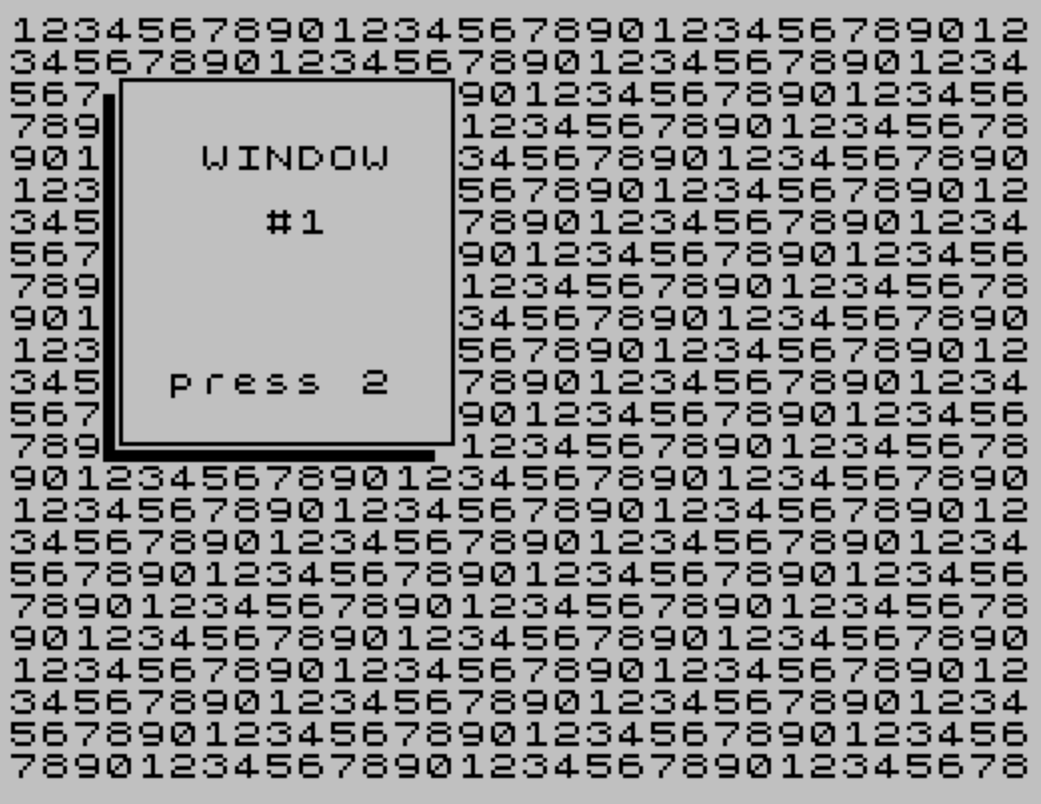
Source Code
  10 REM 2068 Windows from Syncware 11-12/86 by P. Bingham
  20 CLEAR 59198:GO SUB 310:POKE lower,0:FOR f=1 TO 76:PRINT "1234567890";:NEXT f:PRINT "12345678":POKE lower,2:
  30 LET k= USR store
  40 LET n=1:GO SUB 170
  50 PRINT AT 4,6;a$;\{16}\{0} AT 6,8;"#1";\{16}\{0} AT 11,5;b$;"2"
  60 IF INKEY$ <>"2" THEN GO TO 60
  70 LET k= USR renew
  80 LET n=2:GO SUB 170
  90 PRINT AT 5,21;a$; AT 7,23;"#2"; AT 19,20;b$;"3"
 100 IF INKEY$ <>"3" THEN GO TO 100
 110 LET k= USR renew
 120 LET n=3:GO SUB 170
 130 POKE lower,0:PRINT AT 17,6;a$; AT 19,8;"#3"; AT 22,6;b$;"E":POKE lower,2
 140 IF INKEY$ <>"e" THEN GO TO 140
 150 RESTORE 150:CLS :PRINT AT 8,6;"";:FOR t=1 TO 20:READ a:PRINT CHR$ a;:NEXT t:DATA 77,111,118,101,32,111,118,101,114,32,77,65,67,105,110,116,111,115,104,33
 160 GO TO 270
 170 LET w= VAL w$(n, TO 2):LET d= VAL w$(n,4 TO 5):LET r= VAL w$(n,7 TO 8):LET c= VAL w$(n,10 TO 11)
 180 IF r+d>24 OR c+w>32 THEN PRINT AT 21,10;" Window's too big! ":STOP
 190 IF r+d>22 THEN LET low=0:LET r3=24-r-d:GO TO 210
 200 LET low=2:LET r3=2
 210 LET rd=r+d-2:LET cw=c+w-3
 220 POKE lower,low:PRINT AT r,c; CHR$ 144;:FOR t=c TO cw:PRINT CHR$ 145;:NEXT t:PRINT CHR$ 146
 230 FOR t=r+1 TO rd:PRINT AT t,c; CHR$ 147;
 240 FOR f=c TO cw:PRINT " ";:NEXT f:PRINT CHR$ 148;:NEXT t
 250 IF r3=0 THEN OVER 1:FOR t=1 TO 32-w:PRINT " ";:NEXT t:OVER 0:PRINT CHR$ 149;:FOR t=c TO cw:PRINT CHR$ 150;:NEXT t:PRINT CHR$ 151:POKE lower,2:RETURN
 260 PRINT AT rd+1,c; CHR$ 149;:FOR t=c TO cw:PRINT CHR$ 150;:NEXT t:PRINT CHR$ 151:POKE lower,2:RETURN
 270 INPUT "Do you wish to try a Window of  your own? (Y OR N) ";c$:IF c$="n" OR c$="N" THEN STOP
 280 INPUT "New Cooridnates eg."'"""11,02,10,10"" ";w$(1)
 290 RANDOMIZE USR renew:LET n=1:GO SUB 170
 300 PAUSE 0:STOP
 310 RESTORE 310:DIM w$(PI,11):LET a$="WINDOW":LET b$="press ":LET store=59199:LET renew=59211:LET lower=23659:FOR t=store TO 59222:READ f:POKE t,f:NEXT t:DATA 1,0,24,17,87,231,33,0,64,237,176,201,1,0,24,17,0,64,33,87,231,237,176,201:REM LDIR
 320 FOR t=65368 TO 65431:READ a:POKE t,a:NEXT t:FOR t=1 TO PI:READ w$(t):NEXT t:RETURN
 330 DATA 15,8,a,a,232,a,a,a,255,0,a,a,a,a,a,a,255,1,a,a,a,a,a,a,232,a,a,a,a,a,a,a,1,a,a,a,a,a,a,a,232,a,a,239,224,255,a,a,0,a,a,255,0,255,a,a,1,a,a,255,0,224,a,a
 340 DATA "11,12,02,03","13,20,02,17","10,08,16,04"
 350 SAVE "Windows" LINE 20:VERIFY "Windows":STOP
Note: Type-in program listings on this website use ZMAKEBAS notation for graphics characters.