
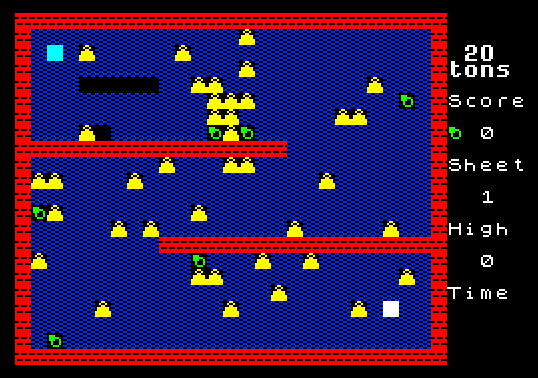
Twenty Tons is a maze-style puzzle game in which the player collects rings across twenty different screens while avoiding falling weights and enemies called “eaters.” The game uses machine code routines loaded separately at address 33000 (15,000 bytes), called via USR at addresses 33000, 33003, 33006, 33009, 33012, and 33018 to handle sprite movement, collision detection, and display updates. Screen data is stored in a custom packed format beginning at address 37000, with each screen occupying 512 bytes plus four metadata bytes encoding shape counts, target score, and player start coordinates. A built-in screen designer allows players to create, edit, and save up to 20 custom levels, with ATTR-based collision detection used to distinguish walls, rings, exits, and hazards. The program uses DEF FN helpers to split 16-bit integers into high and low bytes for POKE operations, and scrolls the title screen text by rotating a string one character at a time in a loop.
Program Analysis
Program Structure
The program is divided into clearly commented sections, with line numbers grouping functional areas:
- Lines 1–99: Initialization, UDG setup, and title screen
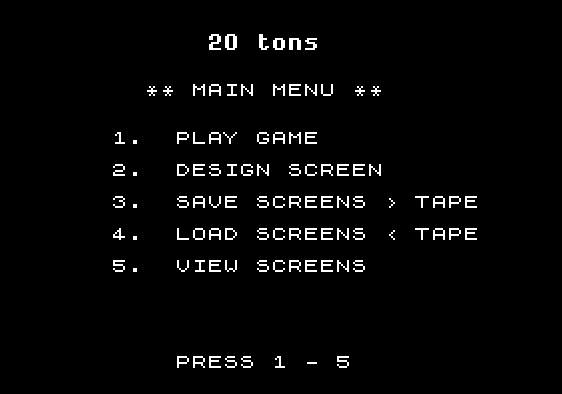
- Lines 100–250: Main menu handling
- Lines 1000–1210: Game loop (play game)
- Lines 5000–5630: Screen designer
- Lines 6000–6100: Screen save routine
- Lines 7000–7010: Screen load routine (machine code call)
- Lines 8000–8050: Screen viewer
- Lines 9000–9020: Border/HUD drawing subroutine
- Lines 9100–9130: Title animation
- Lines 9910–9999: UDG setup, loader stub, and SAVE commands
Two-File Loading System
The program is designed to be loaded in two parts. Line 9998 acts as a loader stub: it displays a “Loading Code” message and then executes LOAD "20tons C" CODE to bring in the machine code binary at address 33000, followed by RUN to restart the BASIC. Line 9999 contains the corresponding SAVE commands that write both the BASIC program and the code block to tape.
Machine Code Interface
All performance-critical operations are delegated to a 15,000-byte machine code block loaded at address 33000. BASIC calls it through multiple entry points via USR:
| Address | Apparent Function |
|---|---|
USR 33000 | Main sprite/game update; returns status in PEEK 32996 |
USR 33003 | Load screen ls from packed data at 37000+512*(ls-1); sets start x/y at 32990/32991, towin at 32995 |
USR 33006 | Sound/effect routine (called after collision events) |
USR 33009 | Called before attribute read for movement; likely erases player sprite |
USR 33012 | Called during death animation sequence |
USR 33018 | Enemy/weight movement update |
Communication between BASIC and machine code uses a small scratchpad region around address 32990–32996. POKE 32992,(LS-1) passes the screen number before calling USR 33003, and PEEK 32996 reads a collision/status flag back.
Screen Data Format
Each of the 20 levels is stored in a 512-byte region starting at address 37000, with consecutive screens at 512-byte intervals (37000, 37512, 38024, …). The save routine in lines 6000–6090 iterates over all 25×20 = 500 cell positions, writing ATTR(y,x)-64 per cell, followed by four metadata bytes: low and high bytes of NOOFSHAPES, then low and high bytes of towin (the score needed to unlock the exit). The DEF FN h and DEF FN l functions defined at line 20 split 16-bit values into byte pairs for these POKEs.
ATTR-Based Collision Detection
The game uses the Spectrum’s color attribute system as a lightweight collision map. In the game loop, LET q=ATTR(oy,ox) at line 1030 reads the paper/ink combination at the target cell, and specific values determine the outcome:
q=70orq=66: Wall — movement blockedq=68: Ring — collected, score incrementedq=71: Exit — level complete ifthisscore>=towinq=67: Presumably a hazard cell, treated specially in the timer check at line 1110
Screen Designer
The designer (lines 5000–5630) implements a full tile-based editor. The cursor is shown using PAPER 9; INK 8; "+", and the cell beneath is restored using the o$ string which maps tile indices to UDG characters. Number keys 1–5 select tile types, space clears, and q ends editing. After design, the player must separately place a start position (s) and an exit position (e) by navigating the cursor — the routine tracks completion of each with the flags sdun and edun.
A subtle bug appears at line 5200: LET y=y+x should almost certainly be LET y=y+1 — after wrapping x back to 1, adding x (now 1) is coincidentally correct at that moment, but the intent is clearly row advancement by one. The logic works only because x has just been reset to 1.
Title Screen Animation
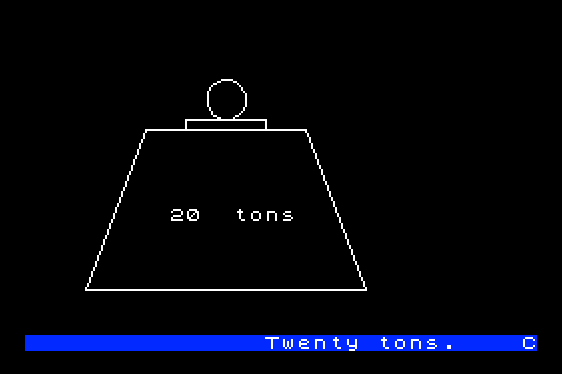
The scrolling marquee at lines 9110–9130 rotates a long string one character at a time: LET a$=a$(2 TO )+a$(1), printing the first 32 characters each iteration with PAUSE 5 for pacing. OUT 254,0 and OUT 254,16 toggle the border color (black then blue) to create a simple flash effect. The loop exits as soon as any key is pressed.
UDG Relocation
Line 9940 dynamically computes the UDG base address from system variables at addresses 23637–23638 (the RAMTOP pointer area), adding 6, then writes the result into system variables 23675–23676 to redirect the UDG table pointer. This is a standard technique for relocating UDGs relative to a CLEAR boundary rather than using fixed addresses.
Key BASIC Idioms
- Boolean arithmetic for directional movement:
LET ox=x+(z$="p")-(z$="o")(lines 1010, 5120, 5270) VAL "number"in line 9940 used as a memory-saving technique for embedding a numeric expression in a string- The lower display area (stream
#1) is used for status messages and game-over text, keeping it separate from the play area - Tape save/load of the screen data block (
CODE 37000,11000) covers all 20 screens (20 × 512 = 10240 bytes, rounded up to 11000) in a single operation
Anomalies and Notes
- Line 230 handles both save (key
3) and load (key4) with the sameSAVEcommand — the load option appears to be unimplemented or mislabeled; aLOADcommand is absent from this branch. - Line 1002’s
PRINT AT y,xreferencesyandxbefore they are initialized in that context; they are set byGO SUB 7000at line 7010 viaPEEK 32990/32991. - Line 9950 contains a long
REMwith embedded binary data (UDG pixel definitions and possibly machine code fragments) disguised within keyword tokens — a common technique for embedding data in REM lines. - The
FLASHattribute on the exit indicator at line 1040 activates only whenthisscore>=towin, giving the player a visual cue that the exit is now open.
Image Gallery
Source Code
    1 REM    Oct  1984                                                  20 TONS \* P Cooke
   10 CLEAR 32000: LET hi=0
   20 DEF FN h(x)=INT (x/256): DEF FN l(x)=x-256*FN h(x)
   30 PAPER 0: INK 7: BRIGHT 1: BORDER 0: CLS
   40 POKE 23658,0: GO SUB 9910
   50 GO SUB 9100
   99 REM  main menu
  100 PAPER 0: INK 7: BORDER 0: CLS : PRINT AT 1,11;"\i\j \k\l\m\n";AT 4,7;"** MAIN MENU **"
  110 PRINT AT 7,5;"1.  PLAY GAME"''"     2.  DESIGN SCREEN"''"     3.  SAVE SCREENS > TAPE"''"     4.  LOAD SCREENS < TAPE"''"     5.  VIEW SCREENS"
  120 PRINT AT 21,9;"PRESS 1 - 5"
  200 LET Z$=INKEY$: IF Z$<"1" OR Z$>"5" THEN GO TO 200
  210 IF Z$="2" THEN GO SUB 5000: GO TO 100
  220 IF Z$="1" THEN GO SUB 1000: GO TO 100
  230 IF z$="3" OR z$="4" THEN SAVE "20TONSSCREEN$ "CODE 37000,11000: GO TO 100
  250 IF z$="5" THEN GO SUB 8000: GO TO 100
 1000 LET score=0: CLS : INPUT "start on screen (1-20) ";ls: IF ls<1 OR ls>20 THEN GO TO 1000:
 1001 GO SUB 7000: LET q=0: LET ti=500: LET thisscore=q
 1002 FOR n=1 TO 10: LET V=USR 33000: PRINT AT y,x; INK 5;"\::\::\::\::\::\::\s\''\t\b"(n): IF n>5 THEN LET v=USR 33018
 1003 IF PEEK 32996<>0 THEN LET W=USR 33006
 1004 FOR m=1 TO 10: NEXT m: NEXT n
 1010 LET z$=INKEY$: LET ox=x+(z$="p")-(z$="o"): LET oy=y+(z$="z")-(z$="a"): IF ox=x AND oy=y THEN FOR n=1 TO 6: NEXT n: GO TO 1100
 1030 LET v=USR 33009: LET q=ATTR (oy,ox): IF q=70 OR q=66 THEN GO TO 1100
 1040 IF q=68 THEN BEEP .02,36: LET thisscore=thisscore+1: PRINT AT 7,27; FLASH (thisscore>=towin);"\e"; FLASH 0;" ";score+thisscore
 1045 IF thisscore<towin AND Q=71 THEN GO TO 1100
 1050 PRINT AT y,x; INK 0;" ";AT oy,ox; INK 5;"\c\d\b"(2+(Z$="p")-(Z$="o")): LET x=ox: LET y=oy
 1060 IF Q=71 THEN GO TO 1200
 1100 PRINT AT 19,28;ti;" ": LET V=USR 33000: IF PEEK 32996<>0 THEN LET W=USR 33006
 1110 LET ti=ti-1: IF V=0 AND Q<>67 AND ti>0 THEN GO TO 1010
 1112 FOR n=1 TO 2: LET v=USR 33012: LET v=USR 33006: NEXT n: FOR n=1 TO 5: PRINT AT y,x;"\o\p\q\r "(n): LET v=USR 33006: FOR m=1 TO 10: NEXT m: NEXT n
 1115 IF ti=0 THEN PRINT #1;AT 1,0; FLASH 1;"           OUT OF TIME",: GO TO 1130
 1120 IF ti<>0 THEN PRINT #1;AT 1,0; PAPER 7; INK 2; FLASH 1;"             CRUSHED",
 1130 BEEP 1,-5: BEEP 1,-5: PRINT #1;AT 0,0; PAPER 0; INK 7;"           GAME   OVER ",
 1135 FOR n=1 TO 200: NEXT n: PAUSE 200: RETURN
 1140 LET score=score+thisscore: IF score>hi THEN LET hi=score
 1150 RETURN
 1200 PRINT AT y,x; INK 5; FLASH 1;"\d": FOR n=1 TO 16: LET v=USR 33018: NEXT n: PAUSE 0: LET ls=ls+1: IF ls=21 THEN LET ls=1
 1210 GO TO 1001
 4000 STOP
 4999 REM DESIGN SCREEN$
 5000 LET ls=0: PAPER ls: INK ls: BORDER ls: CLS : GO SUB 9000: REM BORDER
 5010 INPUT "Load screen ?(y/n) ";y$: IF y$<>"y" AND y$<>"n" THEN GO TO 5010
 5020 IF y$="n" THEN GO TO 5070
 5030 INPUT "load screen (1-20)";ls: IF ls<1 OR ls>20 THEN GO TO 5030
 5040 GO SUB 7000: REM LOAD ls.
 5050 REM
 5070 PRINT #1;"design screen      keys a/z o/p space 1 "; INK 1;"\h "; INK 7;"2 "; INK 2;"\g "; INK 7;"3 "; INK PI;"\f "; INK 7;"4 "; INK 4;"\e "; INK 7;"5 "; INK 6;"\a"; INK 7;" q end"
 5080 LET x=1: LET y=x: LET ox=x: LET oy=y: LET o=x: LET man=0: LET exit=0
 5090 LET o$=" \h\g\f\e\b\a\::"
 5100 PRINT AT oy,ox; PAPER 0; INK o;o$(o+1): LET o=ATTR (y,x)-64: PRINT AT y,x; PAPER 9; INK 8;;"+": LET ox=x: LET oy=y
 5110 LET z$=INKEY$: IF z$<>" " AND z$<>"a" AND z$<>"z" AND z$<>"p" AND z$<>"o" AND z$<>"q" AND (z$<"0" OR z$>"5") THEN GO TO 5110
 5120 IF z$="p" OR z$="o" OR z$="a" OR z$="z" THEN LET x=x+(z$="p" AND x<25)-(z$="o" AND x>1): LET y=y+(z$="z" AND y<20)-(z$="a" AND y>1): GO TO 5100
 5130 IF z$="q" THEN GO TO 5220
 5140 IF z$=" " THEN LET z$="0"
 5150 LET o=VAL z$: IF o=5 THEN LET o=6
 5200 LET x=x+1: IF x=26 THEN LET x=1: LET y=y+x: IF y=21 THEN LET y=1
 5210 GO TO 5100
 5220 LET sdun=0: LET edun=0: INPUT "": PRINT #1;"Please place start pos (s) and  end pos (e)."
 5250 PRINT AT oy,ox; PAPER 0; INK o;o$(o+1): LET o=ATTR (y,x)-64: PRINT AT y,x; PAPER 9; INK 8;;"+": LET ox=x: LET oy=y
 5260 LET z$=INKEY$: IF z$<>"s" AND z$<>"e" AND z$<>"a" AND z$<>"z" AND z$<>"p" AND z$<>"o" THEN GO TO 5260
 5270 IF z$="p" OR z$="o" OR z$="a" OR z$="z" THEN LET x=x+(z$="p" AND x<25)-(z$="o" AND x>1): LET y=y+(z$="z" AND y<20)-(z$="a" AND y>1): GO TO 5250
 5280 IF z$="e" AND NOT edun THEN LET o=7: LET edun=1
 5290 IF z$="s" AND NOT sdun THEN LET o=5: LET sdun=1: LET xstart=x: LET ystart=y
 5295 IF NOT sdun OR NOT edun THEN GO TO 5250
 5296 PRINT AT oy,ox; PAPER 0; INK o;o$(o+1)
 5300 INPUT " OK to save? (Y/N) ";Y$: IF y$<>"y" AND y$<>"n" THEN GO TO 5300
 5310 IF y$="n" THEN GO TO 5600
 5400 INPUT "save screen no(1-20) ";screen: IF screen<1 OR screen>20 THEN GO TO 5400
 5500 GO SUB 6000
 5510 RETURN
 5600 INPUT "Press C continue or Q quit ";y$
 5610 IF y$<>"c" AND y$<>"q" THEN GO TO 5610
 5620 IF y$="q" THEN RETURN
 5630 GO TO 5070
 5999 REM SAVE SCREEN$
 6000 PRINT #1; FLASH 1;"  ** Saving **      Please wait.": LET ADD=37000+512*(SCREEN-1)
 6010 LET X=1: LET Y=x: LET MAXSCORE=0: LET NOOFSHAPES=0: LET towin=0
 6020 LET A=ATTR (Y,X)-64: IF A=4 THEN LET MAXSCORE=MAXSCORE+1: PRINT AT 7,29;maxscore;AT 9,27;"(max)"
 6030 POKE ADD,A: LET ADD=ADD+1: IF A>2 AND A<>5 AND A<>7 THEN LET NOOFSHAPES=NOOFSHAPES+1
 6040: LET X=X+1: IF X=26 THEN LET X=1: LET Y=Y+x
 6050 IF Y<21 THEN GO TO 6020
 6060 INPUT "SCORE TO FINISH (<= max) ";towin
 6070 IF towin>MAXSCORE THEN GO TO 6060
 6080 POKE ADD,FN L(NOOFSHAPES): POKE ADD+1,FN H(NOOFSHApES): POKE ADD+2,FN L(towin): POKE ADD+3,FN H(towin)
 6090 INPUT "": PRINT #1;" ALL OK."
 6100 PAUSE 0: RETURN
 6999 REM LOAD SCREEN$
 7000 REM LOAD SCREEN$ ls
 7010 GO SUB 9000: POKE 32992,(LS-1): LET V=USR 33003: LET X=PEEK 32990: LET Y=PEEK 32991: LET TOWIN=PEEK 32995: RETURN
 8000 CLS : LET ls=1: GO SUB 9000
 8005 POKE 32992,(LS-1): LET V=USR 33003
 8010 PRINT AT 11,29;ls;" ";#1;AT 1,10;"Screen  ";ls;" ";
 8020 FOR n=1 TO 100: IF INKEY$<>"" THEN RETURN
 8025 NEXT n: FOR n=1 TO 2: LET v=USR 33009: LET v=USR 33012: NEXT n
 8030 LET ls=ls+1: IF ls=21 THEN LET ls=1
 8040 IF INKEY$="" THEN GO TO 8005
 8050 RETURN
 9000 BRIGHT 1: PAPER 0: INK 7: PRINT AT 0,0; INK 2;"\g\g\g\g\g\g\g\g\g\g\g\g\g\g\g\g\g\g\g\g\g\g\g\g\g\g\g": FOR n=1 TO 20: PRINT INK 2;"\g"; INK 1;"\h\h\h\h\h\h\h\h\h\h\h\h\h\h\h\h\h\h\h\h\h\h\h\h\h"; INK 2;"\g": NEXT n: PRINT INK 2;"\g\g\g\g\g\g\g\g\g\g\g\g\g\g\g\g\g\g\g\g\g\g\g\g\g\g\g";
 9010 PRINT AT 2,28;"\i\j";AT PI,27;"\k\l\m\n";AT 5,27;"Score";AT 7,27;"\e 0";AT 9,27;"Sheet";AT 11,29;ls;AT 13,27;"High";AT 15,29;hi;AT 17,27;"Time"
 9020 RETURN
 9100 PRINT AT 13,9;"20  tons": PLOT 30,30: DRAW 30,80: DRAW 80,0: DRAW 30,-80: DRAW -140,0: PLOT 80,110: DRAW 0,5: DRAW 40,0: DRAW 0,-5: CIRCLE 100,125,10
 9110 LET a$="                        Twenty tons.    Collect the rings through twenty screens , but avoid the 20 ton weights and the 'eaters'......................   Press a key to start.                    "
 9120 PRINT AT 21,0; PAPER 1;a$( TO 32): OUT 254,0: OUT 254,16: LET a$=a$(2 TO )+a$(1): PAUSE 5: IF INKEY$="" THEN GO TO 9120
 9130 RETURN
 9910 REM UDGs
 9930:
 9940 LET x=VAL "(PEEK 23637+PEEK 23638*256)+6": POKE 23675,FN l(x): POKE 23676,FN h(x): RETURN
 9950 REM  $~~ COPY COPY COPY P($<*p|r""~RND\ 'ATTR COPY MERGE \ '~ COPY COPY " COPY COPY \.  COPY COPY TO 3 TO 3 TO 3 TO 3<ff<``~<ffffff<00<0006<ffff<|fffff>`<|\'  \' AD  COPY COPY COPY COPY COPY COPY COPY COPY \  LN FN ATTR SCREEN$ VAL$ \q LPRINT
 9998 PAPER 0: INK 7: BORDER 0: CLEAR 32000: PRINT AT 5,12;"20 tons.";AT 7,10;"Loading Code";AT 9,10;"Please wait.": LOAD "20tons C"CODE : RUN
 9999 SAVE "20tons" LINE 9998: SAVE "20tons C"CODE 33000,15000
Note: Type-in program listings on this website use ZMAKEBAS notation for graphics characters.