
Authors
Publication
Pub Details
Date
Pages
The SOUND command on the T/S 2068 is probably the most neglected of the new commands because of the complexity involved to utilize it. In addition, there is very little actually written about it, relegating SOUND to the powerful but unused category. Let’s have a look at it now.
The T/S 2068 is capable of producing some very sophisticated music. You can control three separate channels of sound by manipulating the fourteen registers (storage locations). We will look at these registers and how they are usedd in a step by step fashion.
The very first thing which must be done is to enable (turn on) the channel. This is done using register 7, the enable register. It is this register which tells any of the three channels to create a sound. The channels re designated as A, B, and C. When referring to these channels in BASIC commands, channel A = 1, channel B = 2, and channel C = 3. To start a sound on any of these channels, you must change the value of register 7, which originally will contain the value 63 when all channels are disabled. You do this by subtracting the value (or values) of the channels which you want to enable. To enable channel A you would subtract 1 from 63 (62), to enable channel B you would subtract 2 from 63 (61) and to enable channel C you would subtract 4 from 63 (59).
In BASIC, it would look like this:
To enable channel A: SOUND 7,62
To enable channel B: SOUND 7,61
To enable channel C: SOUND 7,59
Sometimes you may find that you want to enable more than one channel at a time. This is accomplished by adding the values of the channels together and then subtracting that number from 63.
Sometimes you may find that you want to enable more than one channel at a time. This is accomplished by adding the values of the channels together and then subtracting that number from 63.
To enable channels A & B (63 – [1 + 2] = 60) SOUND 7,60
To enable channels A & C (63 – [1 + 4] – 58) SOUND 7,58
To enable channels B & C (63 – (2 + 4] = 57) SOUND 7,57
To enable channels A, B & C (63 – [1 + 2+ 4] = 56) SOUND 7,56
If you have tried these commands on your computer, you will have noticed that nothing happened. That is because you have turned the channel(s) on, but haven’t told them what type of sound to produce. You still have to define the pitch, volume, and duration of the desired tone.
The pitch is controlled by two tuning registers for each channel. For channel A, these are registers 0 and 1; for channel B, they are registers 2 and 3; and for channel C, they are registers 4 and 5. For the most part, it is the lower of the two registers (fine tuning) which do most of the tuning. The higher of the two registers (coarse tuning) is used when the number in the fine tuning register exceeds 255. The values for the fine tune register can be in the range of 0-255, and the allowable values for the coarse tune register can be in the range 0-15. As the values in these registers increase, the pitch decreases. The progression of the values does not proceed in absolute steps, as they are based on the tone’s frequency, but doubling or halving the value takes you up or down exactly one octave. The simplest way to get the proper values is to use one of the charts found in the T/S 2068 User Manual (page 187), Timex/Sinclair 2068 Intermediate/Advanced Guide (page 119) or TS 2068 Basics and Beyond (page 145).
The following chart covers one octave. The values listed are for the fine tune register, with the coarse register set to 0.
NOTE    FINE TUNE VALUE
C         209
C#        197
D         186
D#        175
E         165
F         156
F#        147
G         139
G#        131
A         124
A#        117
B         110
C         104
Now we have enabled the channel and defined the pitch, but before any sound is produced, we must still specify the volume. There is a single volume register for each channel; channel A = register 8; channel B = register 9; channel C = register 10. The value range for this register is 0-15 (under normal circumstances). Setting the register to 0 turns the volume all the way down, effectively stopping the sound.
With these three elements, we can now start using the SOUND command. The procedure is to load the registers with the proper values and then enable the channel(s). We will first play a note (middle C) on channel A. First we will load the fine tune register for channel A (0) with the proper value from the chart above. (The coarse tune register initially is set to 0, and we will leave it that way.)
10 SOUND 0,209
In the second line of this program, we will turn channel A’s volume to the maximum by loading register 8 with the value of 15.
20 SOUND 8,15
Finally we have to enable channel A.
30 SOUND 7,62
Now, you can RUN this program and produce a short tone. The short duration is due to the fact that the sound is automatically turned off when the program ends. If there were a long program following this routine, the tone would continue until the volume was set to 0, the channel was disabled, or the program ended. Try this next program which will produce the same tone at the identical volume.
10 SOUND 0,209:8,15;7,62
20 PAUSE 0
First thing you will notice is that we have combined all three lines of the first program into a single SOUND command in the second program. It is simply necessary to separate the sets of numbers by a semicolon. The second line will cause the program to pause until any key is depressed. Now, the tone will continue until you press a key which causes the program to continue – and end.
You can, of course, use all three channels at one time to produce more than one voice. The following program will build a C major chord. First, we will enable all three channels without any pitch or volume information. (Turn you computer off and then back on before you attempt this program to assure that all registers are set to their initial values.)
10 SOUND 7,56
Next we will cause channel A to play middle C at full volume followed by a pause of one second
20 SOUND 0,209;8,15 30 PAUSE 60
Now, we will instruct channel B to play E at full volume, again followed by a one second pause.
40 SOUND. 2,165;9,15 50 PAUSE 60
We complete the chord with a G played on channel C, followed by a pause which will continue until a key is pressed.
60 SOUND 4,139;10,15 70 PAUSE 0
Finally, we will set the tone and volume registers back to 0.
80 SOUND 0,0;2,0;4,0;8,0; 9,0;10,0
Actually, the sound would have ended when the program was finished, but this way, you can reRUN the program and have it work properly. Try leaving out this final line and see what happens. You can disable all three channels by setting register 7 back to its original value of 63, but this would not change the values of the other registers, and when any of the registers would be turned back on, the tone would start again. Try adding these lines:
80 SOUND 7,63 90 PAUSE 60 100 SOUND 7,62 110 PAUSE 60 120 SOUND 7,61 130 PAUSE 60 140 SOUND 7,59 150 PAUSE 60 160 SOUND 7,63 170 SOUND 0
Try experimenting with this program to see what happens by turning registers on or off and by changing values.
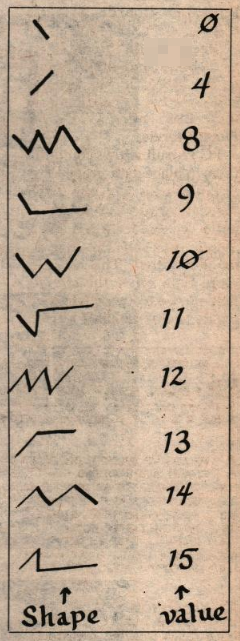
So far, the type of music we have created has been all on one level. For those of you who are concerned with what is called dynamics in music, what we produced up until now has been rather flat as far as dynamics are concerned. If you think about a piano, for instance, you will realize that the music produced by striking a key starts at a certain level and then fades immediately. A violinist will add vibrato to a single note giving it more texture than it would have ordinarily. These affects can be produced on the T/S 2068 by controlling what is called the envelope. By using additional registers, you can actually shape the music you create. By setting the volume registers (8,9,l0) to 16, you turn control of the tone to an envelope which you can determine. You cannot, however, set a different envelope for each channel. You can either give control of a channel to your selected channel, or allow it to remain under your standard volume control, but all channels controlled by the envelope will be controlled by the same selection. Registers 11 and 12 control the period of the envelope – the time it will take for the volume to build or fade. Fine tuning is accomplished using register 11, coarse tuning is accomplished with register 12. The value range for each of these registers is 0 to 255. Register 13 is the register which will hold the shape of your envelope (see chart). By adding the following numbers to these values, and loading into register 13, you have complete control over the sound. Adding 4 to these values will cause the volume to build rather than fading; adding 1 will keep the volume steady rather than dropping to nothing after a cycle is through; adding 2 will cause the build/fade cycle to reverse; adding 8 will cause the tone to continue instead of stopping after a single cycle.
Remember that even though the envelope is controlling the volume, you still have complete control over the pitch and can change it as you would normally.
The final use of the T/S 2068’s SOUND command is the production of special affect sounds. This is done by enabling a channel for noise instead of tones. This is done in the same manner as enabling a channel for a tone – that is by subtracting a value from register 7’s initial value of 63. In this case, you would subtract 8 for channel A; 16 for channel B; or 32 for channel C. When you enable a channel (or channels) for noise, you will use the final SOUND register – 6. Register 6 can hold values in the range of 0 to 31. The higher the number loaded into this register, the lower the pitch of the noise you produce. By combining noise and envelope control, you can create almost any type of sound effect your imagination can produce. The Timex manual has some, and you can find more in BASICS AND BEYOND.
For a more detailed explanation of the SOUND command on the T/S 2068, and many additional examples and ideas for its use, I highly recommend T/S 2068 Basics and Beyond by Sharon Zardetto Aker (Scott, Foresman and Company.
Those of you who have Rotronics wafadrive connected to your T/S 2068 (or Spectrum for that matter) can contact TS Services for their latest catalog. They have been obtaining the rights to many of the most popular programs for the purpose of modifying them to run on the wafadrive. For your copy of the catalog and information about the National TS Users Group, write to TS Services; P.O. Box 15214; Red Bank, TN 37415; (615) 877-6328. Mention that you heard about it in Computer Shopper.
Next month a hands-on review of the Sinclair QL.