
The Quicksilva Programmable Character Generator: £26; Motherboard: £12; Edge Connector: £4. Quicksilva, 95 Upper Brownhill Rd., Maybush, Southhampton, Hants, U.K.
The Quicksilva Programmable Character Generator is a single circuit board which plugs into the QS Motherboard or the QS Edge Connector which plugs into the back of the ZX81. For the ZX80, a few small modifications are needed to connect it to the PCB.
Once installed, it lets the user program 128 different characters rather than the previous 64 and their inverses. After the board has been programmed, it can be LOADed with other programs which use the new character set.
The QS Character Board is operated by a small switch mounted on the side to show the normal characters or the programmed set. The board comes with comprehensive and easy-to-follow instructions as well as a demonstration cassette with two programs: CHR$ and L-CASE. CHR$ (1K) provides a series of machine code routines which make programming the board quite simple. L-CASE (3K) contains all the data for a complete lower case alphabet set.
At the moment, the ZX81 gets the information for displaying the characters from the top 512 bytes of the ROM, from addresses 7680 to 8191. Each character takes up 8 bytes of data. For example, the letter R is made up as follows:
          Contents
Location  in Binary   Total  Hex
8120      00000000    0      00
8121      01111100    124    7C
8122      01000010    66     42
8123      01000010    66     42
8124      01111100    124    7C
8125      01000100    68     44
8126      01000010    66     42
8127      00000000    0      00
The QS Character board represents each character in exactly the same way. Thus for example, if for some obscure reason you wished that the letter E looked like R, you would load the CHR$ program and enter the lines in Figure 1.
Figure 1.
100 LET L=USR SINC          ;Loads the normal character
                            ;set into the character RAM.
110 LET L=USR QLOAD         ;Loads the following characters
                            ;into character RAM.
120 REM E007C42427C444200   ;The first letter is the one
                            ;that you want to change and
                            ;the rest is Hex data for
                            ;the shape of the new
                            ;character.
130 REM STOP                ;Tells the computer that you
                            ;have finished LOADing new
                            ;characters.
Once programmed, the characters remain until they are changed or the power is removed. However, when the LPRINT and COPY commands are used, the normal Sinclair characters are sent to the printer. To circumvent this problem, CHR$ has the routines QCOPY and QPRNT.
The uses of the character board are virtually limitless. Apart from the use of lower case to enhance programs, real “space invaders” can be easily created as well as more serious applications like circuit symbols and fine line drawings.
By combining a number of characters together in one block, the user can produce high resolution drawings. Figure 2 shows a couple of curves produced on the board. Figure 3 shows how to plot high resolution graphs on a 256 x 176 grid such as seen in Figure 2. To change the curves, simply change the equations in lines 120 and 140. Due to the nature of the character board, you cannot plot very complicated functions because they would take up more than 128 of the 704 blocks on the screen. The program needs more than 1K, and, if entered after the CHR$ program has been loaded, you can COPY the graph onto the printer.
The QS Character Board has 1K of static RAM on line which can be used for storing data and some machine code programs. The RAM lies between 33792 and 34815. This means that only “relative jumps” can be used in any machine code that is stored there. There is a 4-way D.I.L. switch on the board which should be off when the ZX81 is in SLOW mode. When the board is being used in FAST mode, or on the ZX80 switches 3 and 4 should be on. All the logic chips and the two 2114s are soldered directly to the PCB which is double-sided.
The board is clearly highly recommended and one of the most useful I have come across.
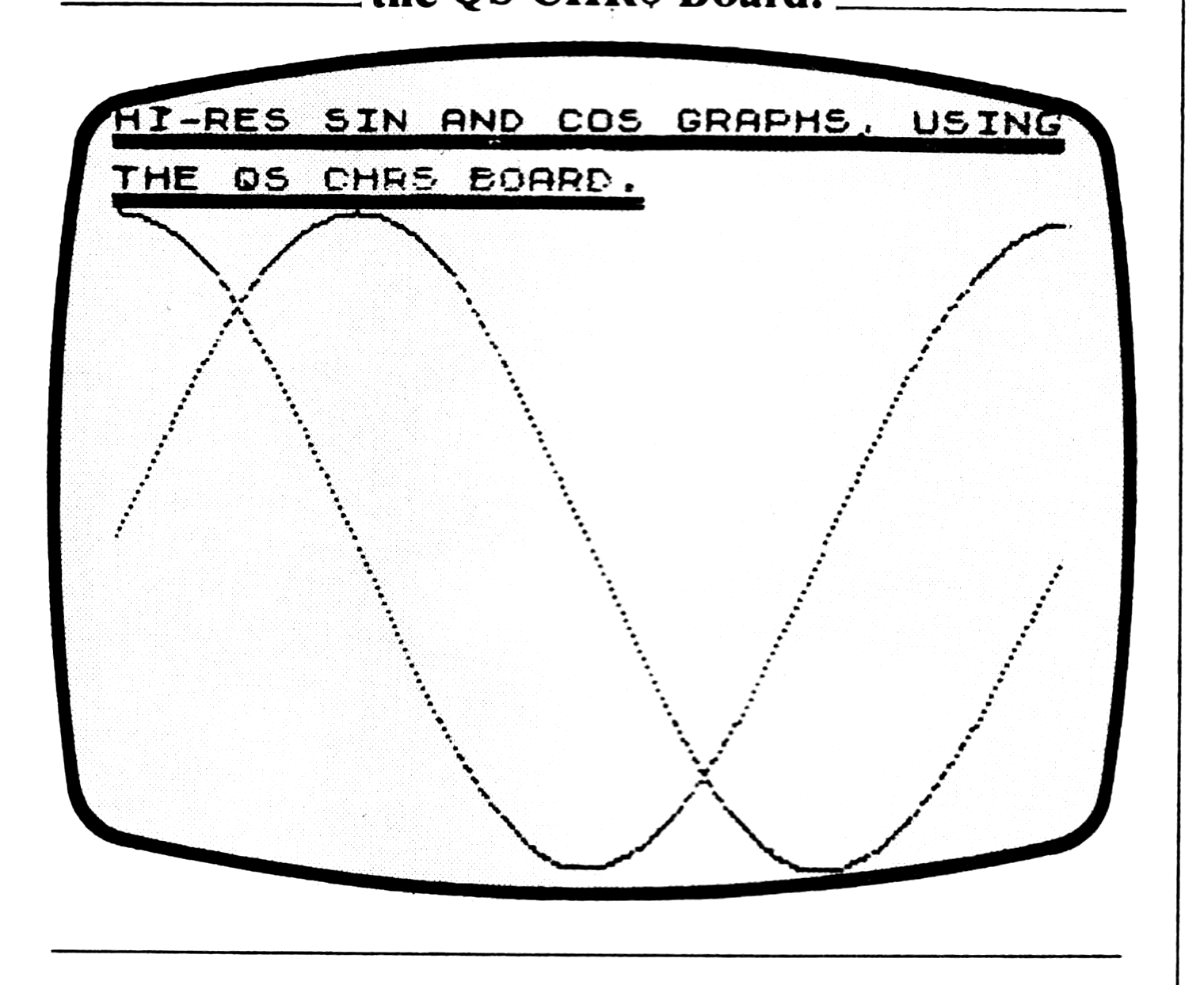
Figure 3. Listing to Generate the Graphs in Figure 2.
  20 REM [inv QS CHR$ HI-RES]
  21 POKE 32512,58
  22 POKE 32513,12
  23 POKE 32514,127
  24 POKE 32515,95
  25 POKE 32516,58
  26 POKE 32517,13
  27 POKE 32518,127
  28 POKE 32519,179
  29 POKE 32520,6
  30 POKE 32521,0
  31 POKE 32522,79
  32 POKE 32523,201
  40 REM
  50 REM
  60 LET L=USR CLR
  70 FAST
  80 DIM A$(32,176)
  90 DIM B$(32,22)
 100 REM [inv GRAPH EQUATIONS]
 110 FOR X=0 TO 255
 120 LET Y=88+86*SIN (X/128*PI)
 130 GOSUB 5000
 140 LET Y=88+86*COS (X/128*PI)
 150 GOSUB 5000
 160 NEXT X
 170 GOTO 5080
5000 REM [inv PLOT X,Y INTO A$]
5010 IF X<0 OR X>255 OR Y<0 OR Y>175 THEN RETURN
5020 LET A=INT (X/8)+1
5030 LET B=176-INT Y
5040 POKE 32524,CODE A$(A,B)
5050 POKE 32525,2**(8*A-INT X-1)
5060 LET A$(A,B)=CHR$ USR 32512
5070 RETURN
5080 REM [inv PRINT A$ ON SCREEN]
5090 LET C=0
5100 FOR A=1 TO 32
5110 FOR B=1 TO 176 STEP 8
5120 IF A$(A,B)<>" " OR A$(A,B+1)<>" " OR A$(A,B+2)<>" " OR A$(A,B+3)<>" " OR A$(A,B+4)<>" " OR A$(A,B+5)<>" " OR A$(A,B+6)<>" " OR A$(A,B+7)<>" " THEN GOSUB 5160
5130 NEXT B
5140 NEXT A
5150 GOTO 5250
5160 LET C=C+1
5170 IF C>127 THEN GOTO 5250
5180 LET B$(A,1+INT (B/8))=CHR$ (C+64*(C>63))
5190 FOR D=0 TO 7
5200 LET E=CODE A$(A,B+D)
5210 IF C>63 THEN LET E=255-E
5220 POKE 33792+C*8+D,E
5230 NEXT D
5240 RETURN
5250 SLOW
5260 FOR A=1 TO 32
5270 FOR B=1 TO 22
5280 PRINT AT B-1,A-1;B$(A,B)
5290 NEXT B
5300 NEXT A
5310 IF INKEY$="Z" THEN LET L=USR QCOPY
5320 IF INKEY$="X" THEN GOTO 5340
5330 GOTO 5310
5340 LET L=USR SINC