
Last issue, SyncWare News printed a simple flow chart generating program. Our Editor issued the following challenges to our readers: 1). Reduce the memory required by the example program to the barest minimum, 2). Create a machine code equivalent of the example program, and/or 3). Write an equivalent program for the ZX81/TS1000 in either MC or BASIC.
The following two programs were submitted in response to the challenge. We’re still looking for an equivalent program for the ZX81/TS1000.
The author of this challenge response prefers to be known by his handle, rather than his name. So who am I to argue?
A few things worth knowing . . .
A couple of comments on the program would be in order. First, the program will not work if you have any material tucked away down below the byte defined by:
PEEK 23635+256*PEEK 23636(PROG in the list of Systems Variables in the manual). I discovered this the hard way, as my printer driver routine resides down in that area. Or rather, it will interpret the material you have cached there as program, and will try to flowchart it. The results can be out‑of‑the‑ordinary, to put it mildly.
FLOWCHART 2068 CHALLENGE
      BY THE OLD GENT
(Ref: SYNCWARE NEWS V5/N6 pg.16)

PROGRAM FEATURES:-
*Automatic print to TS2040
*Graphic SYMBOLS vs plot/draw
*Alpha constants for all numbers
 String constants for SYMBOLS
  ie:- d>z,dd>jj,a$>g$
        a>c=program variables

INSTRUCTIONS:-
*Turn the PRINTER on !!
*PRESS j to LOAD FLOWCHART

*To reprint type GO TO 1:ENTER
 NOTE-reLOAD if you RUN or CLEAR
*To copy program LLIST:ENTER
*To print chart on the screen
 type   OPEN #3,"s":GO TO 1:ENTER

PRESS z TO COPY THIS SCREEN
This deficiency, if it bothers you, could be remedied by defining the starting address (line 9902) as shown above, rather than as an explicit 26710 (=d in the Old Gent’s list of pre‑set variables).
Second, it would have been useful to include a RESTORE in the LOADER program. Without the RESTORE, the program stalls with an Out of DATA message if you GO TO 1 a second time, as advised in line 1025.
Third, a small note — it would have helped absent‑minded people like me if the LOADER program had included a “start tape” message (with BEEPs) after “j” is pressed (line 1020).
This program uses the standard technique of pre‑defining variables (as shown in the Table) to eliminate the memory consumption that would otherwise result from using program space to define them. The price paid for this technique is, as the program tells us, the fact that you can not CLEAR or RUN the program without losing all of these values. Use GO TO 1 instead of RUN.
The program uses LPRINT for display commands. As indicated, the command OPEN #3,”s” disables the printer, and translates the commands to screen display instead. If you want to re‑enable the printer, key in “CLOSE #3”, then ENTER.
Pre-defined variables
| Var | Value | Var | Value |
|---|---|---|---|
| d | 26710 | dd | 13 |
| e | 9951 | ee | 203 |
| f | 9926 | ff | 226 |
| g | 236 | gg | 230 |
| h | 237 | hh | 235 |
| i | 243 | ii | 250 |
| j | 9927 | jj | 254 |
| k | 3 |
| Var | Symbol | Made from |
|---|---|---|
| a$ | ▱ (parallelogram — input/output) | graphics a+b |
| b$ | ▭ (rectangle — process) | graphics c+d |
| c$ | ▢ (rounded rectangle — terminator) | graphics e+f |
| d$ | ◇→ (diamond — decision) | graphics h+i+g |
| e$ | ▭→TO (target box) | graphics k+g plus literal TO |
| f$ | ↓ (flow line) | graphics l+m |
| g$ | : |
BASIC Listing
900 CLS : FOR a=0 TO 18 STEP 2
902 BEEP .1,20: BEEP .1,16: BEEP .1,12
904 PRINT AT a,a;"STOP THE TAPE"
906 PAUSE 10: NEXT a
910 FOR b=65368 TO 65471
911 READ c: POKE b,c: NEXT b
912 DATA 31,16,32,32,64,64,128,255
913 DATA 255,1,2,2,4,4,8,248
914 DATA 255,128,128,128,128,128,128,255
915 DATA 255,1,1,1,1,1,1,255
916 DATA 63,64,128,128,128,128,64,63
917 DATA 252,2,1,1,1,1,2,252
918 DATA 0,0,4,2,255,2,4,0
919 DATA 1,6,24,96,128,96,24,6
920 DATA 0,192,48,12,3,12,48,192
921 DATA 7,8,8,8,8,8,8,7
922 DATA 192,32,32,32,63,32,32,192
923 DATA 1,1,1,1,1,5,3,1
924 DATA 0,0,0,0,0,64,128,0
1000 CLS : PRINT AT 0,4;"FLOWCHART 2068 CHALLENGE";AT 1,8;"BY THE OLD GENT"'"(Ref: SYNCWARE NEWS V5/N6 pg.16)"''
1005 PRINT "PROGRAM FEATURES:-
            *Automatic print to TS2040        *Graphic SYMBOLS vs plot/draw"
1010 PRINT "*Alpha constants for all numbers String constants for SYMBOLS      ie:- d>z,dd>jj,a$>g$                        a>c=program variables"
1015 PRINT '"INSTRUCTIONS:-"
1020 PRINT "*Turn the PRINTER on !!      *PRESS j to LOAD FLOWCHART"
1025 PRINT '"*To reprint type GO TO 1:ENTER NOTE-reLOAD if you RUN or CLEAR*To copy program LLIST:ENTER"
1030 PRINT "*To print chart on the screen type   OPEN #3,""s"":GO TO 1:ENTER"
1060 PRINT #0;AT 1,0;"PRESS z TO COPY THIS SCREEN": PAUSE 0
1070 IF INKEY$="z" THEN COPY
1075 IF INKEY$<>"j" THEN BEEP 1,10: GO TO 1060
1080 CLS : LPRINT "FLOWCHART": LPRINT : PRINT ;FLASH 1;"LOADING": LOAD "FLOWCHART"
“Old Gent’s” flowchart–loader
  1 CLS
 10 IF 5>1 THEN GO TO 9000
 20 FOR f=1 TO 3: PRINT 5: NEXT f
 30 GO SUB 400
 40 LOAD ""
 50 PRINT 1
 60 STOP
 70 LOAD "a"
 80 SAVE "a" LINE 10: BEEP .3,12: BEEP 1,12: VERIFY "a": BEEP .3,16: BEEP 1,16
 90 NEW
100 LIST 10
350 STOP
400 PRINT 123: RETURN
410 STOP
9902 LET a=d
9903 LET c=PEEK (a+n)+q*PEEK a: LET a=a+p: IF c>z THEN STOP
9904 LPRINT c;TAB p;CHR$ PEEK a;
9905 LET b=PEEK a: IF b=gg OR b=jj OR b=ff THEN LPRINT ,c$: LPRINT : LET a=a+o: GO TO w
9907 IF b=ii OR b=i THEN LPRINT ,d$;: LET a=a+k: GO TO f
9909 IF b=hh THEN LPRINT ,b$: GO TO x
9910 IF b=h THEN GO TO l
9912 LPRINT ,a$: IF b=g OR b=h THEN GO TO u
9914 LPRINT ,f$
9916 LET b=PEEK a: IF b=r THEN GO SUB e
9917 IF b=s THEN LET a=a+p
9918 IF b=dd THEN LET a=a+n: GO TO w
9919 IF b=m THEN LET a=a+n: LPRINT g$;CHR$ PEEK a;: GO TO t
9920 LET a=a+n: GO TO u
9926 IF b=i THEN LPRINT ,,f$: GO TO w
9927 GO SUB y: IF b=s THEN LET a=a+p
9929 IF b<>ee THEN GO TO j
9930 GO SUB y: LPRINT " ";CHR$ b;: IF b=g OR b=h THEN GO TO v
9932 GO TO x
9933 LPRINT ,e$;
9934 GO SUB y: IF b<>r THEN GO TO v
9936 LET a=a+k: LPRINT PEEK a+q*PEEK (a+n),: GO TO x
9951 GO SUB y: IF b=r THEN RETURN
9952 GO TO e
9960 LET a=a+n: LET b=PEEK a: RETURN
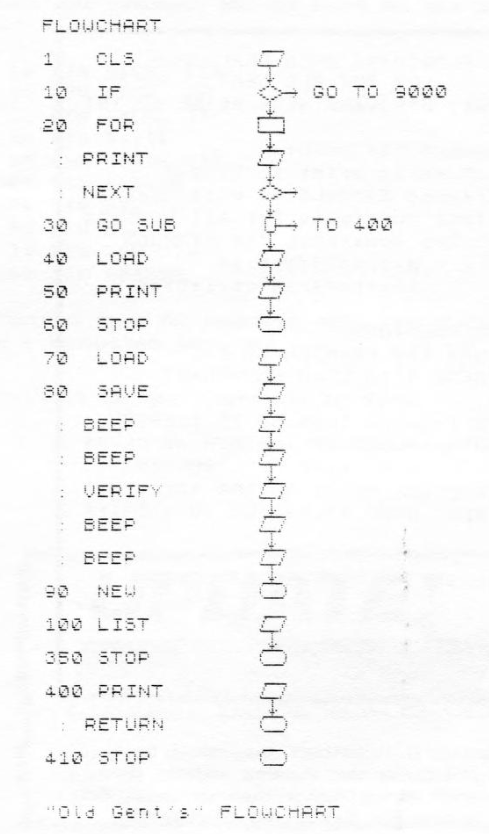
Sample Output
Note: Type-in program listings on this website use ZMAKEBAS notation for graphics characters.