
I just received a LarKen FDD System and ran into a few minor problems with connecting the AMDEK AMDISK III, a 2 drive disk system with power supply all tucked into a compact case. It is a single sided drive though both sides of the disks can be used, the AMDISK “drive-on” indicator lights are green when side 1 of a disk is read from or written to and red for side 2. I received the AMDISK from Peripherals Direct (1-800-332-9988) for $45 + $5 s&h. The 3″ disks are still going for; 5 for $21 or 10 for $39.
I already had the AMDISK when the FDD I/F arrived and the first thing I noticed was that the cable that had come with the AMDISK would not work. I called Rod Gowen (RMG) and he said he had the cable I needed, in stock and he also was a big help in explaining how to go about removing the old and installing the new cable. You have to remove the 5 screws that hold the cover on, then the cover. Remove the centronics connector (I also removed the bracket the connector attached to), unplug the card edge connectors from both drives. I don’t see why you couldn’t use the ribbon cable that came with the AMDISK and remove the centronics connectors and install new edge card connectors, available from Radio Shack $3.95 each and you’ll need 3. The LarKen Operating Manual describes in detail how to install the new connectors.
I thought that maybe replacing one end of the centronics cable with an edge card connector (for the FDD I/F) would solve the problem. So, first, I dug out the multi-tester and checked the continuity of the edge card connectors (to each drive), and found that a couple of the wires were mixed up. They will not work on the LarKen System this way. I was told that the edge card connectors that came with the AMDISK are not reusable. (Once they are disassembled, they fall apart!) An alternative is to get a 2 Drive FDD I/F cable from RMG for $19.95 and simply plug it in.
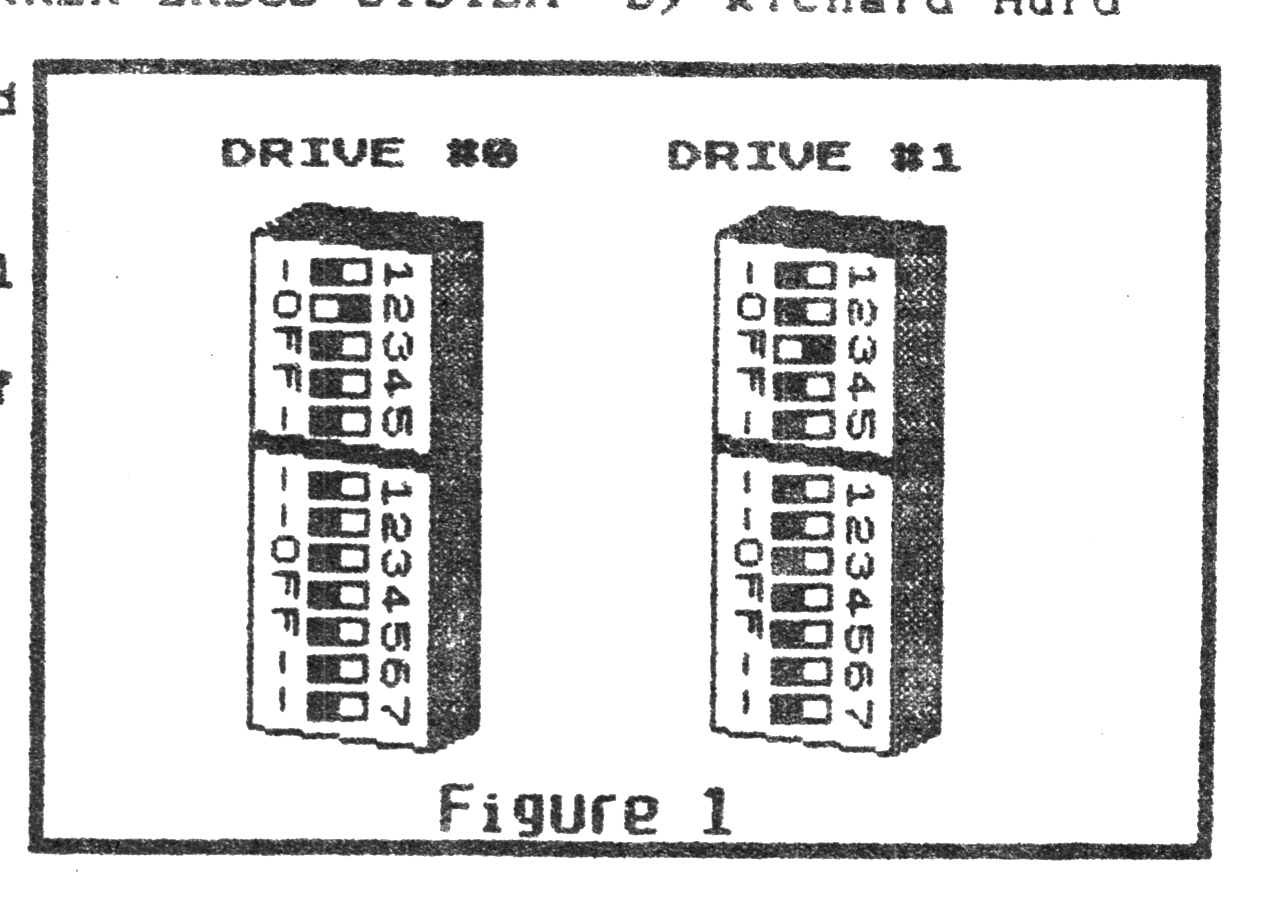
The AMDISK arrived without a owner/operator manual. When I pulled the cover off the AMDISK, I noticed that each drive had 2 dip switches (DS). See figure 1. One, 7 switch DS and one, 5 switch DS on each drive. The 7 switch DS on both drive’s were all switched OFF. The 5 switch DS on both drive’s were switched #3 ON the rest OFF. This setting did not work at all when I tried to test the system out. So, first I disconnected one of the drives and tried it again, it worked fine with one drive. (Either one.) So I ran the LarKen system for an hour or so, easily transferring quite a few of my most used programs to disk. Well, I just had to experiment with the dip switches. I found I only had to change drive #0’s 5 switch DS. Figure 1 shows the setting I came up with. I plugged in both edge card connectors and tried it out, it worked great. I tried out the disk copy program (Copy2D.B1), no problem!
The AMDEK AMDISK III seems to be a very nice system. The biggest drawback is of course, the cost of the diskettes. It didn’t take me long to fill 5 of them. I’ll be looking into substituting a 5.25″ single sided drive in place of one of the AMDEK’s drives useing its’ power supply.