Authors
Publication
Pub Details
Date
Pages
Not too long ago, (give or take a few years), I came home to a strange sight. Piled before the desk I used as my computer station was a foot deep mound of thermal printer paper. On the desk, my TS2040 printer was happily “Whiirrr- CHUCKing” to itself. It was trying in vain to spew forth paper from a now emptied spool.
After resisting several violent urges and merely unplugging the printer, I settled to the fun task of rolling the paper back onto its spool. This wasn’t the first time it had happened! It seems if you turn off your computer and not your printer, the TS2040 will dump its paper. Usually it happens when you are not around to stop it.
Now people that have the ZX printer don’t have to worry about things like that. When you shut off the computer, the printer is also shut down. because the ZX uses the computer power supply. The TS2040 has its own 24 VAC power pack, so even when the printer is turned off, via the OFF button, printer is still running! The thermal heads of the printer are continuously powered to insure that the heads are ready to print upon notice from the computer. The only thing the OFF button does is to disable the drive motor.
So, you are probably asking yourself, “Why doesn’t he just start pushing the OFF button when he is done using the computer?” Well, I’ll tell you, First, I didn’t even pause to consider that idea. Second, I wouldn’t have anything to write about. So, instead of doing the obvious, this is what I came up with while I rerolled that spool.
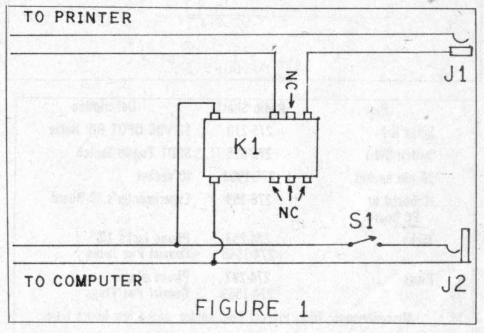
Since I was having this problem with my ZX81/TS1000 computer set-up, I designed the circuit shown in Figure 1. It takes advantage of the fact that the input power to these computers is 9 to 12V DC. (Same as the ZX80 and Spectrum, but not the TS2068. Its input power is 15V DC.) By using a 12V DC relay and a STSP switch, I was able to accomplish two things: 1) I was finally able to be sure that the printer was OFF when I was through with it; and, 2) I finally got an ON/OFF switch for my ZX81/TS1000 machines!!!
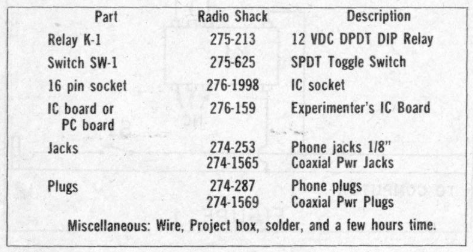
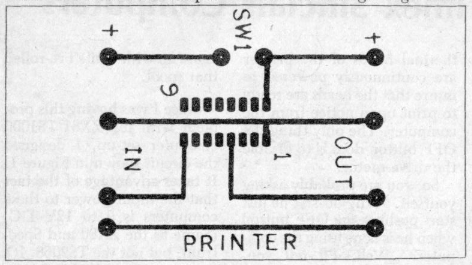
I constructed my version using point-to-point wiring and a small project case as a housing. I’ve been using it for several years now without a hitch. The relay I used was a 12V DC DPDT DIP relay. It is designed to be placed into a 16 pin IC socket. All the parts can be found at your local Radio Shack or electronics store. The total cost of the project should be under $12.00. For those of you who like to burn PC boards, I’ve included a diagram for you. (Figure 2).
Timex Command Cartridge (TCC) Case
When the TS2068 hit the market, one of the things the PR people boasted about was the fact that the TS2068 would have a cartridge system. Yesiree!! It was to be smaller than a pack of cigarettes, yet having up to 56K of ROM on each cartridge. It sure sounded grand, eh? Well, the TCC fell the way of the Saber Toothed Tiger and “Sync” magazine. But, the lucky few who did manage to get some cartridges now have a small problem. Where do you store the little devils!! If Timex had stayed in the game, I’m sure they would have marketed a TCC case. Or perhaps a third party would have picked up on it.
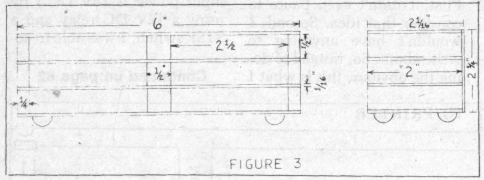
Since no one did, I’ll tell you my solution. Digging into my scrap wood I managed to find some pine wood stripping and hard balsa sheets. You should be able to find these items at any well stocked hobby shop. I used ½”by ½” and ½”by ¼”pine, while the balsa was 1/16 by 3″. I also gathered my wood tools, wood glue, shelf covering and four self-sticking rubber feet.
Looking at Figure 3, you’ll see that you can make the case fit your needs. Just keep stacking the sheeting and the stripping alternately. This produces the required number of cartridge slots. I happen to require six slots as illustrated in Figure 3.
Completing the case, I covered it with “natural wood” shelf covering. This gave it a professional appearance. It also adds protection and strength to the balsa sheeting. Place the feet on the bottom and the case is complete.
Boosting Your BEEP
So, you ve just completed your opus, “Rhapsody in BEEP” and want your computer to play it for your User Group. Well, that’s find, but the TS 2068 just doesn’t have the volume to be heard across a quiet room, let alone in a crowded meeting hall. What can you do to boost the volume of the BEEP sound? It’s a lot simplier than you think, there is nothing to build. When you initiate the BEEP function on your TS2068, the sound is sent to two places. It goes to that tinny sounding speaker and it …
Image Gallery