
THIS PROGRAM AND ARTICLE IS FOR THE SINCLAIR QL
INTRODUCTION
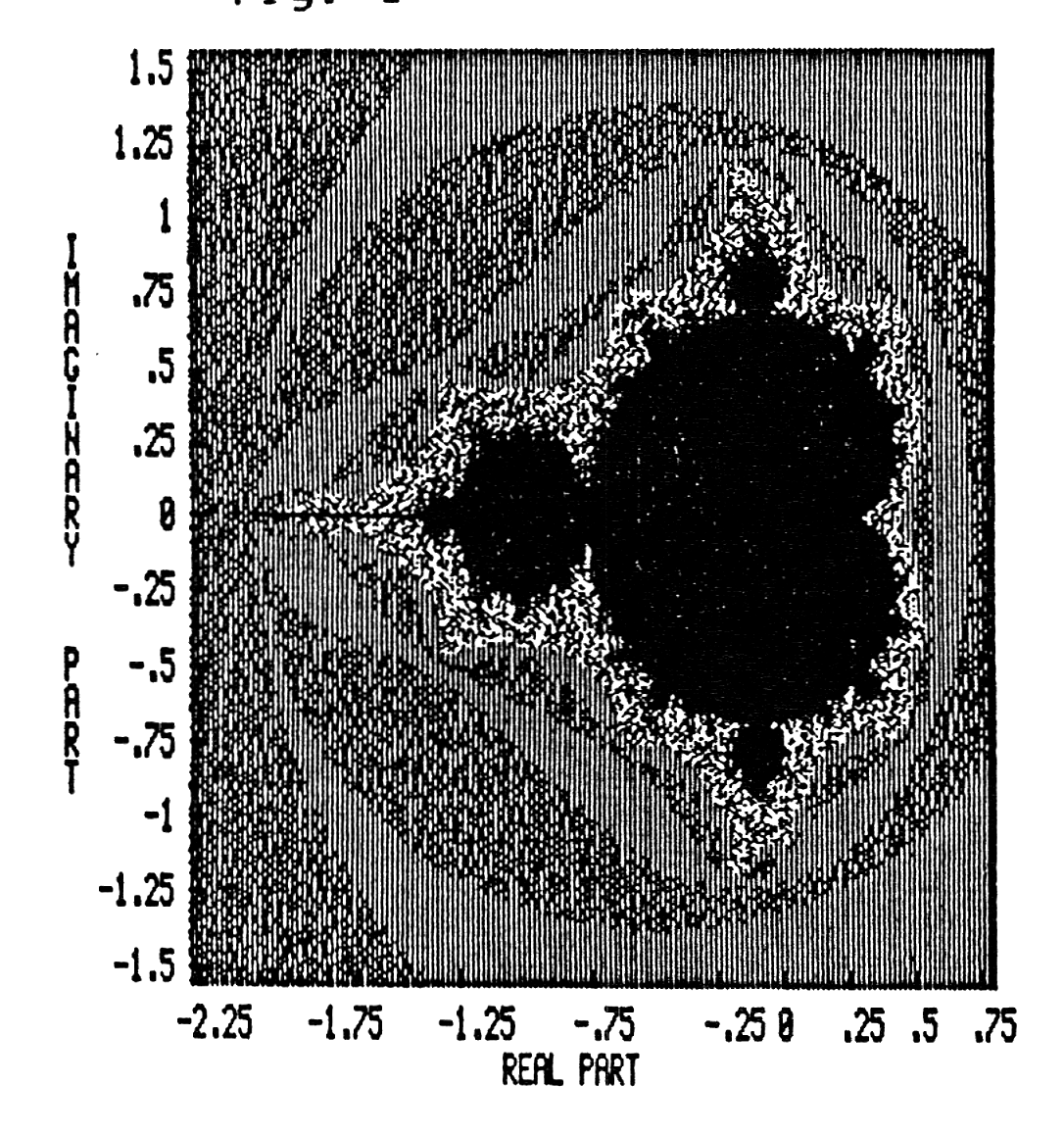
Welcome to the magical world of fractal geometry (“the mathematical study of forms having fractional dimension”). Fractal geometry has been used to build complex mountain ranges and “growing” plants by Lucas Films. It has also been helpful in the study of the baffling world of turbulence. This world was developed by Benoit B. Mandelbrot, a researchest at the IBM Research Center in Yorktown Heights, NY. The “numbers” which lie within the “fractal plain” are said to be within the Mandelbrot set (see solid black area in fig. 1). The set is created and explored by repeatedly calculating a set of complex, real and imaginary numbers. A complex number is any number of the form a+bi, where a and b are real numbers and i=square root of -1. A real number is one in which there is no imaginary part. An imaginary number is a complex number with b not equal to zero. (A full discussion of imaginary and complex numbers is beyond the scope of this article and knowledge of the author.) By using an iterative process, one can generate the Mandelbrot set. Numbers which do not “fly-off” to infinity are said to fall within the Mandelbrot set. This is where the computer comes in — the Number Cruncher! For high resolution, a maximum of 1000 iterations is required. In order to fit the resulting data into an unexpanded QL, I have chosen a low to medium resolution with an iteration of 255. If after 255 steps the calculated number does not equal 4, it is assumed to lie within the Mandelbrot set (see fig. 4 for example of the calculation).
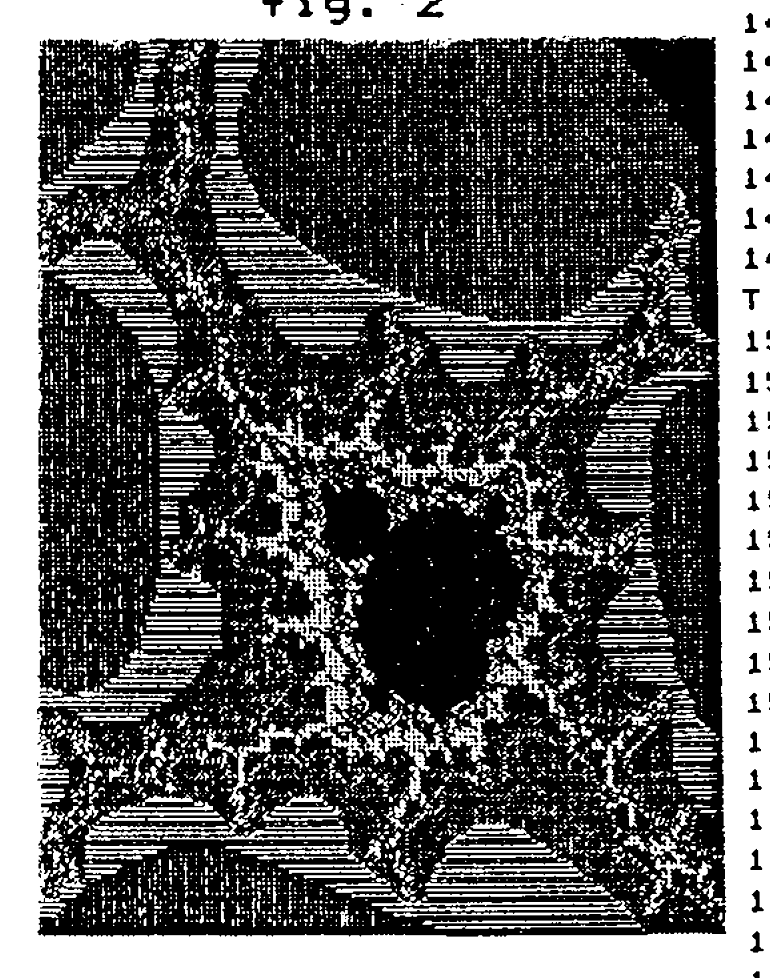
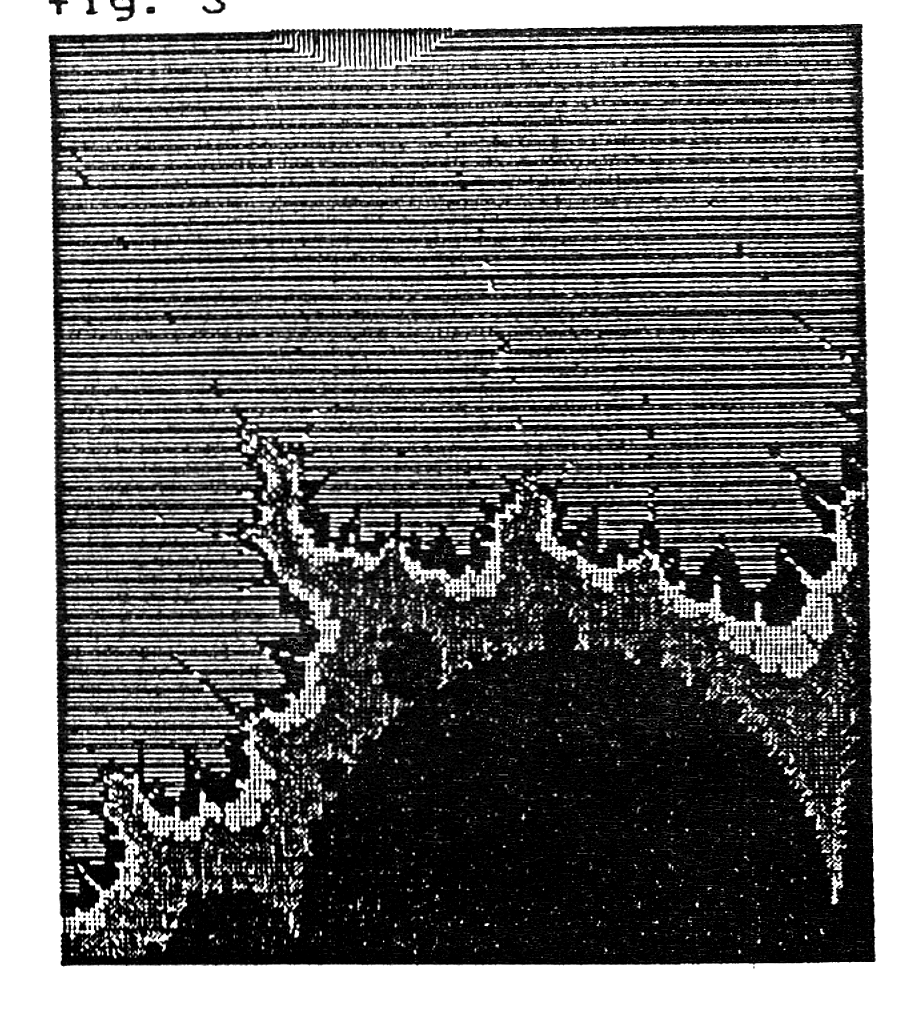
The real beauty of fractal geometry is discovered by “zooming” into areas along the edge of the Mandelbrot set. An infinite number of “worlds” can be discovered. By assigning colors to the numbers that “fly” away from the set, one can find violent, yet beautiful, vortices (see figs. 2 & 3). One can also discover minature replicas of the parent set, along with drastic metamorphoses.
THE ADVENTURE BEGINS
To start your exploratory adventure into the Fractal World, you must first set the parameters of the search. (NOTE: As written, the program expects to be loaded and run from Microdrive #1. Use the command <LRUN mdv1_mandelbrot>.) The selection of “Define New Parameters” from the main menu will allow you to set your sights and the magnification scale needed for zooming into this magical world. First, set the starting corner for the search. A-Corner [real part] is the starting point along the x-axis of fig. 1, B-Corner [imaginary part] is the y-axis point. The size of the search is the length of the sides (a square starting at A & B-corner). When the length of a side is around .01025 or smaller, the resolution of the program begins to fall off. You will need to specify the device (microdrive, floppy disk, etc.) and a name for saving the resulting map. To keep the default device and/or name, simply press RETURN. (NOTE: Remember to include the underscore “_” when naming the device.) After checking to see if the information is correct, you are whisked off on your trek to that particular corner of the fractal world.
fig. 4

gap=side/200
for m=0 to 199
  for n=0 to 199
    real=n*gap+a_corner
    imaginary=m*gap+b_corner
    zr=0: zi=0: count=0
    repeat loop
      r=zr^2-zi^2+real
      zi=2*zr*zi+imaginary
      zr=r
      size=zr^2+zi^2
      if size>=4 then exit loop
      count=count+1
      if count>=255 then exit loop
    end repeat loop
  end for n
end for m

NOTE:  Lines in italics are done via machine code
While the program is calculating and plotting the selected map, the ESC key will provide you with a report on the status and a mini-menu. The mini-menu will allow the saving of data in progress or a fresh start. (NOTE: Those which cannot operate their QL in F1/Monitor mode may miss the first 8 or so lines of the plotted set — the ESC key will keep you informed of your whereabouts.) When saving the data and screen, please be sure your device and medium is ready. If at any time you find yourself out of the program, due to an ERROR or by pressing BREAK, you can return by entering as a direct command <main_prog>. DO NOT Run the program, as this will clear the variables used to Call the machine code routines.
Once the computer has completed calculating all 40,000 points in the plane, a prompt will appear asking you to ready the device for saving. A directory of the device is provided, to help avoid overwriting data you may wish to keep. By answering “Yes” to the prompt, you can overwrite the files if you so desire. Another caution on saving: Insure that the medium will have enough space for all of the data, approximately 147 sectors total. The iterative mathematics is done via a machine code routine to avoid the days of computer-time which would be required by BASIC. If one were to calculate a fractal plane which lay entirely within the Mandelbrot set, a total of 71,400,000 calculations would be required.
fig. 5

              SUGGESTED "HUNTING GROUNDS"

Real Corner     Imaginary Corner     Side

-2.25           -1.5                 3.0       (see fig. 1)
-0.19920         1.01480             0.05227   (see fig. 2)
-0.95            0.23333             0.06667
-0.713           0.49216             0.22213
-1.781           0.0                 0.013     (see fig. 3)
-0.75104         0.10511             0.01025
-0.74758         0.10671             0.00108
-0.74591         0.11196             0.00143
Once a completed picture and data of an area is stored, it can be recalled at any time by selecting “Load Screen and Data” option from the main menu. (Surprise! Surprise!) This option will also re-load a partially calculated plane, allowing one to continue development at a later time.
The color assignments which are provided as a default will not always provide a pleasing result. Therefore, option “Re-Define Color Data” provides a means to select a more satisfactory palette and distribution. Before re-coloring a map for the first time (or one that has just been loaded), the distribution of points must be calculated. It will take about 8 minutes to run through all 40,000 points. (NOTE: Once calculated, this data does not need to be re-calculated before re-defining the colors, as long as the current map is still in memory.) After this array has been amassed, the highest and second highest occurrences of a single point is listed, along with an average. These are only guide-posts to help you in selecting a color spread. Through experimentation, one will be able to use these numbers wisely. You will be asked for a desired range. This is the number of points which will fall within a single color. Next you are asked to provide the desired 7 colors to represent the various degrees of “closeness” to the Mandelbrot set. Quite amazing and different results can be achieved with various mixes of colors and range.
To see the results of a new color selection, choose the “Re-draw Screen” option. The re-plotting of the Mandelbrot map is done via machine code, thus cutting a twenty-minute job in half. After the screen has been re-drawn, a mini-menu will appear allowing you to save the new data, return to the main-menu, or simply sit back and enjoy the results. (NOTE: During the re-plotting of the map, the ESC key and any other keys are disabled.)
PUTTING THE PIECES TOGETHER
There are four separate program listings which need to be entered into the computer before your fractal-adventure can begin. Listings 2 – 4 will compose the different machine code routines used by the BASIC listing 1. Carefully key-in listings 2 – 4 and save before running them. Each of these machine code listings will automatically save the code to microdrive #1, so insure that there is a suitable cartridge in that drive before running them. The BASIC listing should be saved on the same cartridge (or disk) as the supporting machine code routines. (NOTE: Save Listing 1 with the name “Mandelbrot”.) The main BASIC listing will automatically load the needed machine code routines when executed. Once you have successfully run and de-bugged all aspects of the program, you may safely delete the BASIC machine code loaders (listings 2 – 4 ONLY).
TOWARDS THE FUTURE
A complete break-down of the BASIC program along with extensive information on the machine code routines (including source code) will be provided in your next issue of Time Designs Magazine.
Further Reading:
1. Mandelbrot, Benoit B. The Fractal Geomety of Nature. New York; W.H. Freeman and Company, 1983.
2. Peitgen, H. -O. and P. H. Richter The Beauty of Fractals; Images of Complex Dynamic Systems. Berlin, New York; Springer-Verlag, 1986.
3. Dewdney, A. K. “Computer Recreations: A Computer Microscope Zooms in for a Look at the Most Complex Object in Mathematics.” Scientific American. August 1985. pages 16-24.
4. Schroeder, Peter B. “Plotting the Mandelbrot Set.” Byte. December 1986. pages 207-210.
5. Nachbaur, Fred “Mandelplot: Mathematical Print Art.” SuncWare News. May-June 1986. pages 11-14.
6. McDermott, Jeanne “Geometrical Forms Known As Fractals Find Sense in Chaos.” Smithsonian, December 1983. pages 110-117.
The author will provide the complete program on micro-cartridge for $7.50 (or $4.00 if the sender provides a blank cartridge). Send check or money order to:
Michael E. Carver
1016 N. E. Tillamook
Portland, OR 97212
LISTING 1
10 REMark **                    **
20 REMark ** Mandelbrot BASIC   **
30 REMark ** Michael E. Carver **
40 REMark **                    **
50 :
60 initial
70 main_prog
80 :
1000 DEFine PROCedure main_prog
1010   REPeat bigloop
1020     main_menu
1030     store_it
1040     done
1050   END REPeat bigloop
1060 END DEFine main_prog
1070 :
1080 DEFine PROCedure back_door
1090   FOR m=mm TO 199
1100     FOR n=nn TO 199
1110       k=CODE(INKEY$)
1120       IF k=27 THEN mini_menu
1130       cr=n*gap+ac: ci=m*gap+bc
1140       CALL (start+14)
1150       CALL (plotter+704)
1160     END FOR n
1170     nn=0
1180   END FOR m
1182   mini_window
1184   PRINT #8;"To Save --""Ready ";dev$" Press any key""To Continue"
1186   a$=INKEY$(-1)
1187   paste
1190 END DEFine back_door
1200 :
1210 DEFine PROCedure done
1220   LOCal key
1230   REPeat done_loop1
1240     snap_shot: mini_window
1250     PRINT #8;"ESC = View""F1 = Main Menu"
1260     REPeat done_loop2
1270       key=keyin1
1280       SELect ON key
1290         ON key=27: EXIT done_loop2
1300         ON key=232: CLOSE #8: EXIT done_loop1
1310       END SELect
1320     END REPeat done_loop2
1330     paste
1340     key=CODE (INKEY$(-1))
1350   END REPeat done_loop1
1360 END DEFine done
1370 :
1380 DEFine PROCedure store_it
1390   REPeat check1
1400     overwrite=0
1410     OPEN_NEW #7,dev$&"dir_copy"
1420     DIR #7,dev$: CLOSE #7
1430     OPEN_IN #7,dev$&"dir_copy"
1440     INPUT #7;na$: INPUT #7,na$
1450     REPeat check2
1460       IF EOF (#7) THEN EXIT check2
1470       INPUT #7;na$
1480       IF LEN(na$)>LEN(name$)
1490         IF na$(1 TO LEN(name$)+1)=name$&"_": check_dev: EXIT check2
1500       END IF
1510     END REPeat check2
1520     CLOSE #7: DELETE dev$&"dir_copy"
1530     IF overwrite=0: EXIT check1
1540   END REPeat check1
1550   BORDER #8,2,0: CLS #8
1560   CLOSE #8: IF keep THEN paste
1570   mm=m: nn=n
1580   SBYTES dev$&name$&"_scr",131072,32768
1590   SBYTES dev$&name$&"_dat",start,40710
1600   OPEN_NEW #7,dev$&name$&"_dat2"
1610   PRINT #7;PEEK_L(start+642)-start
1620   PRINT #7;mm: PRINT #7;nn
1630   PRINT #7;gap: PRINT #7;ac: PRINT #7;bc
1640   FOR xx=0 TO 255: PRINT #7,color(xx)
1650   CLOSE #7
1660   mini_menu
1670 END DEFine store_it
1680 :
1690 DEFine PROCedure check_dev
1700   mini_window
1710   PRINT #8;"Overwrite?""(y or n)"
1720   a$=INKEY$(-1)
1730   IF a$=="y"
1740     DELETE dev$&name$&"_scr"
1750     DELETE dev$&name$&"_dat"
1760     DELETE dev$&name$&"_dat2"
1770     overwrite=0
1780   ELSE
1790     CLOSE #7:DELETE dev$&"dir_copy"
1800     CLS #8: INPUT #8;"New device " dev$
1810     CLS #8:  INPUT #8;"New Name " name$
1820     overwrite=1
1830   END IF
1835   paste
1840 END DEFine check_dev
1850 :
1860 DEFine PROCedure mini_window
1870   keep=0
1880   IF m>=164 THEN keep=1: snap_shot
1890   OPEN #8,con_192x36a56x0_32
1900   BORDER #8,2,0,5: CLS #8
1910 END DEFine mini_window
1920 :
1930 DEFine PROCedure main_menu
1940   LOCal  a$,b$,x,y
1950   tv: PAPER 4: INK 7: BORDER 4,2,4: CLS: OVER 0
1960   CSIZE 3,0: STRIP 1: CURSOR 134,18: PRINT "          "
1970   CURSOR 128,14:  STRIP 2: PRINT  "MANDELBROT"
1980   CSIZE 2,0
1990   RESTORE 2080
2000   x=32: y=52
2010   FOR i=1 TO 4
2020     a$=FILL$(" ",2): b$=FILL$(" ",23)
2030     STRIP 1: CURSOR x,y: PRINT a$: CURSOR x+72,y: PRINT b$
2040     READ a$,b$
2050     STRIP 2: CURSOR x-6,y-4: PRINT a$: CURSOR x+66,y-4: PRINT b$
2060     y=y+24
2070   END FOR i
2080   DATA "F1"," Define New Parameters ","F2"," Re-Draw Screen        "
2090   DATA "F3"," Load Screen and Data  ","F4"," Re-Define Color Data  "
2100   REPeat response
2110     key=keyin1
2120     SELect ON key=232,236,240,244 : EXIT response
2130   END REPeat response
2140   SELect ON key
2150     ON key=232: set_up
2160     ON key=240
2170       recall
2180       IF back=232 AND m<199 AND n<199
2182         back_door
2185         RETurn
2190       ELSE main_prog
2200       END IF
2210     ON key=244: re_color
2220     ON key=236: redraw
2230   END SELect
2240   SELect ON key
2250     ON key=232
2260       BORDER 6,0: CLS: canvas: CLS #2
2270       back_door
2280     ON key=100: RETurn
2290     ON key=REMAINDER : main_prog
2300   END SELect
2310 END DEFine main_menu
2320 :
2330 DEFine PROCedure mini_menu
2340   LOCal key,key$
2350   mini_window
2360   PRINT #8,"row ";m;" ";"col ";n
2370   PRINT #8, "F1 = Save""F2 = Cont""F3 = Restart"
2380   REPeat query2
2390     key=keyin1
2400     SELect ON key
2410       ON key=232: store_it: mini_window: EXIT query2
2420       ON key=236: EXIT query2
2430       ON key=240
2440         CLS #8: PRINT #8;"Okay to""Abandon?""  (y or n)"
2450         key$=INKEY$(-1): IF key$=="y" THEN main_menu: EXIT query2
2460         EXIT query2
2470     END SELect
2480   END REPeat query2
2490   BORDER #8,2,0: CLS #8
2500   CLOSE #8
2510   IF keep THEN paste
2520 END DEFine mini_menu
2530 :
2540 DEFine PROCedure initial
2550   LOCal x,y,i
2560   tv: PAPER 1: INK 0: BORDER 4,2,1: CLS: CSIZE 3,1
2570   x=64: y=68
2580   FOR i=1 TO 16
2590     CURSOR x,y: OVER 1: PRINT "M A N D E L B R O T"
2600     x=x-1: y=y-(i MOD 2)
2610   END FOR i
2620   CURSOR x,y: INK 2: PRINT "M A N D E L B R O T"
2630   canvas
2640   start=RESPR(40710): LBYTES mdv1_mandelbrot_code,start
2650   camera=RESPR(1808): LBYTES mdv1_snapshot_code,camera
2660   plotter=RESPR(786): LBYTES mdv1_plotter_code,plotter
2670   DIM color(255)
2680   color(0)=4
2690   FOR i=1 TO 58 STEP 2
2700     color(i)=6: color(i+1)=4
2710   END FOR i
2720   color(59)=5: color(60)=5
2730   FOR i=61 TO 66: color(i)=4
2740   FOR i=67 TO 82: color(i)=3
2750   FOR i=83 TO 89: color(i)=2
2760   FOR i=90 TO 102: color(i)=1
2770   FOR i=103 TO 118: color(i)=6
2780   FOR i=119 TO 139: color(i)=5
2790   FOR i=140 TO 162: color(i)=4
2800   FOR i=162 TO 192: color(i)=3
2810   FOR i=193 TO 229: color(i)=2
2820   FOR i=230 TO 254: color(i)=1
2830   FOR i=0 TO 255: POKE (plotter+208+i),color(i)
2840   dev$="mdv2_": name$="mandelbrot"
2850 END DEFine initial
2860 :
2870 DEFine PROCedure set_up
2880   LOCal dev1$,name1$,key
2890   REPeat query
2900     PAPER 2: BORDER 4,2,5: CSIZE 2,0: CLS
2910     AT 2,0
2920     INPUT "Co-ords of proposed Mandelbrot""set""A-Corner [Real Part] ";ac
2930     INPUT "B-Corner [Imaginary Part] ";bc
2940     INPUT "Length of each side ";s
2950     INPUT "Device Name "&dev$dev1$
2960     INPUT "Save as "&"'"&name$&"'"name1$
2970     IF dev1$<>"" THEN dev$=dev1$
2980     IF name1$<>"" THEN name$=name1$
2990     CLS
3000     PRINT"Real Part = ";ac
3010     PRINT"Imaginary Part = ";bc
3020     PRINT"Side = ";s
3030     PRINT"Saving as "&"'"&dev$&name$&"'"
3040     PRINT"Are you satisfied with the above?"
3050     key=keyin1
3060     SELect ON key=89,121: EXIT query
3070     END SELect
3080   END REPeat query
3090   gap=s/200: mm=0: nn=0: calc=0
3100   CALL (start)
3110   array=start+710
3120   POKE_L (plotter+188),array: POKE_W (plotter+192),0: POKE_W (plotter+194),0
3130 END DEFine set_up
3140 :
3150 DEFine PROCedure recall
3160   LOCal dev1$,name1$,key
3170   PAPER 5:INK 0: CLS: AT 2,0
3180   INPUT 'Load from Device ? "'&dev$&'"'dev1$
3190   IF dev1$<>"" THEN dev$=dev1$
3200   CLS: DIR dev$
3210   PRINT: INPUT 'Name ? "'&name$&'"'name1$
3220   IF name1$<>"" THEN name$=name1$
3225   canvas
3230   LBYTES dev$&name$&"_scr",131072
3240   LBYTES dev$&name$&"_dat",start
3250   OPEN_IN #7,dev$&name$&"_dat2"
3260   INPUT #7,a: array=a+start
3270   INPUT #7,mm: INPUT #7,nn
3280   INPUT #7,gap: INPUT #7,ac: INPUT #7,bc
3290   FOR xx=0 TO 255: INPUT #7,color(xx): POKE (plotter+208+xx),color(xx)
3300   CLOSE #7
3310   POKE_L start+642,array: POKE_L plotter+188,array
3320   REPeat recall_loop1
3330     m=mm: n=nn: calc=0
3340     POKE_W (plotter+192),m: POKE_W (plotter+194),n
3350     mini_window
3360     PRINT #8;"ESC = View""F1 = Continue""F2 = Main Menu"
3370     REPeat recall_loop2
3380       key=keyin1
3390       SELect ON key
3400         ON key=27: BORDER #8,2,0: CLS #8: CLOSE #8: EXIT recall_loop2
3410         ON key=232,236: BORDER #8,2,0: CLS #8: CLOSE #8: EXIT recall_loop1
3420       END SELect
3430     END REPeat recall_loop2
3440     IF mm>=164 THEN paste
3450     key$=INKEY$(-1)
3460   END REPeat recall_loop1
3470   back=key
3480   IF mm>=164 THEN paste
3490 END DEFine recall
3500 :
3510 DEFine PROCedure redraw
3520   LOCal array1
3530   array1=start+710
3540   MODE 8: canvas : BORDER 6,0: PAPER 0: CLS #2: CLS #0: CLS
3550   POKE_L (plotter+188),array1
3560   CALL plotter
3570   REPeat redraw_loop1
3580     mini_window
3590     PRINT #8;"ESC = View""F1 = Save""F2 = Main Menu"
3600     REPeat redraw_loop2
3610       key=keyin1
3620       SELect ON key
3630         ON key=27: BORDER #8,2,0: CLS #8: CLOSE #8: EXIT redraw_loop2
3640         ON key=232: key= 100: EXIT redraw_loop1
3650         ON key=236:  BORDER #8,2,0: CLS #8: CLOSE #8: EXIT redraw_loop1
3660       END SELect
3670     END REPeat redraw_loop2
3680     paste
3690     key$=INKEY$(-1)
3700   END REPeat redraw_loop1
3710   IF key<>27 THEN paste
3720 END DEFine redraw
3730 :
3740 DEFine PROCedure re_color
3750   LOCal m,m1,cut_off,check,i,array1,average,total,xx,col(6)
3760   PAPER 2: CLS
3770   REPeat do_calc
3780     IF calc
3790       PRINT "Do you wish to re-calculate Data?"
3800       key$=INKEY$(-1): IF key$<>"y"AND key$<>"Y" THEN EXIT do_calc
3810     END IF
3820     CLS: PRINT "Please prepare a cup of tea as I","will be awhile calculating","requested data. . ."
3830     DIM dat(255): calc=1
3840     array1=start+710
3850     FOR m=0 TO 39999
3860       dat(PEEK(array+m))=dat(PEEK(array+m))+1
3870     END FOR m
3880     high1=1: high2=0
3890     FOR m=1 TO 255
3900       IF dat(m)>high1 THEN high1=dat(m)
3910       IF dat(m)<high1 AND dat(m)>high2 THEN high2=dat(m)
3920     END FOR m: EXIT do_calc
3930   END REPeat do_calc
3940   CLS: PRINT "Highest Range = ";high1"Next Highest = ";high2
3950   total=0
3960   FOR m=0 TO 255: total=total+dat(m)
3970   average=total/256
3980   PRINT  "Average Range = ";average
3990   INPUT "Input desired Range ";cut_off
4000   CLS: DIM col(6)
4010   color_bar: STRIP 2: OVER 0
4020   INPUT "2 colors for Furthest Points "col(0),col(1)
4030   INPUT "Next 4 colors (In order progress-ing toward Mandelbrot Set): "col(2),col(3),col(4),col(5)
4040   INPUT  "Color for Mandelbrot Set ";col(6)
4050   check=0: m=254: xx=1:yy=6
4060   REPeat outer_loop
4070     m1=m
4080     REPeat inner_loop
4090       check=check+dat(m)
4100       IF check>=cut_off THEN EXIT inner_loop
4110       m=m-1: IF m=0 THEN EXIT inner_loop
4120     END REPeat inner_loop
4130     IF m1-m<=2
4140       xx=xx+(xx=0)-(xx=1)
4150       FOR i=m TO m1: color(i)=col(xx)
4160     ELSE
4170       yy=yy-1
4180       IF yy=1 THEN yy=5
4190       FOR i=m TO m1: color(i)=col(yy)
4200     END IF
4210     check=0
4220     m=m-1: IF m=-1 THEN EXIT outer_loop
4230   END REPeat outer_loop
4240   color(255)=col(6)
4250   FOR xx=0 TO 255: POKE (plotter+208+xx),color(xx)
4260 END DEFine re_color
4270 :
4280 DEFine PROCedure color_bar
4290   LOCal x
4300   FOR x=0 TO 7
4310     PRINT " ";x;"=";: STRIP x: OVER 0: PRINT "  ";:OVER 1
4320   END FOR x
4330 END DEFine color_bar
4340 :
4350 DEFine FuNction keyin1
4360   LOCal a$,a
4370   REPeat key1_loop
4380     REPeat waitloop: a$=INKEY$: IF a$="" THEN EXIT waitloop
4390     REPeat getkey: a$=INKEY$: IF a$<>"" THEN EXIT getkey
4400     a=CODE(a$)
4410     RETurn a
4420   END REPeat key1_loop
4430 END DEFine keyin1
4440 :
4450 DEFine PROCedure snap_shot
4460   CALL camera
4470 END DEFine snap_shot
4480 :
4490 DEFine PROCedure paste
4500   CALL (camera+40)
4510 END DEFine snap_shot
4520 :
4530 DEFine PROCedure tv
4540   MODE 8: WINDOW 512,256,0,0
4550   PAPER 0: CLS
4560   WINDOW 420,160,46,0
4570   WINDOW #2,420,160,46,0
4580   WINDOW #0,420,32,46,160
4590   PAPER 2: PAPER #2,1: PAPER #0,0
4600   INK 7: INK #2,7: INK #0,7
4610   CLS: CLS #0
4620 END DEFine tv
4630 :
4640 DEFine PROCedure canvas
4650   WINDOW #2,400,200,56,0
4660   SCALE #2,199,0,0: PAPER #2,0
4670 END DEFine canvas
LISTING 2
100 REMark ** Loader for mandelbrot
110 :
120 start=RESPR(712)
130 :
140 REMark *** POKEs Code for mandelbrot
150 :
160 RESTORE 1000
170 FOR x=0 TO 642 STEP 2
180   READ a: POKE_W (start+x),a
190 END FOR x
200 :
210 SBYTES mdv1_mandelbrot_code,start,712
220 :
1000 DATA 28672,16890,706,17402,634,8840,20085,28672
1010 DATA 8814,28,-11314,10761,14396,514,8764,611
1020 DATA 29184,9276,611,26880,16878,32,9296,-10802
1030 DATA 16878,24,8784,-11314,13841,-18365,26370,24602
1040 DATA 18938,80,-11031,2,6362,6362,6362,18938
1050 DATA 66,-19820,26408,-19308,26384,16878,32,9296
1060 DATA -10802,20553,-17783,25296,24628,18938,46,16878
1070 DATA 40,9296,-10802,-10775,4,10378,24796,18938
1080 DATA 22,16878,40,9296,-10802,-10775,4,10378
1090 DATA 24776,0,0,0,0,0,0,18938
1100 DATA 488,9850,-14,14555,10459,21579,14555,10459
1110 DATA 30728,16988,23500,-4,29208,12408,282,20112
1120 DATA 8814,88,18938,448,14524,0,18938,460
1130 DATA 15788,0,-26618,11692,2,-26616,15788,0
1140 DATA -26624,11692,2,-26622,32256,12348,14,12408
1150 DATA 284,20112,15798,-26624,-26374,11702,-26622,-26372
1160 DATA 18938,402,15788,0,-26624,11692,2,-26622
1170 DATA 15788,0,-26618,11692,2,-26616,32256,12348
1180 DATA 14,12408,284,20112,15798,-26624,-26374,11702
1190 DATA -26622,-26372,-27908,12,32256,12348,12,12408
1200 DATA 284,20112,18938,322,15772,-26618,11668,-26616
1210 DATA 32256,12348,10,12408,284,20112,18938,322
1220 DATA 14582,-26624,10422,-26622,-27908,12,11593,86
1230 DATA 15804,2050,-26624,11708,16384,0,-26622,18938
1240 DATA 276,15772,-26618,11676,-26616,32256,12348,14
1250 DATA 12408,284,20112,15772,-26618,11668,-26616,32256
1260 DATA 12348,14,12408,284,20112,18938,226,15772
1270 DATA -26618,11668,-26616,32256,12348,10,12408,284
1280 DATA 20112,18938,214,14582,-26624,10486,-26622,19450
1290 DATA 196,15196,0,11100,2,-27908,18,11593
1300 DATA 88,15789,0,-26624,11693,2,-26622,15773
1310 DATA -26618,11677,-26616,32256,12348,14,12408,284
1320 DATA 20112,23625,15789,0,-26624,11693,2,-26622
1330 DATA 15789,0,-26618,11693,2,-26616,32256,12348
1340 DATA 14,12408,284,20112,23881,15798,-26374,-26624
1350 DATA 11702,-26372,-26622,32256,12348,10,12408,284
1360 DATA 20112,32256,12348,4,12408,284,20112,15414
1370 DATA -26624,-27908,22,11593,88,18938,42,14868
1380 DATA 3142,4,27648,14,21061,14469,3077,255
1390 DATA 26112,-422,10362,12,6341,19450,6,10892
1400 DATA 20085,0
LISTING 3
100 REMark ** Loader for plotter
110 :
120 plotter=RESPR(786)
130 :
140 REMark *** POKEs plotter code
150 :
160 RESTORE 1000
170 FOR x=0 TO 187 STEP 2
180   READ a:  POKE_W (plotter+x),a
190 END FOR x
200 :
210 FOR x=704 TO 784 STEP 2
220   READ a: POKE_W (plotter+x),a
230 END FOR x
240 :
250 SBYTES mdv1_plotter_code,plotter,786
260 :
1000 DATA 18938,190,16980,12820,17914,186,24832,88
1010 DATA 18938,176,16980,17914,164,18426,180,24832
1020 DATA 98,1682,0,1,18938,152,12820,17914
1030 DATA 154,24832,50,17914,140,24832,94,17914
1040 DATA 130,1618,1,3154,199,28618,19450,114
1050 DATA 1621,1,12821,17914,108,24832,10,3157
1060 DATA 199,28588,20085,8814,88,15745,-26624,28680
1070 DATA 32256,12408,284,20112,13558,-26624,9398,-26622
1080 DATA 20085,30208,10322,-10732,-10557,4627,28713,8316
1090 DATA 2,2,30463,20035,20085,17402,532,13146
1100 DATA 0,9050,2,13146,6,9050,8,28720
1110 DATA 30463,8316,2,2,20035,20085
2000 DATA 18938,-514,12820,17914,-516,24832,-614,17914
2010 DATA -532,18426,-516,24832,-598,1682,0,1
2020 DATA 18938,-544,12820,17914,-542,24832,-646,17914
2030 DATA -556,24832,-602,17914,-566,1618,1,3154
2040 DATA 199,28416,12,16978,19450,-586,1621,1
2050 DATA 20085
LISTING 4
100 REMark *** Loader for Snapshot code
110 :
120 camera=RESPR(80)
130 :
140 REMark *** POKEs Code for Camera
150 :
160 RESTORE 1000
170 FOR x=0 TO 79 STEP 2
180   READ a: POKE_W (camera+x),a
190 END FOR x
200 :
210 SBYTES mdv1_snapshot_code,camera,80
220 :
1000 DATA 8828,1,-4,16890,72,28672,29185,29697
1010 DATA 12505,20994,3074,24,28662,-11524,80,20993
1020 DATA 3073,36,28648,20085,8828,1,-4,16890
1030 DATA 32,28672,29185,29697,13016,20994,3074,24
1040 DATA 28662,-11524,80,20993,3073,36,28648,20085
Note: Type-in program listings on this website use ZMAKEBAS notation for graphics characters.