
Generally SYNC prefers articles in some depth to help you get more out of your computer. However, we receive many short programs that illustrate a point, demonstrate a technique, or show something the reader has found interesting.
“Just for Fun” shares these programs with you. If you learn something, great. If you have some fun, great. If you have some programs that you want to share, send them to: Just for Fun, SYNC, 39 E. Hanover Ave., Morris Plains, NJ 07950.
Survive
Robert J. Midura
8K ROM; 16K RAM
The object of “Survive” is to survive long enough to obtain score points before the computer zeroes in on your location and blasts you. You manuever on a 21 x 31 grid of periods using the arrow keys on 5, 6, 7, 8. Each time you land on a period, you get 2 points. Landing on a location that has been hit (marked with an inverse X) results in losing 1 point. Landing on a clear location (a space) does not affect your score.
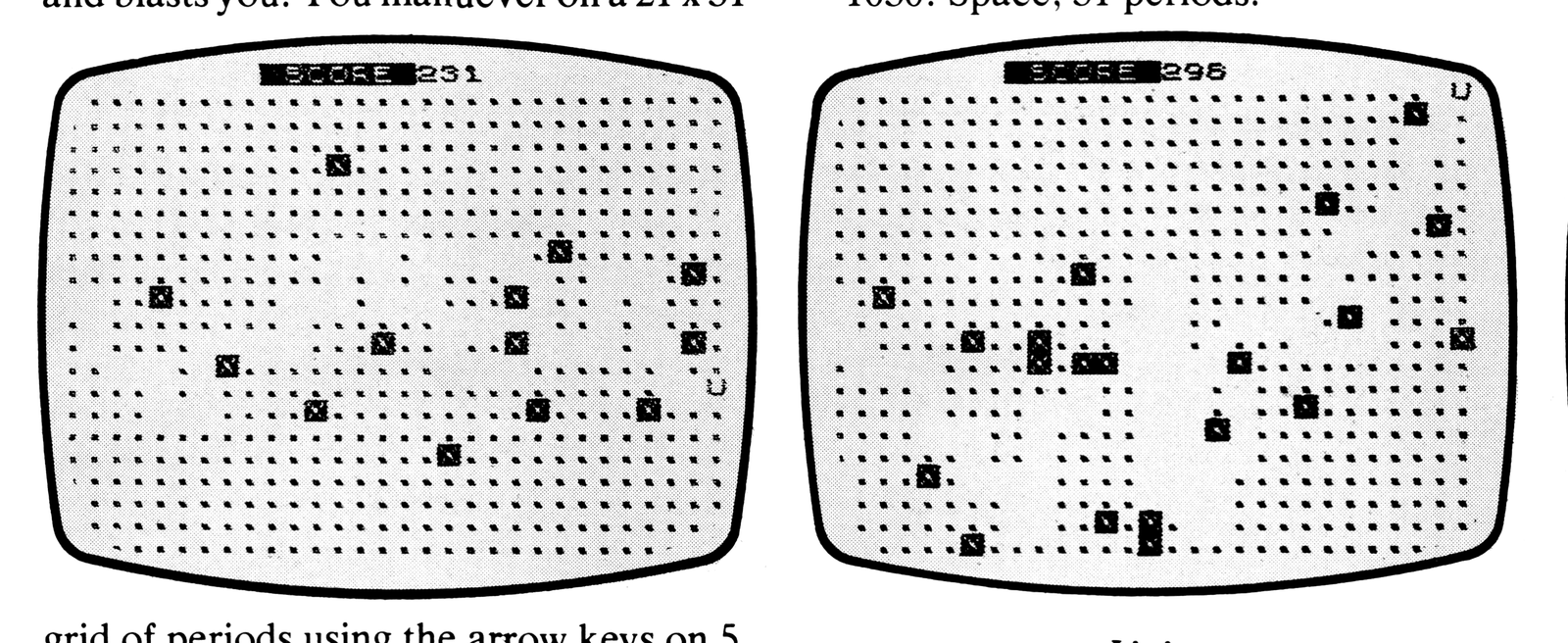
As you move, the computer will blast locations according to your location and direction. You should not stay in one location or head in one direction for too long or you will be hit.
The game ends when you are hit or you move into screen column 31. Ending the game by moving into column 31 will net you a bonus of 100 points.
Type in the program as shown, put the computer in SLOW mode, and type GOTO 1000. To play again, type CONT and ENTER. You may adjust the difficulty by changing the values in line 60. Use large integers for easier games and smaller integers for harder games.
Graphics notes:
80: T,Y,T,Y, inverse X.
110: Inverse space, inverse SCORE, inverse space.
1030: Space, 31 periods.
Listing
   5 LET L=(INKEY$="6" AND X<21)-(INKEY$="7" AND X>1)
  10 LET C=(INKEY$="8" AND Y<31)-(INKEY$="5" AND Y>1)
  15 PRINT AT X,Y;" "
  20 LET X=X+L
  25 LET Y=Y+C
  30 PRINT AT X,Y;"U"
  35 IF Y>30 THEN GOTO 110
  40 LET S=S+M(X,Y)+2
  42 LET M(X,Y)=-2
  45 LET T=T-1
  50 IF NOT T THEN GOTO 80
  55 IF T>0 THEN GOTO 5
  60 LET T=INT (RND*3+3)
  65 LET H=X+T*L
  67 IF H>21 THEN LET H=21
  68 IF H<1 THEN LET H=1
  70 LET I=Y+T*C
  72 IF I<1 THEN LET I=1
  73 IF I>31 THEN LET I=31
  75 GOTO 5
  80 PRINT AT H,I;"[graphic T]";AT H,I;"[graphic Y]";AT H,I;"[graphic T]";AT H,I;"[graphic Y]";AT H,I;"[inverse X]"
 100 LET M(X,Y)=-3
 105 IF H<>X OR I<>Y THEN GOTO 5
 110 PRINT AT 0,11;"[inverse space][inverse SCORE][inverse space]";S+(100 AND Y>30)
 115 STOP
1000 LET X=10
1005 LET Y=1
1010 LET T=0
1015 DIM M(21,30)
1020 LET S=T
1025 FOR L=1 TO 21
1030 PRINT AT L,0;" ..............................."
1035 NEXT L
1040 GOTO 5
The ZX Pumpkin
Mark L. Hall
8K ROM; 2K RAM; 1K RAM
This year you will not have to buy a pumpkin for Halloween, and yet you will be ready for the trick-or-treaters with your ZX/TS pumpkin. To set up your ZX/TS Jack-O-Lantern, type in the listing in Figure 1, put your computer in SLOW mode, and press ENTER.
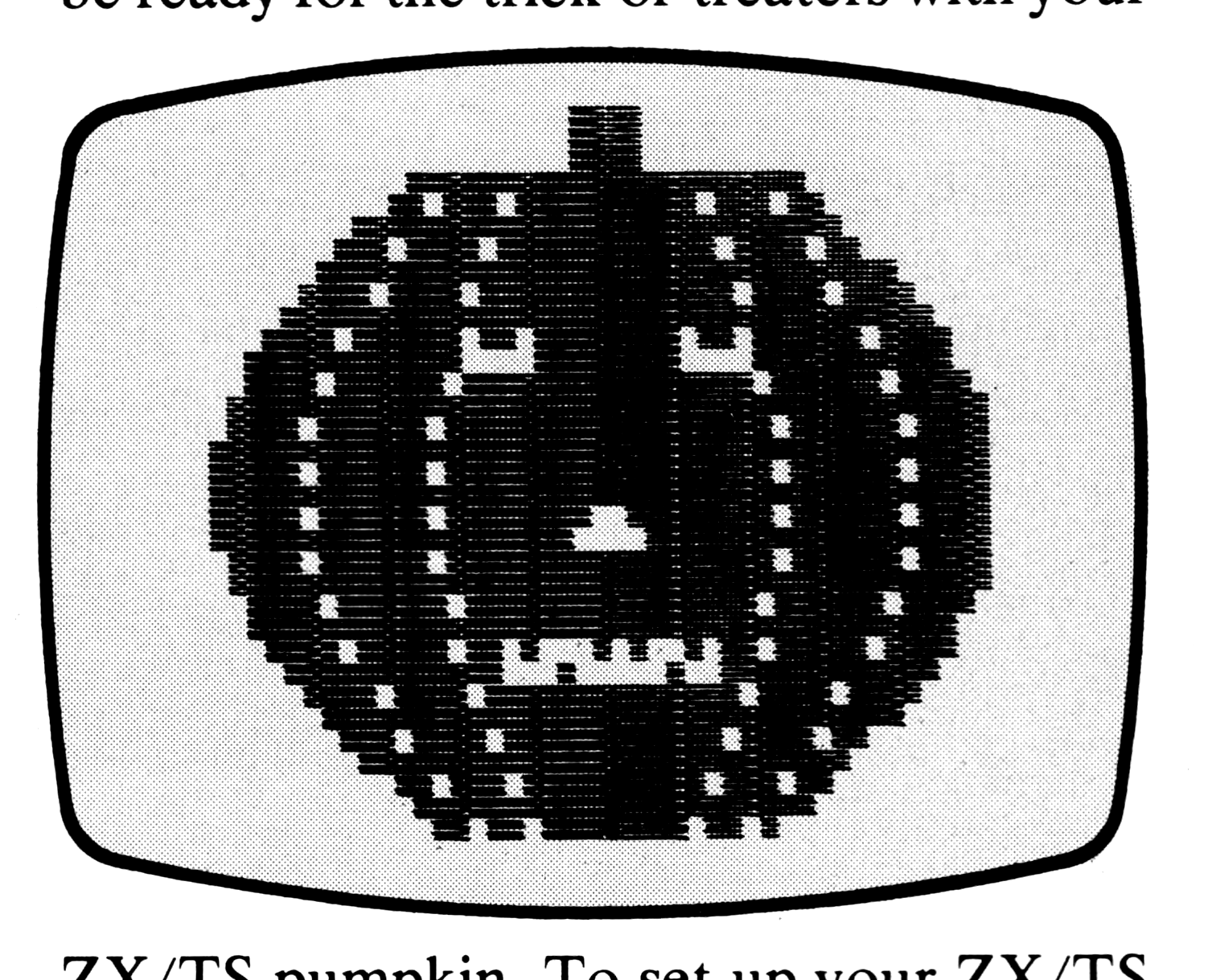
The first six lines of the program draw a rough oval and paint it black. This, of course, is your ZX/TS pumpkin. The next four lines and the sub-routine at line 120 draw the lines of the pumpkin segments. Lines 50 and 53 draw the stem. The next two lines draw the eyes and nose. Lines 65-110 flash the message and teeth of the pumpkin in its mouth. The subroutine at line 100 is a half second pause so that your trick-or-treaters can read the message. Use BREAK to get out of the program.
The program was originally written on the ZX81 and expanded when I got my 16K RAM pack.
To run in 1K enter the program in Figure 2, put the computer in SLOW mode, and hit ENTER. This version does not have the same features as the 2K version does, but it shows some good memory saving techniques.
Figure 1. 2K Version.
 10 FOR Y=5 TO 34
 15 LET X=30-20*SIN (Y/40*PI)
 20 FOR X=X TO 63-X
 25 PLOT X,Y
 30 NEXT X
 35 NEXT Y
 40 LET D=8
 43 GOSUB 120
 45 LET D=15
 47 GOSUB 120
 50 PRINT AT 3,D;"[graphics]"
 53 PRINT AT 4,D;"[graphics]"
 55 PRINT AT 8,11;"[graphics]";AT 8,18;"[graphics]"
 60 PRINT AT 12,D;"[graphics]"
 65 PRINT AT D,13;"[graphics]"
 70 GOSUB 100
 80 PRINT AT D,13;" TRICK"
 82 GOSUB 100
 84 PRINT AT D,13;"  OR  "
 85 GOSUB 100
 87 PRINT AT D,13;"TREAT "
 90 GOSUB 100
 95 GOTO 65
100 FOR T=1 TO 25
105 NEXT T
110 RETURN
120 FOR Y=5 TO 34 STEP 2
125 LET X=30-D*SIN (Y/40*PI)
130 UNPLOT X,Y
135 UNPLOT 63-X,Y
140 NEXT Y
145 RETURN
Graphics notes:
50: INVERSE SPACE (2)
53: INVERSE SPACE (2)
55: INVERSE SPACE, 2, 1, 2, 1,
    INVERSE SPACE
60: 1, 2
65: 2, 3, 2, 2, 3, 1
Figure 2. 1K Version.
 10 FOR D=5 TO 34
 15 LET X=VAL "30-20*SIN (D/40*PI)"
 20 FOR X=X TO 63-X
 25 PLOT X,D
 30 NEXT X
 35 NEXT D
 45 LET D=15
 50 PRINT AT 3,D;"[graphics]"
 53 PRINT AT VAL "4",D;"[graphics]"
 55 PRINT AT VAL "8",VAL "11";"[graphics]";AT VAL "8",VAL "18";"[graphics]"
 60 PRINT AT VAL "12",D;"[graphics]"
 65 PRINT AT D,VAL "13";"[graphics]"
 70 RAND EXP RND
 80 PRINT AT D,13;"  BOO "
 82 RAND EXP RND
 85 GOTO VAL "65"
Graphics notes:
50: INVERSE SPACE (2)
53: INVERSE SPACE (2)
55: 2, 1, 2, 1
60: 1, 2
65: 2, 3, 2, 2, 3, 1
Obtuse Triangle
Michael W. Schultz
This program will draw an obtuse triangle, which is any triangle with an inner angle greater than 90 degrees. This is done by drawing line BC (lines 10-40) and then two oblique lines starting at each end of line BC and have them converge on point A (lines 50-100). The resulting drawing will be the obtuse triangle ABC.
Enter the program in Listing 1. Hit RUN and ENTER in either the SLOW or FAST mode. Notice the uneven spacing caused by the approximated PLOTting of X and Y in the long side AC. This can be remedied by inserting the lines in Listing 2.
Listing 1.
  5 REM "OBTUSE TRIANGLE"
 10 LET Y=20
 20 FOR X=20 TO 40
 30 PLOT X,Y
 40 NEXT X
 50 LET X=20
 60 FOR Y=20 TO 30
 70 PLOT X,Y
 80 PLOT 3*X-20,Y
 90 LET X=X-1
100 NEXT Y
110 PRINT AT 6,5;"A"
120 PRINT AT 12,10;"B"
130 PRINT AT 11,20;"C"
140 PRINT AT 14,10;"OBTUSE TRIANGLE ABC"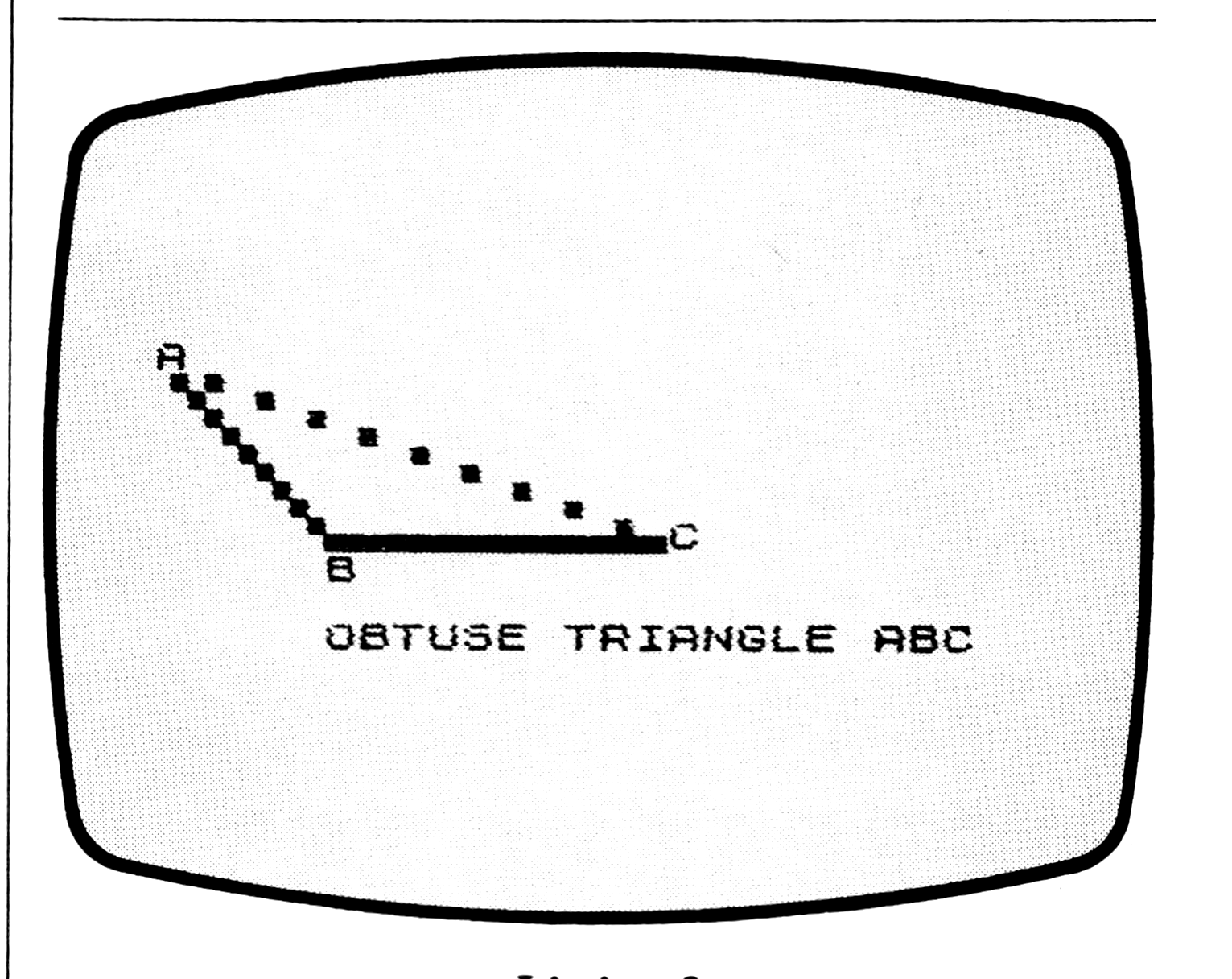
Listing 2.
85 IF Y=30 THEN GOTO 110
92 PLOT 3*X-19,Y
94 PLOT 3*X-18,Y
Message Destruct
Joe Chaiet
Type in the program, and then SAVE it. After SAVEing, put the computer in SLOW mode and type RUN and ENTER. Try to incorporate this technique into your own programs.
10 PRINT "THIS DOCUMENT IS SECRET"
20 PRINT "IT WILL SELFDESTRUCT IN "
21 PRINT AT 5,5;"MEMORIZE THIS NOW"
22 PRINT AT 9,5;"STATION 7 IS READY"
30 PRINT AT 1,27;"UNITS"
40 FOR X=10 TO 0 STEP -1
50 PRINT AT 1,24;X;" "
60 NEXT X
70 NEW
Train Revisited
John C. Hill
8K ROM; 2K RAM
SYNC 3:2 is the first issue I have seen, and I enjoyed the “Just for Fun” column. It is amusing and instructive—more fun than reading instructions.
However, the pixel that wanders off into the air above Joe Chaiet’s train did not seem to go far enough. The train needs more “smoke.” The program below is my doodling to that end. Type in the lines. Be sure you are in SLOW mode, and press RUN and ENTER. Watch the smoke!
  5 PRINT AT 4,4;"FIRE UP THE TRAIN"
 10 LET A=20
 20 FOR B=1 TO 22
 25 PRINT AT 21,0;"[inverse space x32]"
 30 PRINT AT A,B;"  O O  O[graphic]"
 40 PRINT AT A-1,B;"[graphics]"
 50 PRINT AT A-2,B;"[graphics]"
 60 PRINT AT A-3,B;"[graphics]"
 70 PRINT AT A-5,B-1;"     ▒"
 80 PRINT AT A-7,B-2;"   ▒"
 90 PRINT AT A-9,B-3;" ▒"
 92 IF B<=5 THEN GOSUB 130
 94 IF B=5 THEN PRINT AT 6,18;"/"
 95 IF B=5 THEN PRINT AT 7,7;"LET [graphic]ER GO."
 96 IF B=6 THEN PRINT AT A-4,B+5;"T"
 97 IF B=6 THEN PRINT AT A-5,B+5;"O"
 98 IF B=6 THEN PRINT AT A-6,B+5;"O"
 99 IF B=6 THEN PRINT AT A-7,B+5;"T"
100 IF B=7 THEN PRINT AT A-4,B+4;" "
102 IF B=7 THEN PRINT AT A-6,B+4;" "
103 IF B=7 THEN PRINT AT A-7,B+4;" "
105 NEXT B
110 CLS
120 GOTO 5
130 FOR I=1 TO 18-3*B
140 NEXT I
150 RETURN
Strange Listing
David Farrell
Type in the following program. With the computer in either FAST or SLOW mode press RUN and ENTER. Observe the results.
Reprinted with permission from PEAK Software.
  10 LIST
  20 GOSUB 8000
  30 STOP
8000 LET AMEM=PEEK 16396+256*PEEK 16397
8010 LET INCA=8020
8020 LET AMEM=AMEM+1
8030 IF AMEM=PEEK 16400+256*PEEK 16401 THEN RETURN
8040 LET PKA=PEEK AMEM
8050 IF PEEK AMEM=118 THEN GOTO INCA
8060 IF PKA<128 THEN POKE AMEM,(PKA+128)
8070 IF PKA>=128 THEN POKE AMEM,(PKA-128)
8080 GOTO INCA
Media
Note: Type-in program listings on this website use ZMAKEBAS notation for graphics characters.