
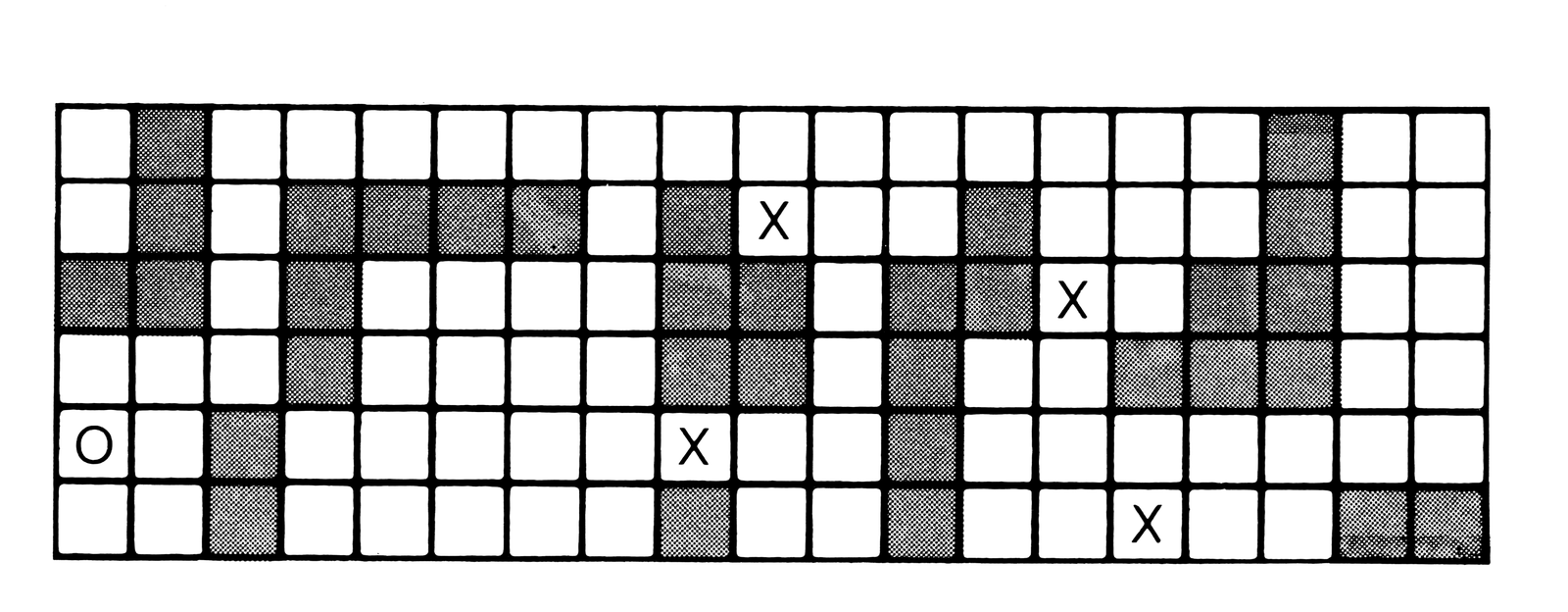
Gauntlet is a game played on a rectangle 19 spaces by 6 spaces. The object is to run a gauntlet of random obstacles and monsters, beginning on the left side and crossing the rectangle. You win when you have successfully moved your marker to the right side.
First you must decide how many monsters you think you can handle, from one to four. Then . . . the screen is randomly sprinkled with blocks. You (0) start at the extreme left. The monsters (X) are between you and your goal, the extreme right.
You move by entering the letters U,D,F or B. For example, to move down and back diagonally you would enter DB or BD. A single letter moves you one space and a Newline alone maintains your position. It is possible to jump an obstacle but if you try to land on one you will not move at all. The monsters frequently blast through the barriers and sometimes that can help you.
The monsters drool green drool, never bathe and have very bad breath. They are also lazy. Except when angry they move only one space at a time. But for all their faults these guys are not dumb. They are very cautious and try to get in front of you before they advance.
When the game is over a NEWLINE will run it again. Any key before the NEWLINE will stop it.
Here are the major sections of the program:
Line 1 is a machine language routine.
Lines 70-120 set the number of monsters.
Lines 130-210 set the starting positions.
Lines 280-430 move the man.
Lines 440-530 move the monsters.
Lines 600-850 end the game or start another.
Lines 900-910 a routine to call the routine.
The machine language routine finds the first character in the display file. It saves about ten bytes over PEEKing and, with only 1K, every little byte counts.
To load the routine, enter REM and five spaces. Then type in the “loader program” and run it. Enter the five numbers from the “decimal listing” and double check them when you are through. Then type in the main program. You will find that various letters appear around the place newlines are entered. This can be ignored. The condition will disappear when the program lines replace the subroutine loader.
Some of the values for the routine are not character codes, and they do strange things when the ZX80 tries to put them on the screen. Some codes will crash a program. To play it safe push the REM statement off the screen with more program lines or use POKE 16403,100. Then do not use LIST without a line number, at least not until you have the program on tape. I do not like that, but I have not found another way to protect a routine and still be able to save it with a program. Any suggestions?
Here are some ways to tailor the program to your own tastes. The TO value in line 140 determines the length of the lines that form the gauntlet. The TO value in line 130 determines the number of lines or the height of the gauntlet. You can change the shape of the display by adjusting those values. However, in 1K this program allows only about 125 characters in the display file. The size of the display file will roughly equal the length of a line plus one, times the number of lines. If you get an error number 4 or 5, it is probably because your display file is too large. To adjust your starting position, change the constant in line 250. A zero starts you on the top line. Adding one to the constant drops you down one line. Be sure that this constant is less than the height of the gauntlet! Finally, if you want to be able to move farther in each turn, increase the TO value in line 300. A three lets you move like a knight in chess. More than three and you are practically unbeatable.
  1 REM SPACE
 70 PRINT "HOW MANY MONSTERS?(1-4)"
 80 INPUT N
 90 LET C=0
100 LET D=0
110 CLS
115 IF N>4THEN GO TO 70
120 DIM B(N)
130 FOR L=1 TO 6
140 FOR K=1 TO 20
170 PRINT CHR$(-(RND(8)>5)*9);
180 NEXT K
190 PRINT
210 NEXT L
220 FOR J=1 TO N
230 LET B(J)=RND(L-1)*K-2-(K/5)*(J-1)
240 NEXT J
250 LET G=K*3
260 GO SUB 900
270 GO TO 430
280 LET S=G
290 INPUT C$
300 FOR J=1 TO 2
310 LET C=CODE (C$)
320 IF C=58 THEN LET S=S-K
330 IF C=41 OR S<0 THEN LET S=S+K
340 IF C=43 OR C=39 AND S=(S/K)*K THEN LET S=S+1
350 IF C=39 THEN LET S=S-1
360 IF S>(L-1)*K THEN LET S=S-K
370 IF S+1=((S+1)/K)*K THEN GO TO 700
380 LET C$=TL$(C$)
390 NEXT J
395 GO SUB900
400 IF PEEK(S+D)=61 THEN GO TO 600
405 POKE D+G,0
410 IF PEEK(S+D)=0 THEN LET G=S
430 POKE D+G,52
440 FOR J=1 TO N
450 POKE D+B(J),0
460 LET C=K
470 IF B(J)/C=G/C THEN LET C=1
480 IF B(J)-G<0 THEN LET C=-C
490 IF PEEK(D+B(J)-C)=9 AND RND (9)>4 THEN LET C=0
500 LET B(J)=B(J)-C
510 IF PEEK(D+B(J))=52 THEN GO TO 600
515 IF RND(9)>7 THEN GO TO 460
520 POKE D+B(J),61
530 NEXT J
540 GO TO 280
600 PRINT "GOTCHA"
610 GO TO 800
700 PRINT "YOU ARE FREE"
800 GO SUB 900
810 POKE D+G,20
840 INPUT C$
850 IF C$="" THEN RUN
900 LET D=USR(16427)
910 RETURN
Subroutine Loader
100 POKE 16403,100
110 FOR J=1 TO 5
120 INPUT C
130 POKE 16426+J,C
140 PRINT J,C
150 NEXT J
DECIMAL LISTING 1 42 2 12 3 64 4 35 5 201
Note: Type-in program listings on this website use ZMAKEBAS notation for graphics characters.