
Authors
Publication
Pub Details
Date
Pages
For several years, publications have carried articles on connecting T/S 1000 and ZX81 computers to monitors, to improve the quality of screen image that some TVs lack. There have been mainly 2 approaches, (1) install a complex converter to give a reverse screen image of white on black, (2) install a simple transistor adapter to match the computer output to the low impedance of the monitor. This gives a normal screen. Number 2 is the easiest and the method is described. On a T/S 1000, the procedure is to tap pin 16 on the Sinclair special IC.
The literature seems to have neglected the T/S 1500. Possibly because the RF modulator is special, or possibly because of the weak signal provided by the newer SCL IC. The writer has converted two T/S 1500 computers with satisfactory performance; one with a B&W Zenith monitor, and one with a NEC color monitor.
This article is not a detailed instruction of my method, so if the reader is not well versed in handling circuit boards and components, it is recommended that you get help from a member of your users group, an amateur radio operator, osr omeone in the radio and TV service business.
Only a few parts are required. The first step is to obtain the transistor, resistor, cable and phono plug or jack, and some wire. The transistor is type 2N2222 which is Radio Shack number 276-2009. The resistor is a 1/4 watt 220 ohm size, but may be 270 to 330 ohms. The phono jack can be R-S type 274-337 if the T/S cable is to be used for monitor connection. A short shielded audio cable (6-8 inches) will provide the computer connection with the jack on the free end. If it is desired to install a single cable to the monitor, then use R-S 42-2370. This provides a matching plug to fit the monitor jack.
To assemble the adapter, fit the resistor to the flat of the the transistor, cutting one wire lead to solder to the emitter lead, close to the transistor’s body. Trim close to the solder connection if the resistor lead protrudes. Do not cut the transistor lead at this time.
Strip the outer insulation from the audio cable, about 3/4 in., and twist the shield wire together. Strip 1/8 in. from the core insulation and solder the center wire to the emitter lead. This lead should be insulated and brought parallel with the resistor. Cut excess wire from this connection. The other end of the resistor should be soldered to the twisted shield of the audio cable. These connections will give an output from emitter and will also ground the resistor. The resistor connection should be close to the cable, to leave the twisted shield for another connection. Using two light-insulated wires (like 30 gauge wire wrap), make your connections to the transistor base and collector leads after they have been shortened. These two wires can be 2-3 inches long. Follow the lead positions as per R-S package.
The assembled module should be insulated so no bare wires are exposed. Wires within the module also should be insulated from each other. Heat shrink tubing or plastic tape can be used. The assembly should have two leads of light gauge wire coming out of one end. These should be marked some way … the transistor collector is +5 volts and the base lead. The other end has the signal out and the ground wire (shield). The shield can have a short but heavier wire (20-24 gauge) soldered to it at this time. This will be a ground wire and a strain relief.
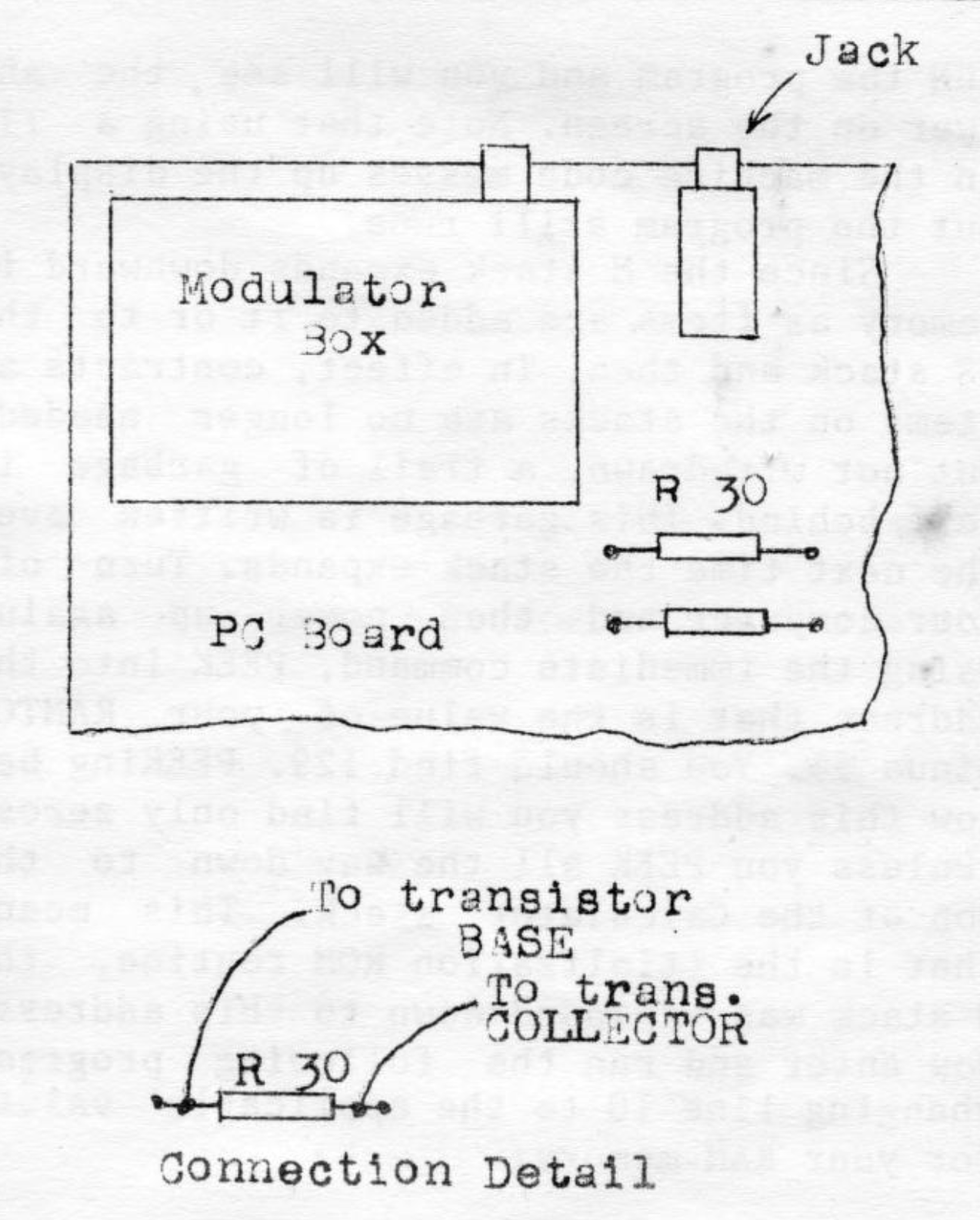
Disassemble the 1500 case by removing five screws and carefully remove the two ribbon cables from their connector blocks. then remove one screw to release the circuit board from the base. With the component side up, determine the location of resistor R30. It is close to the inside corner of the modulator box. Connections will be made to each end of this resistor. The end closest to the modulator box will be connected to the base of the transistor and the other end is +5 volts. See the diagrams for location.
Now make the connections noted above. Be sure the leads are correct before soldering. Solder with light heat, so the circuit board connections will not be damaged as a result. Cut the ground wire short, so when soldered to the ground connection for the jack, it will bring the module close over the jack. The other wires must be slack. Now apply power to the board and connect to the monitor. The cursor will show on the screen if everything is OK.
Exit to the rear when the circuit board is installed in the bottom of the case. Decide how to make the exit thru the top rear. If the cable is small enough (1/8 in. dia.) then it can use the same notch for the modulator cable. Light filing may be required to get around the modulator box. If the cable is heavier, file a notch in the back between the jack and modulator box. Connect the keyboard cables using needle nose pliers. Be most careful not to bend the cables sharply. If a cable is damaged, noted by a crack in the trace, use a sharp knife to separate the insulator cover on the cable. About 3/16 in. will do, and trim with some sharp thin scissors. Cut the cable at the crack so there will be a new end.