
Authors
Publication
Pub Details
Date
Pages
With the wave of new micros touting their window abilities maybe other 2068 owners like myself have been keeping quiet. Well, if you have been feeling sorry for yourself because you have a computer that “won’t do windows” then cheer up! Those windows are painlessly easy on the mighty 2068!
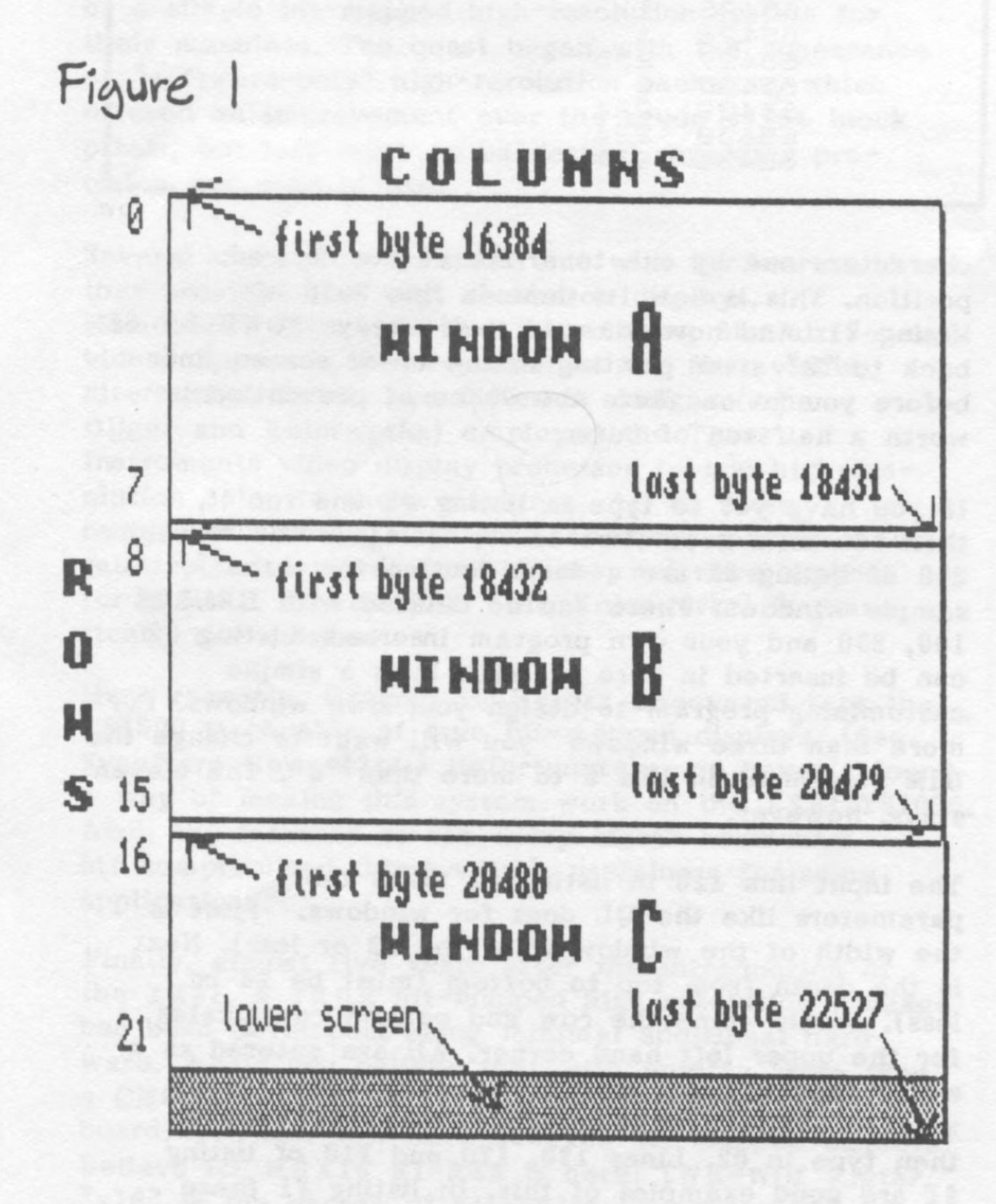
Actually, the normal 24 row by 32 column screen is treated as three separate “windows” by the 2068 already. These begin as blocks in memory, each starting with their own address. These are shown as A, B, and C in figure 1. Try this little program line out after a CLS command: FOR t=16384 TO 22527: POKE t,255: NEXT t and watch the display. You should see a line form at the top of each character square successively until each square is filled in. Notice that the first block of eight rows completely fills in before even the first byte of the second block fills in. The display file is thus split into three blocks of 2048 bytes each.
Now no one reading this needs to have any more computing ability than knowing how to type in a program listing. I will try to explain as we go and let the 2068 do the rest. If you read Robert Hartung’s article back in May/June ’85 of SWN, he explained a nifty routine the Z80 chip in our 2068 possesses called LDIR. LDIR is great for moving huge chunks of memory (like the screen uses) around quickly. Line 5 of listing #1 among other chores sets up all the LDIR’s machine code we will need.
Now to how we are going to do windows. With windows we want to temporarily overlay text or something (in the window) over what’s there already. The hitch is not to lose what was there already! Windows aren’t much use if after we use them they leave a blank space. By reserving space enough to store the original screen contents, we can use the LDIR routine to put the original back on the screen unaltered. If our windows will only be appearing in one of the three blocks of the screen then reserving 2048 bytes for storage is ample. In listing #1 I use CLEAR 59198 in line 5 to give us enough room for all three at once — the whole screen.
Listing #1
    1 REM    2068 Windows!
    5 CLEAR 59198:DIM w$(3,11):LET a$="WINDOW":LET b$="press ":LET store=59199:LET renew=59211:LET lower=23659:FOR t=store TO 59222:READ f:POKE t,f:NEXT t:DATA 1,0,24,17,87,231,33,0,64,237,176,201,1,0,24,17,0,64,33,87,231,237,176,201:REM (sets up LDIR code)
   10 FOR t=65368 TO 65431:READ a:POKE t,a:NEXT t:DATA 15,8,8,8,232,232,232,232,255,0,0,0,0,0,0,0,255,1,1,1,1,1,1,1,232,232,232,232,232,232,232,232,1,1,1,1,1,1,1,1,232,232,232,239,224,255,255,255,0,0,0,255,0,255,255,255,1,1,1,255,0,224,224,224
  100 POKE lower,0:FOR f=1 TO 76:PRINT "1234567890";:NEXT f:PRINT "12345678":POKE lower,2
  110 LET k= USR store
  120 LET n=1:LET w$(n)="11,12,02,03":GO SUB 9000
  140 PRINT AT 4,6;a$; AT 6,8;"#1"; AT 11,5;b$;"2"
  150 IF INKEY$ <>"2" THEN GO TO 150
  160 LET k= USR renew
  170 LET n=2:LET w$(n)="13,20,02,17":GO SUB 9000
  180 PRINT AT 5,21;a$; AT 7,23;"#2"; AT 19,20;b$;"3"
  190 IF INKEY$ <>"3" THEN GO TO 190
  200 LET k= USR renew
  210 LET n=3:LET w$(n)="10,08,16,04":GO SUB 9000
  220 POKE lower,0:PRINT AT 17,6;a$; AT 19,8;"#3"; AT 22,6;b$;"E":POKE lower,2
  230 IF INKEY$ <>"e" THEN GO TO 230
  240 CLS :PRINT AT 8,6;"";:FOR t=1 TO 20:READ a:PRINT CHR$ a;:NEXT t:DATA 77,111,118,101,32,111,118,101,114,32,77,65,67,105,110,116,111,115,104,33
  250 STOP
 9000 LET w= VAL w$(n, TO 2):LET d= VAL w$(n,4 TO 5):LET r= VAL w$(n,7 TO 8):LET c= VAL w$(n,10 TO 11)
 9010 IF r+d>24 OR c+w>32 THEN PRINT AT 21,10;" Window's too big! ":STOP
 9020 IF r+d>22 THEN LET low=0:LET r3=24-r-d:GO TO 9040
 9030 LET low=2:LET r3=2:
 9040 LET rd=r+d-2:LET cw=c+w-3
 9050 POKE lower,low:PRINT AT r,c; CHR$ 144;:FOR t=c TO cw:PRINT CHR$ 145;:NEXT t:PRINT CHR$ 146
 9060 FOR t=r+1 TO rd:PRINT AT t,c; CHR$ 147;
 9070 FOR f=c TO cw:PRINT " ";:NEXT f:PRINT CHR$ 148;:NEXT t
 9080 IF r3=0 THEN OVER 1:FOR t=1 TO 32-w:PRINT " ";:NEXT t:OVER 0:PRINT CHR$ 149;:FOR t=c TO cw:PRINT CHR$ 150;:NEXT t:PRINT CHR$ 151:POKE lower,2:RETURN
 9090 PRINT AT rd+1,c; CHR$ 149;:FOR t=c TO cw:PRINT CHR$ 150;:NEXT t:PRINT CHR$ 151:POKE lower,2:RETURN
 9900 SAVE "windows" LINE 5
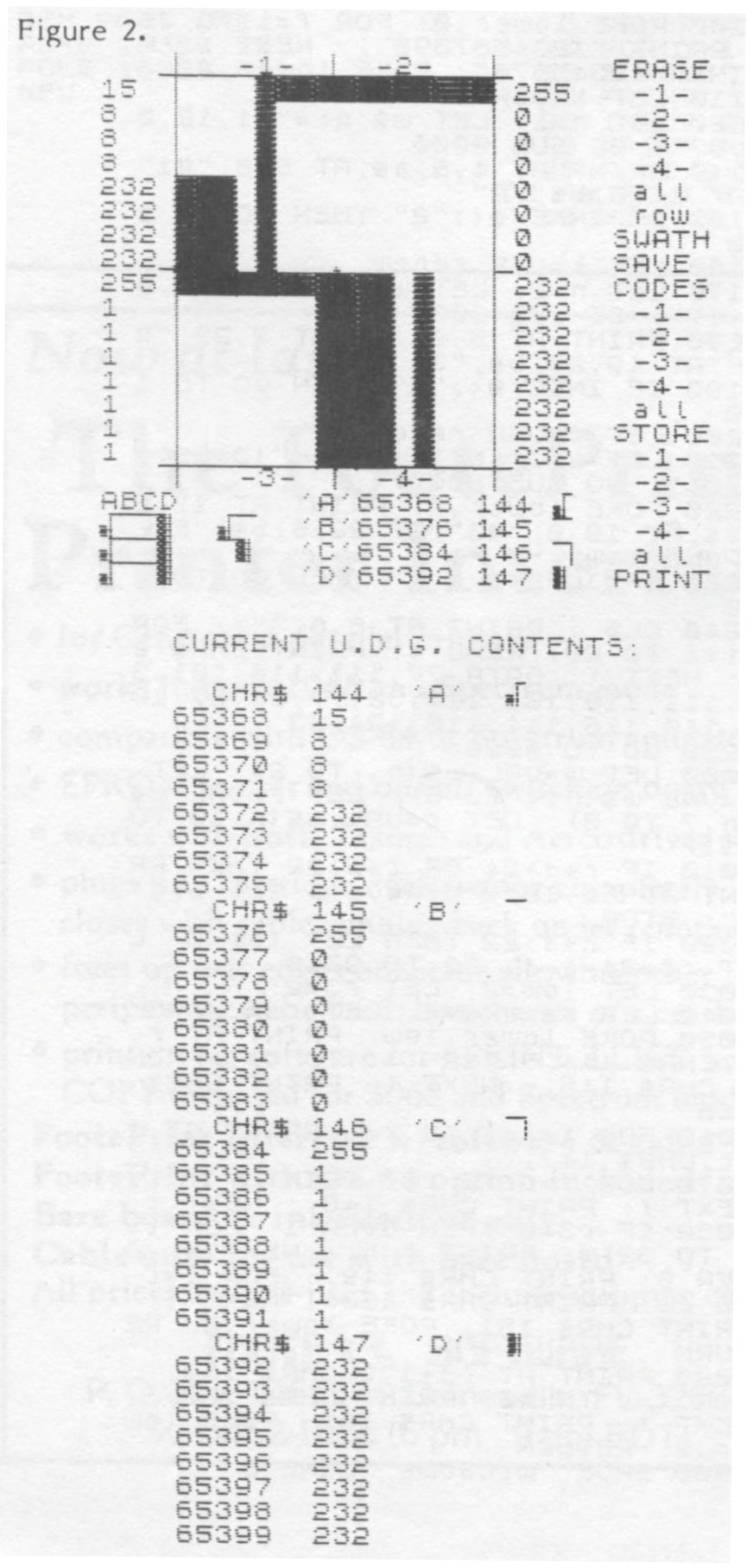
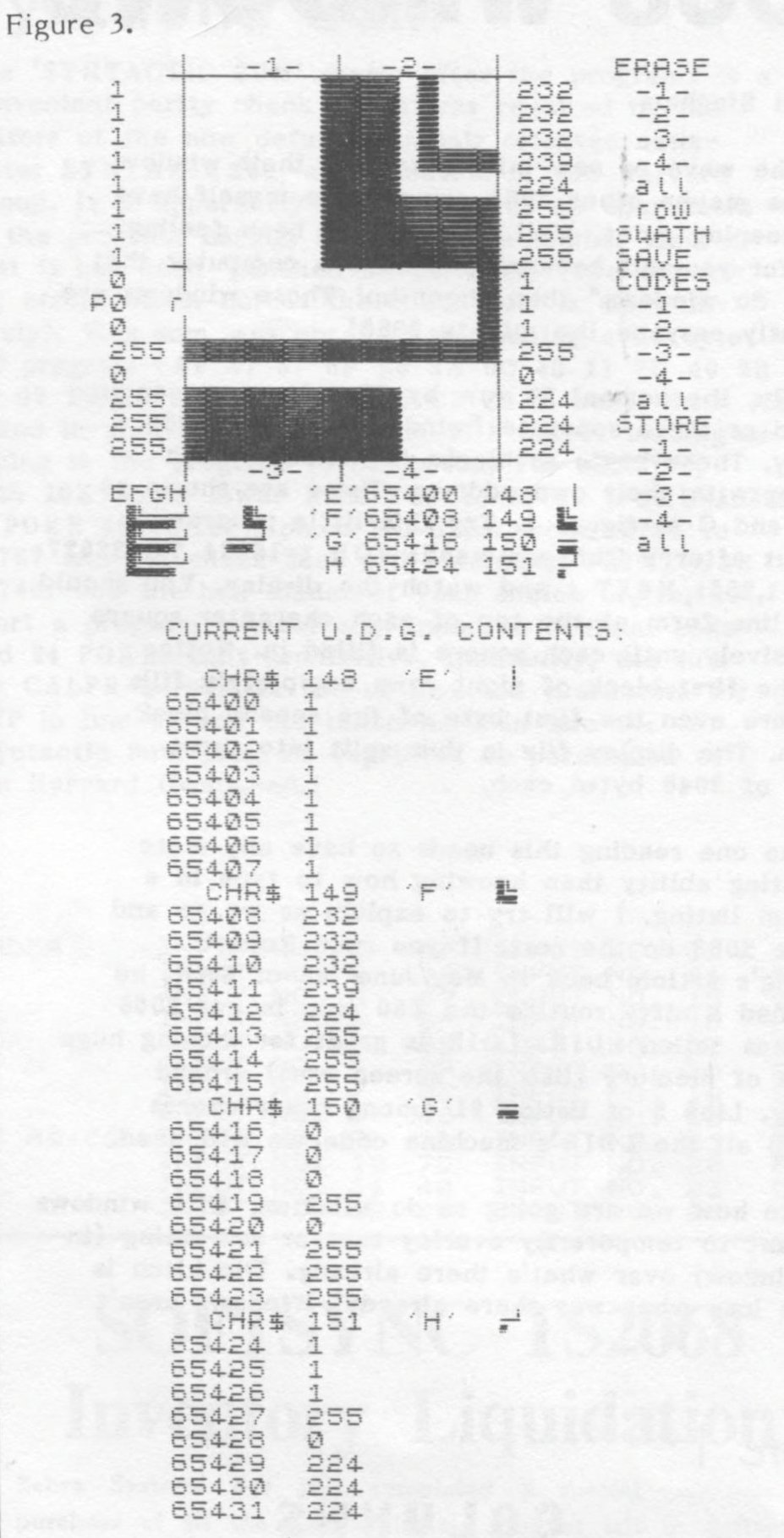
In drawing quality window outlines we could use the DRAW command to make lines and shadows. But using the 2068 UDGs is quicker and cleaner. Line 10 sets up all eight UDG characters we will need for elegant windows. This particular line abandons the need for BIN statements as suggested in the User Manual. (This is the technique I used in the Tyd/bit column of the Jan/Feb ’85 SWN.) Once set up these UDG characters can be printed as easily as any symbol. These graphic characters are detailed in figures 2 and 3. The BASIC in listing #1 lines 9000 onward calculate where each UDG goes in order to form nice window borders.
The routines in lines 9020 and 9080 deal with the lower two lines of the screen. The User manual refers to these as “not usable”. Its in these lines that the 2068 badgers us for all the foolish syntax errors we made in our programming. Well, these lines are not at all off limits if we obey a few simple rules. If we POKE a zero into the system variable DF SZ at 23659 (also a no-no in the User Manual–see pg 263) the 2068 is lead to believe it has zero lines at the bottom of the screen. PRINT AT 22,0 works! PRINT AT 23,0 does not work, though. (Unless you wanted a good crash.) AT, TAB, and commas don’t apply to line 23. The only way is to start in line 22 and print spaces over the existing screen characters one by one to arrive at the desired position. This is how its done in line 9080 of listing #1. And now for rule two: always POKE DF SZ back to “2” after printing in the lower screen lines before you go on. Here the ounce of prevention is worth a half ton of cure.
If you have yet to type in listing #1 and run it, then now is a good time to try it. Lines 100 through 250 of listing #1 are a demo section for three sample windows. These can be deleted with DELETE 100, 250 and your own program inserted. Listing #2 can be inserted in here as well. It is a simple customizing program to design your own windows. For more than three windows you will want to change the DIM statement in line 5 to more than “3”. The eleven stays, however.
The input line 110 in listing #2 takes the parameters like the QL does for windows. First is the width of the window (must be 32 or less). Next is the depth from top to bottom (must be 24 or less). Lastly come the row and column coordinates for the upper left hand corner. All are entered as a string with commas in between as follows: xx,xxxxxx. If a number is only one digit, say 2, then type in 02. Lines 120, 170 and 210 of listing #1 are good examples of this. In listing #1 these lines serve to set up the number of the window (n) and the window string (w$) in lieu of listing #2’s INPUT statement. After w$(n) is set with the right parameters a simple GOSUB 9000 does the rest! Any text we want in the window can be done in BASIC as usual such as in listing #1’s lines 140, 180, and 220. Line 220 prints into the lower screen and also POKEs DF SZ with zero and then 2 as we discussed previously. Can’t remember where DF SZ is? Not to worry–I set a variable “lower” equal to the address.
I don’t like to keep track of call addresses, either, so two more variables are set and ready from line 5: “store” and “renew”. All we need to do is make a user call such as LET k=USER store to run the LDIR machine code that stores the screen safely away. Likewise LET k=USER renew puts the stored original back on the screen. See lines 120 and 150 of listing #2 for examples.
Listing #2
  100 INPUT "Window #= ";n: INPUT "WINDOW w,d,r,c ";w$(n)
  110 POKE lower,0: FOR f=1 TO 76: PRINT "1234567890";: NEXT f: PRINT "12345678": POKE lower,2
  120 LET k=USR store
  130 GO SUB 9000
  140 IF INKEY$="" THEN GO TO 140
  150 LET k=USR renew: STOP
We have pretty well walked through both entire programs. There is a loop in line 100 of listing #1 that simply fills the screen, some key checks in lines 150, 190 and 230, and a sign-off message in line 240. None of these is essential. I am hoping that this little 1.7K program will be a good springboard for inventiveness. Machine code for the renewing of the screen is blinding fast. I intend to whittle back on the cumbersome BASIC slowness of the window drawing with machine code, too, in the future. If anyone else desires tackling improvements in this area I might suggest some good SWN reading: Ray Kingsley’s ROM calls in Sept/Oct ’84, P. H. Skipper’s 2068 Messages in Mar/Apr ’86, and William Powers’ M.C. Print Statement in May/Jun ’85.
If any of you have suggestions or comments, I would love to hear from you! Also, if you are not up to typing in the long listings here, or would like a copy (on a new cassette with documentation) of the UDG designer program that produced figures 2 and 3 just send $5 (or your own cassette and $3) to: Paul Bingham, P.O. Box 2034, Mesa, AZ 85204.
Products
Media
Image Gallery
Note: Type-in program listings on this website use ZMAKEBAS notation for graphics characters.